MR8740T_user_manual_eng_20191016H.pdf - 第143页
138 Conguring the Numerical Calculation Settings 4 Click the [Area] box, and then choose an option for a calculation range. Y ou can specify a calculation range for each calculation. Whole Makes calculations using who…
137
Conguring the Numerical Calculation Settings
3
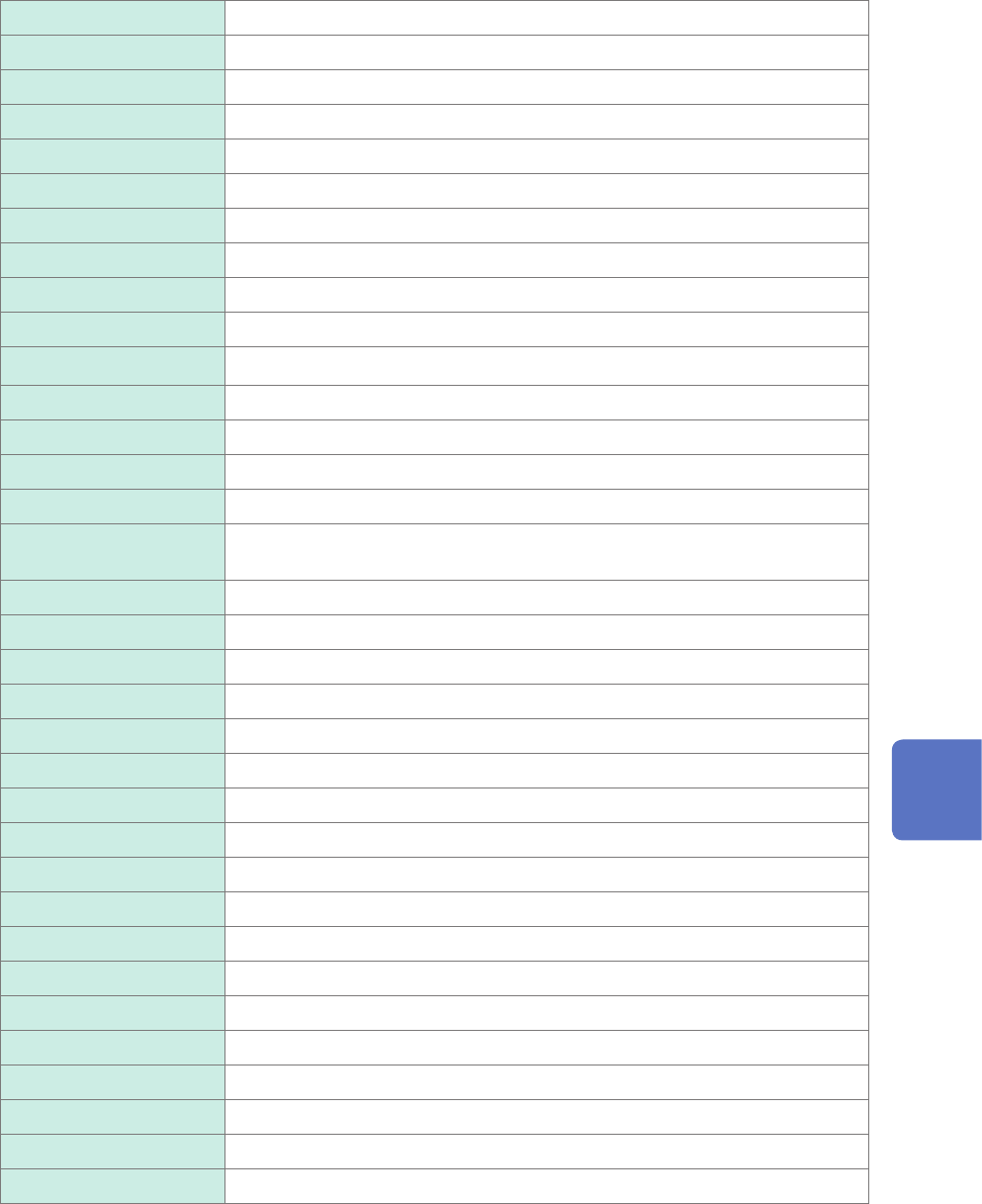
Click the [Calculation Type] box, and then choose a calculation type from the list.
Off
The instrument does not perform any calculation.
Average value Average value of waveform data
RMS RMS value of waveform data
P-P Peak-to-peak value of waveform data
Maximum Maximum value of waveform data
Time to maximum Period of time elapsed from a trigger point to the time of the maximum value
Minimum Minimum value of waveform data
Time to minimum Period of time elapsed from a trigger point to the time of the minimum value
Period*
2
Period of waveform data
Frequency*
2
Frequency of waveform data
Rise time*
1
Rise time of waveform data
Fall time*
1
Fall time of waveform data
Standard deviation Standard deviation of waveform data
Area Area enclosed by the horizontal axis and waveform data
X-Y area Area enclosed by an X-Y composite curve
Time to level*
2
Period of time elapsed from a trigger point to the time when waveform data
reached the specied level
Level at time*
2
Measured value when the specied time has elapsed from a trigger point
Pulse width*
2
Pulse width of waveform data
Duty ratio*
2
Duty ratio of waveform data
Pulse count*
2
Pulse count of waveform data
Arithmetic operations Four arithmetic operations of numerical calculation results
Time difference*
2
Time lag between phenomena A and B
Phase contrast*
2
Time lag between phenomena A and B represented as a phase difference
High level*
1
High level of waveform data
Low level*
1
Low level of waveform data
Intermediate value Intermediate value of waveform data
Amplitude*
1
Amplitude value of waveform data
Overshoot
*
1
Overshoot value of waveform data
Undershoot
*
1
Undershoot value of waveform data
+Width*
1
Time value above the intermediate level
−Width*
1
Time value below the intermediate level
Burst width*
2
Burst width of waveform data
Accumulation Accumulated value of waveform data
Angle of XY waveform Slope angle of a regression line on an X-Y composite curve
*1: Unable to make any calculations using data acquired across the measurement channels of Model MR8990
and Model MR8990 Digital Voltmeter Unit.
*2: The settings can also be congured for the logic channels.
Refer to “Calculation target channels and setting contents of calculation conditions for each calculation type”
(p. 139).
7
Numerical Calculation Function

138
Conguring the Numerical Calculation Settings
4
Click the [Area] box, and then choose an option for a calculation range.
You can specify a calculation range for each calculation.
Whole
Makes calculations using whole waveforms.
A_B Makes calculations using waveforms between trace cursors A and B.
C_D Makes calculations using waveforms between trace cursors C and D.
Choosing [A_B] or [C_D] allows you to specify the calculation range with the trace cursors on the waveform
screen. When the instrument does not acquire any waveforms, perform another measurement and specify a
range. Doing so allows you to make calculations using data acquired within the specied range from the next
measurement.
5
Click a calculation target channel.
The channel selection screen appears.
Refer to “Calculation target channels and setting contents of calculation conditions for each calculation type”
(p. 139).
6
Set calculation conditions.
Refer to “Calculation target channels and setting contents of calculation conditions for each calculation type”
(p. 139).
7
Execute calculation.
(To calculate existing data)
Click [Execute].
(To automatically make calculation after measurement)
Click the start icon.
139
Conguring the Numerical Calculation Settings
Calculation target channels and setting contents of calculation conditions for
each calculation type
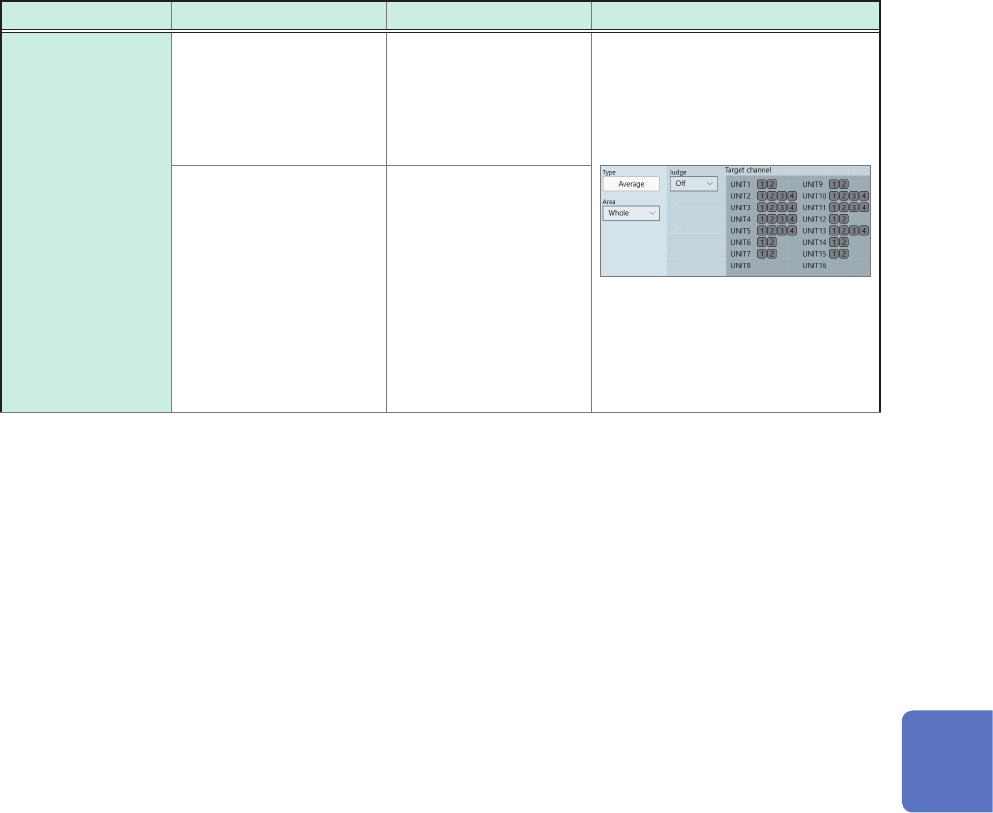
Calculation type Setting Description Example of screen
Average value
RMS
P-P
Maximum
Time to maximum
Minimum
Time to minimum
Standard
deviation
Area
High level
Low level
Intermediate value
Amplitude
Overshoot
Undershoot
Accumulation
Target channel
(Analog, waveform
calculation)
Allows you to specify
calculation target
channels.
With the [Area] or
[Accumulation] setting,
set [Method].
(Total
, Absolute value,
Positive, Negative)
Calculates an area or
accumulation according
to the method you
specify here.
7
Numerical Calculation Function