MR8740T_user_manual_eng_20191016H.pdf - 第131页
126 Searching For Positions Where a T rigger Condition Is Satised 6.2 Searching For Positions Where a T rigger Condition Is Satised Setting a trigger condition allows you to search measured data for positions where the…
125
Searching For Peak Values
6
(When you choose [Maximal] or [Minimal] in the [Type] box)
Click the [Filter(samples)] box, and then from the list, choose a decision criterion for
maximal or minimal values.
Off
Regards a value as a maximal value when it is larger than the values found one point
before and after, and a minimal value when it is smaller.
10 to 10,000 Regards a value as a maximal value when it is larger than all the values found the
specied number of points before and after, and a minimal value when it is smaller.
7
(When you choose [Maximal] or [Minimal] in the [Type] box)
Click the [Display order] box, and then from the list, choose a sort criterion for search
results.
Sort by time
Displays retrieved positions in chronological order. You cannot enter the number in the
[Number to display] box. The instrument handles up to 10,000 search results. The
instrument stops the search if it retrieves more than 10,000 results.
Sort by data With the [Maximal] setting, displays the number, which is specied by [Number
to display], of retrieved positions in descending order. With the [Minimal] setting,
displays them in ascending order.
(When you choose [Sort bya data] in the [Display order] box)
Click the [Number to display] box, and then enter the number of search results to be displayed.
8
Click [Execute].
The instrument puts search marks ( ) on positions where the search criteria are satised.
The [Search Pos.] switching panel appears on the waveform screen.
To stop the search
Click the stop icon.
9
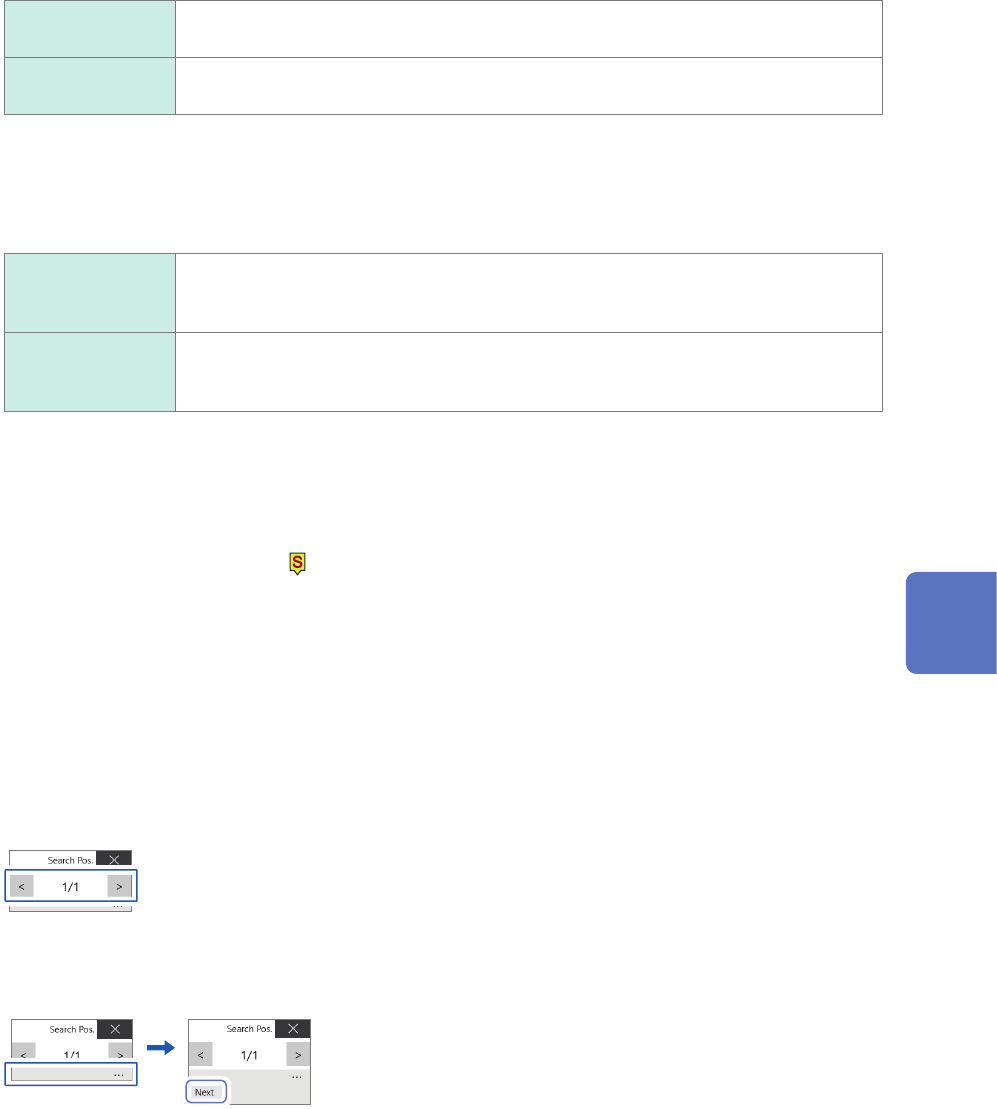
Switch retrieved positions using the [Search Pos.] switching panel and check the search
results.
You can switch the retrieved positions by clicking [<] or [>].
The display order follows the setting in the [Display order] box.
Clicking [Next] executes another search beginning from the next point of the retrieved position presently
displayed.
The instrument discards a previous search result.
To specify a retrieved position and jump there
As described in “6.4 Jump to the Specied Position” (p. 132), choose [Search number] in the [Type] box,
and then click [Execute].
6
Search Function
126
Searching For Positions Where a Trigger Condition Is Satised
6.2 Searching For Positions Where a Trigger
Condition Is Satised
Setting a trigger condition allows you to search measured data for positions where the trigger
condition is satised.
>
1
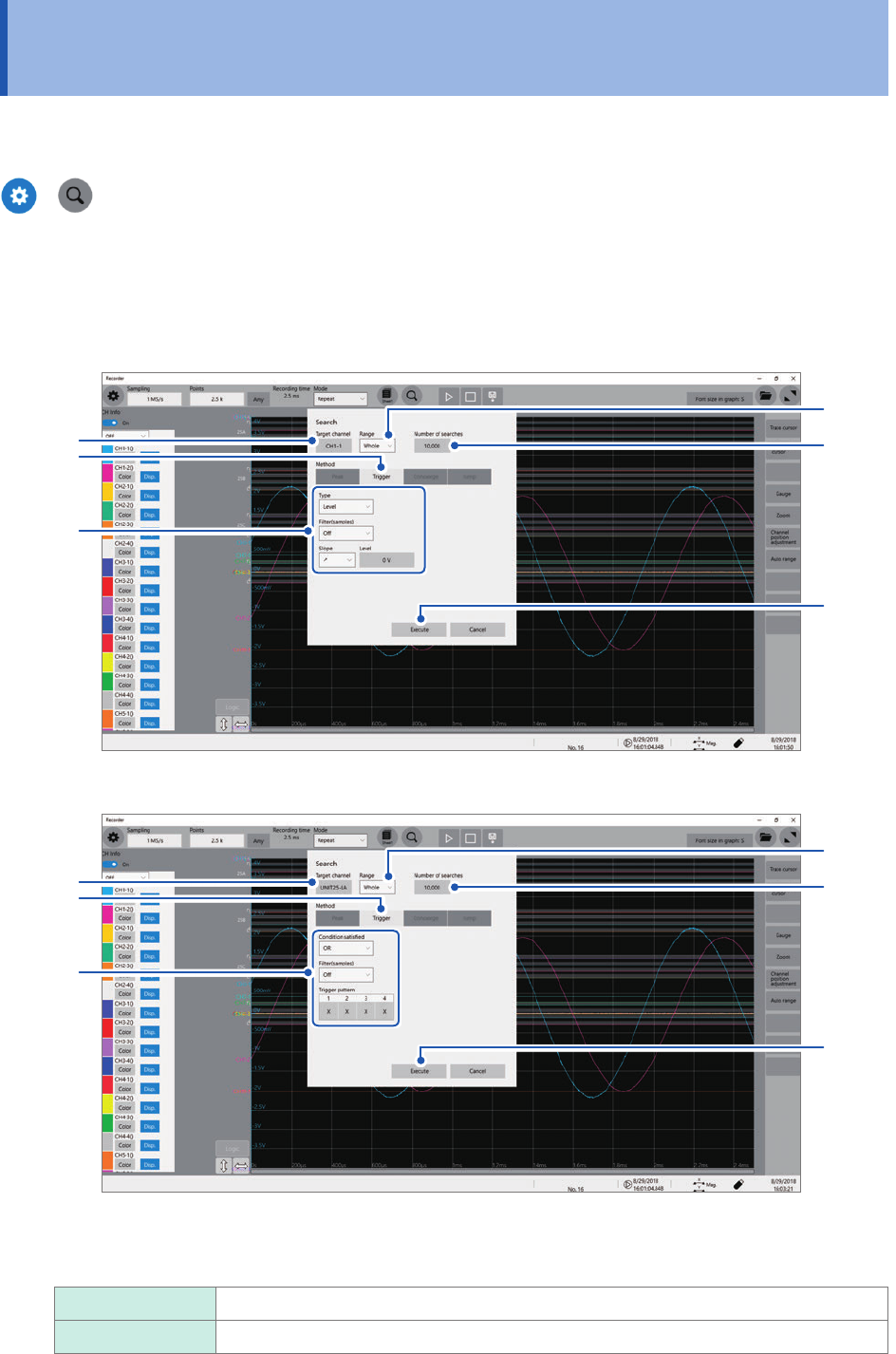
Click the [Target channel] box, and then from the channel setting dialog box, choose a
channel to be searched for positions where a trigger condition is satised.
When you choose an analog channel
3
1
4
2
5
6
When you choose a logic channel
3
1
4
2
5
6
2
Click the [Range] box, and then from the list, choose an option for a scope to be searched
for positions where a trigger condition is satised
Whole
Allows you to search whole waveform.
A_B, C_D Searches the scope specied with trace cursors A and B or trace cursors C and D.
127
Searching For Positions Where a Trigger Condition Is Satised
3
Click the [Number of searches] box, and then enter the number of search results.
4
In the [Method] area, click [Trigger] to choose a search method for searching for triggers.
5
Set search criteria.
-1. When you choose an analog channel under [Target channel]
Click the [Type] box, and then from the list, choose a trigger type to be searched for.
Level
Allows you to enter a level and search for positions where a waveform crosses the
level.
In Allows you to enter an upper and lower limit values to specify a range and search for
positions where a waveform falls within the range.
Out Allows you to enter an upper and lower limit values to specify a range and search for
positions where a waveform gets out of the range.
Set the search criterion.
Items to be set may vary depending on trigger types.
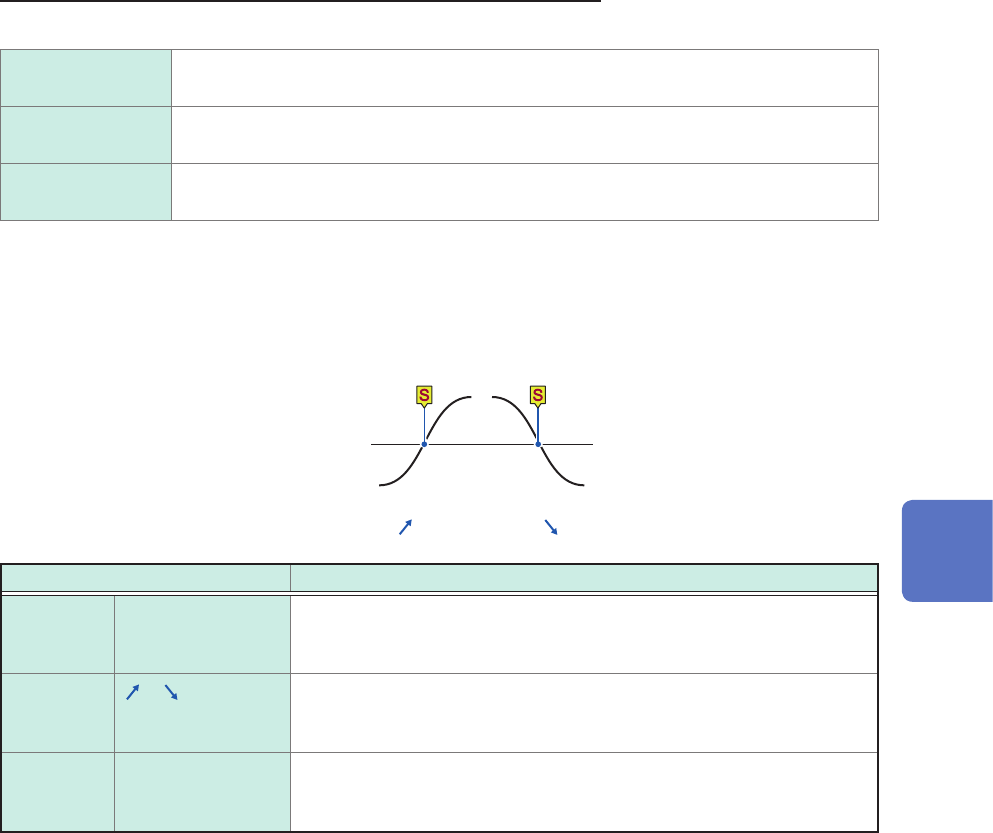
(1) When you choose [Level]
Level
Input waveform
Slope: [
] [ ]
Setting Description
Filter Off
,
10 to 10,000
Allows you to enter a lter width in the number of samples. Positions
where a search criterion is continuously satised during the specied
period are determined to be the retrieved positions.
Slope
, Allows you to choose which of the following points to search for, points
at which a signal crosses the specied level in the positive direction or
those in the negative direction.
Level −
3
.
4028
E+
38
to
3
.
4028
E+
38
Default: 0
Allows you to enter a threshold (level) to be searched for.
6
Search Function