MR8740T_user_manual_eng_20191016H.pdf - 第142页
137 Conguring the Numerical Calculation Settings 3 Click the [Calculation T ype] box, and then choose a calculation type from the list. Off The instrument does not perform any calculation. A verage value Average value…
136
Conguring the Numerical Calculation Settings
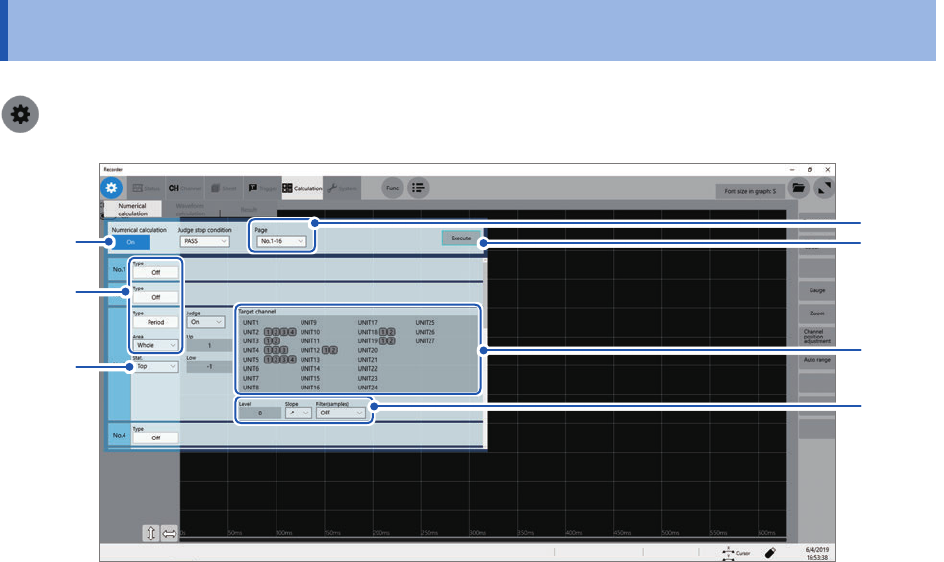
7.2 Conguring the Numerical Calculation Settings
> [Calculation] > [Numerical calculation]
7
1
3
4
2
5
6
1
Click the [Numerical calculation] button to set it to [On].
2
Click the [Page] box, and then choose calculation numbers.
You can specify up to 108 numerical calculations.
137
Conguring the Numerical Calculation Settings
3
Click the [Calculation Type] box, and then choose a calculation type from the list.
Off
The instrument does not perform any calculation.
Average value Average value of waveform data
RMS RMS value of waveform data
P-P Peak-to-peak value of waveform data
Maximum Maximum value of waveform data
Time to maximum Period of time elapsed from a trigger point to the time of the maximum value
Minimum Minimum value of waveform data
Time to minimum Period of time elapsed from a trigger point to the time of the minimum value
Period*
2
Period of waveform data
Frequency*
2
Frequency of waveform data
Rise time*
1
Rise time of waveform data
Fall time*
1
Fall time of waveform data
Standard deviation Standard deviation of waveform data
Area Area enclosed by the horizontal axis and waveform data
X-Y area Area enclosed by an X-Y composite curve
Time to level*
2
Period of time elapsed from a trigger point to the time when waveform data
reached the specied level
Level at time*
2
Measured value when the specied time has elapsed from a trigger point
Pulse width*
2
Pulse width of waveform data
Duty ratio*
2
Duty ratio of waveform data
Pulse count*
2
Pulse count of waveform data
Arithmetic operations Four arithmetic operations of numerical calculation results
Time difference*
2
Time lag between phenomena A and B
Phase contrast*
2
Time lag between phenomena A and B represented as a phase difference
High level*
1
High level of waveform data
Low level*
1
Low level of waveform data
Intermediate value Intermediate value of waveform data
Amplitude*
1
Amplitude value of waveform data
Overshoot
*
1
Overshoot value of waveform data
Undershoot
*
1
Undershoot value of waveform data
+Width*
1
Time value above the intermediate level
−Width*
1
Time value below the intermediate level
Burst width*
2
Burst width of waveform data
Accumulation Accumulated value of waveform data
Angle of XY waveform Slope angle of a regression line on an X-Y composite curve
*1: Unable to make any calculations using data acquired across the measurement channels of Model MR8990
and Model MR8990 Digital Voltmeter Unit.
*2: The settings can also be congured for the logic channels.
Refer to “Calculation target channels and setting contents of calculation conditions for each calculation type”
(p. 139).
7
Numerical Calculation Function

138
Conguring the Numerical Calculation Settings
4
Click the [Area] box, and then choose an option for a calculation range.
You can specify a calculation range for each calculation.
Whole
Makes calculations using whole waveforms.
A_B Makes calculations using waveforms between trace cursors A and B.
C_D Makes calculations using waveforms between trace cursors C and D.
Choosing [A_B] or [C_D] allows you to specify the calculation range with the trace cursors on the waveform
screen. When the instrument does not acquire any waveforms, perform another measurement and specify a
range. Doing so allows you to make calculations using data acquired within the specied range from the next
measurement.
5
Click a calculation target channel.
The channel selection screen appears.
Refer to “Calculation target channels and setting contents of calculation conditions for each calculation type”
(p. 139).
6
Set calculation conditions.
Refer to “Calculation target channels and setting contents of calculation conditions for each calculation type”
(p. 139).
7
Execute calculation.
(To calculate existing data)
Click [Execute].
(To automatically make calculation after measurement)
Click the start icon.