MR8740T_user_manual_eng_20191016H.pdf - 第43页
38 Converting Input V alues (Scaling Function) 3.2 Converting Input V alues (Scaling Function) About the scaling function The scaling function enables you to convert voltage outputted from measuring devices such as senso…
37
Overlaying New Waveforms With Previously Acquired Waveforms
2
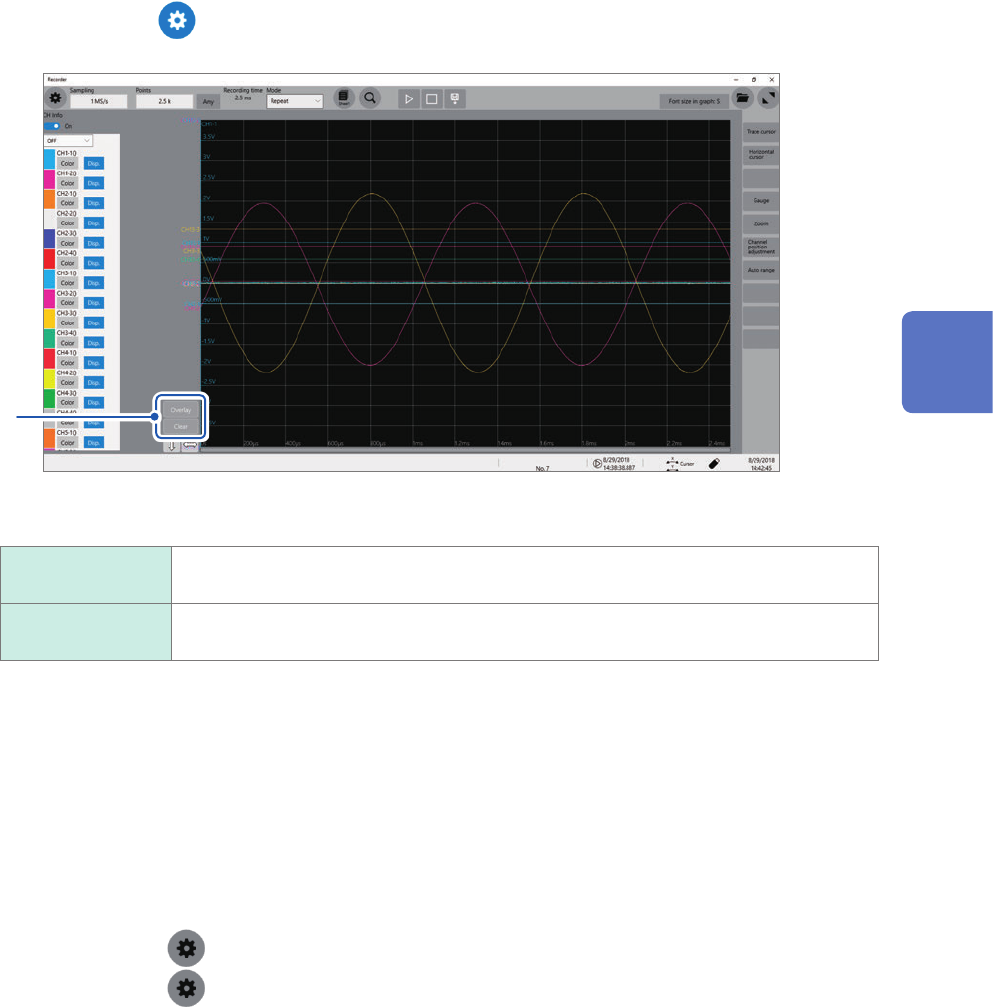
Click the button to display the waveform screen.
3
3
Overlay the waveforms manually (leaving any waveforms to be displayed on the screen).
Overlay Leaves the acquired waveforms displayed on the screen.
The overlay setting continues to be available until the waveforms are cleared.
Clear Clears all the overlaid waveforms displayed on the screen.
No cleared waveforms can be displayed again.
When the overlay function is enabled (When [Overlay] is set to [Auto] or [Manual])
• The instrument displays the waveforms always after the data has been acquired.
• The trace cursors show the measured values of the waveforms most recently acquired.
• The following operation is not available on the waveform screen:
Scrolling through waveforms, switching the zoom function between on and off, changing the
magnication, and changing the zero position.
• The instrument leaves the waveforms most recently displayed only and clears the others in the
following cases:
• After selecting
> [Sheet] and changing its setting
• After selecting > [Channel] and changing the waveform display settings (switching
between on and off for the display setting or changing a waveform color)
• After executing the search.
• After changing the waveform display settings (switching between on and off for the display
setting or changing waveform color) in [CH info] on the waveform screen.
3
Advanced Functions
38
Converting Input Values (Scaling Function)
3.2 Converting Input Values (Scaling Function)
About the scaling function
The scaling function enables you to convert voltage outputted from measuring devices such as
sensors into physical quantities of measuring objects.
Hereafter, the term “scale” refers to converting numerical values using the scaling function.
Gauge scales, scaled values (upper and lower limits of the vertical axis or voltage axis), and
measured values using trace cursors are represented as scaled values in the specied units.
You can congure different scale settings for each channel.
Before scaled After scaled
[
V
]
0
0.1
0.2
[
A
]
0
5.0
10
Scaling methods
The following six methods are available:
• Specifying a conversion ratio and offset
• Specifying two points
• Choosing a model name of a connected current sensor or differential probe
• Choosing an output rate
• Specifying an input value in decibels and value after scaled
• Specifying a rated capacity and rated output according to an inspection record of a strain gauge
converter (for Model U8969 Strain Unit only)
> [Channel]
3
4
1
2
39
Converting Input Values (Scaling Function)
1
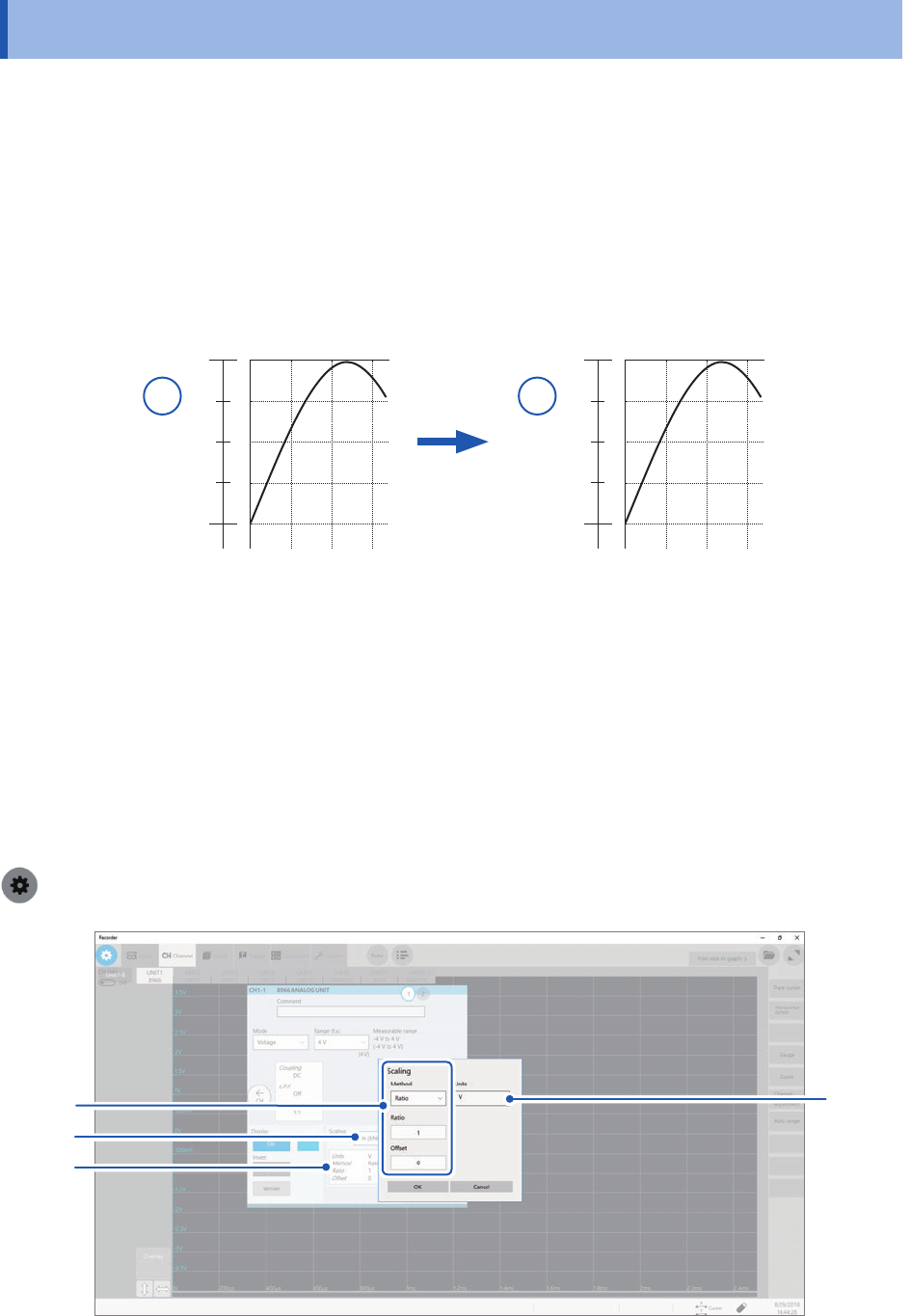
Click the [Scaling] box, and then choose a scaling setting from the list.
Off
Does not scale any values.
On (ENG) Displays values in decimal notation with a unit prex (such as m and k).
On (SCI) Displays values in scientic notation (as a power of 10).
2
Click the setting items area.
The setting dialog box appears.
3
Click the [Method] box, and then choose a setting method from the list.
Ratio
Allows you to specify conversion ratio and an offset.
2-Point Allows you to specify two points
Sensor Allows you to choose a model name and measurement range of a connected current
sensor or differential probe.
Output rate Allows you to choose an output rate (ratio) of a current sensor or a division ratio of a
voltage dividing probe.
dB Allows you to specify an input value in decibels and value after scaled.
Rating Allows you to specify a rated capacity and rated output according to an inspection
record of a strain gauge converter to be used. (For Model U8969 Strain Unit only)
When using [Ratio]
Enter a conversion ratio in the [Ratio] box.
−9.9999E+9 to 9.9999E+9
Enter an offset value in the [Offset] box.
−9.9999E+19 to 9.9999E+19
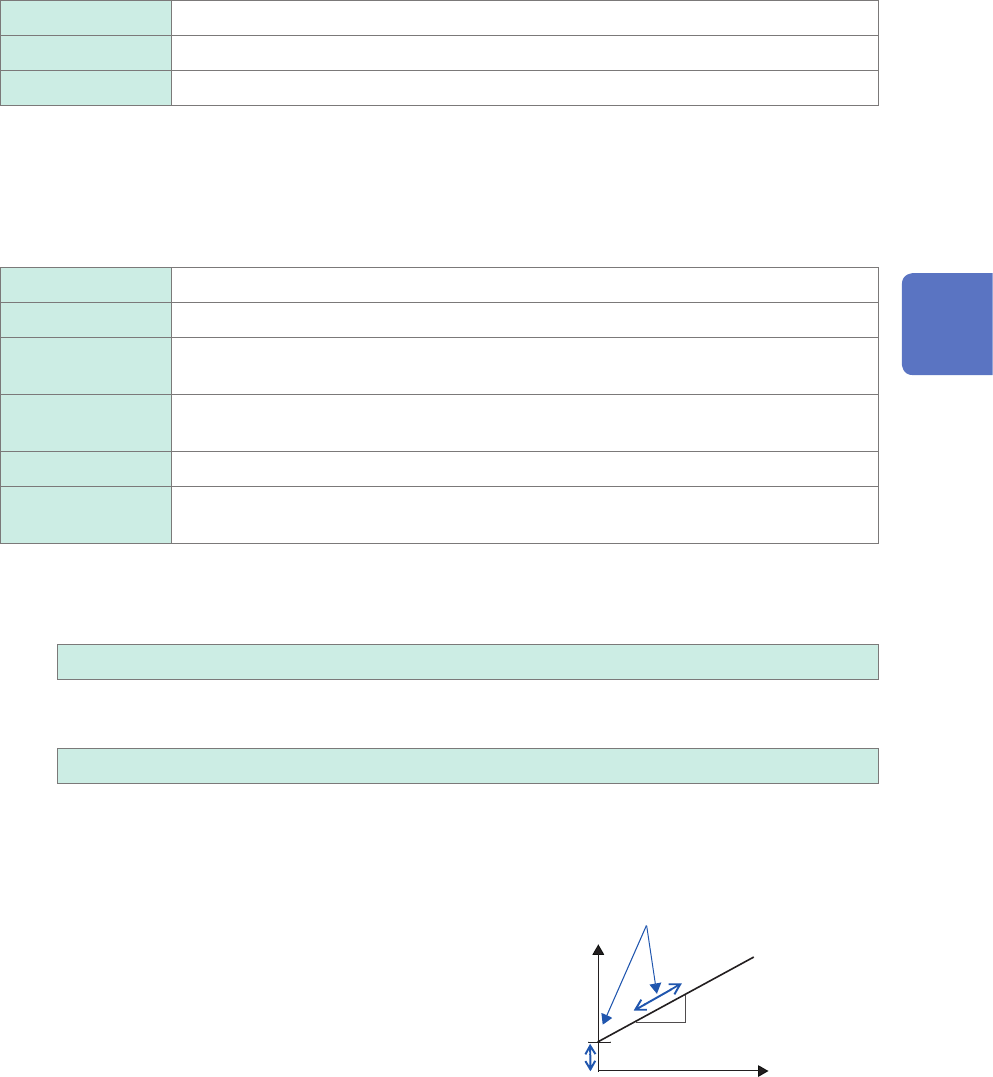
To inputted voltage values into current values
Specify a physical quantity per one volt of an inputted
signal (conversion ratio: eu/V), an offset value, and a
measurement unit to be used. The instrument converts
(scales) measured values acquired in volts into that in the
specied measurement unit. (eu: engineering unit)
Example:
Ratio: Change in amperes per volt; offset value: B
Unit: A
[A]
B
Scaling values using a slope
(conversion ratio) and offset
value
[V]
3
Advanced Functions