MR8740T_user_manual_eng_20191016H.pdf - 第133页
128 Searching For Positions Where a T rigger Condition Is Satised (2) With the [In] or [Out] se tt ing [In] Upper limit value Lower limit value [Out] Upper limit value Lower limit value Setting Description Filter Off …
127
Searching For Positions Where a Trigger Condition Is Satised
3
Click the [Number of searches] box, and then enter the number of search results.
4
In the [Method] area, click [Trigger] to choose a search method for searching for triggers.
5
Set search criteria.
-1. When you choose an analog channel under [Target channel]
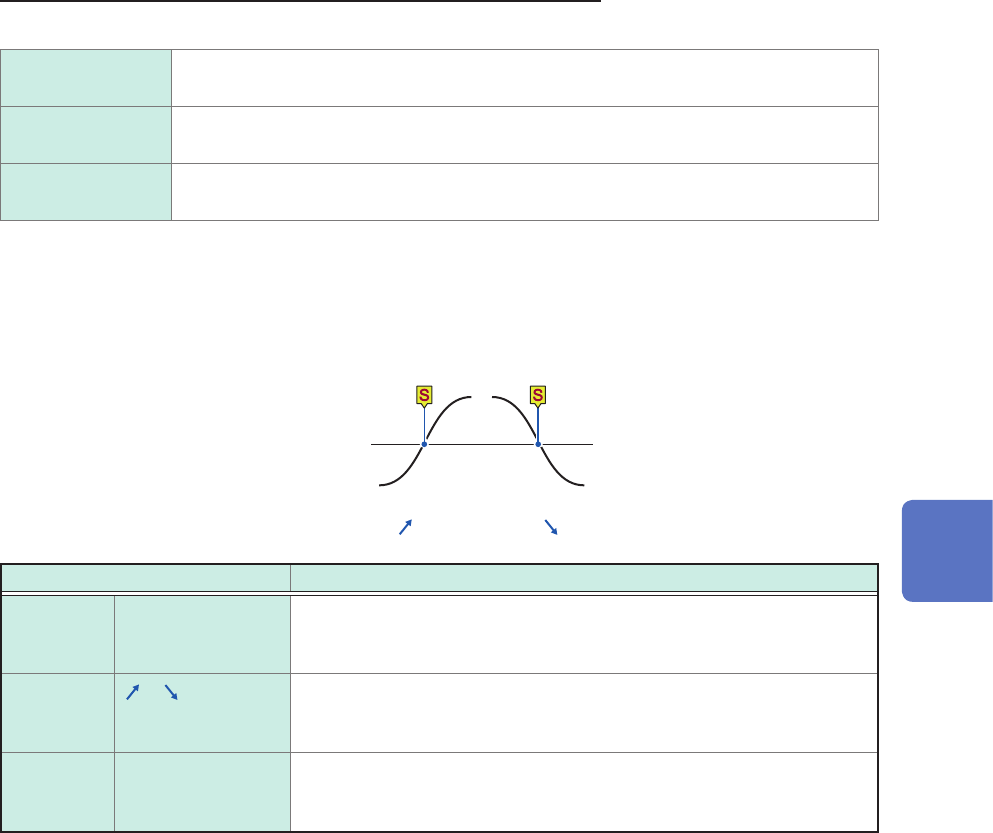
Click the [Type] box, and then from the list, choose a trigger type to be searched for.
Level
Allows you to enter a level and search for positions where a waveform crosses the
level.
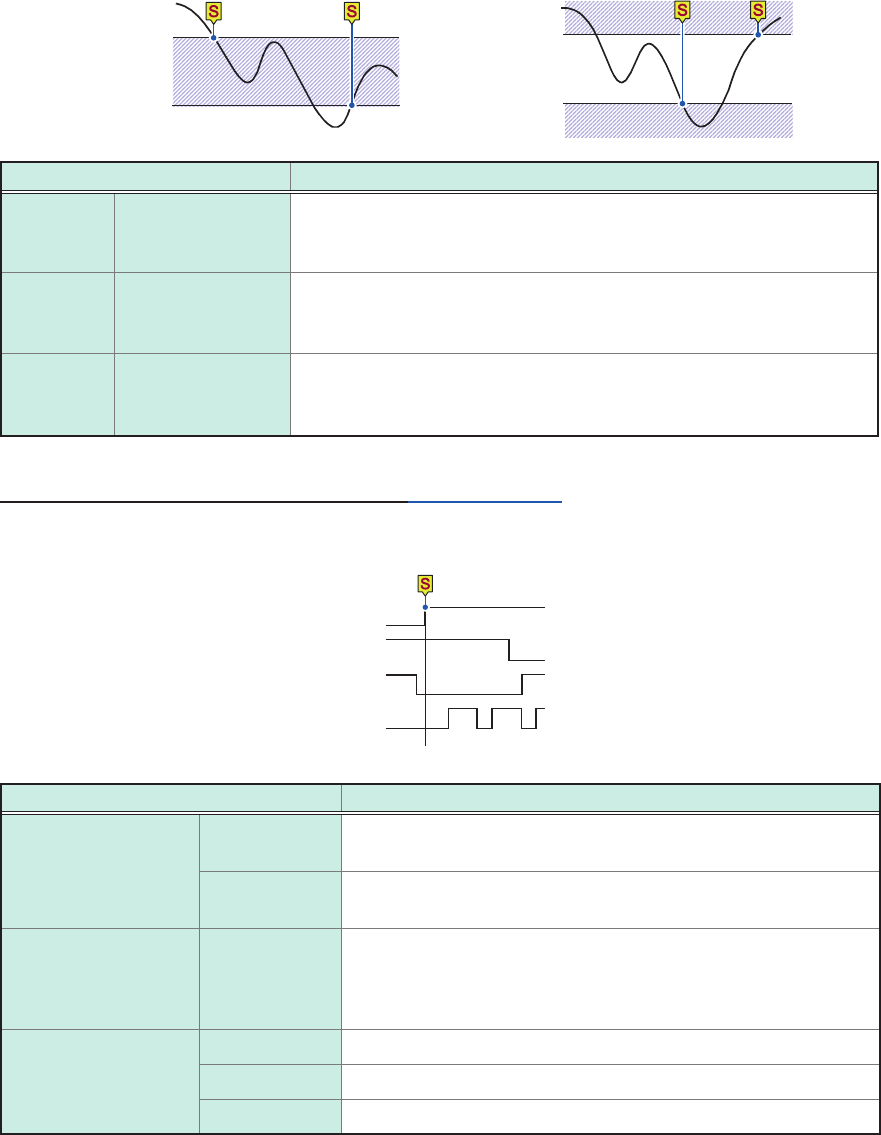
In Allows you to enter an upper and lower limit values to specify a range and search for
positions where a waveform falls within the range.
Out Allows you to enter an upper and lower limit values to specify a range and search for
positions where a waveform gets out of the range.
Set the search criterion.
Items to be set may vary depending on trigger types.
(1) When you choose [Level]
Level
Input waveform
Slope: [
] [ ]
Setting Description
Filter Off
,
10 to 10,000
Allows you to enter a lter width in the number of samples. Positions
where a search criterion is continuously satised during the specied
period are determined to be the retrieved positions.
Slope
, Allows you to choose which of the following points to search for, points
at which a signal crosses the specied level in the positive direction or
those in the negative direction.
Level −
3
.
4028
E+
38
to
3
.
4028
E+
38
Default: 0
Allows you to enter a threshold (level) to be searched for.
6
Search Function
128
Searching For Positions Where a Trigger Condition Is Satised
(2) With the [In] or [Out] setting
[In]
Upper limit value
Lower limit value
[Out]
Upper limit value
Lower limit value
Setting Description
Filter Off
,
10 to 10,000
Allows you to enter a lter width in the number of samples. Positions
where a search criterion is continuously satised during the specied
period are determined to be the retrieved positions.
Upper limit
value
−
3
.
4028
E+
38
to
3
.
4028
E+
38
Default: 0.2
Allows you to enter an upper limit value.
Lower limit
value
−
3
.
4028
E+
38
to
3
.
4028
E+
38
Default: 0.2
Allows you to enter a lower limit value.
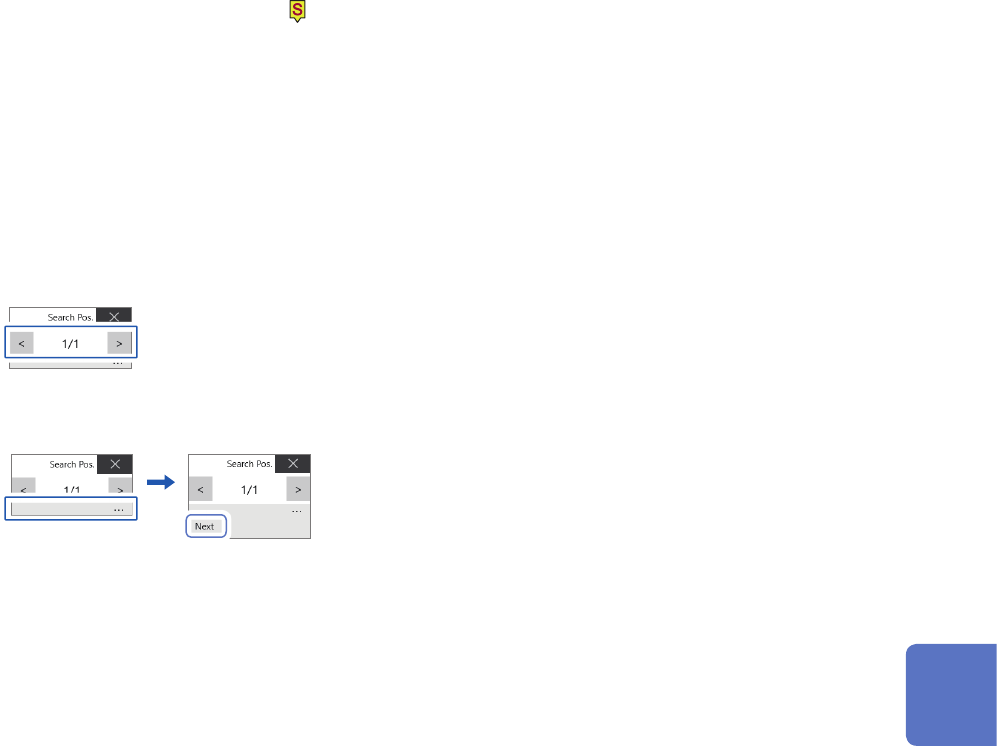
-2. When a logic channel is selected under [Target channel]
You can search for a position that matches the specied pattern.
Trigger pattern
LA1 1
LA2 0
LA3 X
LA4 X
Setting Description
Satised OR
The positions where any one of the specied search patterns is
satised are determined to be the retrieved positions.
AND The positions where all the specied patterns are satised are
determined to be the retrieved positions.
Filter Off
,
10 to 10,000
Allows you to enter a lter width in the number of samples.
Positions where a search condition is continuously satised
during the specied period are determined to be the retrieved
positions.
Trigger pattern X
Ignored data.
0 Searches for low-level positions.
1 Searches for high-level positions.
In the logic search, the retrieved position is the point where the condition that has not been satised changes
to being satised. Thus, even if signals match a search pattern at the start of a search, it is not regarded as a
retrieved position.
129
Searching For Positions Where a Trigger Condition Is Satised
6
Click [Execute].
The instrument puts search marks ( ) on positions where the search criterion is satised. You can search for
up to 10,000 points. The instrument stops the search if it nds more than 10,000 positions.
The retrieved position switching panel appears on the waveform screen.
To stop the search
Click the stop icon.
7
Switch retrieved positions using the [Search Pos.] switching panel and check the search
results.
You can switch the retrieved positions by clicking [<] or [>].
The display order follows the setting in [Display order].
Clicking [Next] executes another search beginning from the next point of the retrieved position presently
displayed. The instrument discards a previous search result.
To specify a retrieved position and jump there
As described in “6.4 Jump to the Specied Position” (p. 132), choose [Search number] in the [Type] box,
and then click [Execute].
6
Search Function