MR8740T_user_manual_eng_20191016H.pdf - 第118页
11 3 T riggering the Instrument Using Analog Signals (Analog T rigger) 5. [Glitch] trigger The glitch-trigger condition is satised when a pulse width of an input signal that has crossed the specied level is shorter tha…
112
Triggering the Instrument Using Analog Signals (Analog Trigger)
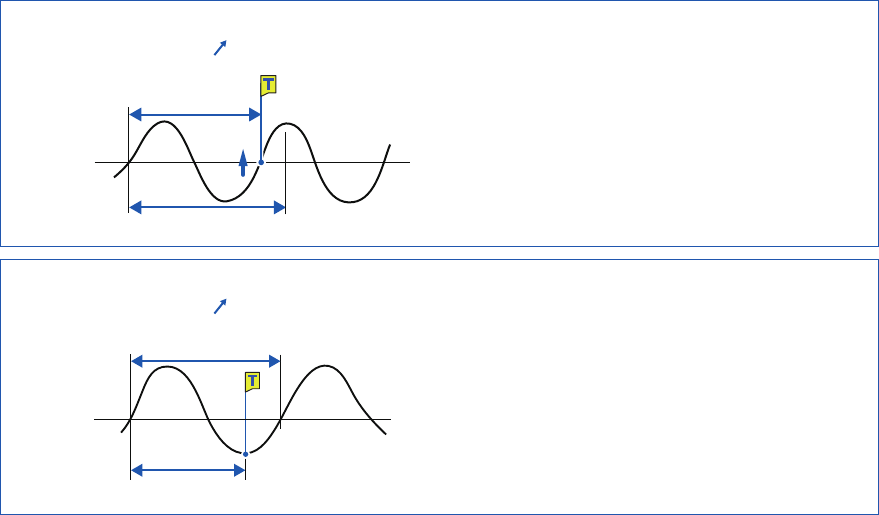
Setting of the period range
The period range settings of the period trigger vary depending on the sampling periods (sampling
rates).
(The setting value of the period range also changes in conjunction with the sampling period [sampling
rate] setting.)
Select [Status] > [Condition] > [Sampling] and check the sampling rate setting.
To set the period-trigger condition such that it is satised when an input frequency exceeds
the upper limit value (when the period becomes shorter)
Set [Type] to [Period-in] and set [Period lower limit] at [0]. The instrument ignores a value in
the [Period lower limit] box, and the period-trigger condition is satised when an input frequency
exceeds a value in the [Period upper limit] box.
To set the period-trigger condition such that only when an input frequency falls below the
upper limit value (when the period becomes longer):
Set [Type] to [Period-out] and set [Period lower limit] at [0]. The instrument ignores a value in
the [Period lower limit] box, and the period-trigger condition is satised when an input frequency
falls below a value in the [Period upper limit] box.
[Period-out] trigger
The instrument calculates periods by monitoring times when an input signal crosses the specied
level in the positive or negative direction, and the period-trigger condition is satised when a period
gets out of the specied period range.
Points at which the period-trigger condition is satised varies depending on the specied period
range and the period of a measuring object.
When an input signal period is shorter than the specied lower limit of periods (with the
slope set to positive [ ]).
Level at
time
Period of the input signal
Period lower limit
The period-trigger condition is satised when a rising
slope of an input signal crosses the specied level
before the lower limit of periods elapses.
When an input signal period is longer than the specied upper limit of periods (with the
slope set to positive [ ])
Period of the input signal
Period upper limit
Level
The period-trigger condition is satised when the upper
limit of periods elapses before a rising slope of an input
signal crosses the reference voltage level.
Thus, points at which the period-out-trigger condition is
satised varies depending on the upper limit of a period
range.
113
Triggering the Instrument Using Analog Signals (Analog Trigger)
5. [Glitch] trigger
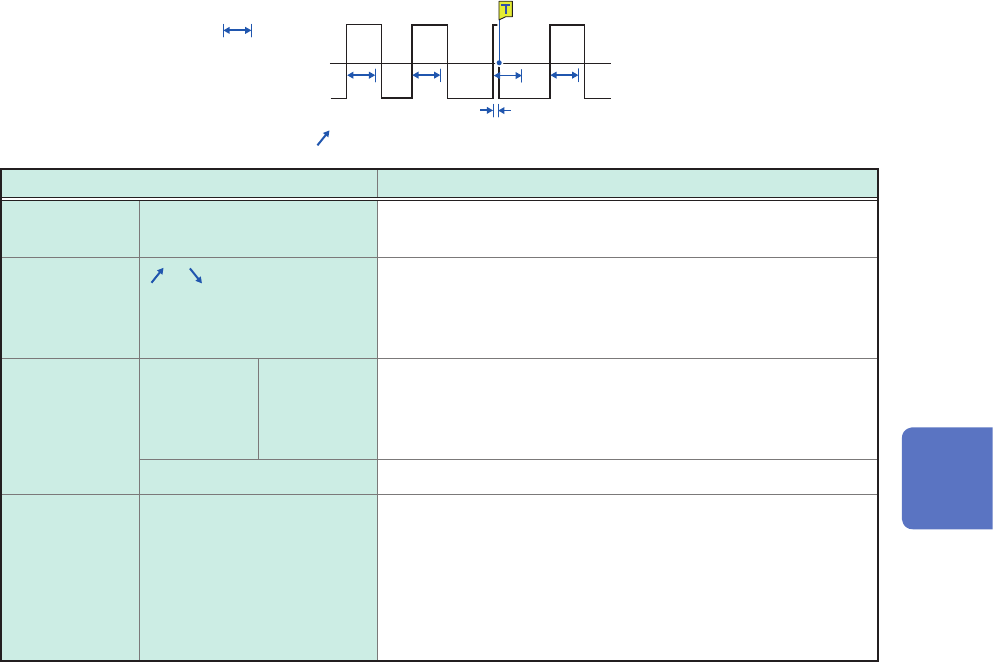
The glitch-trigger condition is satised when a pulse width of an input signal that has crossed the
specied level is shorter than the specied duration.
These triggers cannot be set either when Model MR8990 or Model U8991 is used.
Width
Level
Input waveform
Slope: [
]
Setting Description
Level –f.s. to +f.s.
Default: 0
Allows you to specify the level for detecting glitches.
Slope
, Allows you to choose which of the following points to use
to detect glitches: two consecutive points at which a signal
crosses the specied level in the positive direction; or those
in the negative direction.
Event With OR 1
to 4,000 Allows you to enter the number of events.
The instrument counts the number of times the glitch-trigger
condition is satised. An analog trigger is generated only
after the count reaches the specied number of events.
With AND Not available
Width 2 times to 4000 times of
the sampling period
Allows you to enter a pulse width (time), which is used to
determine a glitch.
The glitch-trigger condition is satised when a pulse width is
shorter than the specied width. (The available setting range
varies depending on the sampling periods. Lower limit: 2
times sampling period or longer; Upper limit: 4000 times
sampling period or shorter)
5
Conguring the Trigger Settings
114
Triggering the Instrument With Logic Signals (Logic Trigger)
5.7 Triggering the Instrument With Logic Signals
(Logic Trigger)
This section explains how to congure the logic trigger settings.
• Input signals acquired across the logic channels serve as a trigger source.
• You can set a trigger pattern and trigger logical-condition by choosing between logical AND and
OR operations. When the logic-trigger conditions are satised, a logic trigger is generated.
• With the trigger lter setting, no logic triggers are generated until the logic-trigger condition is
continuously satised during the specied lter width or more.
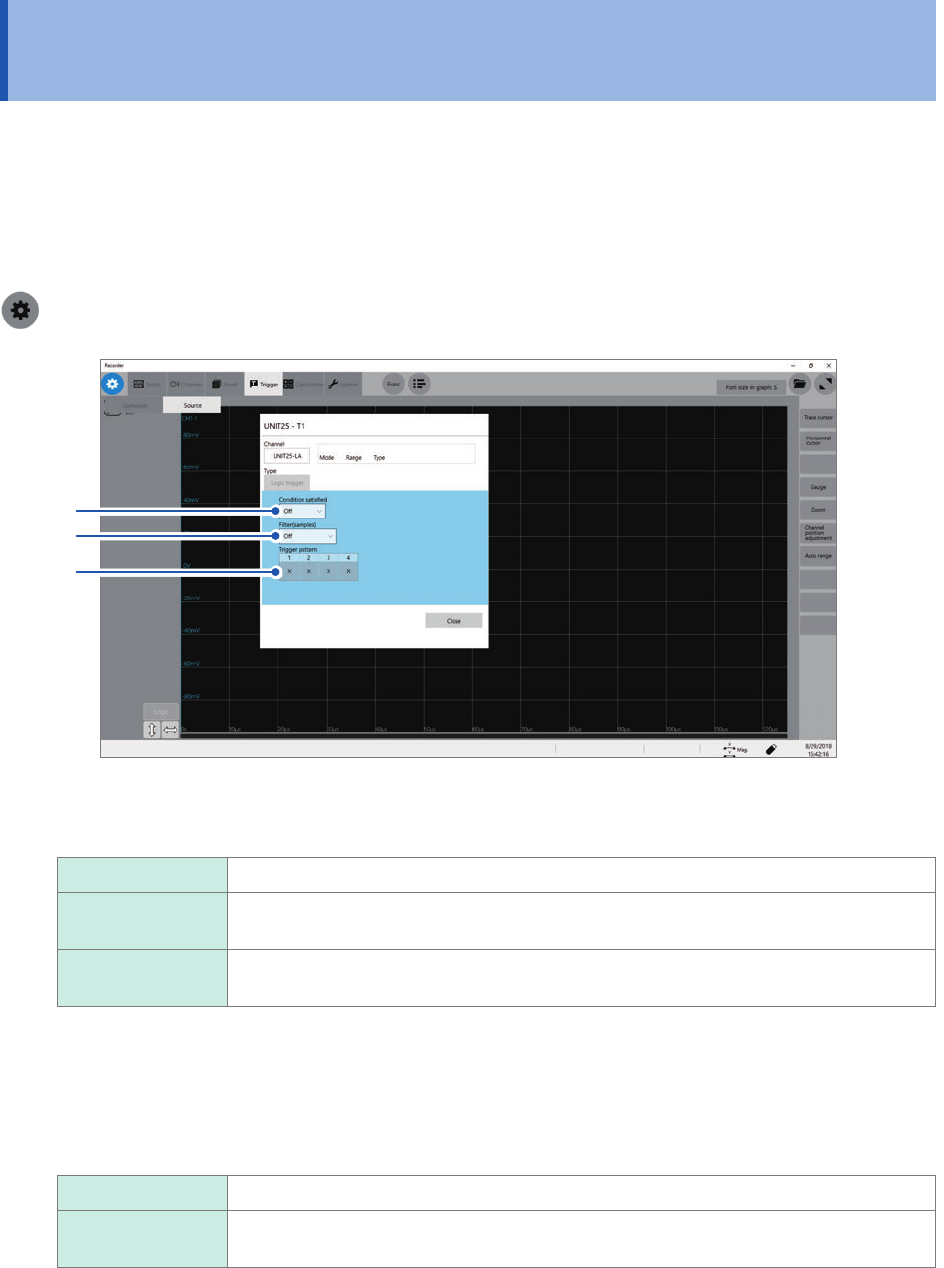
> [Trigger] > [Source]
2
3
1
1
Click the [Condition satised] box, and then choose a logic-trigger satisfaction condition
from the list.
Off
Disables the logic trigger.
OR The logic-trigger condition is satised when any one of logic input signals matches the
trigger pattern.
AND The logic-trigger condition is satised when all logic input signals match the trigger
pattern.
2
Click the [Filter] box, and then choose a sampling count of the lter from the list.
Only after the level-trigger condition is continuously satised during the specied period, an analog trigger is
generated.
Conguring the trigger lter setting prevents a logic trigger from being unintentionally generated due to noise.
(p. 107)
Off
Disables the trigger lter.
10 to 10000 Enables the trigger lter.
Allows you to enter a lter width in the number of samples.