3OM-996-005.pdf - 第119页
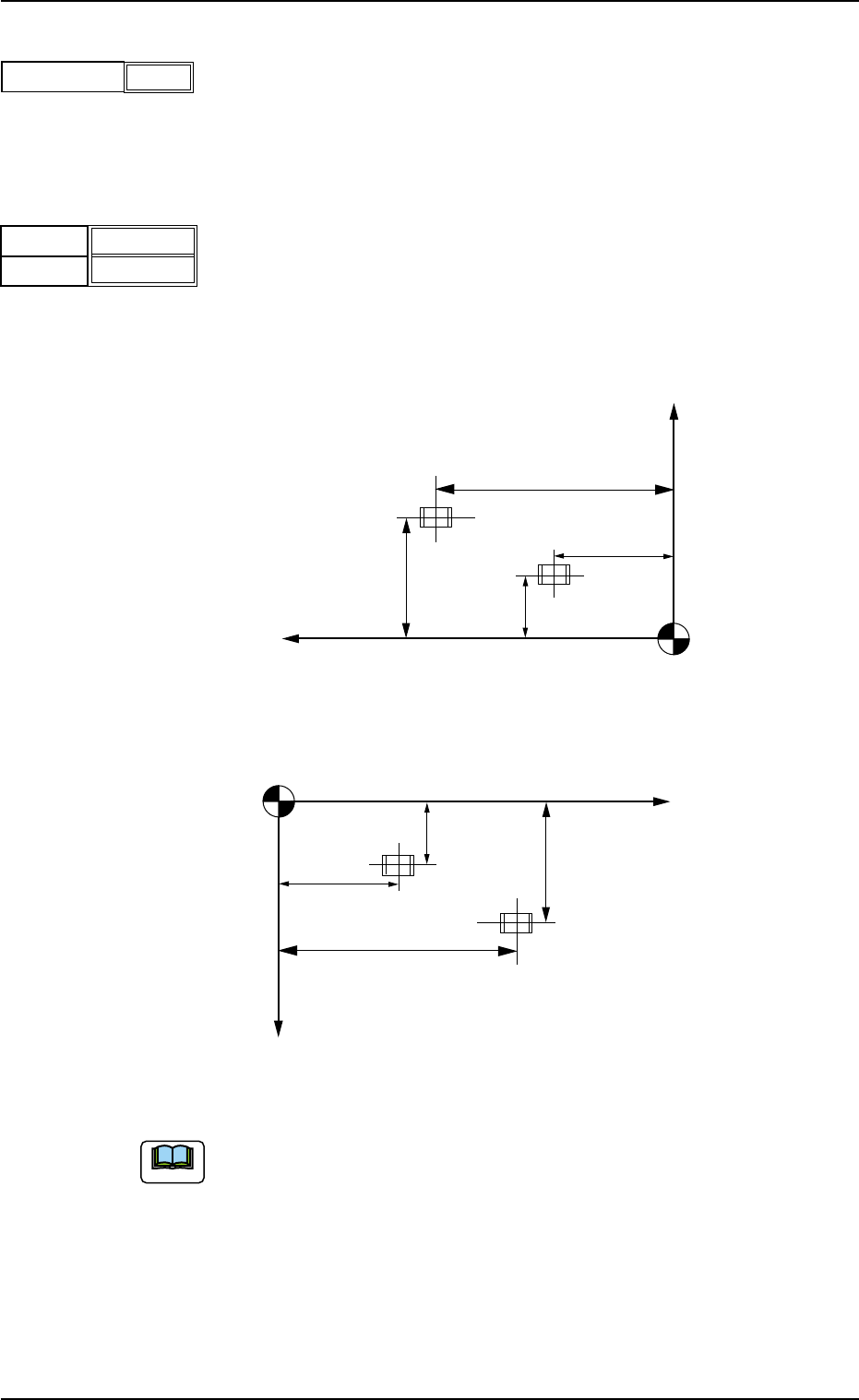
(C02_03) P-No. Shown are the step Nos. of the placement data (P). Set coordinates and angles for component placement in the lines of the step Nos. (P-Nos.). (C02_04) X [mm] and Y [mm] Set coordinates X and Y for componen…
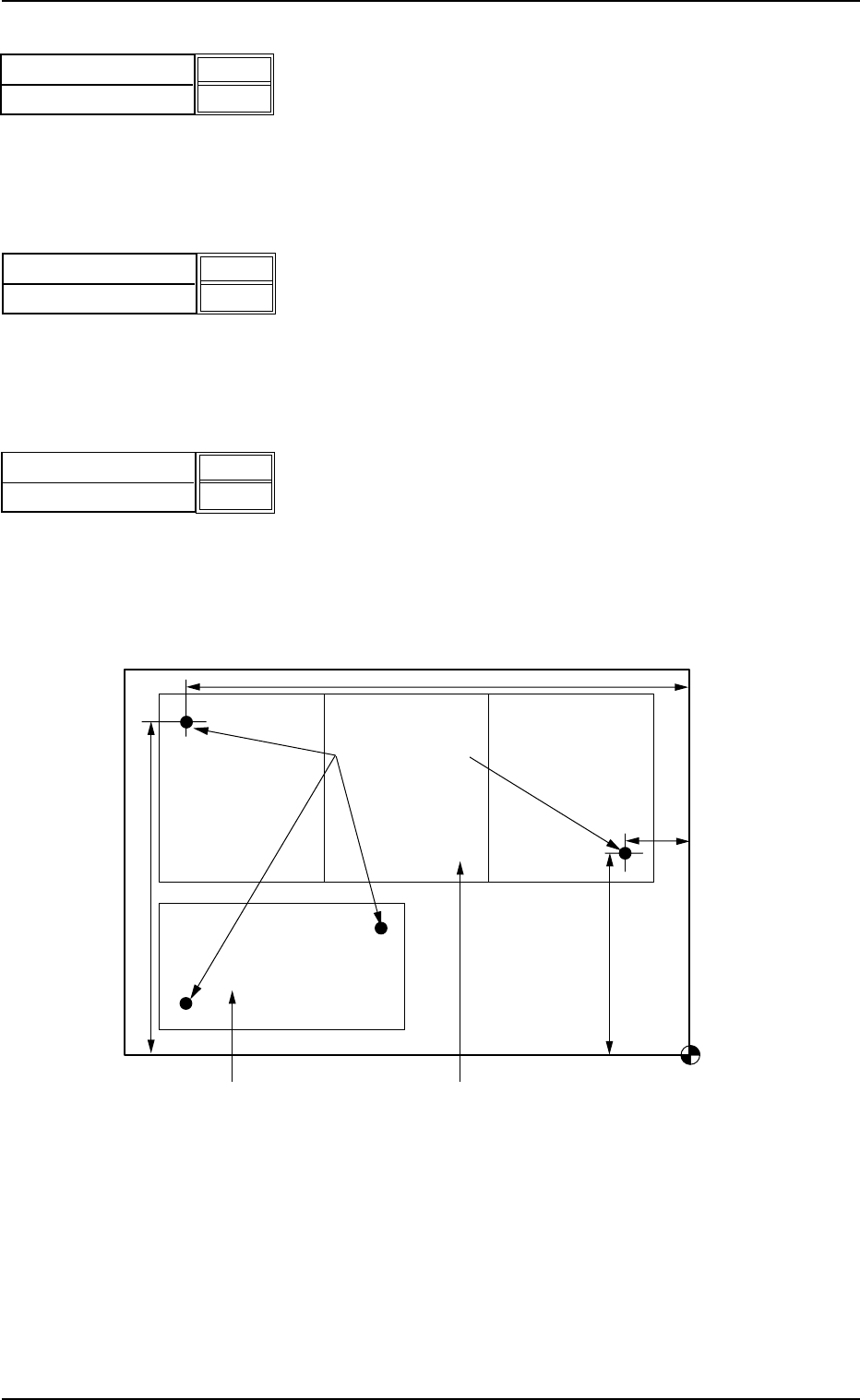
Recog Coord X1 [mm] and Recog Coord Y1 [mm]
Set the X1 and Y1 coordinates of the first fiducial mark based on the
pattern origin.
Unit: mm
Recog Coord X2 [mm] and Recog Coord Y2 [mm]
Set the X2 and Y2 coordinates of the second fiducial mark based on
the pattern origin.
Unit: mm
Fiducial Mark FM1 and Fiducial Mark FM2
Set the mark Nos. of the first and second fiducial marks FM1 and FM2.
Select the mark Nos. (Mark #) specified in the P.E.C. recognition mark
data of the operation data.
(2) "U-N" in "P.E.C. recognition mode image" Text Box
Fig. 3B96 Example of Two Units (TCM-X210)
• Set parameters in the "Recog Coord X1 [mm]",
"Recog Coord Y1 [mm]", "Recog Coord X2 [mm]",
"Recog Coord Y2 [mm]", "Fiducial Mark FM1", and
"Fiducial Mark FM2" text boxes for each unit.
• The recognition coordinates must be specified, re-
garding the placement coordinate reference as an
origin.
Recog Coord X1 [mm]
Recog Coord Y1 [mm]
010.000
010.000
Fig. 3B93
Fig. 3B94
Recog Coord X2 [mm]
Recog Coord Y2 [mm]
100.000
100.000
0305-001 2-49 AIM01EDTP
Fig. 3B95
Fiducial Mark FM1
Fiducial Mark FM2
01
01
2.5 Placement Data
Placement Coordinate Reference Point
Fiducial Marks
U02
U01
Y
2
Y
1
X
2
X
1
(C02_03) P-No.
Shown are the step Nos. of the placement data (P).
Set coordinates and angles for component placement in the lines of
the step Nos. (P-Nos.).
(C02_04) X [mm] and Y [mm]
Set coordinates X and Y for component placement.
The coordinates must be based on the placement coordinate refer-
ence point (N
0
).
Unit: mm
Fig. 3B99
(a) Do not set any coordinates for component placement in the last line
(last step No.).
Keep them as "000.000".
(b) To use the unit P.C.B. B.B.R. detection function (option), set the co-
ordinates of the bad mark to be put on in the "X [mm]" and "Y [mm]"
text boxes of the first step (P-No. 1).
Refer to "3.5 Repetitive Patterns (Unit P.C.B. B.B.R. Function En-
abled)" for concrete examples.
2.5 Placement Data
0510-003 2-50 AIM01EDTP
Note
1
P-No.
Fig. 3B97
Fig. 3B98
X [mm]
Y
[mm]
010.000
010.000
Y
X
Y
2
Y1
X1
X2
Placement Coordinate Reference (N0)
Y
X
Y
2
Y1
X1
X2
Placement Coordinate Reference (N0)
TCM-X110
TCM-X210 TCM-X300 TCM-X110M
(C02_05) Z
= =
= =
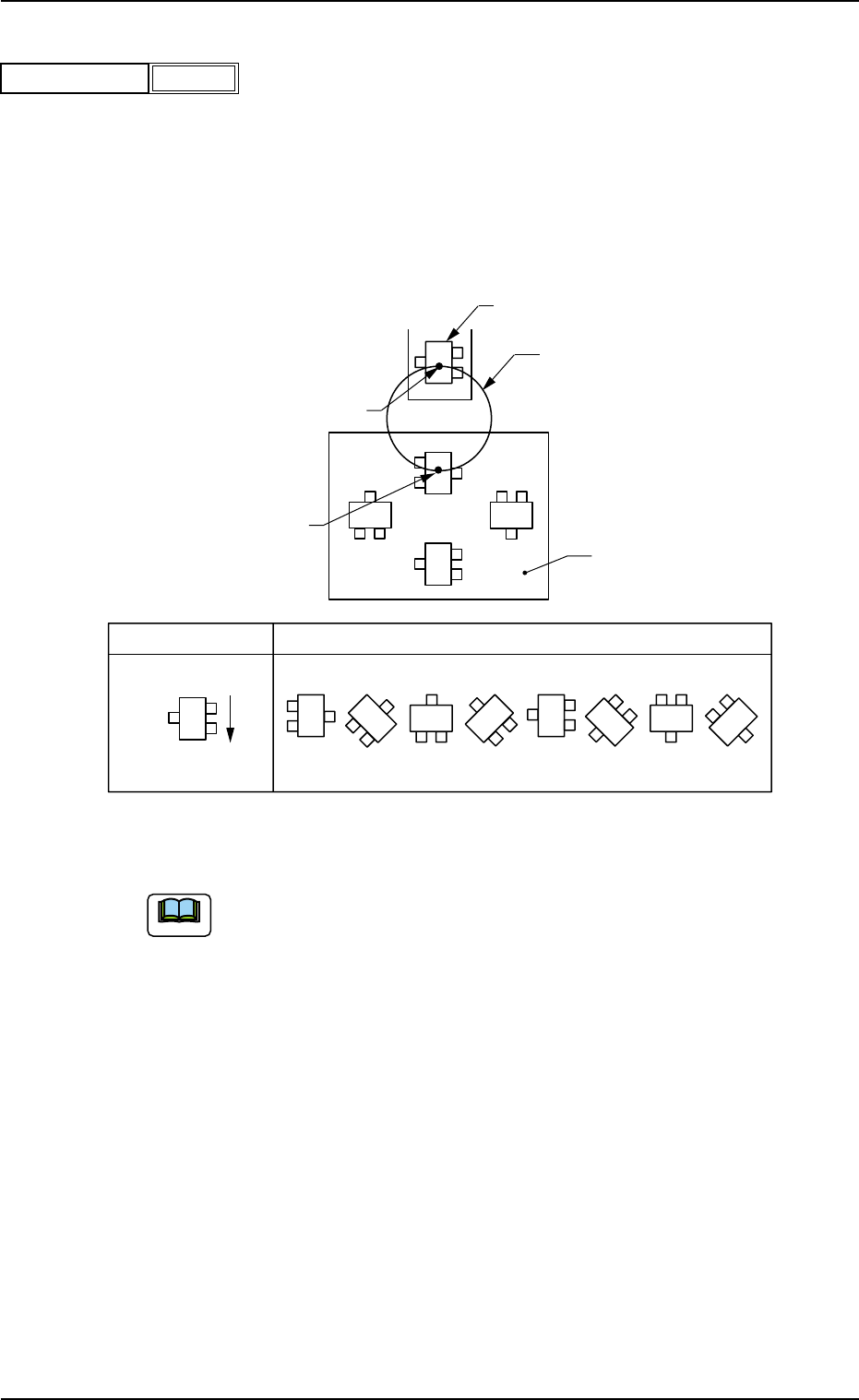
= theta [deg]
Set angles for component placement.
Unit: °(degree)
The placement angles must be determined according to the pack-
aged posture of components on the tape or the bulk feeder.
Example:
Fig. 3B101
Do not set any angle for component placement in the last line
(last P-No.).
Keep it as "+000.00".
Rotary Turret
90°
180°
270°
0°
Z
0° 45° 90° 135° 270°225°180°
315°
Packaged Posture
User Direction
of Feed
Packaged Posture of Component on
Tape Feeder
P.C.B.
Component Pick-Up Station
Component Placement Station
2.5 Placement Data
Note
0305-001 2-51 AIM01EDTP
Fig. 3B100
+000.00
Z = theta [deg]