3OM-996-005.pdf - 第322页
0305-001 5-39 AIM01EDTP *3 Camera1 Theta [deg] This is the offset data used to correct angle dif ference between the X/Y table coordinate system and Camera #1 (Component Recogni- tion Camera (High Magnification)) scannin…
• Sheet Composition
*1 Camera1-Camera2
X [mm], Y [mm]
This is the offset data (X and Y directions) used to correct positional
relation between the centers of Camera #1 (Component Recogni-
tion Camera (High Magnification)) and Camera #2 (Component Rec-
ognition Camera (Low Magnification)).
Shifted coordinates (deviation converted into Camera #1
scanned coordinate axis) between the center coordinates
of Camera #2 and Camera #1 are set using Camera #1
scanning coordinate system.
*2 Camera 1
Magnification X [0.01
µµ
µµ
µm/pixel], Y [0.01
µµ
µµ
µm/pixel]
These parameters are used to set magnification of Camera #1 (Com-
ponent Recognition Camera (High Magnification)) in increments of
0.01 mm per pixel.
Parameters must be entered for both X and Y directions.
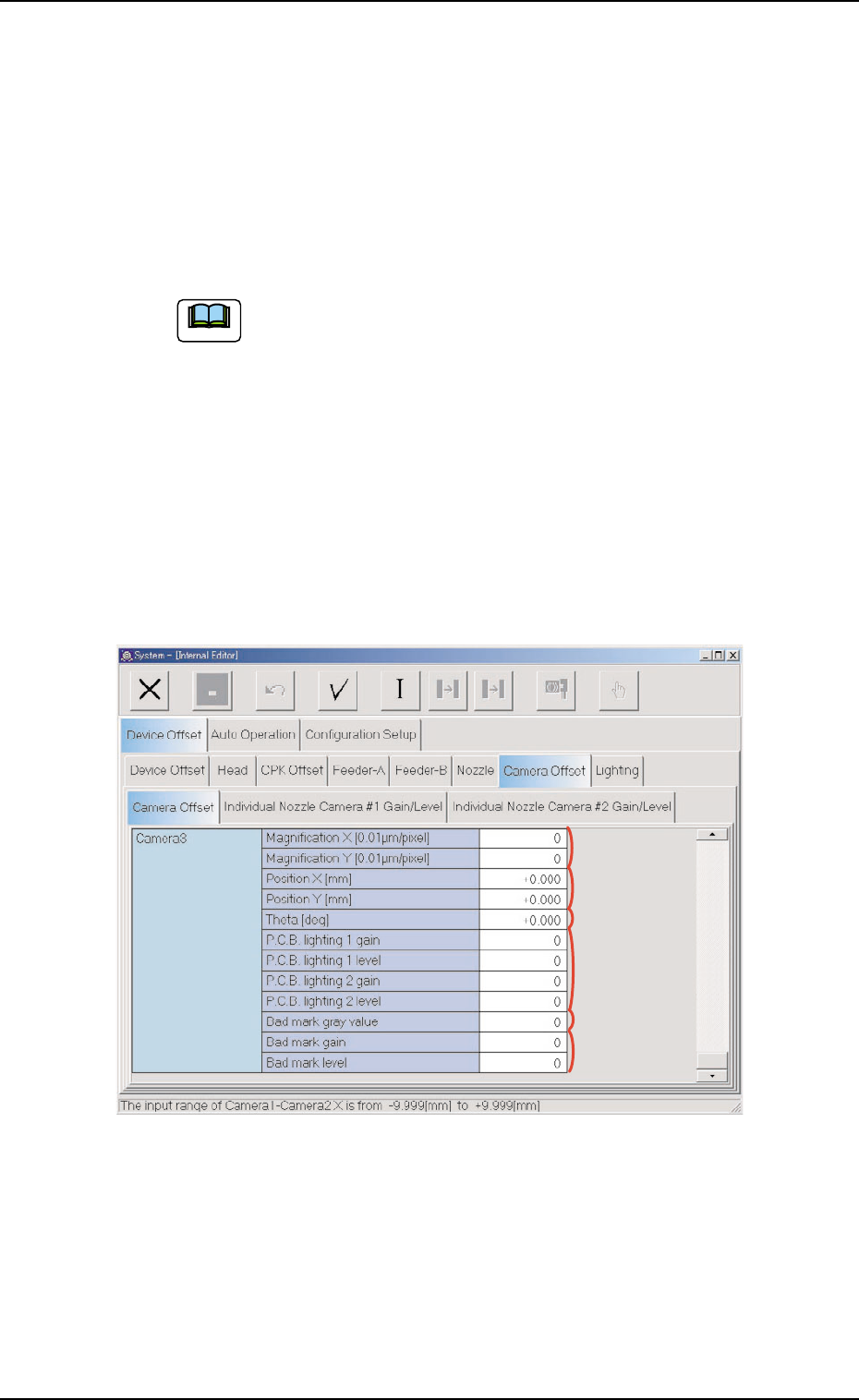
Fig. 3E37 "Camera Offset" Tab Sheet (3)
3.2 "Device Offset" Tab
*8
*9
*10
*11
*12
*13
0305-001 5-38 AIM01EDTP
Note
0305-001 5-39 AIM01EDTP
*3 Camera1
Theta [deg]
This is the offset data used to correct angle difference between the
X/Y table coordinate system and Camera #1 (Component Recogni-
tion Camera (High Magnification)) scanning coordinate system.
When the camera scanning coordinate system deviates
counterclockwise from the X/Y table coordinate system, a
plus value must be entered as offset data.
*4 Camera1
Standard gain (Back Lighting), Standard level (Back Lighting),
Standard gain (Front Lighting 12), Standard level (Front Light-
ing 12), Standard gain (Front Lighting 1), Standard level (Front
Lighting 1), Standard gain (Front Lighting 2), Standard level
(Front Lighting 2)
These parameters are used to set amplifications at which the im-
age signals of Camera #1 (Component Recognition Camera (High
Magnification)) is converted into picture information representing
brightness.
(a) The lower the gain is, the better the contrast becomes.
(b) The smaller the level is, the brighter the whole view
becomes.
(c) Parameters can be set for both back- and front-light-
ing systems.
*5 Camera2
Magnification X [0.01
µµ
µµ
µm/pixel], Magnification Y [0.01
µµ
µµ
µm/pixel]
These parameters are used to set magnification of Camera #2 (Com-
ponent Recognition Camera (Low Magnification)) in increments of
0.01 mm per pixel.
Parameters must be entered for both X and Y directions.
*6 Camera2
Theta [deg]
This is the offset data used to correct angle difference between the
X/Y table coordinate system and the Camera #2 (Component Rec-
ognition Camera (Low Magnification) scanning coordinate system.
When the camera scanning coordinate system deviates
counterclockwise from the X/Y table coordinate system, a
plus value must be entered as offset data.
3.2 "Device Offset" Tab
Note
Note
Note
*7 Camera2
Standard gain (Back Lighting), Standard level (Back Lighting),
Standard gain (Front Lighting 12), Standard level (Front Light-
ing 12), Standard gain (Front Lighting 1), Standard level (Front
Lighting 1), Standard gain (Front Lighting 2), Standard level
(Front Lighting 2), Standard gain (Front Lighting 3), Standard
level (Front Lighting 3)
These parameters are used to set amplifications at which the im-
age signals of Camera #2 (Component Recognition Camera (Low
Magnification)) is converted into picture information representing
brightness.
(a) The lower the gain is, the better the contrast becomes.
(b) The smaller the level is, the brighter the whole view
becomes.
(c) Parameters can be set for both back- and front-light-
ing systems.
*8 Camera3
Magnification X [0.01
µµ
µµ
µm/pixel], Magnification Y [0.01
µµ
µµ
µm/pixel]
These parameters are used to set magnification of Camera #3
(P.E.C. Recognition Camera) in increments of 0.01 mm per pixel.
Parameters must be entered for both X and Y directions.
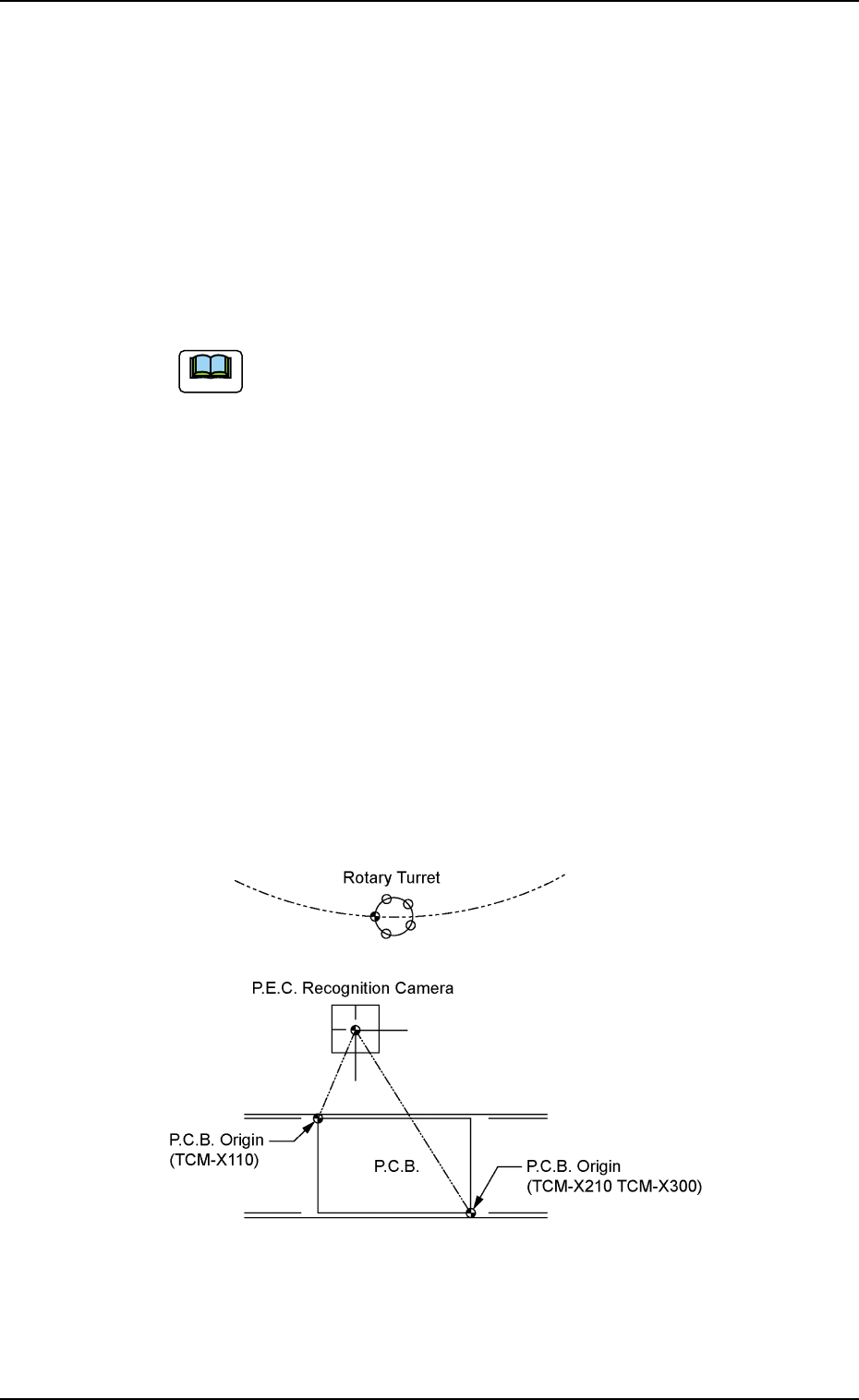
*9 Camera #3
Position X [mm], Position Y [mm]
The distances between the X/Y table P.C.B. origin and the center of
Camera #3 (P.E.C. Recognition Camera) should be set to adjust
the data compared with the design values.
Fig. 3E38
0305-001 5-40
AIM01EDTP
3.2 "Device Offset" Tab
Note