3OM-996-005.pdf - 第352页
3.4 "Configuration Setup" T ab 3.4.1 "Light T ower Setup" T ab • Sheet Layout When the "Light T ower Setup" tab is pressed in the "Configuration Setup" tab sheet, the following tab…

*18 Transfer conveyor reverse speed
When a P.C.B. is transferred, the rotation of the conveyor is re-
versed to bring the P.C.B. close to the transfer claw. The speed of
the reverse rotation can be specified in this text box.
Select one of the following options.
Full Speed, 10%Decr, 20%Decr, 30%Decr, 40%Decr,
50%Decr, 60%Decr, 70%Decr, 80%Decr, 90%Decr
0305-001 5-63
AIM01EDTP
3.3 "Auto Operation" Tab
3.4 "Configuration Setup" Tab
3.4.1 "Light Tower Setup" Tab
• Sheet Layout
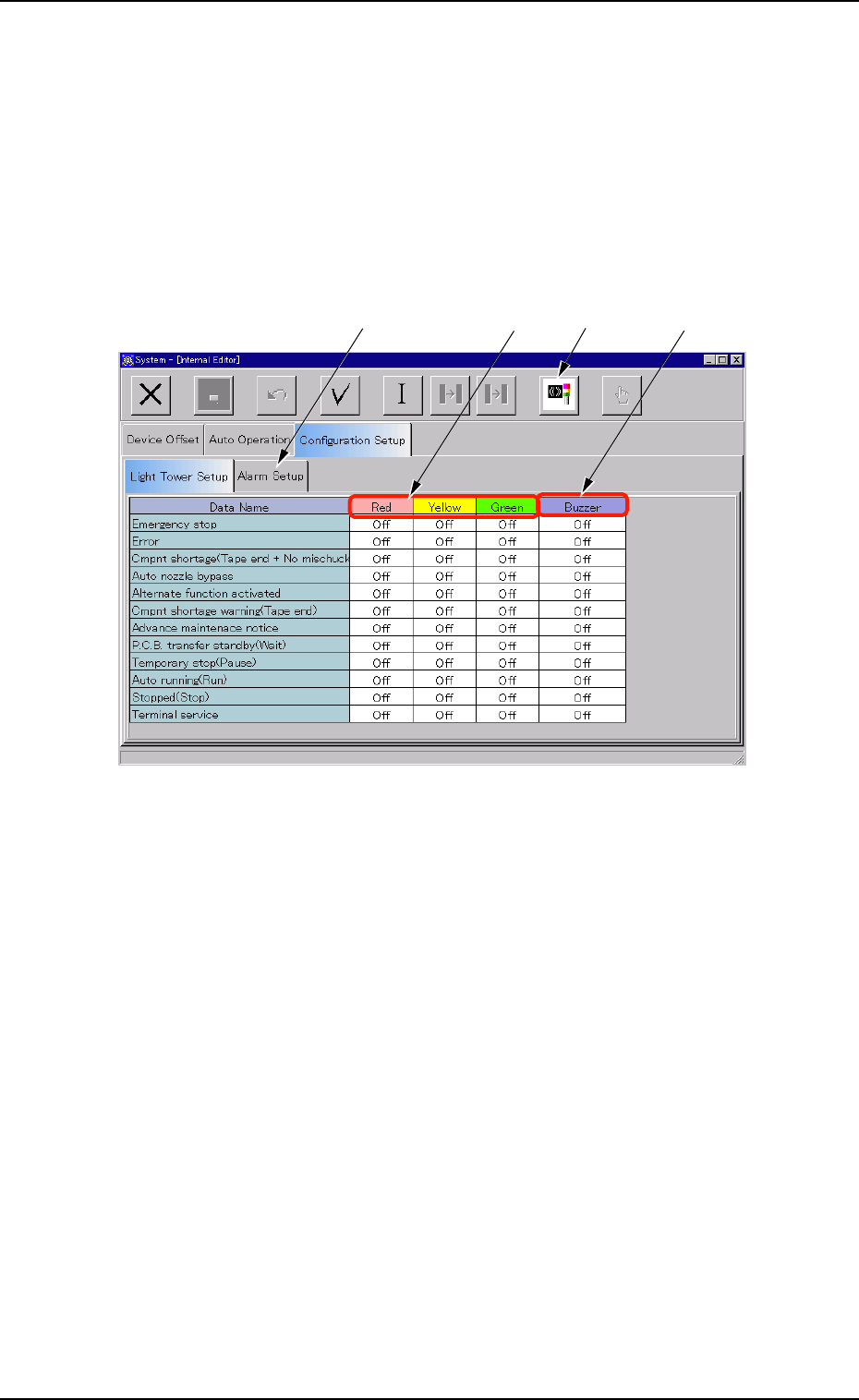
When the "Light Tower Setup" tab is pressed in the "Configuration Setup"
tab sheet, the following tab sheet appears.
Fig. 3E54 "Light Tower Setup" Tab Sheet
• Sheet Composition
*1 Data Name
Displayed are the items for which the colors (red, yellow, and green)
of the tower lights and the types of alarm sounds should be speci-
fied.
*2 Red, Yellow, Green
Set "On", "On & Off", or "Off" in each text box to specify the colors
(red, yellow, and green) of the tower lights.
*3 Buzzer
Set "Off", "Intmt Snd", "Cont Snd", or "Optl Snd" in each text box to
specify the types of alarm sounds.
The desired sound patterns can be made, using the "Alarm Setup"
tab sheet.
0305-001 5-64
AIM01EDTP
3.4 "Configuration Setup" Tab
*1
*2
*3
*4

*4 "Standard Setup" Icon
When pressed, this changes the colors of the tower lights to the
standard ones.
0305-001 5-65
AIM01EDTP
3.4 "Configuration Setup" Tab