3OM-996-005.pdf - 第347页
0305-001 5-59 AIM01EDTP Stop timer [sec] Set the delay time (the period of time during which the sensor at the buffer position of the input conveyor detects a P .C.B. and the con- veyor stops) in the text box. When a P .…
Conveyer #2
The P.C.B. on the conveyor can be transferred only when a P.C.B.
request signal is received.
Conveyor #3
The input conveyor is activated to receive a P.C.B. from the input
machine when the P.C.B. transfer signal is received from the input
machine.
The input conveyor keeps on running even if the P.C.B. transfer
signal is interrupted temporarily.
*5 Input conveyor
Timer #1 [sec], Timer #2 [sec], Stop timer [sec]
Set each parameter to specify how the input conveyor should work.
Timer #1 [sec]
Set the time to limit the operating time (P.C.B. reception from the
input machine) of the input conveyor.
This timer measures the operating time of the input conveyor and is
used to detect an interrupted P.C.B.
(a) Add 2 seconds (approx.) to the time required for P.C.B.
reception from the input machine and set the time in
the text box.
(b) The data input range is "0 to 99 seconds".
Timer #2 [sec]
Set the time to limit the operating time of the input conveyor to transfer
a P.C.B. on the main machine side.
This timer measures the operating time of the input conveyor and is
used to detect an interrupted P.C.B.
The data input range is "0 to 99 seconds"
0305-001 5-58
AIM01EDTP
3.3 "Auto Operation" Tab
Note
Note
0305-001 5-59 AIM01EDTP
Stop timer [sec]
Set the delay time (the period of time during which the sensor at the
buffer position of the input conveyor detects a P.C.B. and the con-
veyor stops) in the text box.
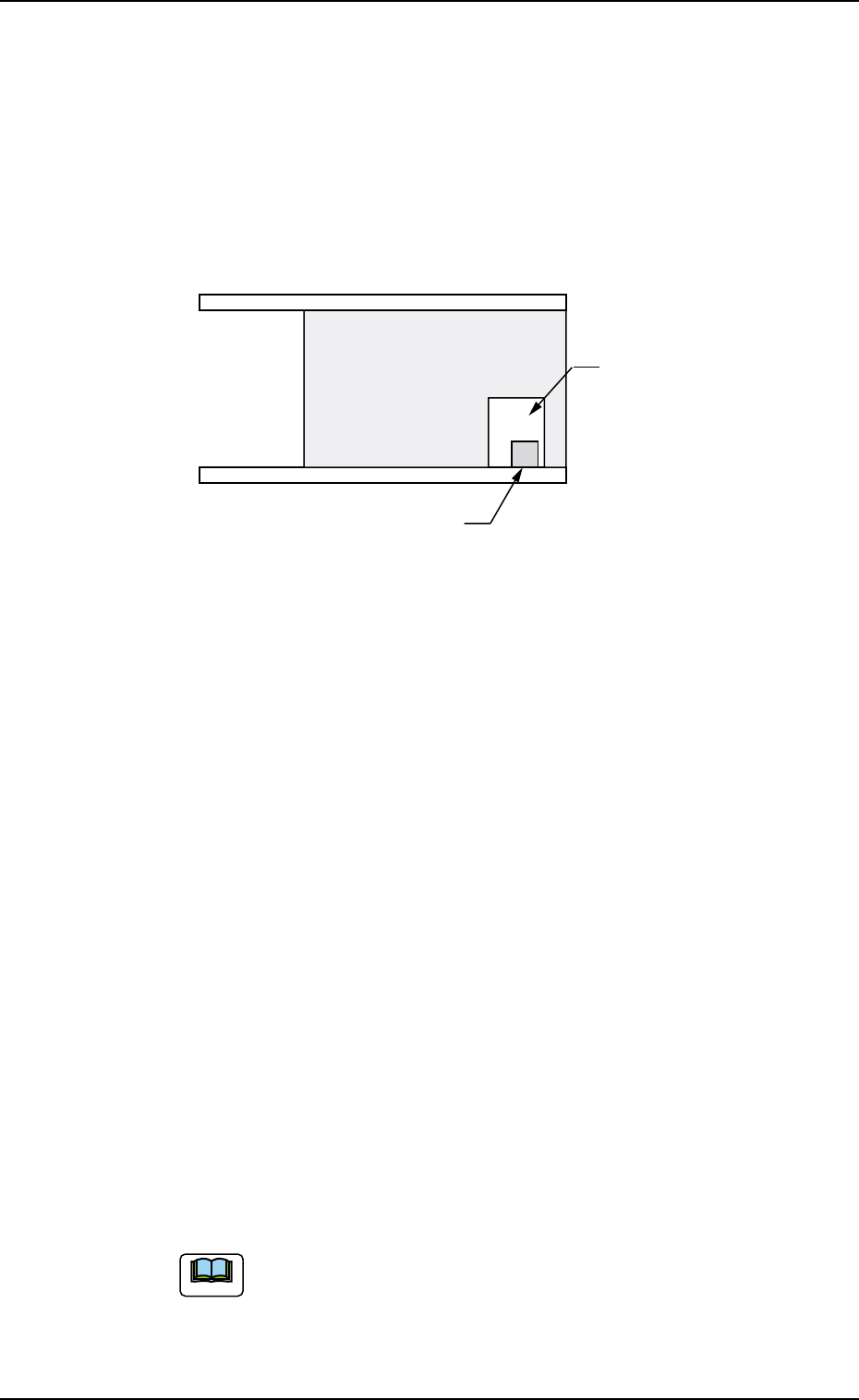
When a P.C.B. has a cutout as shown in the figure below and stops
at a position where the photosensor is located inside the cutout
after it is detected by the photosensor, the system determines it as
there is no P.C.B. To avoid this, it is required to set the delay time.
Fig. 3E50
*6 Output mode
Select "Standard", "Interval", or "SEMEMA" to determine how to
transfer a P.C.B. from the main machine to the output machine.
Standard
When the output machine is manufactured by us, set "Standard" in
the text box.
When the work request signal is received from the output machine,
the P.C.B. transfer signal of the machine is turned ON and a P.C.B.
is transferred to the output machine by the output conveyor.
When the work request signal is not turned OFF within the specified
time after a P.C.B. unloading action has started, the machine stops
in an error condition.
Interval
When the work request signal of the output machine is turned ON,
P.C.B.’s on the machine side are transferred to the output machine.
The conveyor stops when the output conveyor timer has reached
the specified time.
The machine starts its unloading actions when the unloading condi-
tion is fulfilled after the conveyor has stopped running and the time
specified in the "Output interval timer [sec]" text box has elapsed.
No error detection is made.
SMEMA (Not Available)
P.C.B.’s are transferred according to the "SMEMA" standard.
3.3 "Auto Operation" Tab
Photosensor
Cutout
P.C.B.
Note
*7 Output conveyor
Timer #1 [sec], Timer #2 [sec], Stop timer (Buffer #1) [sec], Stop
timer (Buffer #2) [sec]
Timer #1 [sec]
Set the time to limit the operating time (P.C.B. reception by the out-
put machine) of the output conveyor.
(a) Add 2 seconds (approx.) to the time required for P.C.B.
reception by the output machine and set the time in
the text box.
(b) The data input range is "0 to 99 seconds".
Timer #2 [sec]
Set the time to limit the operating time of the output conveyor to
transfer a P.C.B. on the main machine side.
The data input range is "0 to 99 seconds"
Stop timer (Buffer #1) [sec]
Set the delay time (the period of time during which the sensor at the
buffer 1 position of the output conveyor detects a P.C.B. and the
conveyor stops) in the text box.
Stop timer (Buffer #2) [sec]
Set the delay time (the period of time during which the sensor at the
buffer 2 position of the output conveyor detects a P.C.B. and the
conveyor stops) in the text box.
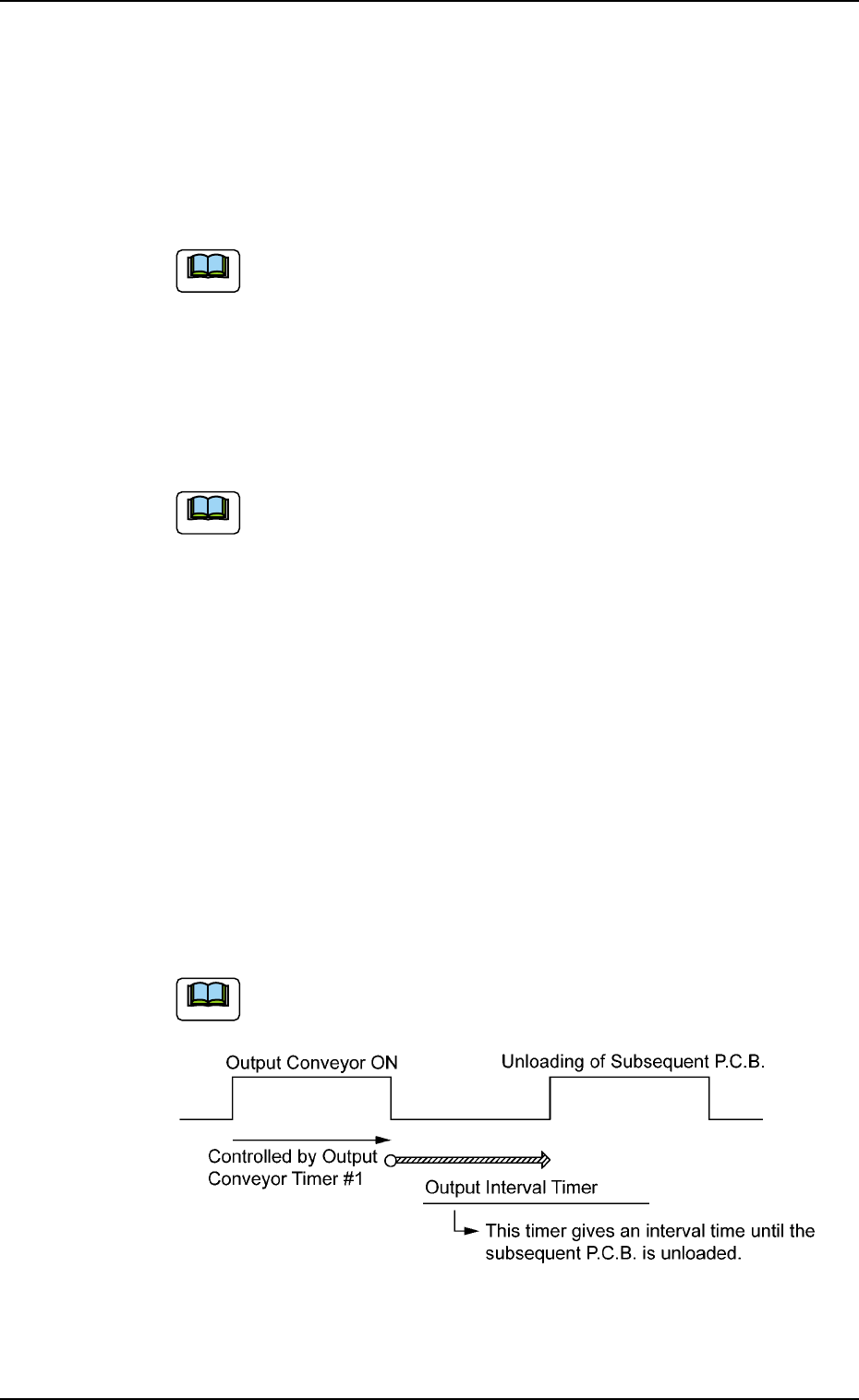
*8 Output interval timer [sec]
When "Interval" is set in the "Output mode" text box, set the time as
interval time for P.C.B. unloading actions.
The data input range is "0 to 99 seconds".
Fig. 3E51
0305-001 5-60 AIM01EDTP
3.3 "Auto Operation" Tab
Note
Note
Note