HS50_advance_level 2.pdf - 第18页
1 - 4 07/2002 Editio n Student G uide HS -50 Advanc ed II Contents 4

3DJH
&RQWHQWV
Student Guide HS-50 Advanced II 07/2002 Edition
Contents
3
6DIHW\&RQVLGHUDWLRQ
0DFKLQH6DIHW\
1.1.1 Safety instructions for closing the protective covers . . . . . . . . . . . . . . . . . . . . . . . . . . 8
1.1.2 Safety instructions for changing the component table. . . . . . . . . . . . . . . . . . . . . . . . . 9
(6'JXLGHOLQHV
1.2.1 What does ESD mean?. . . . . . . . . . . . . . . . . . . . . . . . . . . . . . . . . . . . . . . . . . . . . . . 10
1.2.2 Important measures to protect against static charging . . . . . . . . . . . . . . . . . . . . . . . 10
1.2.3 Handling ESD modules . . . . . . . . . . . . . . . . . . . . . . . . . . . . . . . . . . . . . . . . . . . . . . . 10
1.2.4 Measurements and modifications to ESD modules. . . . . . . . . . . . . . . . . . . . . . . . . . 11
1.2.5 Shipping ESD modules . . . . . . . . . . . . . . . . . . . . . . . . . . . . . . . . . . . . . . . . . . . . . . . 11
6DIHW\&LUFXLW+6
)ORZFKDUW3URWHFWLYHFLUFXLW

1 - 4
07/2002 Edition Student Guide HS-50 Advanced II
Contents
4
Student Guide HS-50 Advanced II 07/2002 Edition
1 Safety Consideration
5
6DIHW\&RQVLGHUDWLRQ
0DFKLQH6DIHW\
1
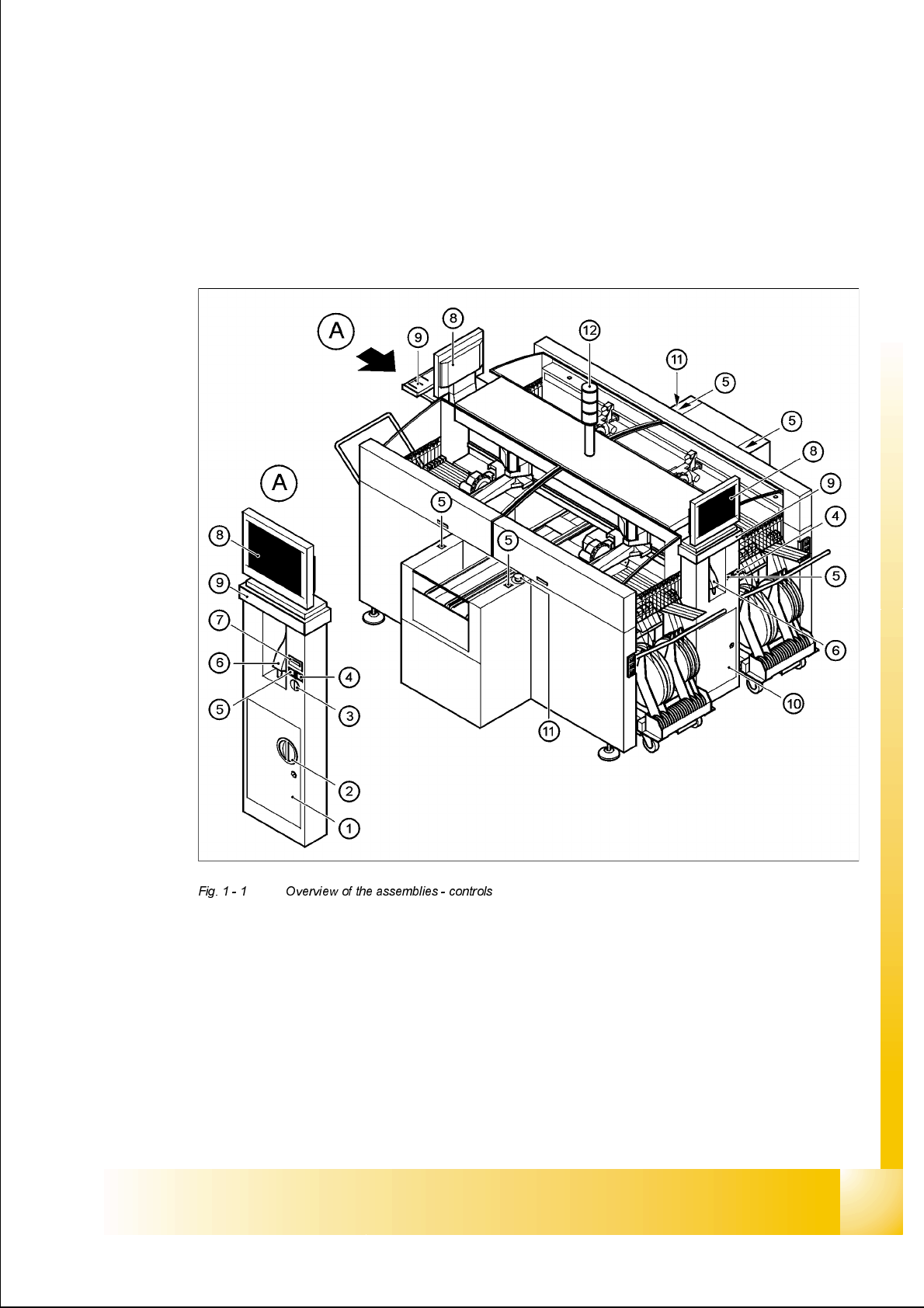
1. Operator’s panel, left 7. Component counter
2. Main switch 8. LCD screen
3. Key switch 9. Keyboard with trackball
4. Stop button (black) 10. Operator’s panel, right
5. Start button (white) 11. Emergency stop button
6. Component barcode scanner 12. Pilot lamp