HS50_advance_level 2.pdf - 第82页
07/2002 Editio n Student G uide HS -50 Advanc ed II 3 Power Sup ply 44 ➠ Switch the pl acement sy stem on an d start it up, then measu re the voltages as per the table in secti on 3.2.2.2 on page 3 - 12 . ➠ Complete th e…
Student Guide HS-50 Advanced II 07/2002 Edition
3 Power Supply
43
3DUWV
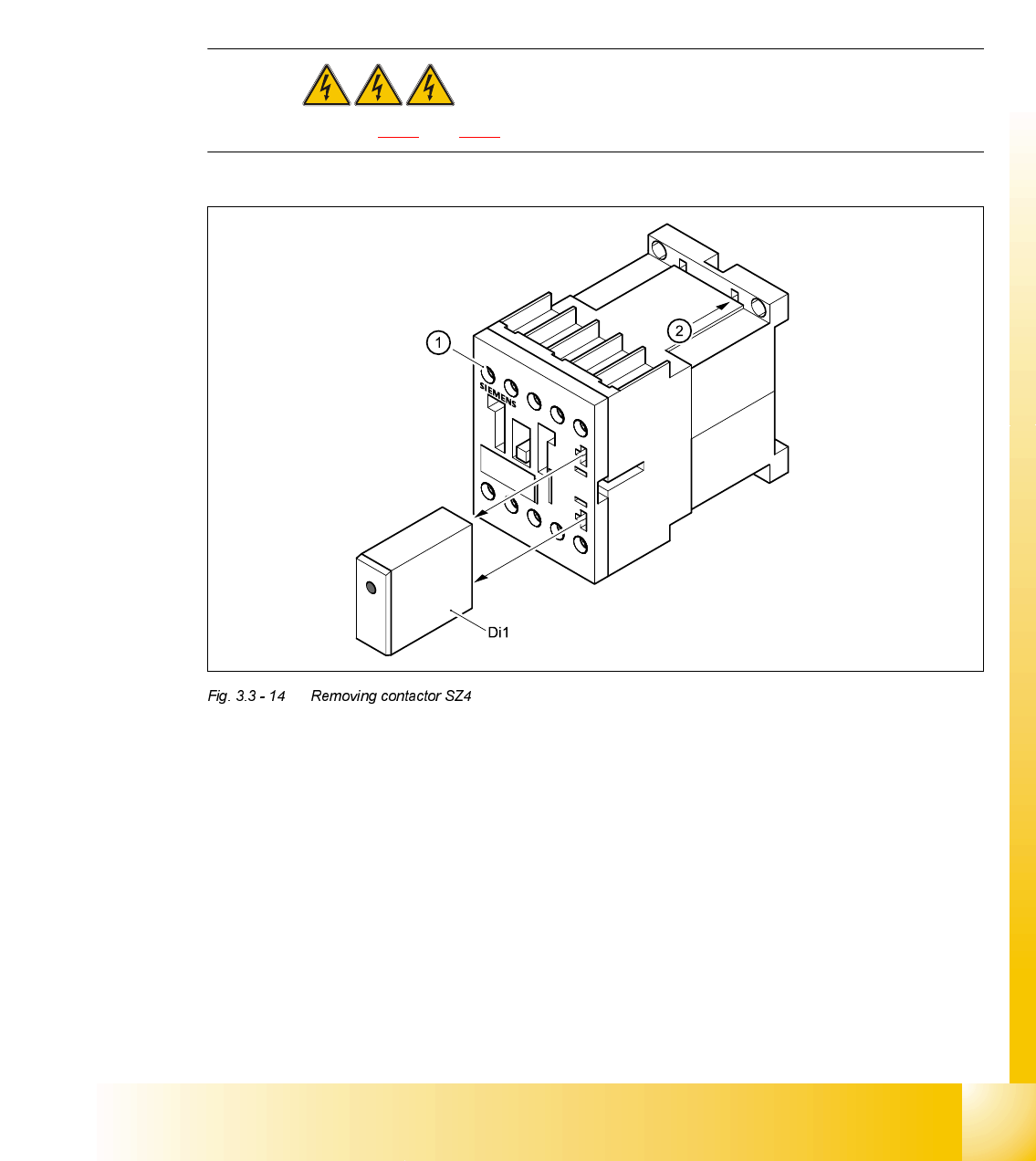
5HPRYLQJFRQWDFWRU6=
DANGER Switch off the placement system and disconnect from the power
supply (see sections 3.3.1 and 3.3.2).
➠ Remove the suppressor diode Di1 from contactor SZ4.
➠ Loosen the contactor clamping screw (1).
➠ Pull the terminal wires out one by one and identify with adhesive labels.
➠ Insert a screwdriver into the opening (2) in the plastic retainer and lift up slightly.
➠ Tilt the contactor down slightly and remove.
)LWWLQJFRQWDFWRU6=
➠ Place the contactor on the top of the top-hat rail and snap into place.
➠ Connect up the terminal wires.
➠ Fit the suppressor diode Di1.
&RQWDFWRU 'HVLJQDWLRQ ,WHPQXPEHU
SZ4 SIRIUS 3RT13/24 VDC, size S0 00341209-01
Di1 Suppressor diode for contactor SZ4/DL 24-70V 00342396-01

07/2002 Edition Student Guide HS-50 Advanced II
3 Power Supply
44
➠ Switch the placement system on and start it up, then measure the voltages as per the table in
section 3.2.2.2
on page 3 - 12.
➠ Complete the servicing work as described in 3.3.3 on page 3 - 29.
5HSODFLQJPLQLDWXUHFLUFXLWEUHDNHU))
7RROVDQGHTXLSPHQW
– Set of slotted-head screwdrivers
– Digital multimeter
– HS-50 detailed circuit diagrams
3DUWV
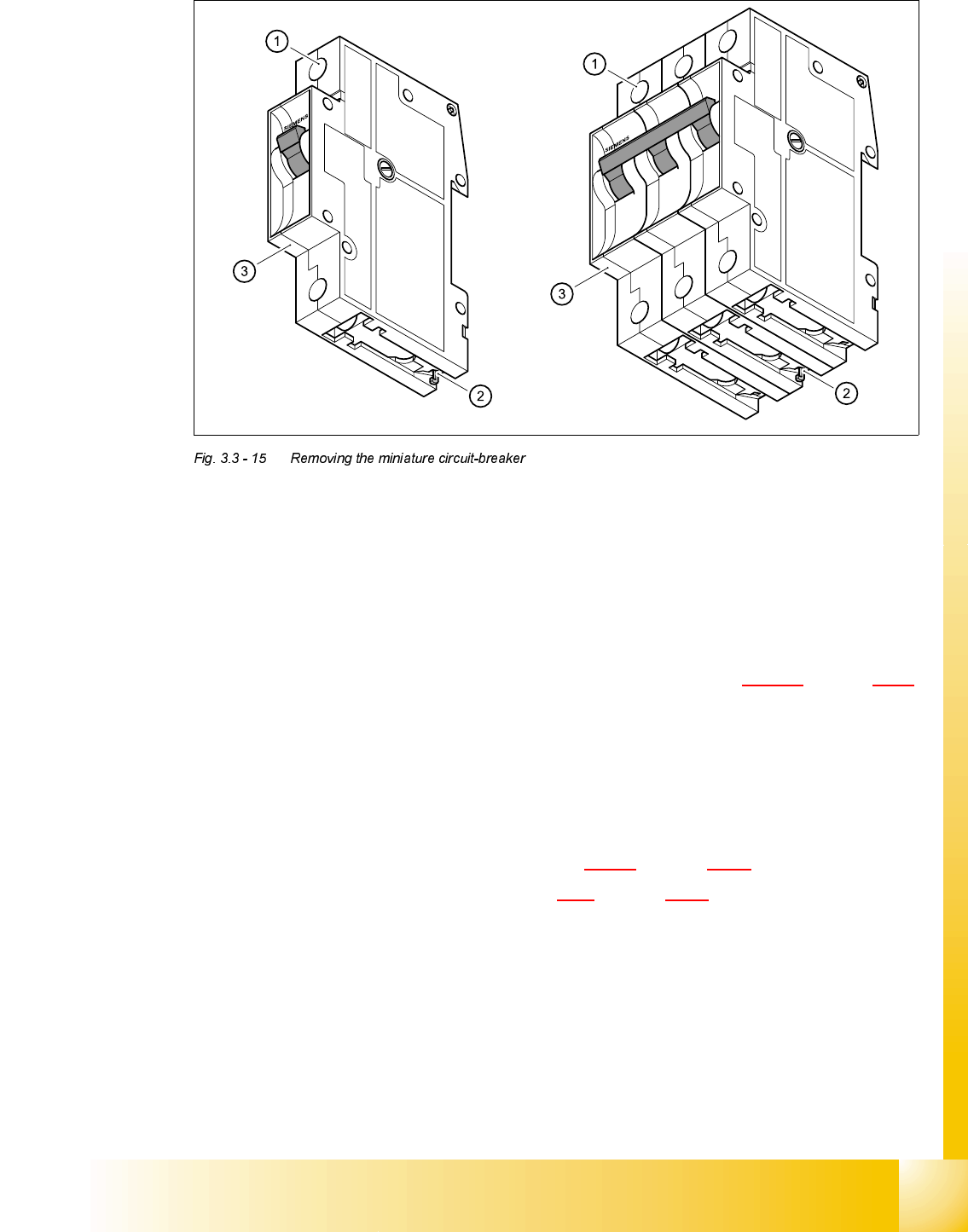
5HPRYLQJWKHPLQLDWXUHFLUFXLWEUHDNHU
DANGER Switch off the placement system and disconnect from the power
supply (see sections 3.3.1 and 3.3.2).
0LQLDWXUHFLUFXLWEUHDNHU 7\SH &KDUDFWHULVWLFIHDWXUHV ,WHPQXPEHU
F1 5SX2/1-pole/4A-AC C 00307161-01
F3 5SX2/3-pole/4A-AC C 00302817-01
F4 5SX2/3-pole/32A-AC D 00341203-01
F5, F6, F7, F9 5SX2/1-pole/10A-AC B 00341204-01
F8 5SX2/1-pole6A-AC 00341205-01
F10 5SX2/1-pole/25A-AC C 00341206-01
F11 5SX2/1-pole/1A-AC 00310685-01
Student Guide HS-50 Advanced II 07/2002 Edition
3 Power Supply
45
➠ Loosen the clamping screw (1).
➠ Pull out the terminal wires.
➠ Use the screwdriver to press the hook (2) downwards and hold it in this position.
➠ Tilt the miniature circuit-breaker (3) upwards and remove.
)LWWLQJWKHPLQLDWXUHFLUFXLWEUHDNHU
➠ Check the type of miniature circuit-breaker against the table in section 3.3.10.2 on page 3 - 43.
➠ Attach the miniature circuit-breaker to the top of the top-hat rail.
➠ Press down on the miniature circuit-breaker so that it snaps in place.
➠ Check that it is firmly seated.
➠ Connect up the terminal wires.
➠ Switch the placement system on and start it up.
➠ Measure the voltages as per the table in section 3.2.2.2 on page 3 - 12.
➠ Complete the servicing work as described in 3.3.3 on page 3 - 29.