HS50_advance_level 2.pdf - 第398页
07/2002 Editio n Student G uide HS -50 Advanc ed II 14 Conveyor System 24 ➠ 5HOLHYHWKHWHQVL RQ on the rele vant pair of to othed be lts by loose ning the fastener s of the a l- located EHOWJX LGH on the fixe d DQG m…
Student Guide HS-50 Advanced II 07/2002 Edition
14 Conveyor System
23
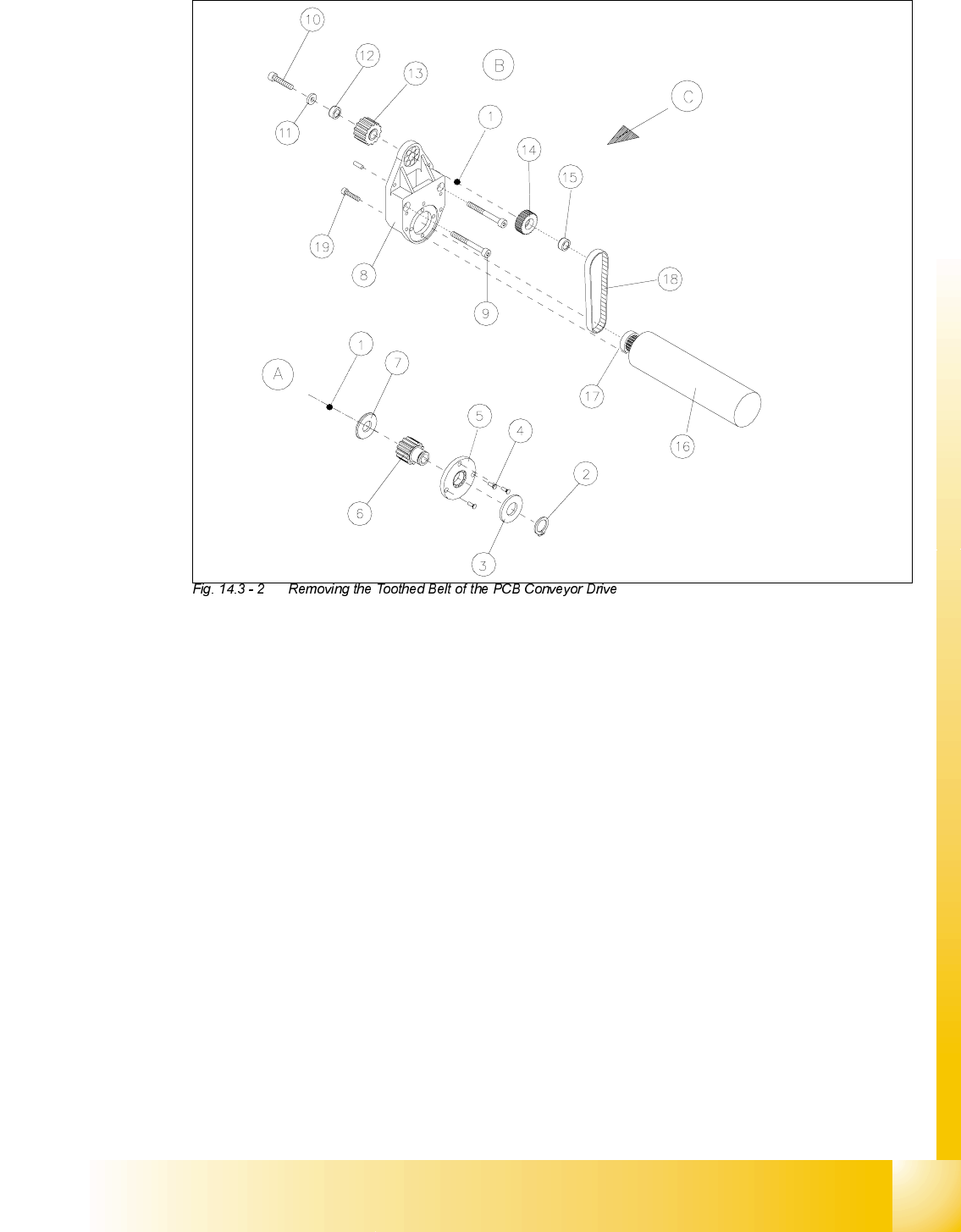
Key to
A) Layout on the movable side of the conveyor
-XVWundo the screws fastening the end
shield !
B) Layout on the fixed side of the conveyor
C) PCB transport direction
1) Hexagonal drive shaft 2) Retaining ring (is not removed)
3) Disk (is not removed) 4) 3 slotted screws M2 x 5
5) End shield 6) Synchronizing disk
7) Disk 8) Motor mount assembly
9) Screws fastening the motor mount: parallel
pin, 2 hex socket head cap screws M4 x
20,
10) Screw fastening the drive shaft:
hexagonal socket head cap screw M4 x 10
11) Pressure disk 12) Annular spring
13) Synchronizing disk (toothed belt for conv.) 14) Synchronizing disk (toothed belt for drive)
15) Annular spring (Tension element) 16) DC geared motor
17) Synchronizing disk 18) Toothed belt Synchroflex 6 T2.5/177.5
19) Screws to fasten geared motor
4 hex socket head cap screws M3 x 10

07/2002 Edition Student Guide HS-50 Advanced II
14 Conveyor System
24
➠ 5HOLHYHWKHWHQVLRQon the relevant pair of toothed belts by loosening the fasteners of the al-
located EHOWJXLGH on the fixed DQGmovable side of the conveyor (two M3 hexagonal socket
head cap screws each: see!).
➠ When exchanging at the LQWHUPHGLDWHRULQSXWFRQYH\RU
Where applicable, disassemble the sonar proximity switch mount incl. the sensing head ->
Keep the above NOTE in mind.
➠ Mark the polarity of the motor terminals (+/-) -> Important for restoring the direction of rotation.
➠ Pull the cable shoes off the motor terminals.
➠ Pull the heat-shrinkable sleeves (which hold the cable in place) off the motor.
➠ For the exchange at conveyor 1 or 2:
➠ On the movable side of conveyor 1 or 2 undo the screws fastening the end shield ((3 slotted
M2 screws: see -> 5).
➠ If a dual conveyor is present (and the toothed belt on conveyor 1 is exchanged) also
loosen the screws fastening the end shield at conveyor 2.
➠ $WWKHIL[HGVLGHRIWKHFRQYH\RU
➠ Undo and remove the screws fastening the pertinent motor mound (two M 4 hexagonal
socket head cap screws: see ).
➠ In case involving both a dual converter and exchanging the toothed belt at conveyor 1, the
screws fastening the motor mount must be undone (see -> 4). This creates space to re-
move the end shield, moving in the direction of conveyor 2.
➠ On the drive unit, remove the pressure disk, the annular spring (tensioning element) and
the synchronizing disk from the hexagonal drive shaft.
➠ Push the drive unit toward the movable side of the conveyor until the synchronizing disk of
the drive no longer engages in the toothed belt of the conveyor.
Where a dual conveyor is present (and the toothed belt on conveyor 1 exchanged), first
push the drive shaft of conveyor 2 away from conveyor 1 to make room for the drive shaft
of conveyor 1. Then push the drive shaft of conveyor 1 away too.
➠ Remove the damaged toothed belt for the drive from the motor mount.
,QVWDOOLQJWKH7RRWKHG%HOWIRUWKH3&%&RQYH\RU'ULYH
CAUTION O
The new toothed belt is not to be stretched or kinked during the following procedure. 14
➠ Insert the new toothed belt into the relief cut in the motor casing (see ).
➠ Place the toothed belt around the synchronizing disk of the geared motor.
➠ In the opening of the motor mount, pull the toothed belt up slightly but do not stretch it.
➠ Guide the hexagonal drive shaft with synchronizing disk (see ) into the motor mount.

Student Guide HS-50 Advanced II 07/2002 Edition
14 Conveyor System
25
➠ Place the external synchronizing disk, the annular spring and the plain washer onto the end of
the hexagonal drive shaft and bolt the drive shaft to the motor mount (one M3 hexagonal socket
head cap screw).
➠ Check: The toothed belt must be engaged in the top and bottom synchronizing disk over its
entire width (see ).
➠ Carry out the remaining assembly procedures in the order reverse to that described for the dis-
assembly in section 14.3.2.1, above.
➠ Restore the correct polarity of the motor terminals (+/-) -> direction of rotation!direction of ro-
tation
➠ Fasten the motor cable to the circumference of the motor with the heat-shrinkable sleeve.
➠ If applicable, mount the sonar proximity switch mount incl. the sensing head.
– The connecting cables of the sonar proximity switch are not to be damaged or kinked.
➠ Fasten the EHOWJXLGHV(see ) in the FRUUHFWSRVLWLRQin the slots (two MS hexagonal socket
head cap screws) and note:
– The toothed belt is not to be under tension.
➠ Carry out the pertinent "final steps incl. function check" (see section 14.4). During the process,
make certain that the geared motor will turn in the correct direction.
([FKDQJLQJWKH0RWRU0RXQW$VVHPEO\IRU3&%&RQYH\RU3&%&RQ
YH\RU'ULYH
CAUTION O
The toothed belt is not to be stretched or kinked. 14
NOTE:
If the ball bearing in teh motor mount is faulty, exchange the motor mount assembly for PCB con-
veyor". If the geared motor ist faulty as well, exchange the "PCB conveyor drive" (= entire unit in-
cluding geard motor). 14
5HPRYLQJWKH0RWRU0RXQW$VVHPEO\3&%&RQYH\RU'ULYH
➠ Carry out DOOsteps as described in section 14.3.2.1 for the removal of the "toothed belt for PCB
conveyor drive. The toothed belt in the motor mount is removed, however, because the above-
mentioned assemblies LQFOXGHLW(see NOTE).
➠ Pull the motor mount with geared motor off the drive shaft.
➠ If you wish to exchange the "motor mount assembly", remove the geared motor for re-use with
the motor mount (four M3 hexagonal socket head cap screws: see ).