CP-7-series Verification System Instruction manual(2.0E).pdf - 第124页
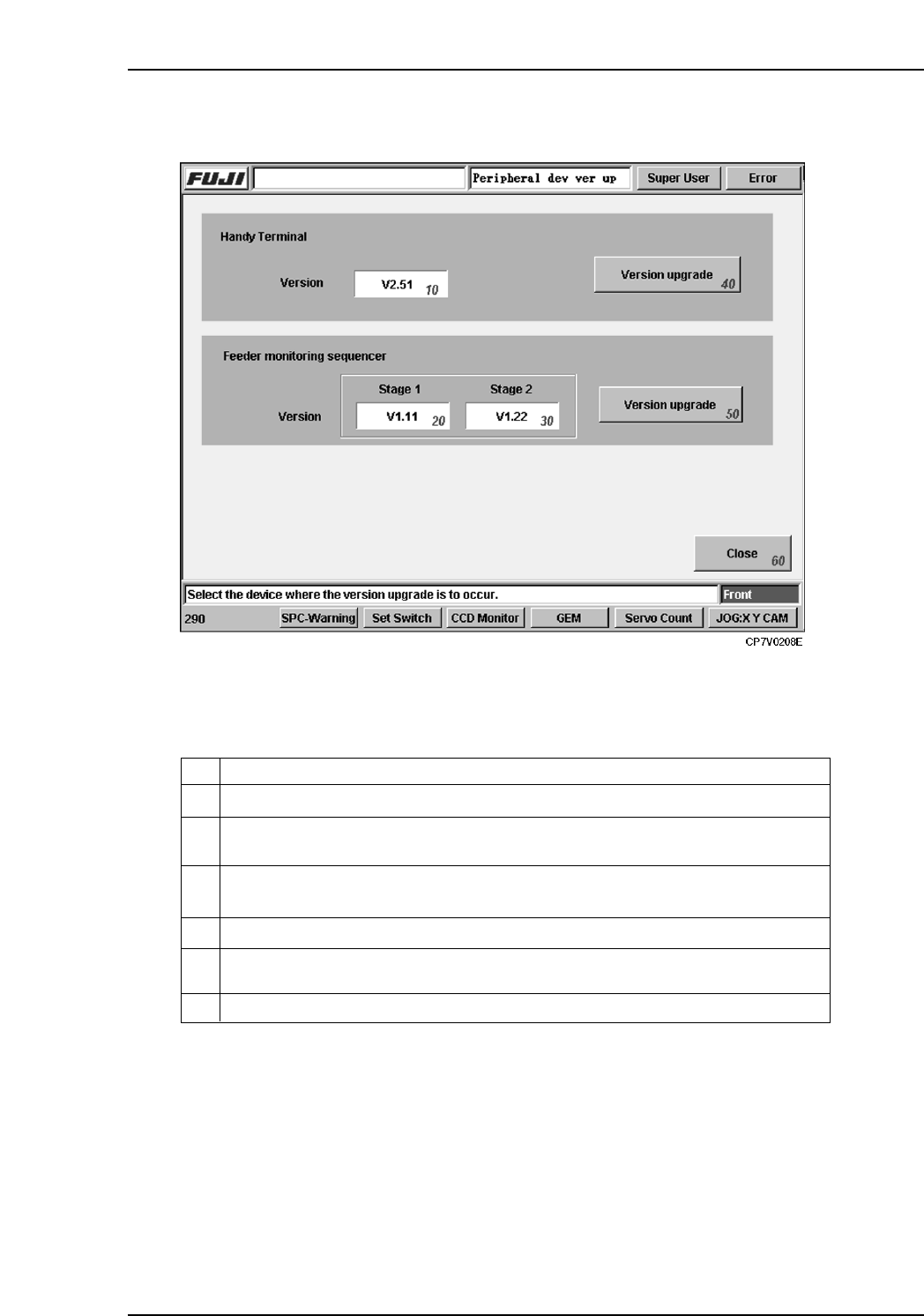
15. Explanation of Operation Screens Edition 2.0 113 CP-7-series V erification System Instruction Manual Screen access Screen Explanation 10 Version number of the Handy Terminal currently connected to the machine. Versio…

15. Explanation of Operation Screens
Edition 2.0 112 CP-7-series Verification System Instruction Manual
15. Explanation of Operation Screens
The machine operation screens used for the Part Verification operation are explained below.
15.1 [Version Up] Screen
Function
Displays the version number and upgrades the version of the control programs in PDT-3100
and setup sensor & LED sequencer.
Screen access
• To display this screen, execute the [Maintenance] - [Version Up]
- [Maintenance for Each Machine] commands.
• The display content of this screen varies according to the part verification system
settings specified at the [Parts Administration System] screen.
When “Use Handy Terminal” is ON:
Only the "Handy Terminal" section displays at the [Version Up] screen.
When [Use Setup Sensor and LED] is ON:
Only the "Feeder monitoring sequencer" section displays at the [Version Up] screen.
15. Explanation of Operation Screens
Edition 2.0 113 CP-7-series Verification System Instruction Manual
Screen access
Screen Explanation
10
Version number of the Handy Terminal currently connected to the machine.
Version number of the feeder mount/demount monitoring sequencer currently
connected to the machine’s stage 1 side.
20
Version number of the feeder mount/demount monitoring sequencer currently
connected to the machine’s stage 2 side.
30
ExplanationNo.
40
Upgrades Handy Terminal’s control application version.
50
Upgrades the feeder mount/demount monitoring sequencer’s control application
version.
60
Returns to the [Maintenance] screen.
VT013E
15. Explanation of Operation Screens
Edition 2.0 114 CP-7-series Verification System Instruction Manual
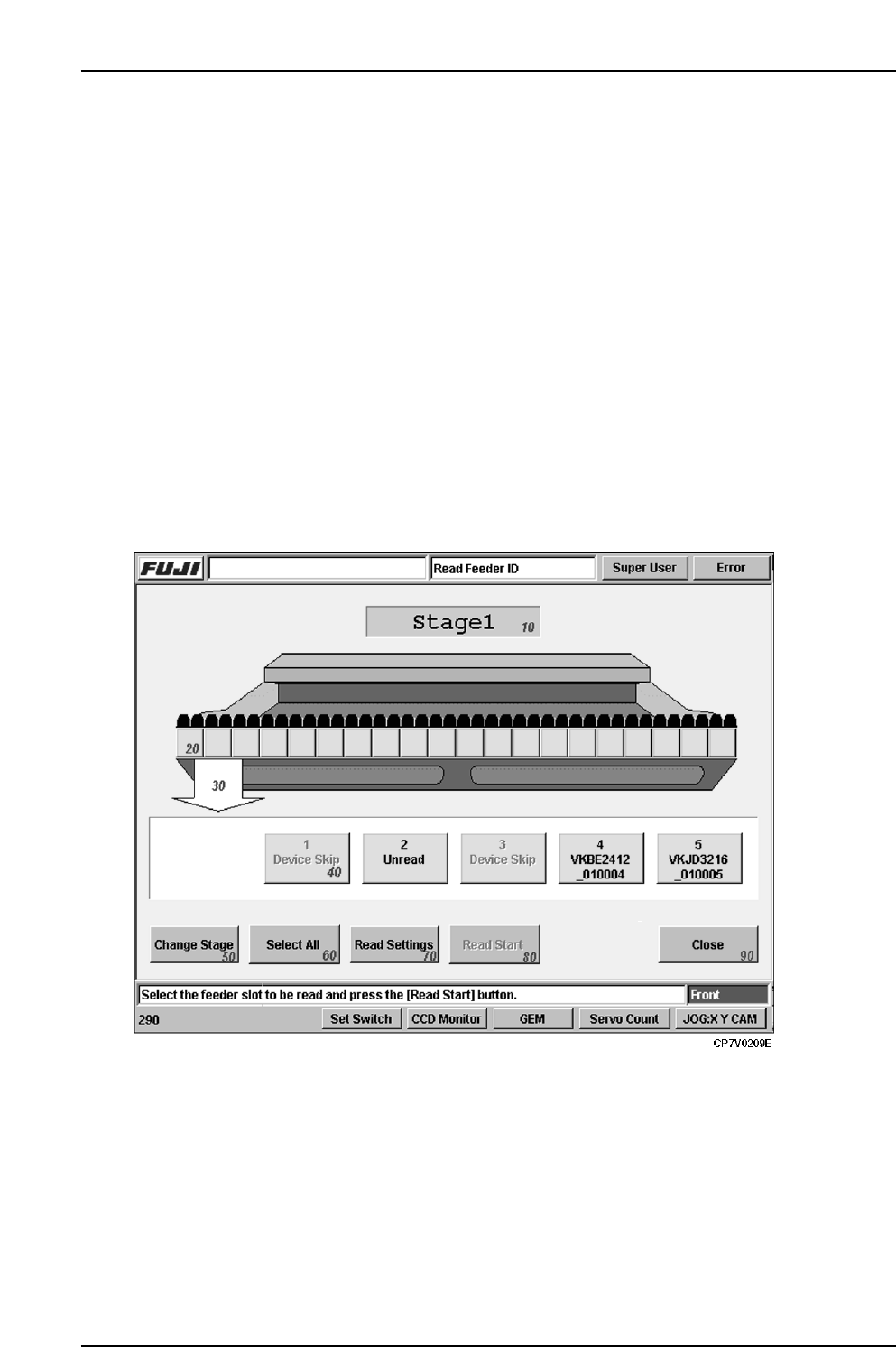
15.2 [Read Feeder ID] Screen
Function
This screen is used for reading the feeder IDs attached to feeders.
Although feeder ID reading usually occurs when automatic operation begins, this screen
enables the reading function to be executed by itself, without starting operation.
In the quick verify mode, parts cannot be verified until the feeder ID is read, and the reel
information is obtained from Fujitrax Verifier. Therefore, it is not possible to know if the
correct feeders are set until automatic operation begins.
This display screen offers a way around this restriction, providing an easy way to check the
part setup without having to begin production.
Input
• To display the Feeder ID Reading screen, press the [Read Feeder ID] button at the
[Main] screen.
• Display of the [Read Feeder ID] screen is only possible if the [Use Fujitrax Verifier]
button is selected at the [Parts Administration System] screen.
Screen Access