CP-7-series Verification System Instruction manual(2.0E).pdf - 第36页
5. Explanation of Functions Edition 2.0 25 CP-7-series V erification System Instruction Manual By adopting the principle that the device status stored by Fujitrax V erifier is cleared when maintenance is performed for a …
5. Explanation of Functions
Edition 2.0 24 CP-7-series Verification System Instruction Manual
5.4.5 Device Status Flag
The status of each device on the machine is stored in the Fujitrax Verifier database.
These device statuses are not cleared unless ID information is created using Fujitrax
Verifier, or either standard or DC AUTO mode verification is performed using the Hand
Terminal.
By enabling this function, the previous device status is reflected at the machine when
reading feeder IDs.
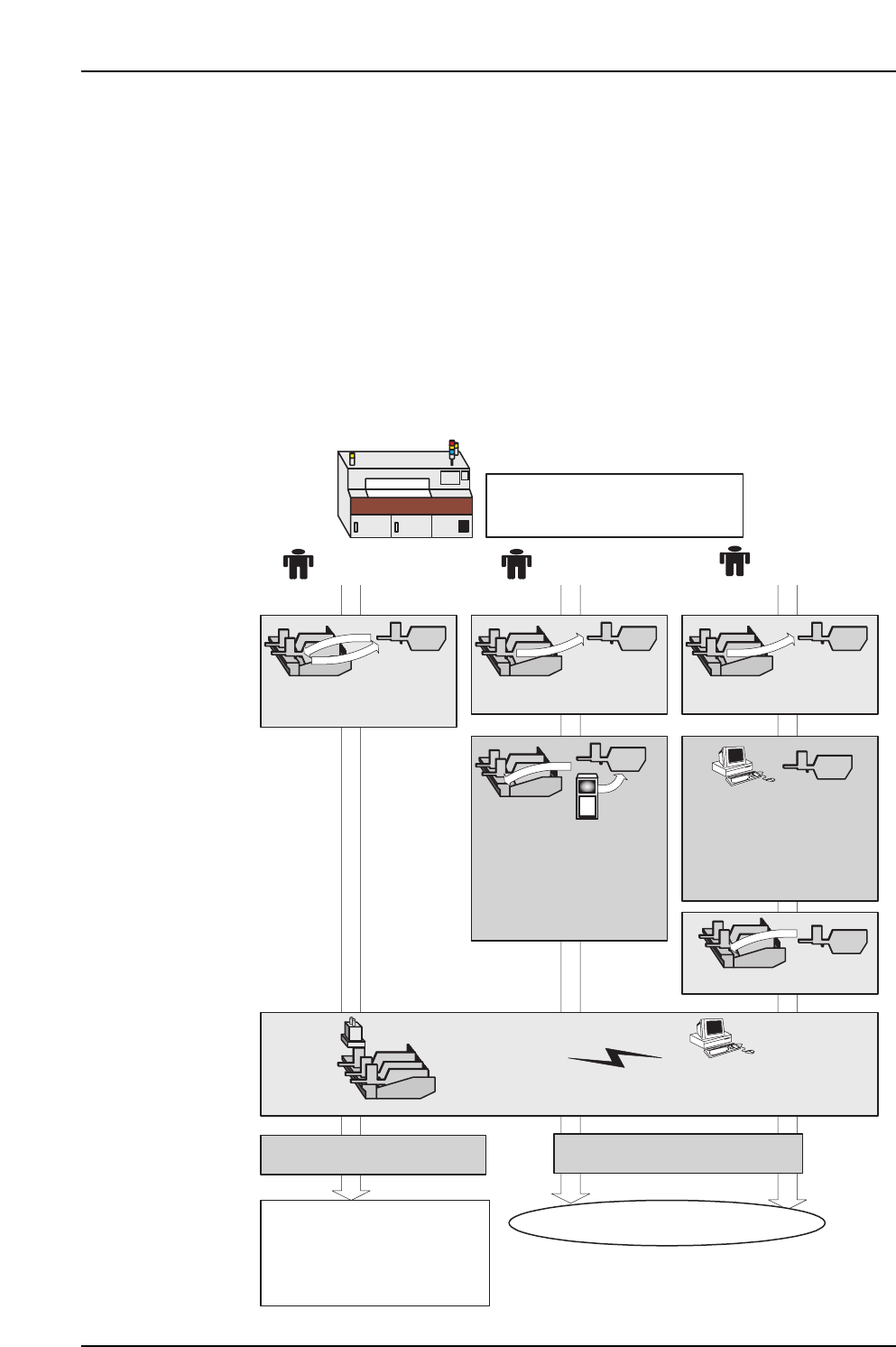
[Ex] When this function is enabled, the device status stored at Fujitrax is used as is
for a feeder for which a vision processing error has occurred, and when the
feeder ID is read, Fujitrax Verifier reports to the machine that a vision
processing error previously occurred for this feeder. As a result, production
stops and the device status for that slot indicates a vision processing error.
Vision processing error occurred
Operation A Operation B Operation C
Production resumes
An "error device report
received" error occurs, and
automatic operation is stopped.
A "vision processing error"
device status is established.
Fujitrax Verifier
With vision processing error
report from Fujitrax Verifier.
Without error report from
Fujitrax Verifier.
Fujitrax Verifier
Feeder is removed and
loaded again.
Feeder is loaded.
Feeder is removed and
maintenance is performed.
Feeder is removed and
maintenance is performed.
A device check is
performed by switching
to the DC AUTO mode
by the Handy Terminal.
The Fujitrax Verifier error
information is cleared.
ID information at
Fujitrax Verifier is
recreated.
The Fujitrax Verifier error
information is cleared.
Data is obtained from
Fujitrax Verifier.
Automatic operation
starts, and feeder
ID reading occurs.
5. Explanation of Functions
Edition 2.0 25 CP-7-series Verification System Instruction Manual
By adopting the principle that the device status stored by Fujitrax Verifier is cleared
when maintenance is performed for a feeder on which an error has occurred, this
function prevents feeders on which errors have occurred being reused without first
performing maintenance.
This function can only be used when the quick verify mode is set to “FULLAUTO”.
5.4.6 Feeder Type Check Function
The feeder type (tape, embossed), feeder width, and the feed pitch information can be
obtained from the 2D code used for feeder ID reading.
The feeder type check function compares the feeder information obtained from the
feeder ID reading operation with the production program's feeder information to ensure
that correct feeder types are loaded.
As standard barcodes do not contain feeder information, the feeder type check function
is disabled when using a barcode reader for feeders.
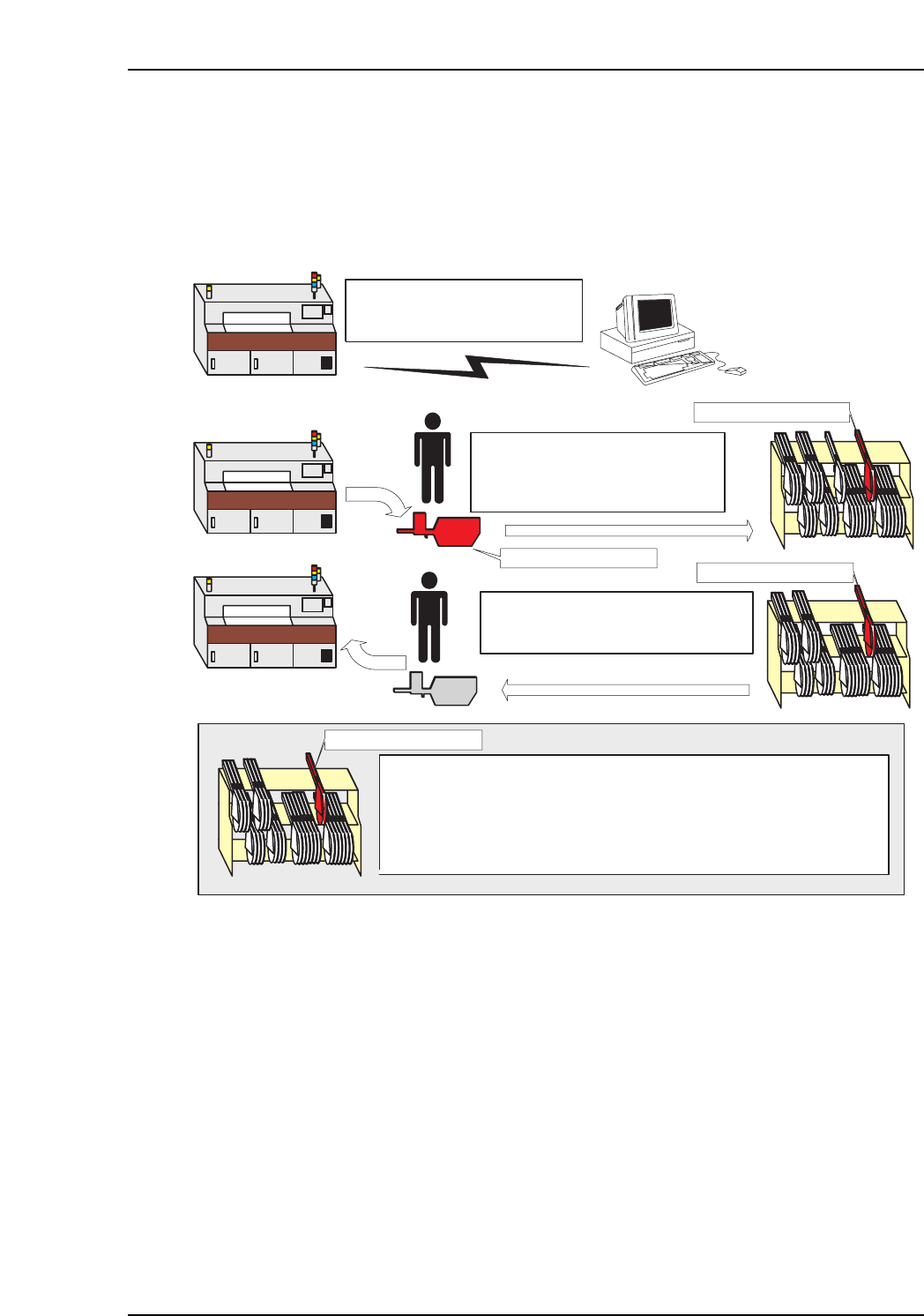
(1) Error occurs Error reported
to Fujitrax Verifier
(2) Operator removes and checks
feeder, then places it at the
temporary holding area for
maintenance.
(3) Operator loads a replacement
feeder on the machine.
Fujitrax Verifier
Error feeder
Error feeder
Error feeder
Error feeder
Even if an attempt is made to use the error feeder which is in the
temporary holding area, an error will occur at feeder ID reading, and
automatic operation will be stopped.
The error feeder can be used again in production after maintenance
has occurred, and after the Fujitrax Verifier error information has been
cleared.
6. Settings
Edition 2.0 26 CP-7-series Verification System Instruction Manual
6. Settings
6.1 Part Administration System Setting Screen
To specify settings related to the Verify operation, execute the following command sequence:
[Maintenance] - [Configuration] - [Machine Function Settings] - [Part Administration System].
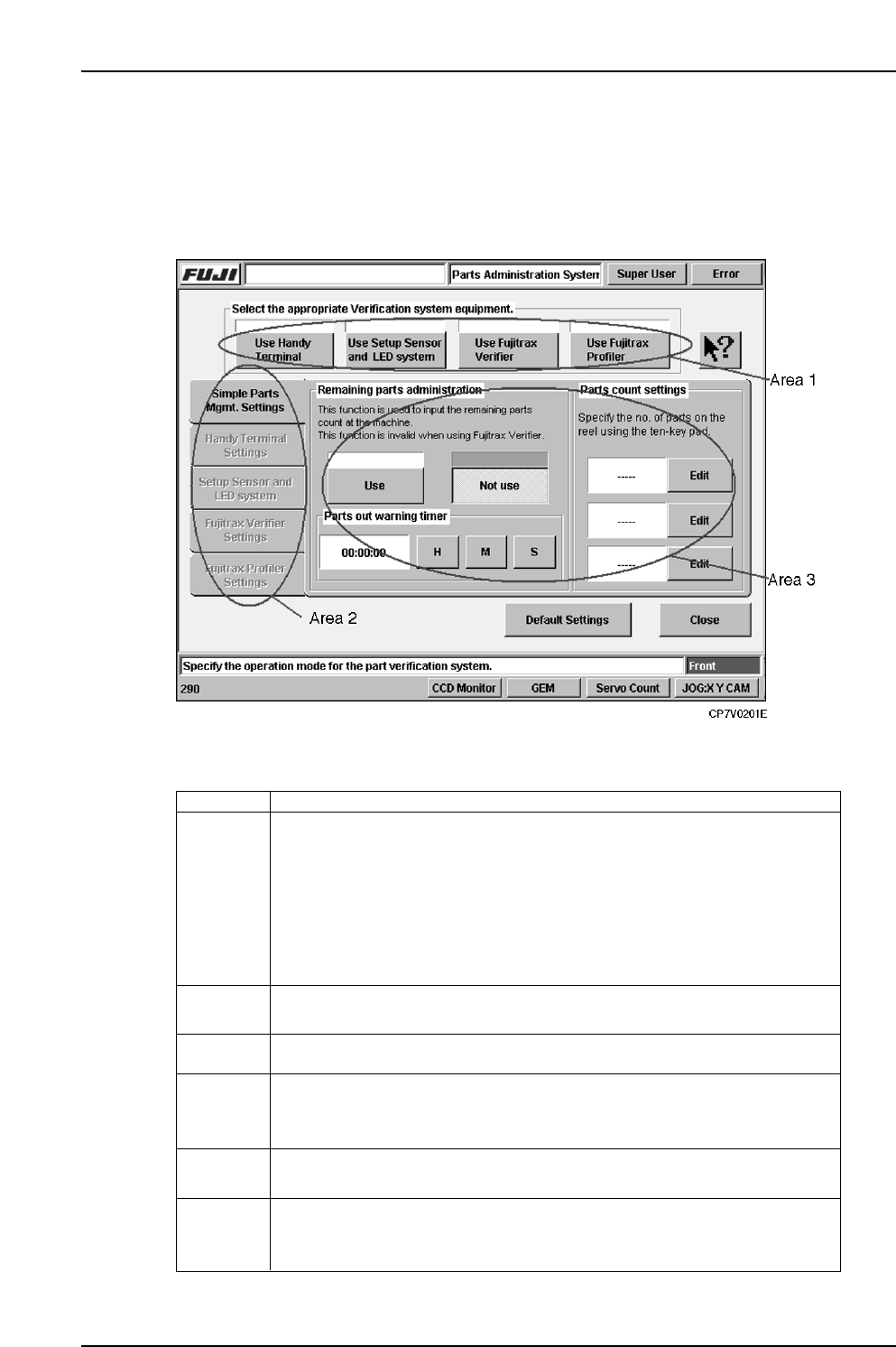
★ Explanation of Screen Layout
Area 1
Specifies the configuration of the verification system items to be used.
Pressed buttons remain pressed, and the green indicator at the top of each
button lights.
Note that the use of Fujitrax Profiler requires that Fujitrax Verifier also be
used. When items are selected at Area 1, the tabs in Area 2 become enabled
(grayed out status canceled). Setting changes made in Area 1 become
enabled after the [Close] button is pressed, and the system returns to the
[Machine Function Settings] setting screen.
Area 2 Changes to the tab sheet for Area 3. Select the tab where a setting change
is desired.
Returns some of the setting items to their default values.
Area 3 Displays the setting item for the tab which was selected at Area 2.
Popup Hint Press the Pop-Up Hint button, then press any other button to display an
explanation of that button’s function.
Default
settings
Close Closes the [Parts Administration System] screen. Depending on setting
changes which may have been made, it may take several minutes to return to
the [Machine Function Settings] setting screen.
Explanation
VT004Eb