CP-7-series Verification System Instruction manual(2.0E).pdf - 第96页
1 1. Using the FULL AUTO Mode Edition 2.0 85 CP-7-series V erification System Instruction Manual 1 1.6.1.3 Automatic Operation Start • Automatic operation is started. 1 1.6.1.4 Feeder ID Reading • The camera at ST1 reads…
11. Using the FULL AUTO Mode
Edition 2.0 84 CP-7-series Verification System Instruction Manual
11.6 FULL AUTO Mode Procedure 4
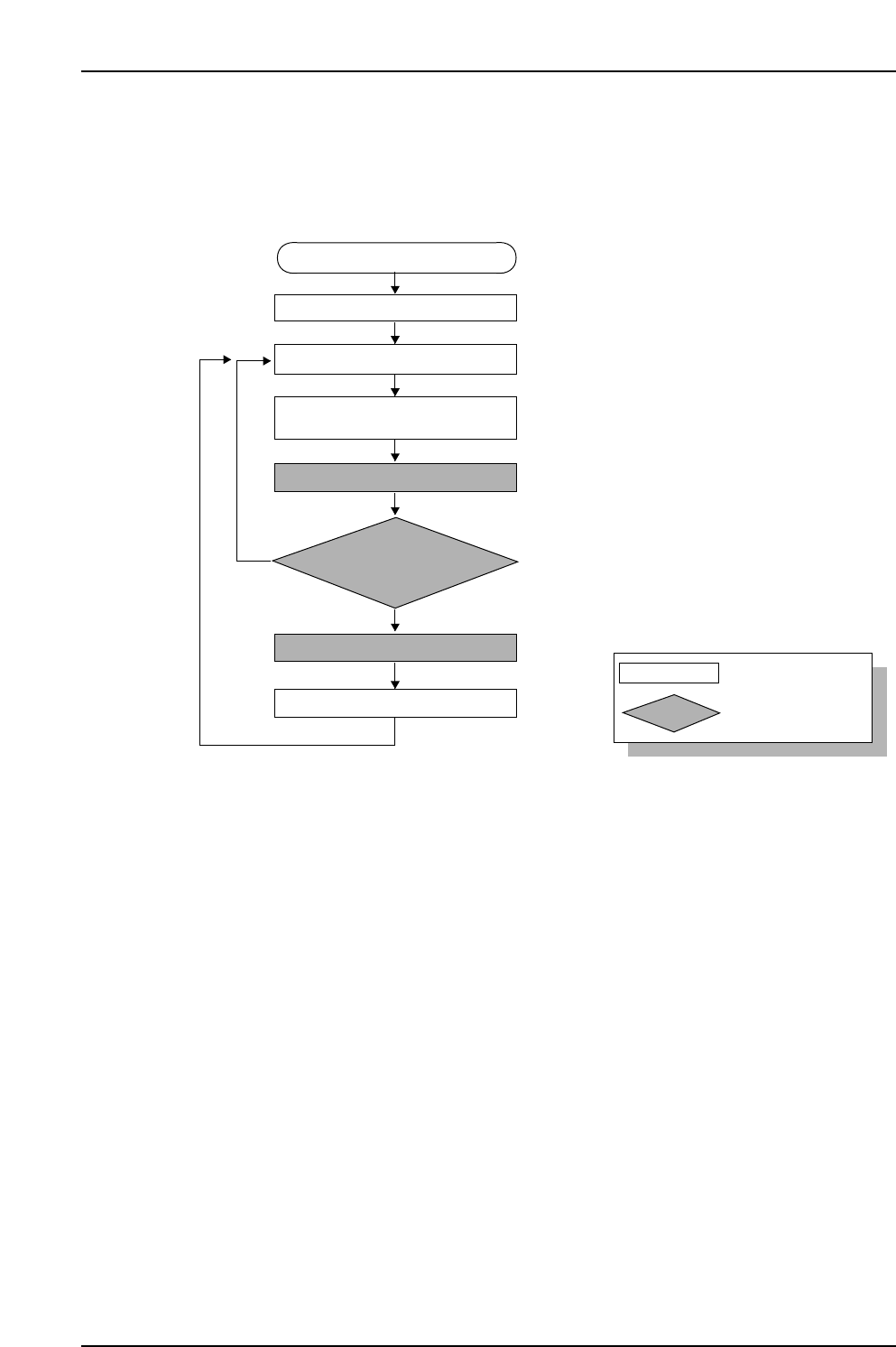
11.6.1 Procedure Flowchart
The following flowchart shows the general procedure.
11.6.1.1 Recipe Switching
• The recipe is switched.
11.6.1.2 Device Check
• Use one of the two methods described below to complete this step.
• LEDs remain on at all slots where feeders have not been set (error slots and slots to
be used). Perform the feeder setup with reference to these LEDs.
• To clear device errors such “pickup errors” and “vision errors”, demount the
feeder, then remount it again.
• Check the setup combination information from Fujitrax Verifier to determine the
correct feeder to mount.
• All slots on the device table are ready for production when all LEDs are off.
• As the LEDs will indicate slots where maintenance in required, there is no
particular need to display the [Device Check] screen except to check status details.
• Open the [Device Check] screen, or, in the case where a [VERIFY CHECK] was
performed on the PDT-3100, the device map (list matching part device comments
to their respective slots) list displays at the Handy Terminal screen.
CP7V0056E
: Operator tasks
: Machine processing
Unshaded box
Shaded box
Device check start
Recipe switching
Device check
Part supply
Parts out occurrence
Automatic operation start
(START button pressed)
Mismatch
Checked against Verifier database
Feeder ID reading
Production start
Match

11. Using the FULL AUTO Mode
Edition 2.0 85 CP-7-series Verification System Instruction Manual
11.6.1.3 Automatic Operation Start
• Automatic operation is started.
11.6.1.4 Feeder ID Reading
• The camera at ST1 reads the 2D codes attached to each of the feeders.
• This code reading occurs at slots where an “Unchecked”, ”Part Unverified”, or
”Feeder Unverified” status exists. (Device status can be checked on the [Device
Check] screen.
Note: Because the FULL AUTO Mode operation obtains and verifies the DID and device
comment based on the FIDL, reading will also be required at slots where an
“Unchecked” status exists.
11.6.1.5 Check Against Fujitrax Verifier Database
• Information indicating the parts reel which corresponds to the feeder ID which
was read is obtained from Fujitrax Verifier.
• The device comment included in the obtained reel information is checked against
the recipe.
11.6.1.6 Production Start
• Production is started automatically.
11.6.1.7 Part Supply
• Parts are supplied.
11. Using the FULL AUTO Mode
Edition 2.0 86 CP-7-series Verification System Instruction Manual
11.6.2 Device Check Procedure Using PDT-3100
There are two methods for using the PDT-3100 in FULLAUTO mode operations.
With one method, a device comment list displays at the PDT-3100, and with the other
method, it does not display.
11.6.2.1 Method Where Device Comment List Displays at PDT-3100
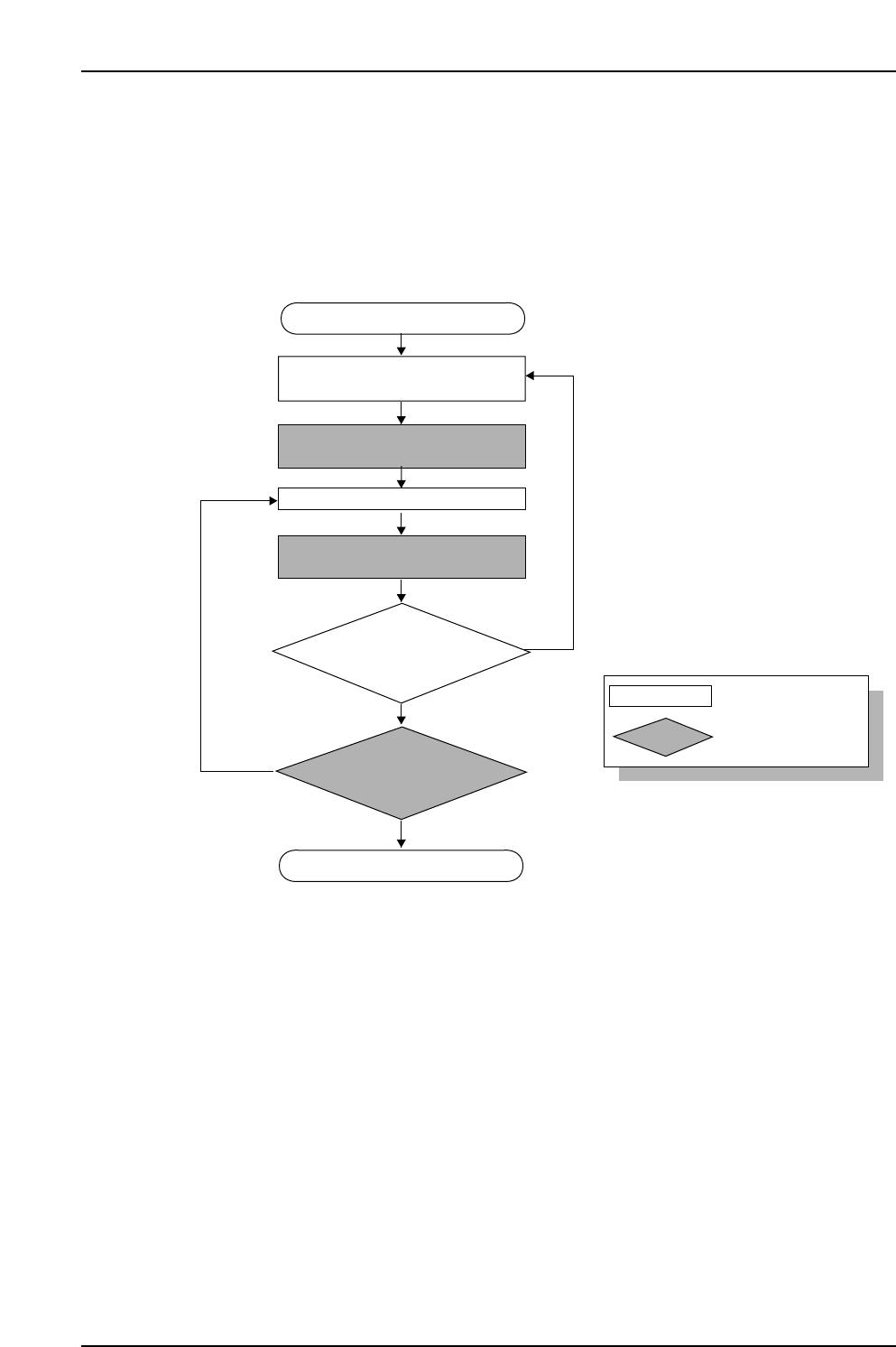
11.6.2.1.1 Device Check Flowchart
Device check start
Stage
for which device comment
list is to display
is determined
Display device comment list at
Handy Terminal
LED switches off at slot where
feeder was set.
Device check completed
CP7V0057E
No
No
Yes
Yes
Set feeder on device table
Change the Stage
for which a device comment list
is to display?
Have feeders
been set in all the required
slots?
: Operator tasks
: Machine processing
Unshaded box
Shaded box