CP-7-series Verification System Instruction manual(2.0E).pdf - 第126页
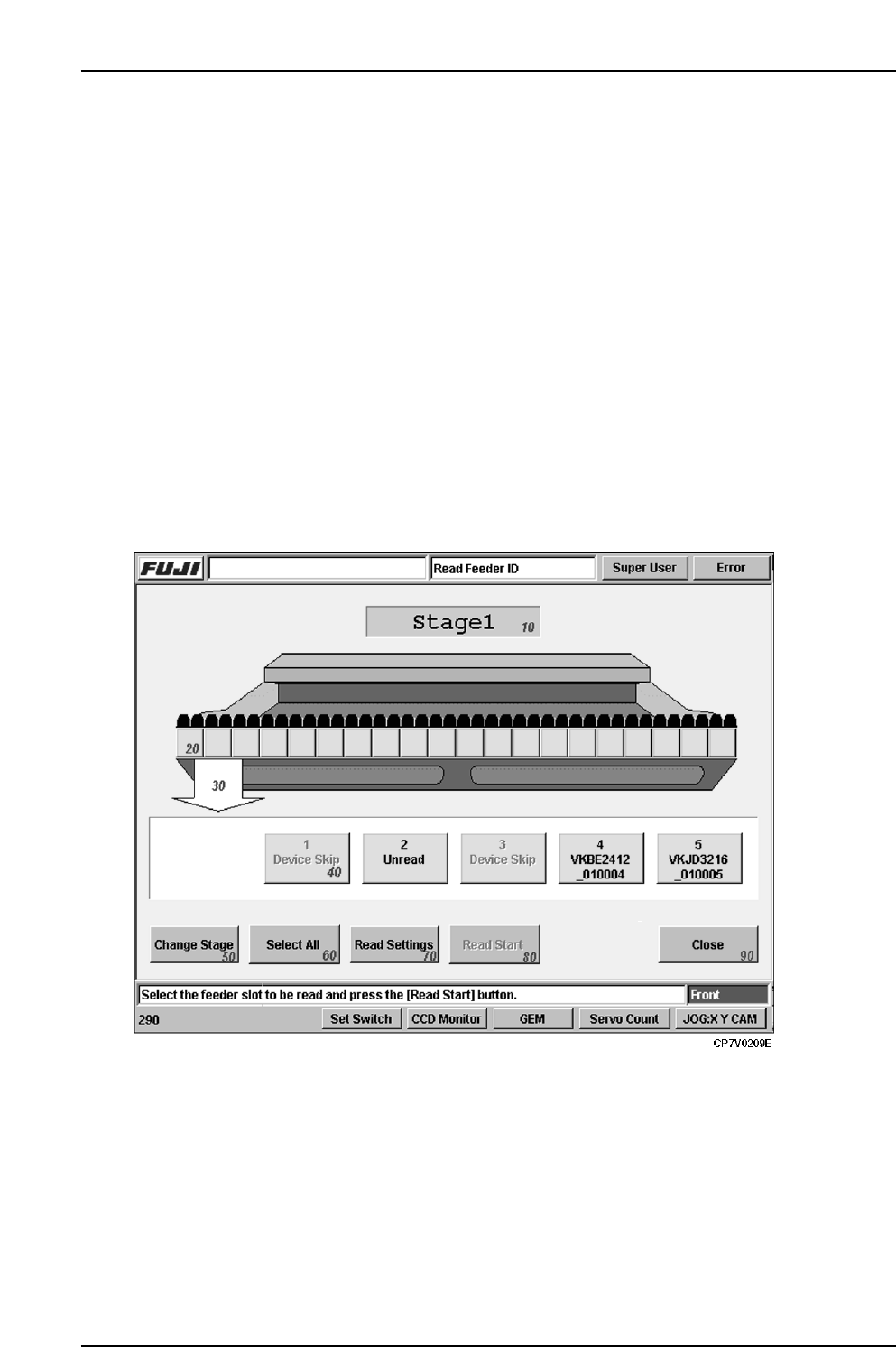
15. Explanation of Operation Screens Edition 2.0 115 CP-7-series V erification System Instruction Manual Screen Explanation 10 Indicates the current Stage number. Display area for all slots. Indicates the feeder ID readi…
15. Explanation of Operation Screens
Edition 2.0 114 CP-7-series Verification System Instruction Manual
15.2 [Read Feeder ID] Screen
Function
This screen is used for reading the feeder IDs attached to feeders.
Although feeder ID reading usually occurs when automatic operation begins, this screen
enables the reading function to be executed by itself, without starting operation.
In the quick verify mode, parts cannot be verified until the feeder ID is read, and the reel
information is obtained from Fujitrax Verifier. Therefore, it is not possible to know if the
correct feeders are set until automatic operation begins.
This display screen offers a way around this restriction, providing an easy way to check the
part setup without having to begin production.
Input
• To display the Feeder ID Reading screen, press the [Read Feeder ID] button at the
[Main] screen.
• Display of the [Read Feeder ID] screen is only possible if the [Use Fujitrax Verifier]
button is selected at the [Parts Administration System] screen.
Screen Access
15. Explanation of Operation Screens
Edition 2.0 115 CP-7-series Verification System Instruction Manual
Screen Explanation
10
Indicates the current Stage number.
Display area for all slots.
Indicates the feeder ID reading status for all slots of one Stage.
Green
Yellow
Red
: Reading completed.
: Reading is enabled, but has not yet occurred.
: Reading is disabled (feeder not set, etc.).
Green : Indicates that reading is completed. The feeder ID where reading
occurred is indicated on the button.
Yellow : Reading is enabled, but has not yet occurred.
Red : Reading is disabled (feeder not set, etc.).
20
Indicates which part of the all slots display area is being displayed at the details
display area.
30
ExplanationNo.
50
Changes the display subject Stage.
60
Selects all slots where reading is to occur.
70
Changes to the screen for 2D camera adjustments.
Displays only when the 2D code feeder camera is used.
Returns to the [Main] screen.
90
40
Details display area.
Displays details about slot numbers and feeder ID reading statuses. When the
yellow button is pressed, it begins blinking, indicating that feeder ID reading is to
occur for that slot. The blinking stops when the button is pressed again.
VT014Eb
Enables the feeder ID reading [START] switch. This button is only enabled if reading
is to occur at one or more slots.
80
15. Explanation of Operation Screens
Edition 2.0 116 CP-7-series Verification System Instruction Manual
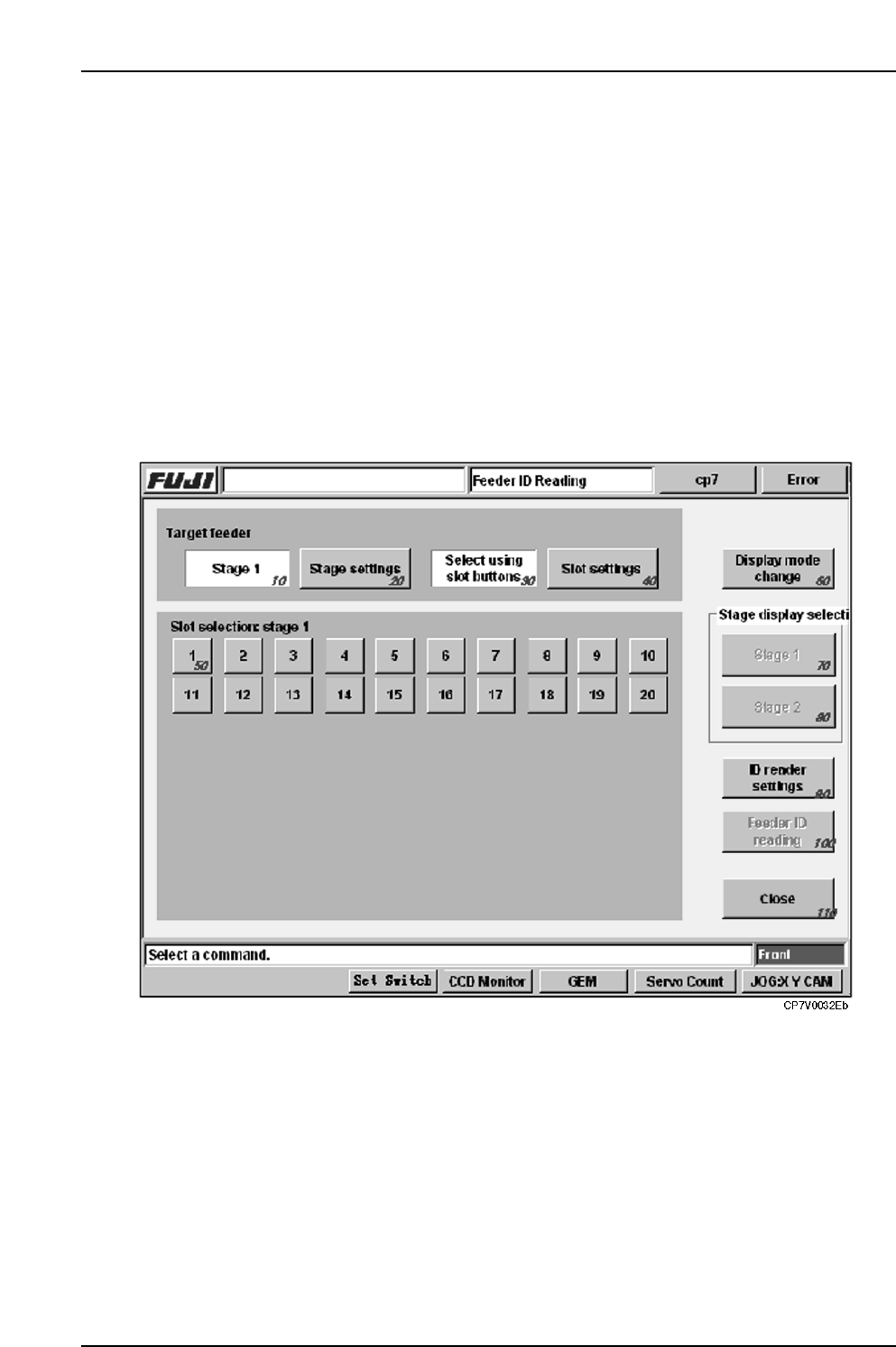
15.3 Feeder ID Reading Test Screen
Function
This screen is used to perform a test reading of the 2D code which is affixed to the feeder. As
this reading is only for test purposes, the reading results are lost when this screen is closed,
and those results are not used for part verification.
Input
• Execute the [Maintenance] - [Maintenance for Each Machine] - [Feeder Check Read Test]
commands to display the test screen:
• The [Feeder Check Reader Test] item displays at the [Maintenance]
- [Maintenance for Each Machine] - [Feeder Check Read Test] screen only if the
[Use Fujitrax Verifier] button is selected at the [Parts Administration System] screen.
Screen Access