CP-7-series Verification System Instruction manual(2.0E).pdf - 第29页
5. Explanation of Functions Edition 2.0 18 CP-7-series V erification System Instruction Manual 5.2.2 Next Production V erify When in the “Changeover” table mode, this function performs a “next production device check” at…

5. Explanation of Functions
Edition 2.0 17 CP-7-series Verification System Instruction Manual
5. Explanation of Functions
This section explains the functions of each of the 3 hardware devices which may be used in
verification operations (Handy Terminal, setup sensor & LED, feeder ID read system).
5.1 Device Table Check on Machine
This function allows devices to be checked without performing a verification operation.
Based on the device comment displayed at the machine control panel, the operator performs a
visual check to verify that the correct reels are set on the device table.
5.2 Handy Terminal Functions
5.2.1 Device Comment Verification Using Handy Terminal
Use of this function requires that device comment barcode labels be affixed on the side
face of each part reel.
The Handy Terminal reads the slot ID affixed to each slot and device comment, enabling
the machine to monitor which reel the operator is setting in which slot. The machine
checks this information against the recipe to ensure that the proper reels are in the
correct slots.
5. Explanation of Functions
Edition 2.0 18 CP-7-series Verification System Instruction Manual
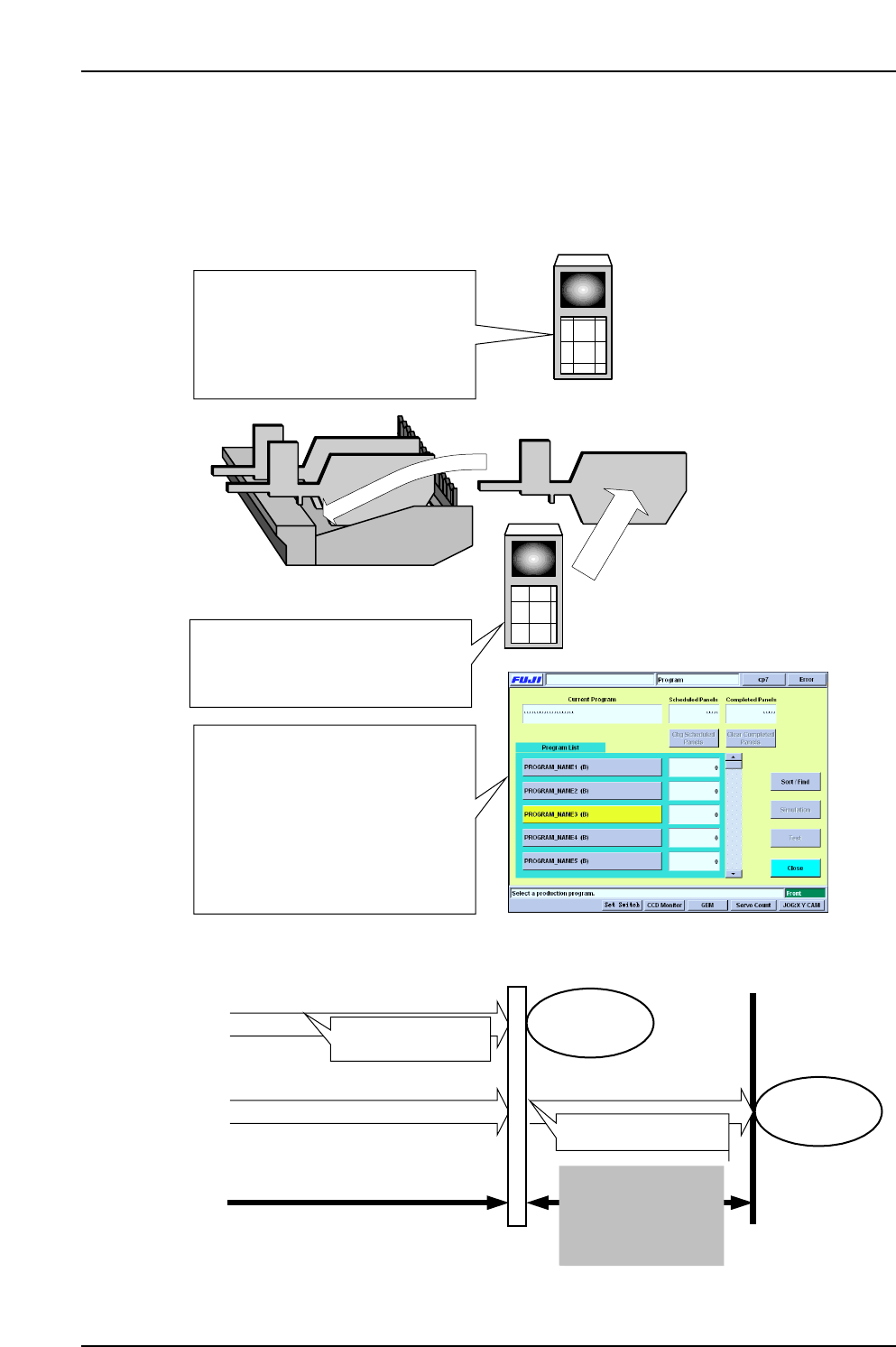
5.2.2 Next Production Verify
When in the “Changeover” table mode, this function performs a “next production
device check” at the idle table. While current production continues, the next production
recipe can be specified so that the idle table setup can be checked before the changeover
occurs, thereby reducing the time required for changeovers.
(1) The next-production recipe is
selected (only the changeover mode
program can be selected for the table
mode). The table not being used in
the current production is designated
for use in the next production.
Idle device table
(2) Next production verification
occurs at the table which is not being
used in the current production
(idle side).
(3) Upon completion of the current
production, the program is switched
to that for the next production. At this
time, the next production program
specified at the Handy Terminal blinks
in yellow. If the next production
verification has been completed,
automatic operation can begin
immediately.
Next production
verification occurs
With next production verification
Without next production verification
Production for recipe prior to
switching
Verification occurs
Production start
This changeover time
can be eliminated by
using the next
production verification
function
Recipe switching
Production start

5. Explanation of Functions
Edition 2.0 19 CP-7-series Verification System Instruction Manual
5.2.3 Manual Permission / Escape Permission
This function can be used to exempt a specified slot from the verification operation.
“Manual permission” can be specified for each slot, and “escape permission” can be
specified for each stage.
The device in an “exempt” slot (manual/escape permission) can be used in production
even though it has not undergone a verification operation by Handy Terminal and
Fujitrax Verifier.
Therefore, exempt devices (manual/escape permission) cannot be guaranteed to contain
the correct parts.
Moreover, when using Fujitrax Verifier, exempt devices will not be subject to Fujitrax
Verifier functions such as the “remaining parts count administration” and “feeder
maintenance administration” functions.
As the main purpose of the part verification system is to prevent the wrong parts from
being loaded, use of this “permission” function is not generally recommended.
The “permission” function should be used only as a temporary measure, such as when
the barcode printer fails, making it impossible to print out the required barcode labels
for the reels, etc.