CP-7-series Verification System Instruction manual(2.0E).pdf - 第28页
5. Explanation of Functions Edition 2.0 17 CP-7-series V erification System Instruction Manual 5. Explanation of Functions This section explains the functions of each of the 3 hardwar e devices which may be used in verif…

4. Adjustments
Edition 2.0 16 CP-7-series Verification System Instruction Manual
Corrective Action 2:
There may be a communication problem or a barcode reader failure.
• Check to see if the connector is disconnected from the communication port.
• If the connector is not disconnected from the communication port, replace
the RS232C cable.
• If no problems are found at the above 2 check items, restart the machine.
• If the problem persists after the machine is restarted, replace the barcode
reader.
Corrective Action 3:
There may be a communication problem.
• There may be a problem with the barcode reader and the communication
cable. If the problem occurs frequently, replace the barcode reader and the
communication cable.
Note: After replacing a barcode reader, acquire trace information following the test reading
operation, and send this trace information to your Fuji service representative.

5. Explanation of Functions
Edition 2.0 17 CP-7-series Verification System Instruction Manual
5. Explanation of Functions
This section explains the functions of each of the 3 hardware devices which may be used in
verification operations (Handy Terminal, setup sensor & LED, feeder ID read system).
5.1 Device Table Check on Machine
This function allows devices to be checked without performing a verification operation.
Based on the device comment displayed at the machine control panel, the operator performs a
visual check to verify that the correct reels are set on the device table.
5.2 Handy Terminal Functions
5.2.1 Device Comment Verification Using Handy Terminal
Use of this function requires that device comment barcode labels be affixed on the side
face of each part reel.
The Handy Terminal reads the slot ID affixed to each slot and device comment, enabling
the machine to monitor which reel the operator is setting in which slot. The machine
checks this information against the recipe to ensure that the proper reels are in the
correct slots.
5. Explanation of Functions
Edition 2.0 18 CP-7-series Verification System Instruction Manual
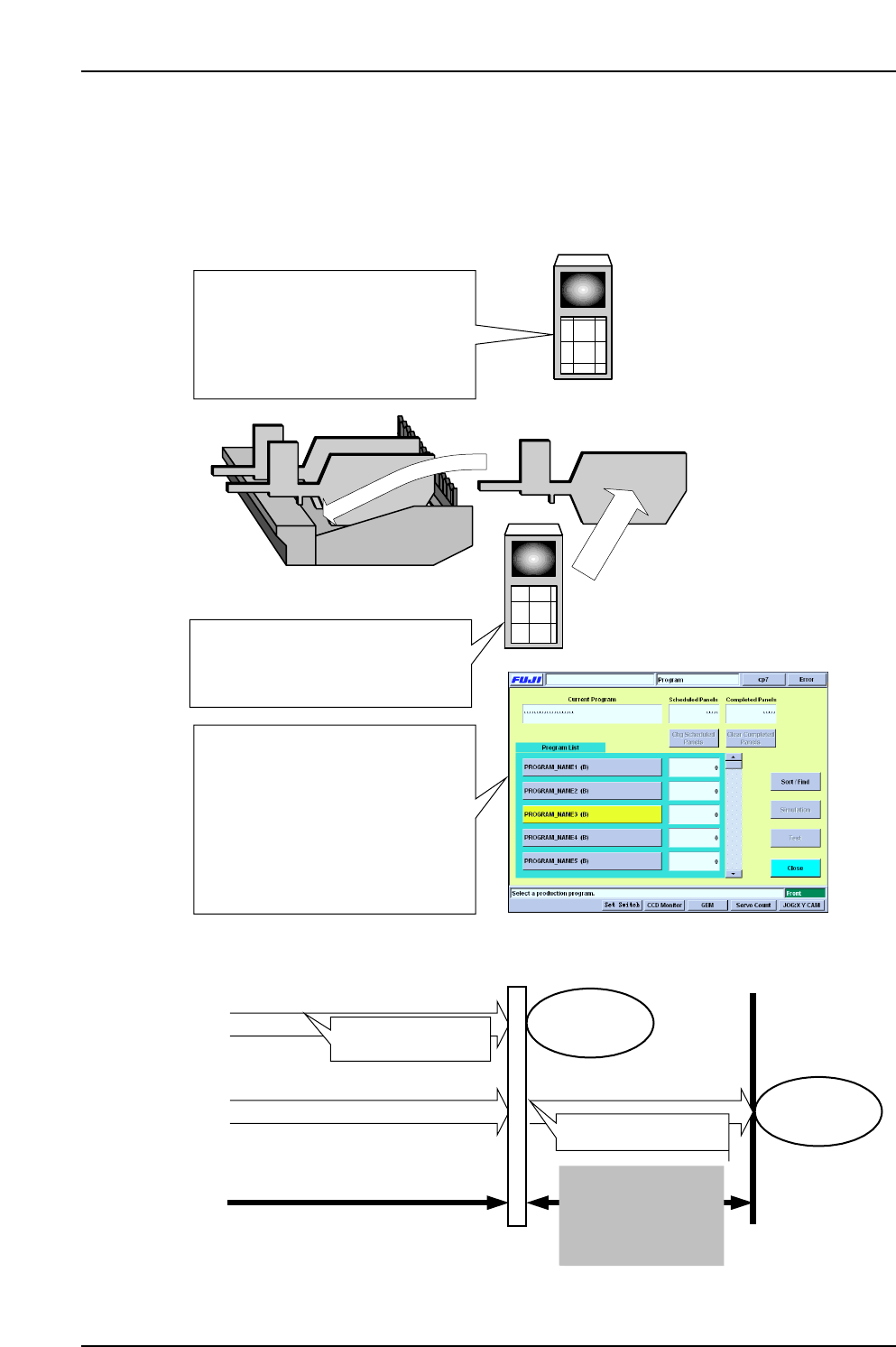
5.2.2 Next Production Verify
When in the “Changeover” table mode, this function performs a “next production
device check” at the idle table. While current production continues, the next production
recipe can be specified so that the idle table setup can be checked before the changeover
occurs, thereby reducing the time required for changeovers.
(1) The next-production recipe is
selected (only the changeover mode
program can be selected for the table
mode). The table not being used in
the current production is designated
for use in the next production.
Idle device table
(2) Next production verification
occurs at the table which is not being
used in the current production
(idle side).
(3) Upon completion of the current
production, the program is switched
to that for the next production. At this
time, the next production program
specified at the Handy Terminal blinks
in yellow. If the next production
verification has been completed,
automatic operation can begin
immediately.
Next production
verification occurs
With next production verification
Without next production verification
Production for recipe prior to
switching
Verification occurs
Production start
This changeover time
can be eliminated by
using the next
production verification
function
Recipe switching
Production start