CP-7-series Verification System Instruction manual(2.0E).pdf - 第27页
4. Adjustments Edition 2.0 16 CP-7-series V erification System Instruction Manual Corrective Action 2: There may be a communication pr oblem or a barcode r eader failure. • Check to see if the connector is disconnected f…
4. Adjustments
Edition 2.0 15 CP-7-series Verification System Instruction Manual
When the barcode is difficult to read (low reading rate):
In this case, the reading result is “FAIL”, but the feeder ID displays. The following
message displays in a dialog box: “Feeder ID reading rate failed to satisfy the
criterion value.”
• Use the jig to re-check and readjust the laser beam position.
• Check for scratched, peeled, soiled, or torn barcode.
• Check to see if the barcode is affixed in the correct position.
• Check for a deformed feeder reel holder.
If the reading rate is still poor after performing the above checks and adjustments,
re-affix the barcode label and check again.
When the barcode can’t be read at all:
In this case, the reading result is “FAIL”, and the feeder ID does not display. The
following message displays in a dialog box: “Feeder ID could not be read.”
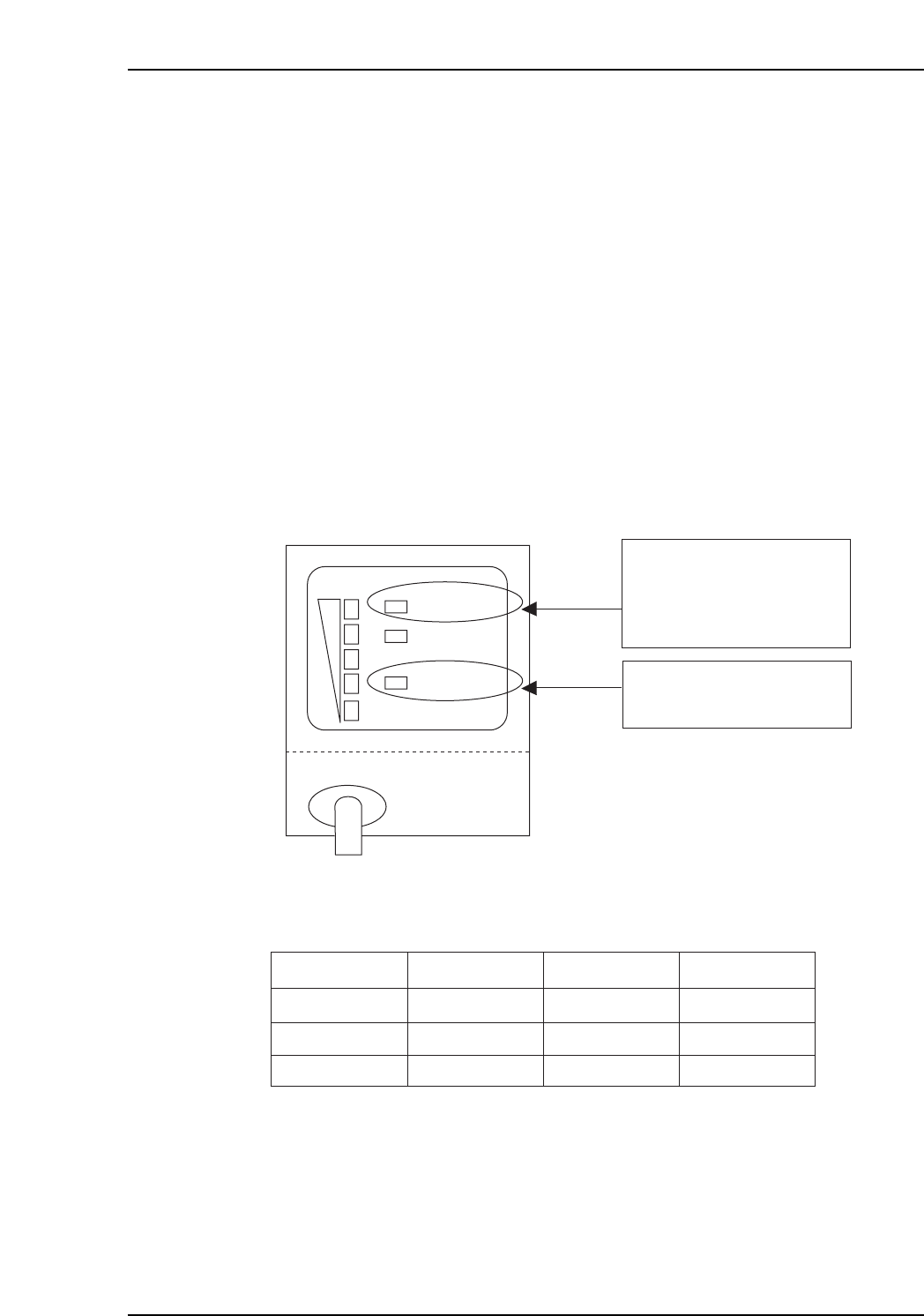
The problem cause can be identified based on the reading result and the barcode
reader’s LED indicator status.
Check to see which LEDs light during the test reading operation.
Use the following table to identify the problem cause.
Corrective Action 1:
The laser beam is being emitted, but the barcode is not being read correctly. The
barcode may be damaged, or there may be a barcode reader setting problem.
• Check to see if the laser beam is striking the barcode.
• Check for scratched, peeled, soiled, or torn barcode.
The barcode is defective if reading is OK when another barcode is used.
• If no problems are found at the above 2 check items, restart the machine.
VT017E
Reading Result
NG
NG
NG
Red
Off
Green
On
Off
On
1
2
3
OK/NG LED LASER ON LED Corrective Action
STB
OK/NG
TIMING
LASER ON LASER ON LED
On when the laser is on.
OK/NG LED
Green:
Red:
OK output
FAIL output
CP7V0095E

4. Adjustments
Edition 2.0 16 CP-7-series Verification System Instruction Manual
Corrective Action 2:
There may be a communication problem or a barcode reader failure.
• Check to see if the connector is disconnected from the communication port.
• If the connector is not disconnected from the communication port, replace
the RS232C cable.
• If no problems are found at the above 2 check items, restart the machine.
• If the problem persists after the machine is restarted, replace the barcode
reader.
Corrective Action 3:
There may be a communication problem.
• There may be a problem with the barcode reader and the communication
cable. If the problem occurs frequently, replace the barcode reader and the
communication cable.
Note: After replacing a barcode reader, acquire trace information following the test reading
operation, and send this trace information to your Fuji service representative.

5. Explanation of Functions
Edition 2.0 17 CP-7-series Verification System Instruction Manual
5. Explanation of Functions
This section explains the functions of each of the 3 hardware devices which may be used in
verification operations (Handy Terminal, setup sensor & LED, feeder ID read system).
5.1 Device Table Check on Machine
This function allows devices to be checked without performing a verification operation.
Based on the device comment displayed at the machine control panel, the operator performs a
visual check to verify that the correct reels are set on the device table.
5.2 Handy Terminal Functions
5.2.1 Device Comment Verification Using Handy Terminal
Use of this function requires that device comment barcode labels be affixed on the side
face of each part reel.
The Handy Terminal reads the slot ID affixed to each slot and device comment, enabling
the machine to monitor which reel the operator is setting in which slot. The machine
checks this information against the recipe to ensure that the proper reels are in the
correct slots.