CP-7-series Verification System Instruction manual(2.0E).pdf - 第77页
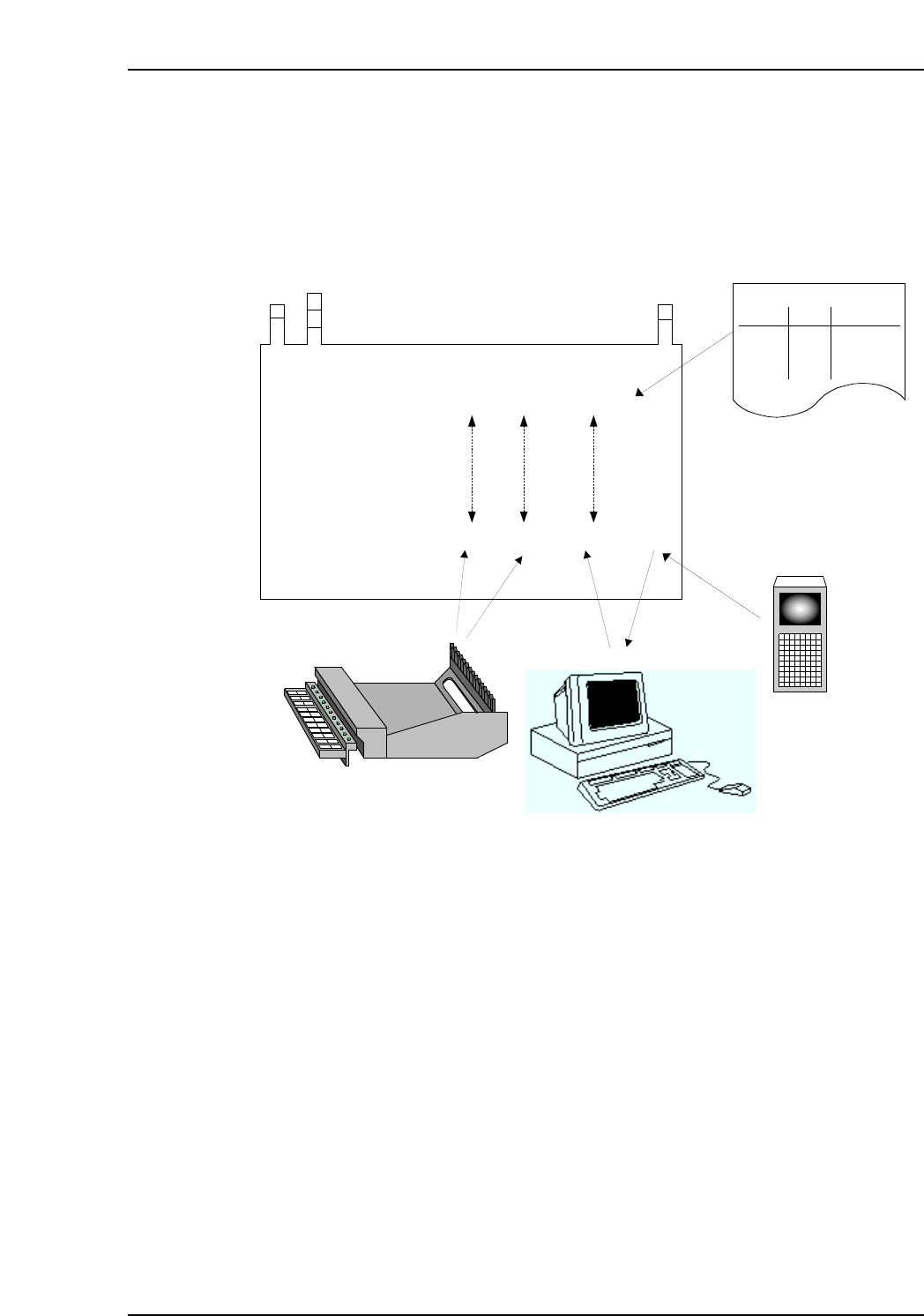
9. Using The Normal V erification Mode Edition 2.0 66 CP-7-series V erification System Instruction Manual Data flow (after automatic operation start) The FIDL which was r ead is used as a key to search the Fujitrax V eri…
9. Using The Normal Verification Mode
Edition 2.0 65 CP-7-series Verification System Instruction Manual
9.6.2.10 All LEDs ON at Stage to be Verified
• LEDs for all slots to be verified at the current verify subject stage are on.
Data flow (at Verify operation)
The feeder mount position and the device comment read to the Handy Terminal are
checked against the recipe for data mismatches.
CC
CC
PP
PP
77
77
Stage Slot Comment DIDFIDL
Stage Slot Comment
CP7V0018Ea
Production Program
Specifications:
Acquired Data:
(6) Comparison
1 1 aaaaa
1 2 bbbbb
2 1 ccccc
2 2 ddddd
Stage
Slot
Comment
Production Program
(1) Production Program Analysis
(2) DID Readings
(4) Device
comment is
returned as a
reply.
(5) Feeder Settings
(3) Device comment
is requested
based on the DID.
Fujitrax-Verifier
9. Using The Normal Verification Mode
Edition 2.0 66 CP-7-series Verification System Instruction Manual
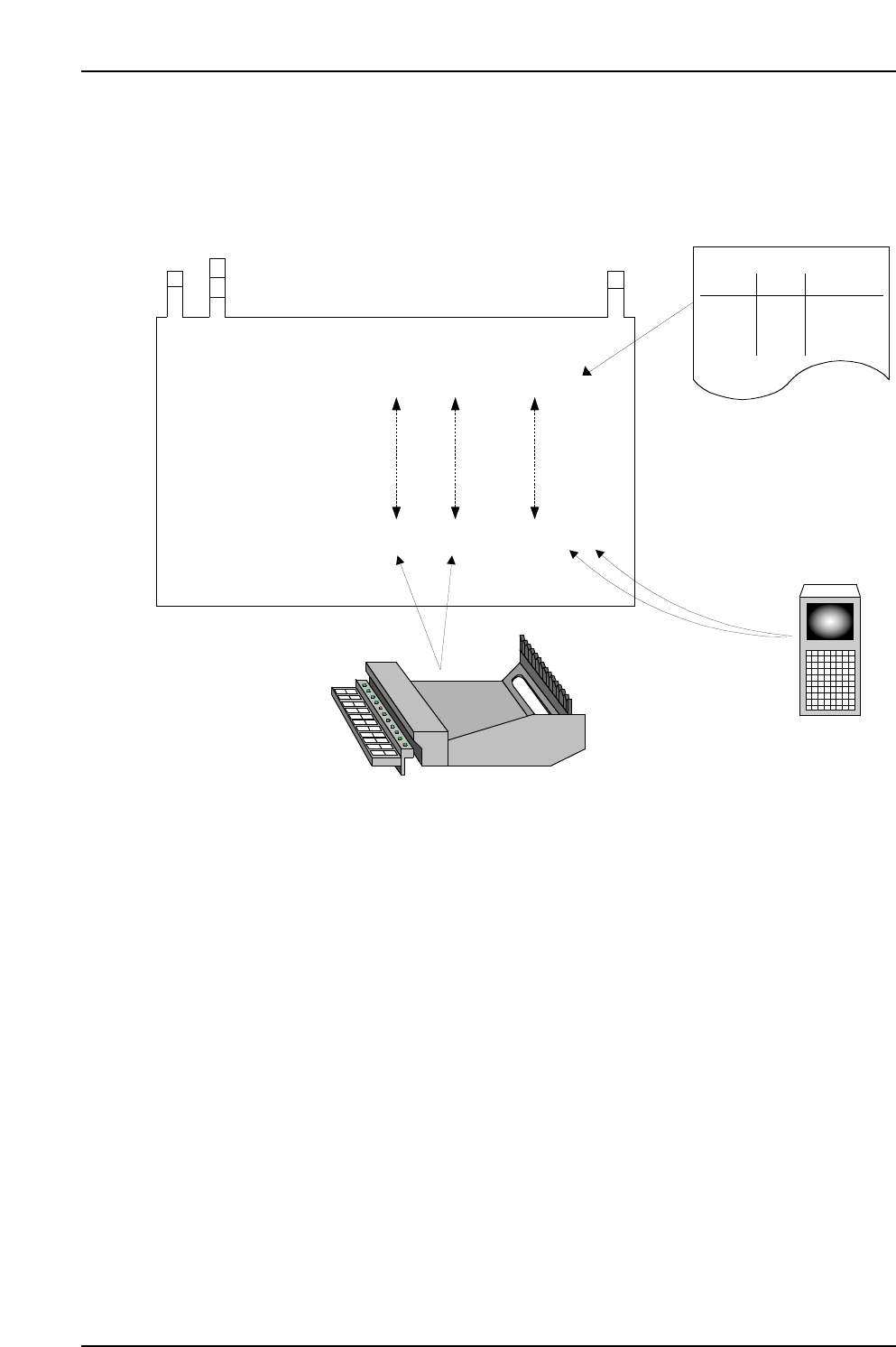
Data flow (after automatic operation start)
The FIDL which was read is used as a key to search the Fujitrax Verifier database in
order to download the required information.
CC
CC
PP
PP
77
77
1 1 aaaaa
1 2 bbbbb
2 1 ccccc
2 2 ddddd
Stage Slot Comment DIDFIDL
Stage Slot Comment
Production Program
Specifications:
Acquired Data:
(5) Comparison!
Stage
Slot
Comment
Production Program
(1) Production Program Analysis
(3) Device comment
reading
(2) DID Readings
(4) Feeder Settings

10. Using the DC AUTO Mode
Edition 2.0 67 CP-7-series Verification System Instruction Manual
10. Using the DC AUTO Mode
10.1 Opration Conditions
The DC AUTO mode is only operative when "Use Handy Terminal" and "Use Fujitrax Verifier"
settings are specified at the verification system settings.
10.2 Preparations
10.2.1 Settings
At the [Maintenance] - [Configuration] - [Machine Function Settings]
- [Parts Administration System] - [Fujitrax Verifier Setting] tab, specify the DC AUTO
Quick Verify mode. See Chapter 6 (Settings) for details.
Note: Both Fujitrax Verifier and Handy Terminal are used in the DC AUTO mode. Therefore, the
DC AUTO Quick Verify mode is only selectable when the "Use Handy Terminal" and "Use
Fujitrax Verifier" settings are specified.
10.3 DC AUTO Mode Operation Procedure
Verification operations vary somewhat, depending on the verification configuration (devices)
which are used. These devices can be selected at the [Select the appropriate Verification
system equipment] item on the [Parts Administration System] screen. The following buttons
are used to select the desired devices:
• [Use Handy Terminal]
• [Use Setup Sensor and LED system]
• [Use Fujitrax Verifier]
The table below shows the device combinations and corresponding procedures.
Configuration 6
✔ N/A ✔
Procedure 1
(Not supported)
Procedure 2
✔✔✔
Configuration 8
Use Handy Terminal
Button
Configuration
Use Setup Sensor
and LED system
Use Fujitrax Verifier
Procedure