CP-7-series Verification System Instruction manual(2.0E).pdf - 第18页
4. Adjustments Edition 2.0 7 CP-7-series V erification System Instruction Manual 4. Adjustments CAUTION Check the D-axis calibration data before performing the adjustments described below . 4.1 Handy T erminal Adjustment…
3. Hardware Configuration
Edition 2.0 6 CP-7-series Verification System Instruction Manual
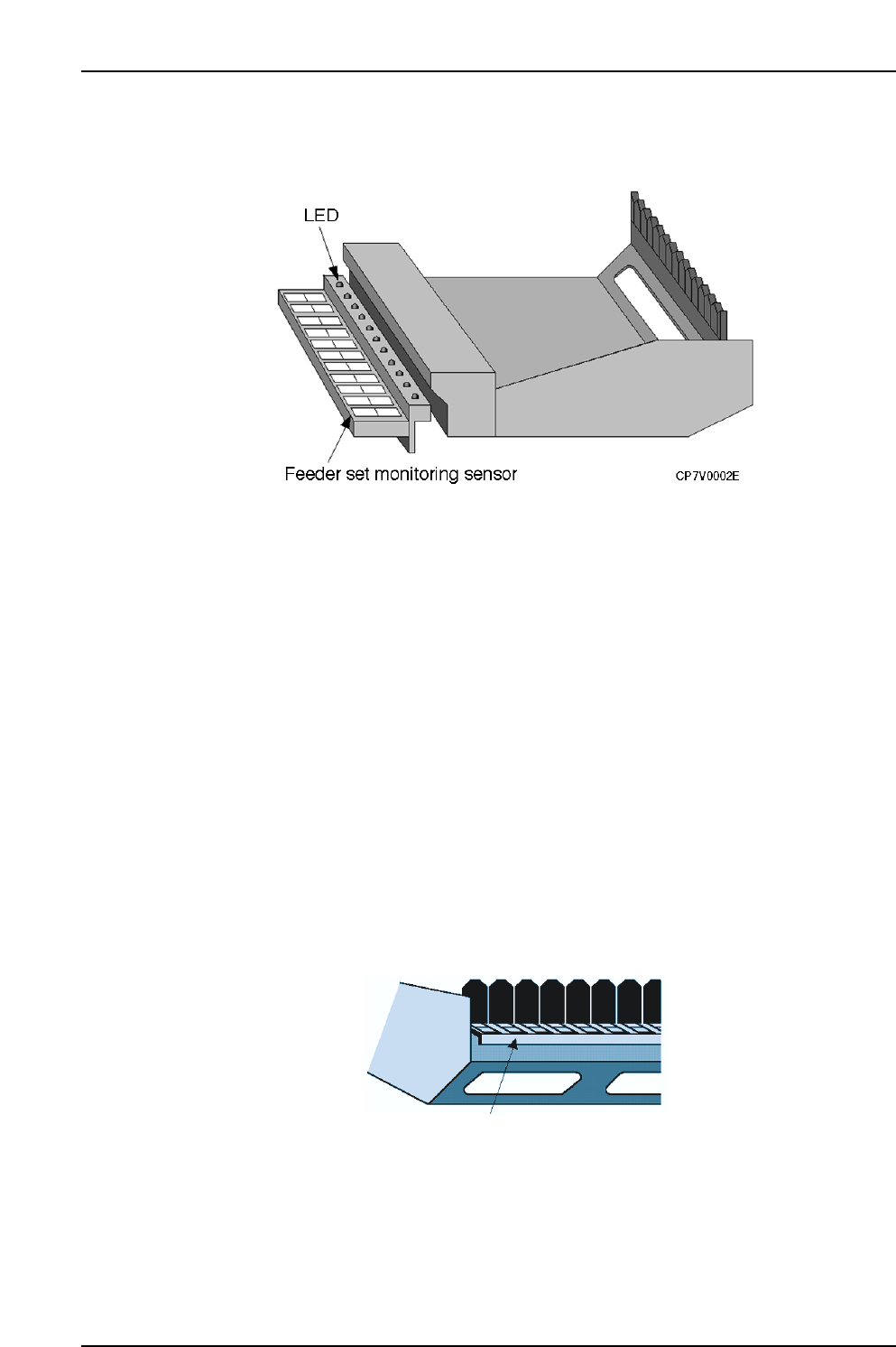
3.2.2 Device Table Area
LED
These LEDs provide the operator with an easy visual reference for identifying slots
where maintenance or check operations are required. The LEDs remain on at slots
where an error status exists.
When a device table is removed from its standby position, however, all of that table’s
LEDs switch off.
When a normal verification mode operation is performed using the Handy Terminal,
only the LED at the slot where the verification operation is to occur switches on, making
that slot easy to identify.
Setup Sensor
This sensor monitors the feeder mount/demount status at each slot. Monitoring is
enabled only when the device table is at the standby position.
Even if verification has been completed for a device, the verification must be performed
again if that device is demounted and then remounted. This prevents the wrong parts
from being mounted and used in production.
Barcode For Reading Slot Numbers
There are cases where a slot number must be specified in the course of the Verify
operation procedure. The specified slot can be determined by reading this barcode.
Barcode for reading
slot numbers
CP7V0003E

4. Adjustments
Edition 2.0 7 CP-7-series Verification System Instruction Manual
4. Adjustments
CAUTION
Check the D-axis calibration data before performing the
adjustments described below.
4.1 Handy Terminal Adjustment
This procedure consists only of a Handy Terminal operation check as no physical adjustments
are required. To perform the operation check, use a program with the same content as that
used on the CP-643E. The same verification barcodes are also used.
• For PDT3100
1. Select the following commands: [Maintenance] - [Configuration]
- [Machine Function Settings] - [Part Administration System] - [Use Handy Terminal] at
the machine’s touch screen.
2. Select the [Maintenance] - [Configuration] - [Machine Function Settings]
- [Part Administration System] - [Handy Terminal Settings], then select [PDT3100] as the
Handy Terminal type.
3. Turn the Handy Terminal power on.
4. Select the following commands to upgrade the Handy Terminal version: [Maintenance]
- [Maintenance for Each Machine] - [Version Up].
5. Using a production program, perform the device check function from the Handy
Terminal.
• For BL-N60
1. Select the following commands: [Maintenance] - [Configuration]
- [Machine Function Settings] - [Part Administration System] - [Use Handy Terminal] at
the machine’s touch screen.
2. Select the [Maintenance] - [Configuration] - [Machine Function Settings]
- [Part Administration System] - [Handy Terminal Settings], then select [Scanner] as the
Handy Terminal type.
3. Using a production program, perform the device check function from the Handy
Terminal.
4. Adjustments
Edition 2.0 8 CP-7-series Verification System Instruction Manual
4.2 Setup Sensor & LED Adjustment
1. Select the following commands: [Maintenance] - [Configuration]
- [Machine Function Settings] - [Part Administration System]
- [Use Setup Sensor and LED System] at the machine’s touch screen.
2. Select the [Maintenance] - [I/O Check] commands to display the monitoring system’s
[Stage 1] and [Stage 2] buttons.
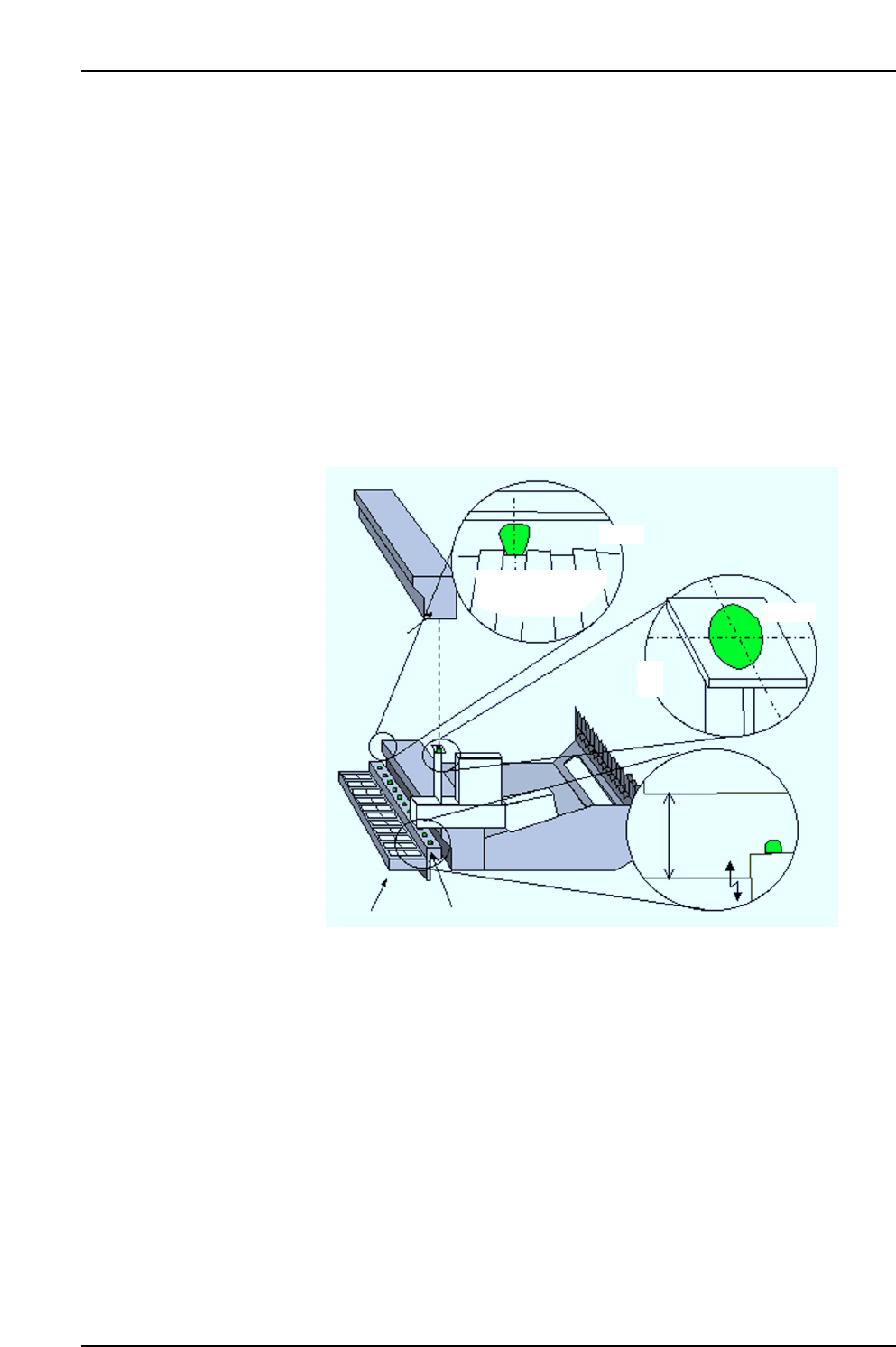
Turn the I/O output signals on at the first and last slots of each stage (slot Nos. 1 and 30,
or 1 and 40 on the CP-742ME and, 1 and 70 on the CP-742E) to turn the LEDs ON.
Adjust the positions of the feeder removal position LED and the feeder set position LED
so that they are aligned with the feeder lever and feeder pallet slot centers as shown in
the figure below.
Next, adjust the height until the distance between the sensor and feeder is 80 mm, then
set a feeder in position and use I/O commands to check the response.
Feeder removal
position LED
Sensor beam
Feeder pallet
Rear view
Feeder
lever
Feeder
80 mm
Sensor
Feeder set position LED
Setup sensor
CP7V0086E
Sensor beam