CP-7-series Verification System Instruction manual(2.0E).pdf - 第47页
8. V erification Modes Edition 2.0 36 CP-7-series V erification System Instruction Manual 8. V erification Modes The CP-7 has 2 verification modes: standard verification mode, and quick verification mode. This chapter ex…

7. Dedicated Verification Devices and Communication
Edition 2.0 35 CP-7-series Verification System Instruction Manual
7.2 When Using Setup Sensor & LED Sequencer
Communication timing
Communication with setup sensor & LED sequencer occurs at the times shown below.
The phrase, "With setup sensor & LED sequencer" implies that verification system
settings is specified as "With setup sensor & LED sequencer".
• When the machine is started up (providing that a "With setup sensor & LED
sequencer" setting was specified at the previous power OFF).
• When the parts administration system settings screen is closed after the parts
verification system setting has been changed to "With setup sensor & LED
sequencer".
• When the connection port number setting is changed at the "Feeder Loading
Monitoring System" panel of the parts administration system settings screen.
Items to check when communication errors occur
• Check the parts administration system settings screen to see if the wrong connection
port number has been specified for the setup sensor & LED sequencer.
• Check to see if the cable connecting the sequencer to the machine is disconnected.
7.3 When Using Feeder ID Read System
Communication timing
Communication with feeder ID read system occurs at the times shown below.
• When the machine is started up (providing that a "With feeder ID read system"
setting was specified at the previous power OFF).
• When the parts administration system settings screen is closed after the parts
verification system setting has been changed to "With Fujitrax Verifier".
• When the connection port number setting is changed at the "Fujitrax Verifier setting"
panel of the parts administration system settings screen.
• When the feeder ID read system type is changed at the [Parts Administration
System] screen.
Items to check when communication errors occur
• Check the parts administration system settings screen to see if the wrong connection
port number has been specified for the feeder ID read system.
• Check to see if the cable connecting the feeder ID read system to the machine is
disconnected.

8. Verification Modes
Edition 2.0 36 CP-7-series Verification System Instruction Manual
8. Verification Modes
The CP-7 has 2 verification modes: standard verification mode, and quick verification mode.
This chapter explains the differences between these two modes.
8.1 Standard Verification Mode
Part barcodes are read and verified for each device, using the Handy Terminal connected to
the machine.
This mode can be used even if the Fujitrax Verifier system has not been installed. Although
verification is performed for the devices being used, the verification time for each device is
longer than when the quick verify mode is used.
Moreover, because only one Handy Terminal can be used, this mode is not suitable for
situations where two or more operators perform the device setup for a single machine (there is
a risk that the wrong feeder may be loaded).
With the Fujitrax Verifier used, the normal verification mode cannot be used when the Fujitrax
Verifier “Without DID” mode is in effect.
8.2 Quick Verify Mode
The following three quick verify modes are available.
1. Standard mode
2. DC AUTO mode
3. FULLAUTO mode
These settings can be made at the [Parts Administration System] screen using the
[Maintenance] - [Configuration] - [Machine Function Settings] - [Parts Administration System]
commands, and then selecting the [Fujitrax Verifier Settings] tab.
An explanation of each is provided below.
Nomal Mode
The DID is read using the Handy Terminal, and in the case where a DID Joint Symbol has not
been specified, the device comment is then read. In the case where a DID Joint Symbol has
been specified, the device comment is extracted from the DID. A comparison is then
performed between the extracted device comment and the device comment specified in the
production program.
DC AUTO Mode
The DID is read using the Handy Terminal, and in the case where a DID Joint Symbol has been
specified, the device comment is extracted from the DID. In the case where a DID Joint
Symbol is not used, the DID becomes the key ID and the device comment is acquired
automatically from Fujitrax Verifier. Acomparison is then performed between the acquired
device comment and the device comment specified in the production program.
FULL AUTO Mode
An association is formed in advance at Fujitrax Verifier between the feeder ID (FIDL) and the
part ID (DID). Unlike either of the above methods, there is no need to read either the DID or
the device comment when performing a device check. The feeders to be used in production
are loaded on the machine and the feeder Ids (FIDL) are read upon the commencement of auto
operation. The FIDL becomes the key ID and the device comment is acquired automatically
from Fujitrax Verifier. Acomparison is then performed between the acquired device comment
and the device comment specified in the production program.
Note: Ensure to confirm the Quick Verify mode settings after upgrading the machine control
software and make any changes if necessary.
8. Verification Modes
Edition 2.0 37 CP-7-series Verification System Instruction Manual
The following restriction, however, applies when in the FULLAUTO mode: Once a feeder and
reel combination has been registered, the reel cannot be removed from the feeder once
operation begins. If removed, the reel/feeder combination information must be re-registered
at Fujitrax Verifier.
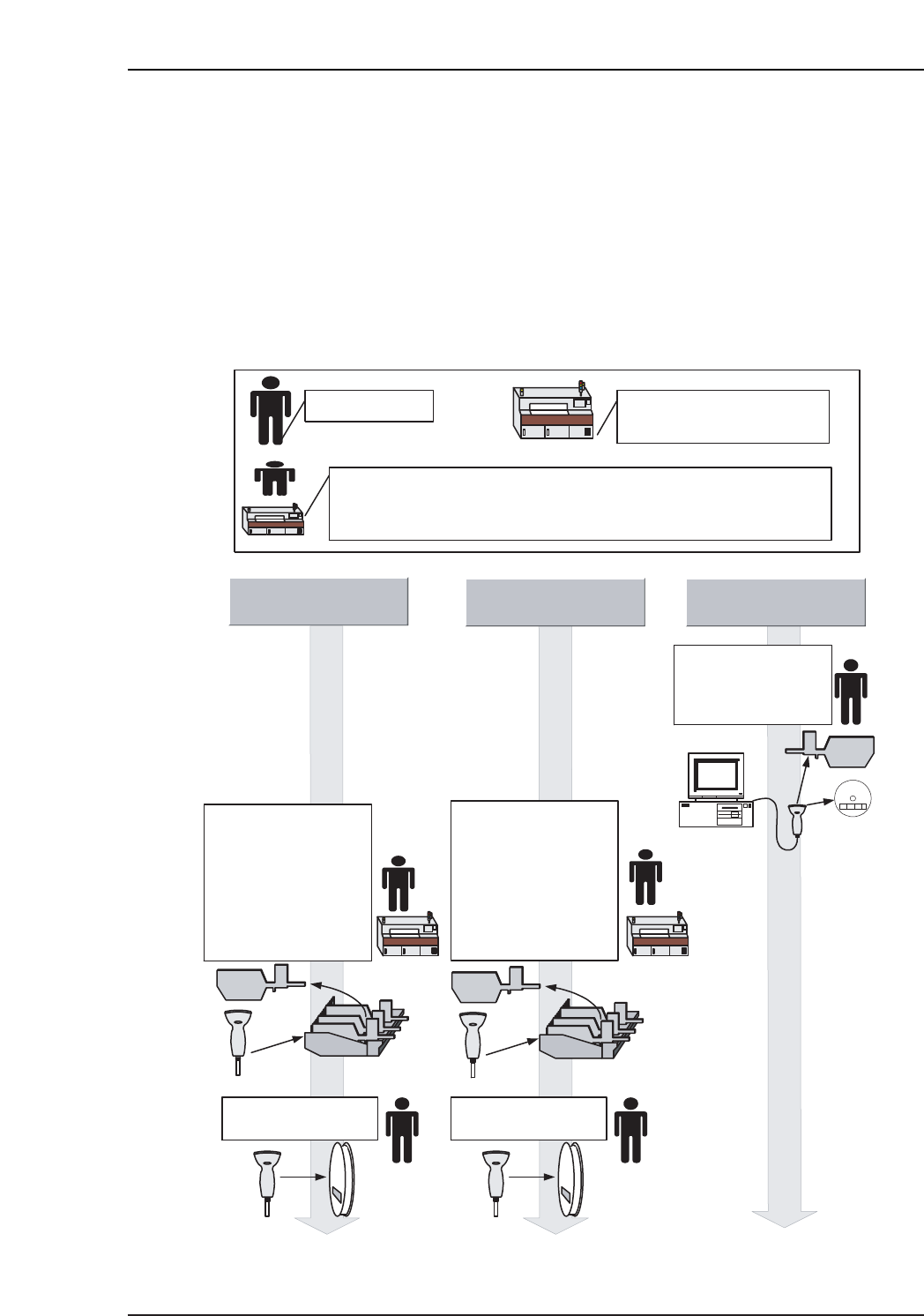
The figure below shows the verification procedure for each verification mode, with the Handy
Terminal, setup sensors and LEDs, and the feeder ID reading system all being used.
● Explanation of symbols used in the figure
DISABLED
DC AUTO FULL AUTO
Operator task
Processing performed
automatically by the machine
Task which can be performed either by the operator, or automatically
by the machine. Setting is possible at the [Parts Administration
System] screen, or at the PDT3100.
DID reading DID reading
Stage No. and Slot
No. are determined. *1
●Feeder is removed
●Setting specified at
Handy Terminal
●Automatic position
selection function is
used
Stage No. and Slot
No. are determined. *1
●Feeder is removed
●Setting specified at
Handy Terminal
●Automatic position
selection function is
used
Feeder and part
combinations are
registered in advance
at Fujitrax Verifier.