N7201A304E05(1)_0.pdf - 第107页
NPM LNB 3.2 Event Information EJM9BE-MB-03L-20 Page 3-15 3.2 Event Information 3.2.1 Machine Event Information You can browse the machine event information. 1 Choose [Machine Event] in [Event Log] from the menu. • The ma…
NPM
LNB
3.1 Production Management Information
Page 3-14 EJM9BE-MB-03L-20
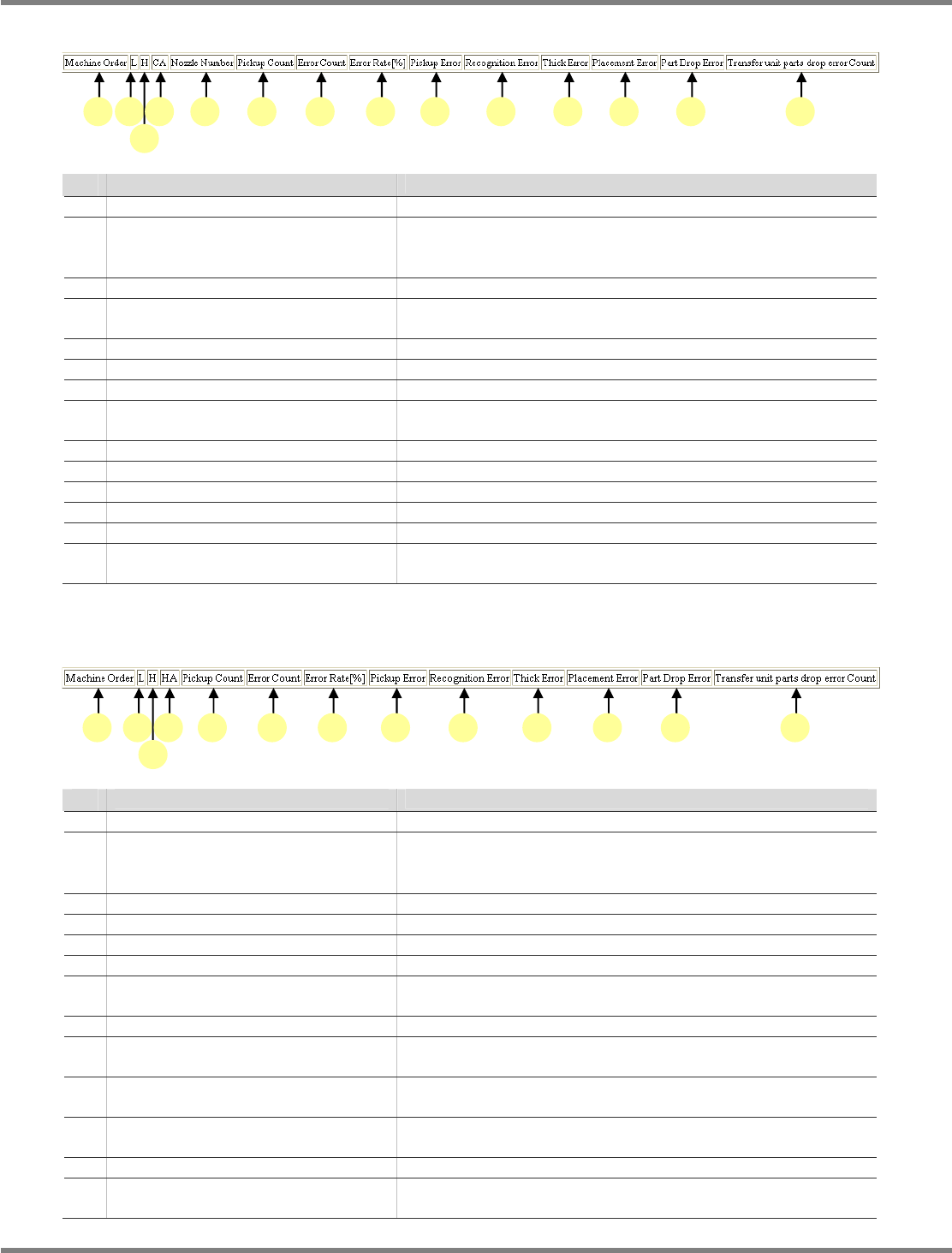
L) Pickup count per nozzle changer
Name
Explanation
a Machine Order
The machine number
b L Production lane (F: Front / R: Rear)
∗
This field is displayed only when shift information is
displayed.
c H The position of the head (1: Front / 2: Rear)
d CA The slot number of the nozzle changer to which the pickup
nozzle is arranged
e Nozzle Number
The number of the pickup nozzle
f Pickup Count
The number of pickup actions by the nozzle
g Error Count
The number of errors occurred on the nozzle
h Error Rate[%]
The rate of error occurrences against the pickup count of the
nozzle
i Pickup Error
The number of pickup errors occurred on the nozzle
j Recognition Error
The number of recognition errors occurred on the nozzle
k Thick Error
The number of tombstoning errors occurred on the nozzle
l Placement Error
The number of placement errors occurred on the nozzle
m Part Drop Error
The number of dropping errors occurred on the nozzle
n Transfer unit parts drop error Count
The number of parts drop errors of the transfer unit occurred
on the nozzle
M) Pickup count per nozzle holder
Name
Explanation
a Machine Order
The machine number
b L Production lane (F: Front / R: Rear)
∗
This field is displayed only when shift information is
displayed.
c H The position of the head (1: Front / 2: Rear)
d HA The address of the nozzle holder
e Pickup Count
The number of pickup actions by the nozzle holder
f Error Count
The number of errors occurred on the nozzle holder
g Error Rate[%]
The rate of error occurrences against the pickup count of the
nozzle holder
h Pickup Error
The number of pickup errors occurred on the nozzle holder
i Recognition Error
The number of recognition errors occurred on the nozzle
holder
j Thick Error
The number of tombstoning errors occurred on the nozzle
holder
k Placement Error
The number of placement errors occurred on the nozzle
holder
l Part Drop Error
The number of drop errors occurred on the nozzle holder
m Transfer unit parts drop error Count
The number of parts drop errors of the transfer unit occurred
on the nozzle holder
LNB3-1013_E
a b
c
d e f g h i j k l n m
LNB3-1014_E
a b
c
d e f g h i j k m l
NPM
LNB
3.2 Event Information
EJM9BE-MB-03L-20 Page 3-15
3.2 Event Information
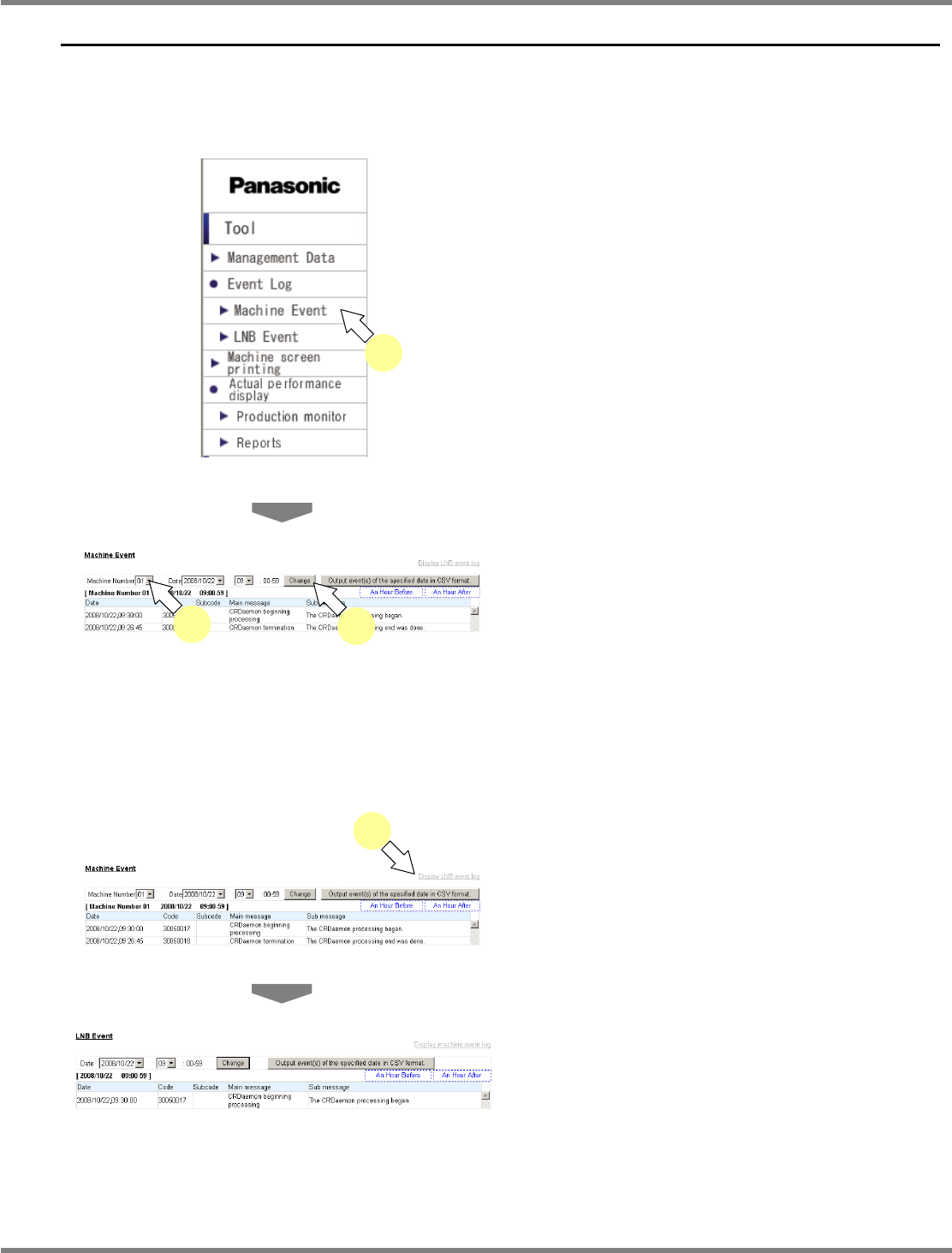
3.2.1 Machine Event Information
You can browse the machine event information.
1
Choose [Machine Event] in [Event
Log] from the menu.
•
The machine event information is displayed.
2
Select the desired machine number
from the “Machine Number” combo
box, and click [Change].
•
The 1 hour’s machine event information of the
specified machine is displayed.
Changing the event information to display
1
Choose [Display LNB event log].
•
The LNB event information is displayed.
lnb3-2001_e
1
lnb3-2002_e
lnb3-2001_e
2
2
lnb3-1001_e
1
NPM
LNB
3.2 Event Information
Page 3-16 EJM9BE-MB-03L-20
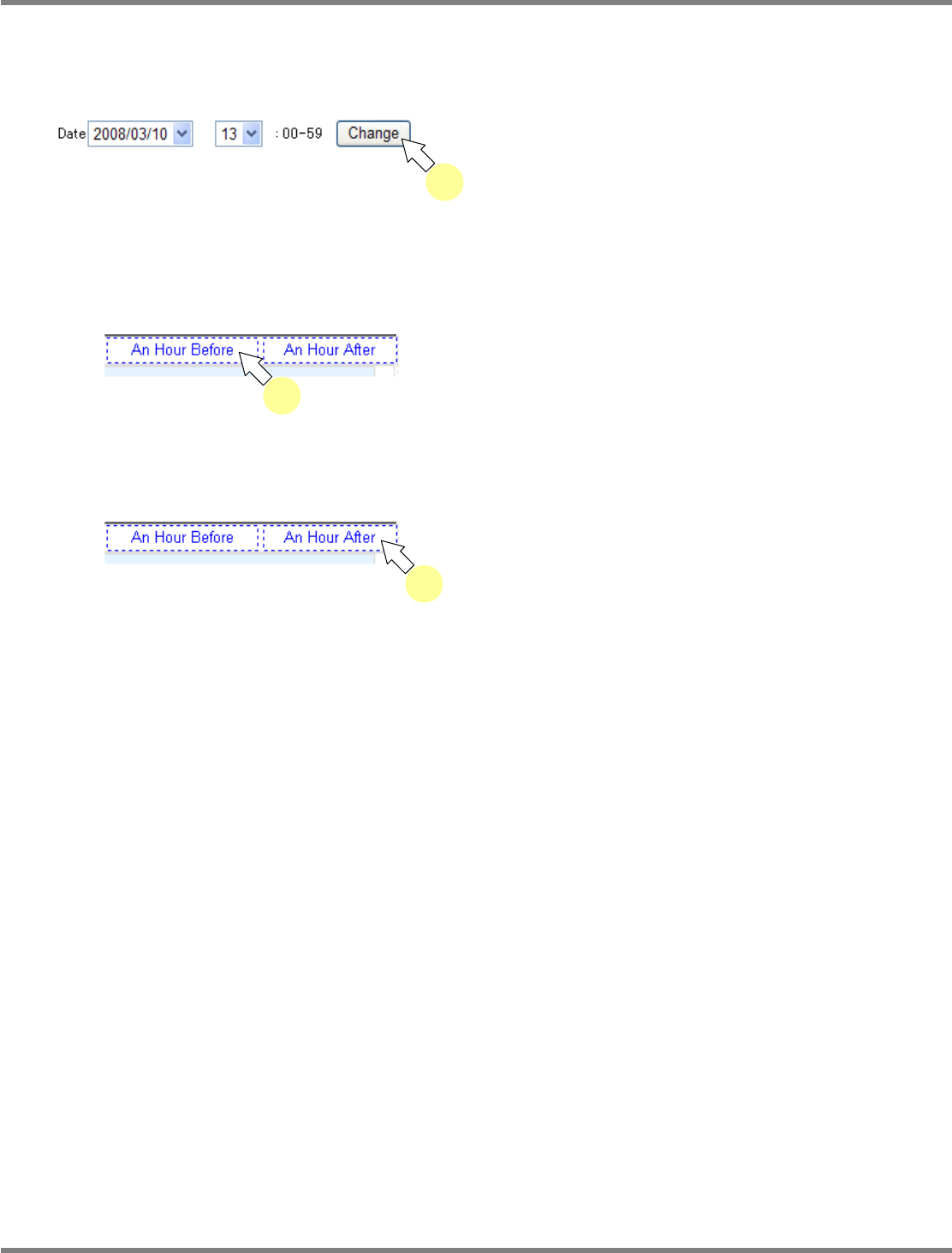
Changing the target time frame
You can change the time frame when events occurred, and display their information.
A) Specifying the time frame
1
Specify the date and time frame, and
click [Change].
•
You can display the machine event
information within the specified time frame.
B) Specifying the time frame of an hour before
1
Click [An Hour Before].
•
You can display the machine event
information of an hour before the current one.
C) Specifying the time frame of an hour after
1
Click [An Hour After].
•
You can display the machine event
information of an hour after the current one.
lnb3-2003_e
1
lnb3-2004_e
1
lnb3-2004_e
1