N7201A304E05(1)_0.pdf - 第145页
NPM LNB 4.3 Advanced Setting EJM9BE-MB-04L-20 Page 4-15 4.3.5 Calculation Method Setting You can set the calculation method. 1 Choose [Calculation method setting] in [Advanced] from the menu. • The <Calculation method…
NPM
LNB
4.3 Advanced Setting
Page 4-14 EJM9BE-MB-04L-20
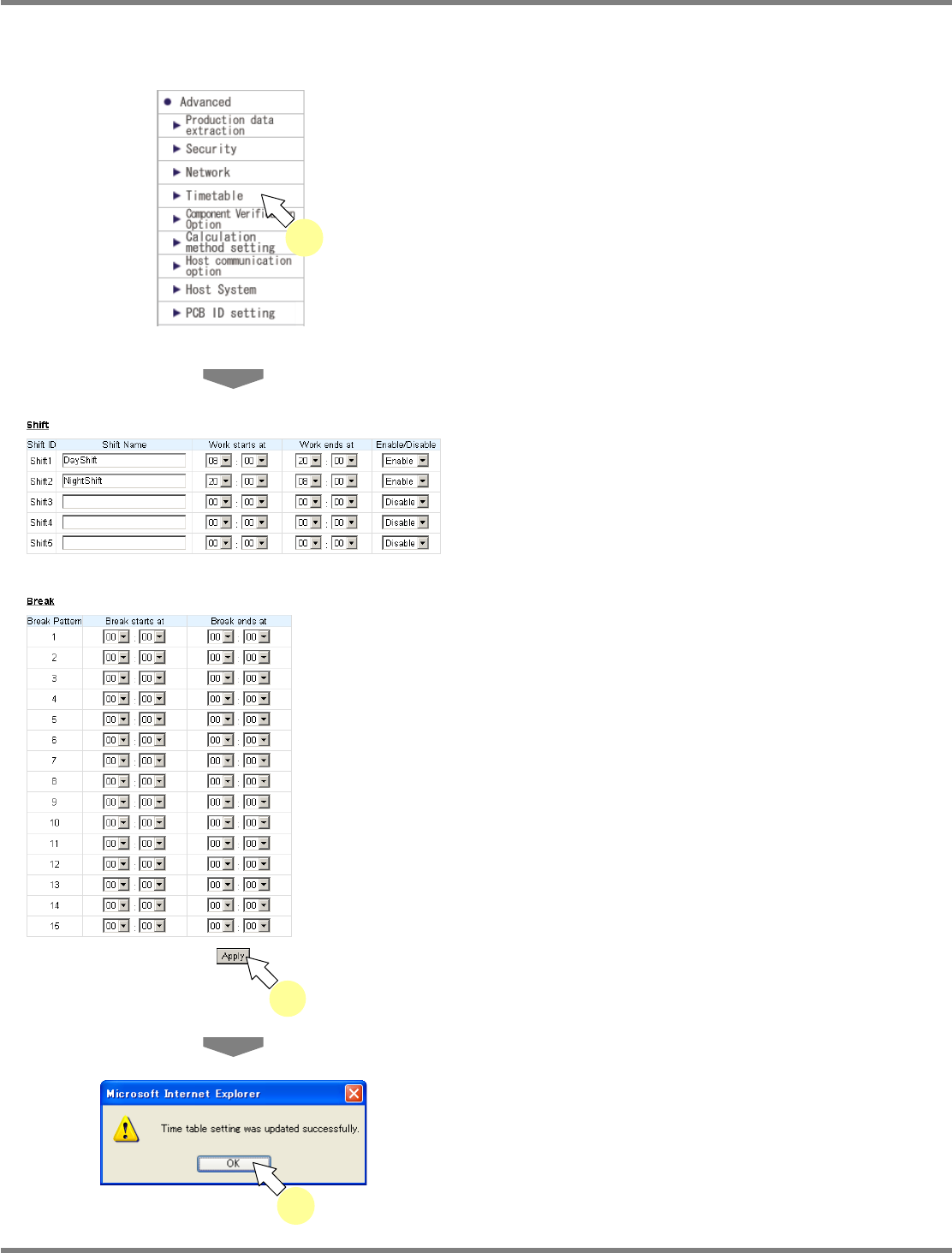
4.3.4 Timetable Setting
You can set the timetable (shift, break).
1
Choose [Timetable] in [Advanced]
from the menu.
•
The <Timetable> screen is displayed.
2
Set the desired shift and break, and
click [Apply].
•
The message of timetable setting update
completion appears.
3
Click [OK].
lnb4-3020_e
2
lnb4-3021_e
3
lnb4-3001_e
1
NPM
LNB
4.3 Advanced Setting
EJM9BE-MB-04L-20 Page 4-15
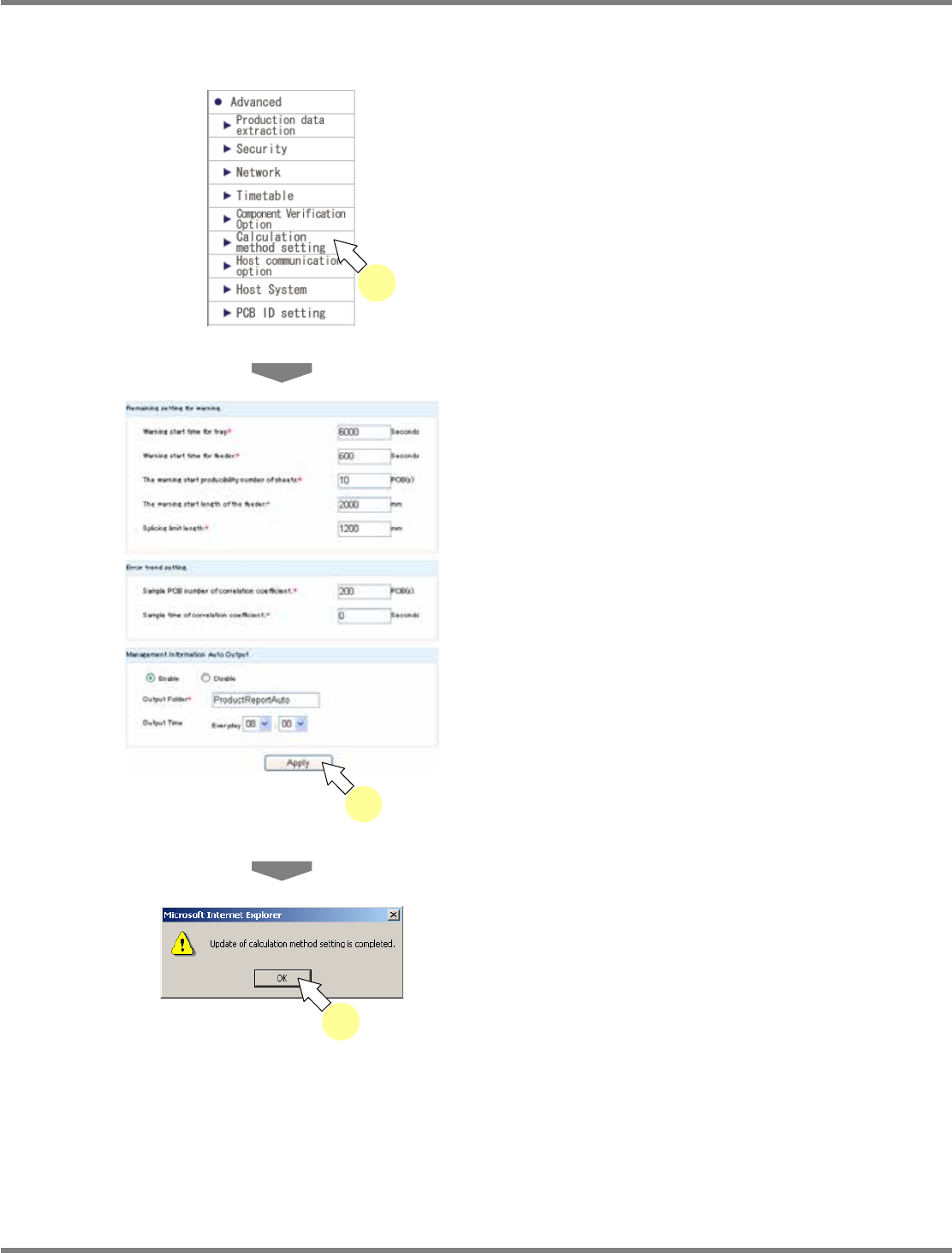
4.3.5 Calculation Method Setting
You can set the calculation method.
1
Choose [Calculation method setting]
in [Advanced] from the menu.
•
The <Calculation method setting> screen is
displayed.
2
Enter the information in the desired
items, and click [Apply].
•
The default values are set at startup. For
details about the setting items, see
“Calculation method setting items” on the next
page.
∗
Items with (*) are compulsory input items.
•
The message of calculation method setting
update completion appears.
3
Click [OK].
lnb4-3022_e
2
lnb4-3023_e
3
lnb4-3001_e
1

NPM
LNB
4.3 Advanced Setting
Page 4-16 EJM9BE-MB-04L-20
Calculation method setting items
Shown below are the items for calculation method setting.
Item
Explanation
Remaining setting for warning
∗
1
Set the thresholds for remainder warning.
Warning start time for tray
When the remaining production time for tray falls to the set
time and below, remainder warning starts.
The remaining production time for tray refers to the time that
elapses before the remaining parts count of tray becomes
“0.”
Warning start time for feeder When the remaining production time for feeder falls to the
set time and below, remainder warning starts.
The remaining production time for feeder refers to the time
that elapses before the remaining tape length of reel
reaches the splicing limit length.
The warning start
producibility number of
sheets
When the remaining production count for machine falls to
the set count and below, remainder warning starts.
The warning start length of
the feeder
When the remaining tape length of reel on feeder reaches
(set length
+
splicing limit length), remainder warning starts.
Splicing limit length
This is the length of tape that tape splicing can be done.
When the remainder of tape has fallen to this limit length
and below, tape splicing cannot be done.
Error trend setting
∗
2
Set the number of samples for the calculation of correlation
coefficient of error trend.
Sample PCB number of
correlation coefficient
Set the production count to be used for the calculation of
correlation coefficient.
Sample time of correlation
coefficient
Set the production time to be used for the calculation of
correlation coefficient.
PCB (s) to Judge Performance Set the function to display on the DGS whether the
production performance exists in the production data.
PCB (s) to Judge
Performance
Set the number of PCBs produced for production
performance determination.
Summary per Lane in Bottleneck
Machine
Set the method to display the bottleneck machine by the
signal tower.
per Lane/per Machine If ‘per Lane’ is selected, the bottleneck lamp of the machine
blinks indicating that there is a bottleneck in a line. Lamps of
two machines may blink at the same time.
If ‘per Machine’ is selected, the lamp of one machine blinks
indicating that there is a bottleneck.
Dual Lane Operation Rate
Calculation Method
Set the method calculating the operating rate of whole
machines in the production management information.
Hide/ F/R Lane Total/ F/R
Lane Average
If ‘Hide’ is selected, the operating rate of whole machines is
not displayed.
If ‘F/R Lane Total’ is selected, the total of both front and rear
lanes is displayed.
If ‘F/R Lane Average’ is selected, average of both front and
rear lanes is displayed.
∗
1
For the remainder warning setting, if you enter ‘0’ in the threshold, the warning function
related to the corresponding threshold is regarded as ‘OFF’ and remainder warning will not
occur.
∗
2
The sample for the calculation of correlation coefficient will be adopted if either of the two
conditions above is satisfied. When ‘0’ is input in one of the boxes, only the other sample is
used for the calculation of correlation coefficient.