N7201A304E05(1)_0.pdf - 第8页
NPM Page 8 EJM9BE-CT-01N-21 TABLE OF CONTENTS z Safety Precautions ...................................................................................................S-1 z Labels pasted on product for safety.............…
NPM
EJM9BE-BP-01N-12 Page 7
Wording in context
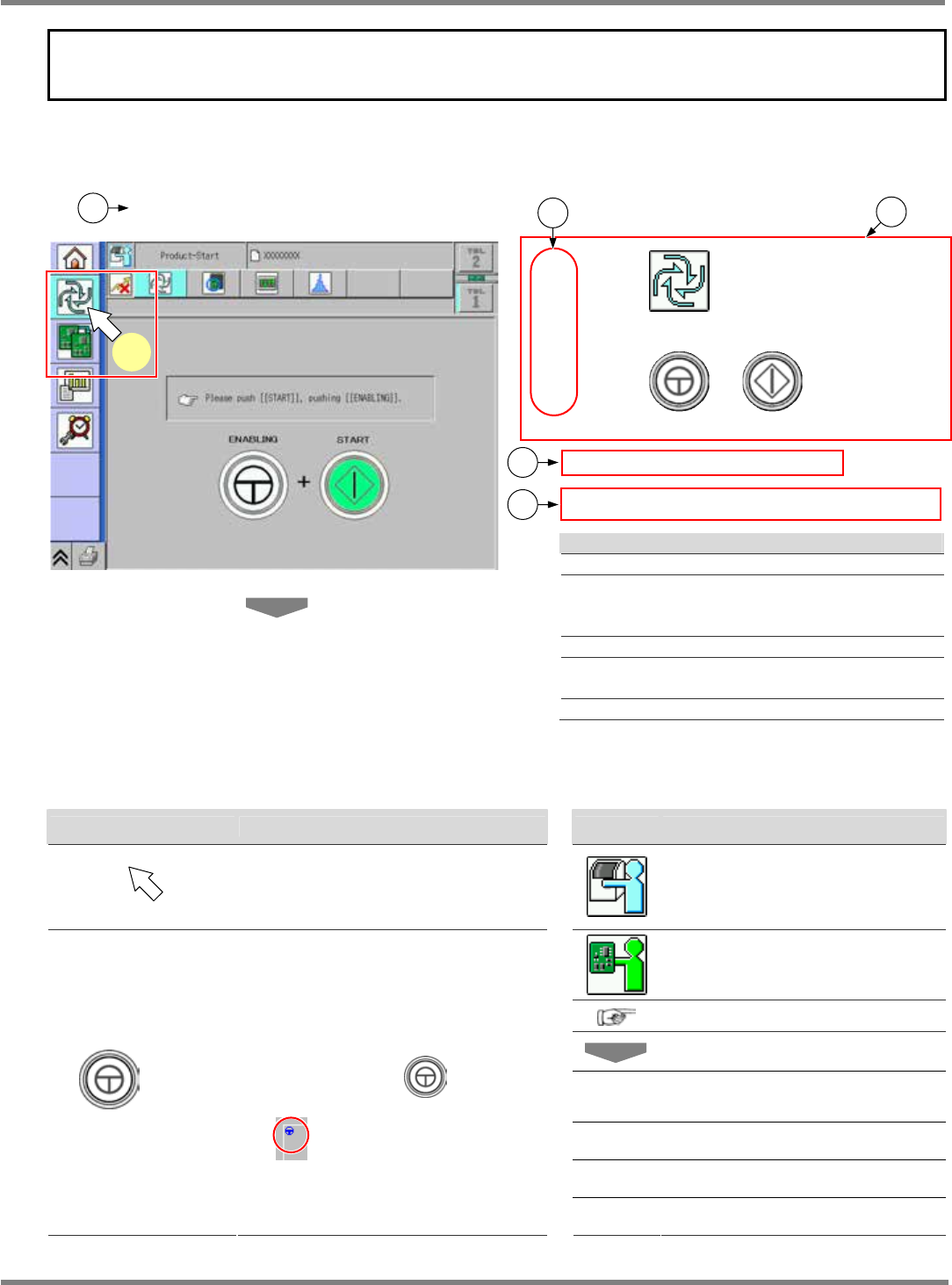
How to read operating instructions
Description depends on the page; however, it is constructed basically as follows.
1.1.1 Starting Operation
1
Press in the main menu.
2
Press + .
•
The self-diagnosis process starts.
∗
If the servo switch is OFF (O), turn it ON ( I ).
Explanation
Title
Operation step number
Corresponds to the arrow number in a red
frame on the screen.
Actual operation
Describes the effect produced by the
operation.
Describes the supplementary explanation.
Symbols used in this manual
In this manual, the following symbols are used for description.
Symbol Explanation Symbol Explanation
Shows pressing a button on the color
touch panel.
Shows the operation for an
operator.
Shows the operation for an
engineer.
Shows a reference item.
Shows an operation flow.
<Screen
name>
Shows a screen name.
[Button] Shows a button or a menu.
“Message” Shows an on-screen message.
+ [ A ]
Indicates that you should press [A] on
the touch panel with
held down.
The button that requires this operation
has
mark in the upper left.
‘Item’ Shows an item on the screen etc.
ComEnabStart-02E00
1
1
3
2
4
5

NPM
Page 8 EJM9BE-CT-01N-21
TABLE OF CONTENTS
z
Safety Precautions...................................................................................................S-1
z
Labels pasted on product for safety...................................................................... S-17
z
Safety switches..................................................................................................... S-33
z
Lock out tagout procedure .................................................................................... S-33
z
Usage of warning sheets in maintenance............................................................. S-34
z
Stopping specifications when coupled.................................................................. S-35
z
The uninterrupted power connectors and the motor that does not stop if an
emergency stop switch is pressed........................................................................ S-36
z
Handling of linear motors...................................................................................... S-37
z
Handling of the line camera .................................................................................. S-38
z
Handling of the 3D sensor (option) ....................................................................... S-39
z
Handling of the vertical line camera (option) ........................................................ S-41
z
Handling of the change cart switch unit ................................................................ S-42
z
Handling of the wired scanner .............................................................................. S-44
z
Handling of the wireless scanner.......................................................................... S-45
z
Handling of SD card.............................................................................................. S-46
z
Serial number plate............................................................................................... S-48
z
Disposal of air spring ............................................................................................ S-50
z
Disposal or recycling of components containing mercury .................................... S-51
z
Repairs on or disposal of the linear motor ............................................................ S-52
z
Guidelines on using the machine.......................................................................... S-54

NPM
LNB
EJM9BE-CT-01L-20
Page 9
TABLE OF CONTENTS
1. GENERAL DESCRIPTION .............................. 1-1
1.1 Conveyors.............................................................................................................1-2
1.2 Line Configuration ................................................................................................1-3
1.3 System Configuration ...........................................................................................1-4
1.4 Outline of Functions..............................................................................................1-6
1.4.1 LNB......................................................................................................................................................1-6
1.4.2 LWS.....................................................................................................................................................1-6
2. BASIC OPERATIONS ..................................... 2-1
2.1 Operating Instructions of the Main Power Supply Switch at Production Start/End2-2
2.1.1 Operating Units ...................................................................................................................................2-2
2.1.2 Production Start...................................................................................................................................2-2
2.1.3 Production End....................................................................................................................................2-2
2.2 Screen Flow..........................................................................................................2-3
2.3 Operation Flow .....................................................................................................2-5
2.3.1 Initial Introduction ................................................................................................................................2-5
2.3.2 Browsing the Production Management Information ............................................................................2-5
2.3.3 Browsing the Event .............................................................................................................................2-6
2.3.4 Browsing the LNB Configuration Information......................................................................................2-6
2.3.5 Changing the Settings with Easy Setting ............................................................................................2-7
2.3.6 Changing the Settings with Advanced Setting ....................................................................................2-7
2.4 Login/Logout.........................................................................................................2-8
2.4.1 Login....................................................................................................................................................2-8
2.4.2 Logout ...............................................................................................................................................2-10
2.5 Initial Setting .......................................................................................................2-11
2.5.1 LNB Initial Setting..............................................................................................................................2-11
2.5.2 Installing Flash Player .......................................................................................................................2-12
3. TOOL ............................................................... 3-1
3.1 Production Management Information ...................................................................3-2
3.1.1 Browsing the Production Management Information ............................................................................3-2
3.1.2 Explanations of Production Information Names..................................................................................3-8
3.2 Event Information ...............................................................................................3-15
3.2.1 Machine Event Information ...............................................................................................................3-15
3.2.2 LNB Event Information ......................................................................................................................3-18
3.3 Production Machine Screen Print .......................................................................3-20
3.4 Result Information Display..................................................................................3-22
3.4.1 Production Status Monitor.................................................................................................................3-22
3.4.2 Reports..............................................................................................................................................3-28