N7201A304E05(1)_0.pdf - 第70页
NPM LNB 1.4 Outline of Functions Page 1-6 EJM9BE-MB-01L-20 1.4 Outline of Functions The purposes, functions, and sp ecifications of LNB and LWS are describ ed below. 1.4.1 LNB Purpose No. Description 1 To provide the ope…
NPM
LNB
1.3 System Configuration
EJM9BE-MB-01L-20 Page 1-5
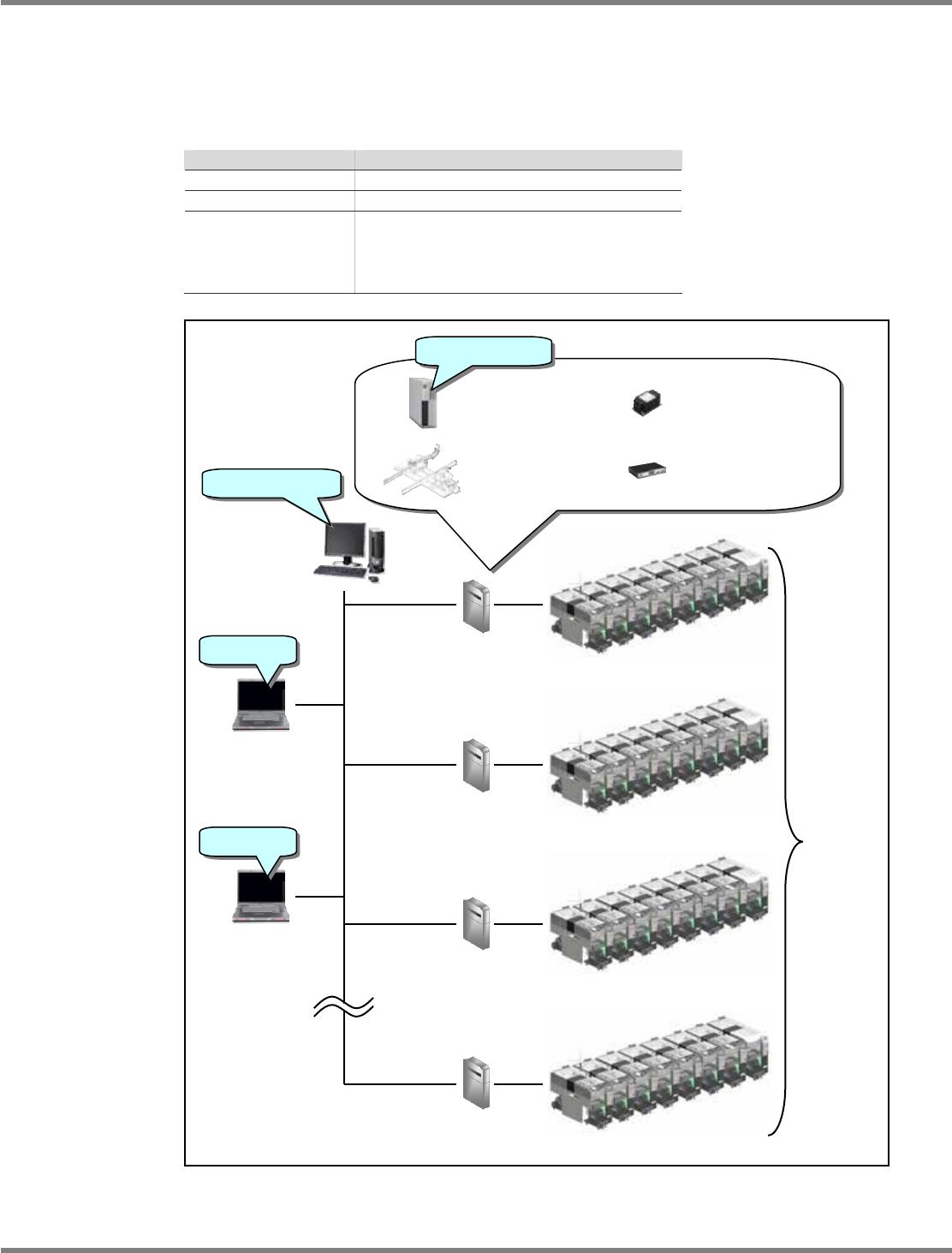
Normal configuration
This is used for the operation of two or more lines.
NL-CON1 as many as the number of lines is required.
We recommend using LWS as many as the number of lines. However, one or more LWS
enables operation because one LWS can connect to multiple NL-CON1. Prepare LWS as
needed.
Item Quantity
No. of lines
n
No. of LNBs
n
No. of LWSs
Arbitrary
∗
n recommended
∗
Up to one line of LNB connected
concurrently
FA-specific PC
LNB software
Extension conveyor
mechanism
Network equipment
Power equipment
Line NL-CON1
NPM-DGS
(∗ Not included
in this product)
n Line
LWS
IE7.0
DGS software
LWS
IE7.0
Line NL-CON1
Line NL-CON1
Line NL-CON1

NPM
LNB
1.4 Outline of Functions
Page 1-6 EJM9BE-MB-01L-20
1.4 Outline of Functions
The purposes, functions, and specifications of LNB and LWS are described below.
1.4.1 LNB
Purpose
No.
Description
1
To provide the operability that enables you to handle two or more coupled machines as
one machine.
2 To provide the function to distribute and relay a large amount of production result data.
Function
No.
Description
1 Downloads production data to the machine.
2 Keeps production data and manages the difference.
3 Keeps and compiles the production management information for a week.
4 Keeps event information for a week.
FA PC
No.
Description
Type
FC-E21A (NEC product)
1.4.2 LWS
Purpose
No.
Description
1 To provide the GUI for LNB, which has no screens, enabling operation.
Function
No.
Description
1 To display the summary result of the production management information kept in LNB.
2 To display the event information kept in LNB.
3 To edit the setting of LNB.
4 To update LNBs or machines.
LWS operating environment
No.
Description
Browser
IE (Internet Explorer) 7.0
∗
1: A PC you prepare is used for LWS.
∗
2: When you share PC with NPM-DGS for the minimum configuration, prepare a PC
that satisfies with the NPM-DGS performance specifications. For details, refer to the
manual of NPM-DGS.

NPM
LNB
EJM9BE-MB-02L-20 Page 2-1
2. BASIC OPERATIONS
This chapter explains the whole structure of screens as the screen flow, and the
frequently used operations as the operation flow. And also, the login/logout procedures
and initial settings necessary for operations are described.