CP43操作手册.pdf.pdf - 第107页
Chapter 5 Next Device Part 2 5. Next Device On the FCP IV -3 an empty device can be readied with the same part being used by another device so that when the first runs out of parts, the next device can be used. This proc…
Chapter 4 Device CheckPart 2
4.4 Permanent Set
If a number of production programs are being used, there are cases when
frequently used devices are fixed in order to eliminate several steps in the
changeover process when changing programs. When programs are
changed, if this method is used, a comparison is made between the device
comments stored in present machine memory and the device comment of
the program that has changed. For any devices in common, device check
is omitted if the device has been checked already. Devices set in such a
manner are referred to as permanently set devices.
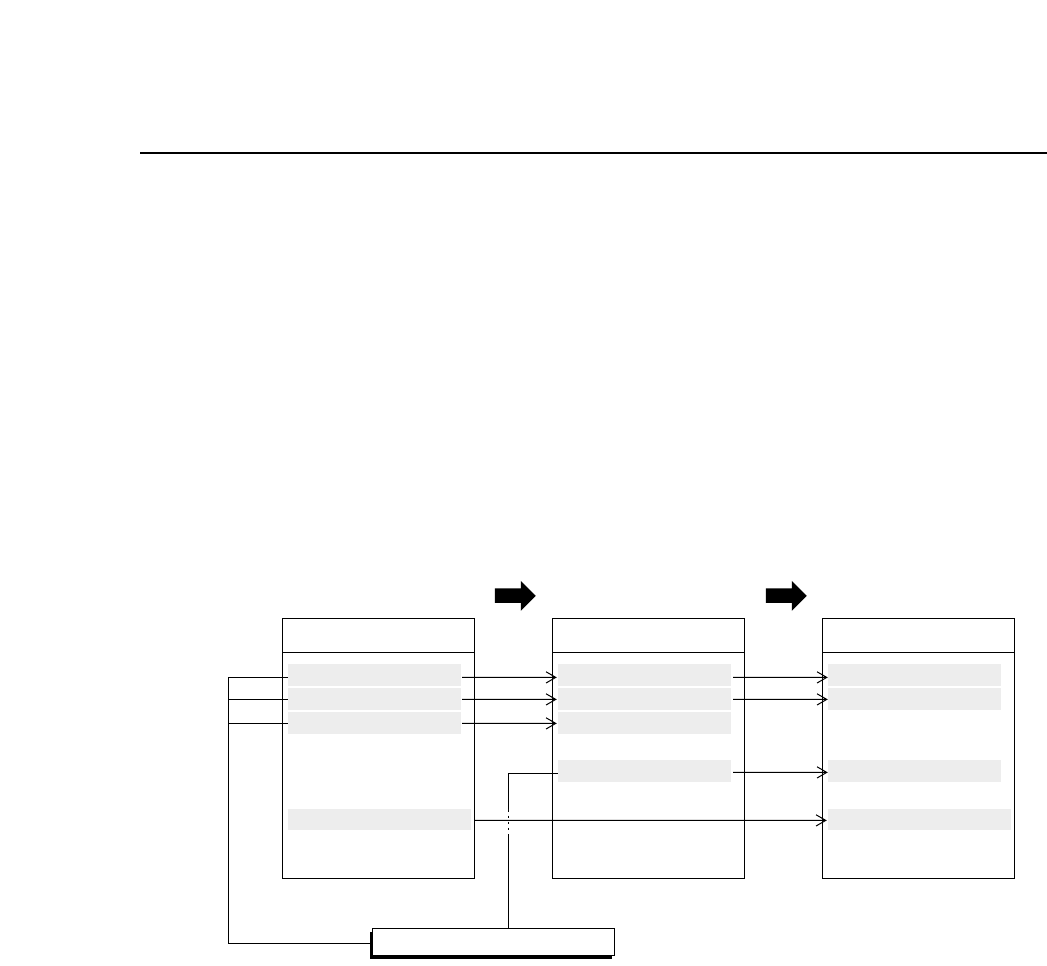
For example, consider the display below where production programs are
carried out in A → B → C order.
When changing from production program A to B.
If D1~D3 are used in both programs then once these devices have
been checked they are considered permanently set devices. These
devices are displayed in green on the device check screen. Once a
device check is completed on D7 it is considered a permanently set
device. Since D7 is not used in production program B a device check
is not carried out. Permanently set devices such as D7 that are not
used in the current program display in blue on the screen.
When changing from production program B to C.
D1 and D2 are used in both programs and have already been checked.
These devices have been judged as permanently set devices and are
displayed in green on the device check screen. The device being used
in D3 has changed and thus a device check is carried out. This device
is displayed in yellow on the device check screen until a check is
carried out. D7 has already been checked and determined as a
permanently set device and thus it displays in green.
Device_Comment
D1 RECT3216120
D2 RECT1608040
D3 MINI1220120
D4 ALEC4343570
D5 RECT2012040
D6 RNT45032040
D7 SQFP03610100
··········
Production program A
Device_Comment
D1 RECT3216120
D2 RECT1608040
D3 MINI1220120
D4 ALEC4343570
D5 RECT2012040
D6 RNT45032040
··········
Production program B
Device_Comment
D1 RECT3216120
D2 RECT1608040
D3 MINI1220120
D4 ALEC4343570
D5 RECT2012040
D6 RNT45032040
D7 SQFP03610100
··········
Production program C
Permanently Set Devices
2 – 38Version 2.0
FCP IV-3 Operation

Chapter 5 Next DevicePart 2
5. Next Device
On the FCP IV-3 an empty device can be readied with the same part being used
by another device so that when the first runs out of parts, the next device can
be used. This process is called “Next Device”.
Next device is set in the production program using the MCS/2H Editor. A
simple example with explanation follows.
5.1 Setting Next Device
5.1.1 Setting Device Information Data (D_data)
Under the “Next” heading in device information data is the device
number of the device to be used after the previous device runs out
of parts. When this data is set the same type of part must be
mounted in an empty device position so that when the current
device runs out of parts, the same part can automatically be placed
from the next device.
D_data Next $ @
001 004 RECT2012040 Original parts
002 RECT3216120
003 RECT1005040
004 005 RECT2012040 Next parts No.1
005 001 RECT2012040 Next parts No.2 End
Device comment
Part data file name
Next device number
Device number
2 – 39Version 2.0
FCP IV-3 Operation

Chapter 5 Next DevicePart 2
5.1.2 Setting Sequence Information Data
Under the “D” heading set the device number the sequence will
pick from.
Program Data
N_Data B W D X Y Q
001 1 D 001 -01000 01000 0.00
002 1 D 002 -02000 02000 0.00
003 1 D 001 -03000 03000 0.00
004 1 D 003 -04000 04000 0.00
D_data (device data), where
the device number is listed.
5.1.3 Device Table Change Trigger
In next device mode and device change mode, there are times when
certain problems occur (i.e. when there is a picking error, vision
processing error or when a feeder has run out of parts) and it
would not be advisable to automatically change device tables. On
the other hand, there are also times when these problems occur but
where the device table could be changed. The choice is left to the
operator to decide under what circumstances the device or device
table will be automatically changed.
Proper data setting:
78. D Change Trigger
• Error: The device or device table will change
when the device is out of parts, not picking
properly or experiencing a vision
processing error.
• Parts: The device or device table will change only
when the current device is out of parts.
• Miss: The device or device table will change only
when the device is out of parts or not
picking properly.
• PD: The device or device table will change as
specified in Part data (explanation follows).
2 – 40Version 2.0
FCP IV-3 Operation