CP43操作手册.pdf.pdf - 第130页
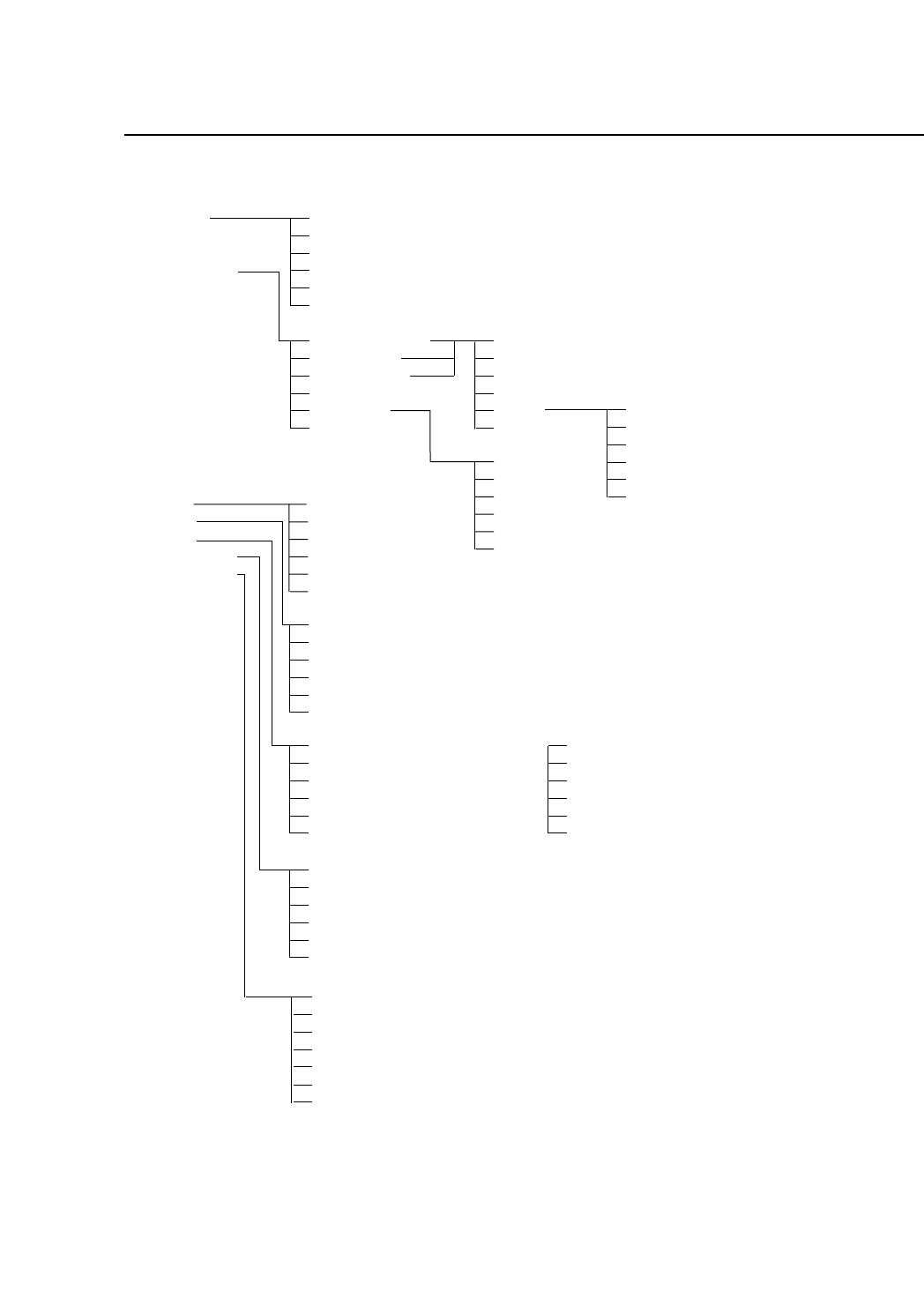
Part 3 3 – 5 V ersion 5.0 Chapter 1 Command Hierarchy FCP IV -3 Operation SPEED CONV. WIDTH TRACE LIST MODE RETURN 540 ▲ ▼ RETURN 541 COMMON AREA AXIS AREA TRACE DATA PRINT ALL RETURN SRV SRV-1 +PAGE -PAGE +LINE -LINE PR…
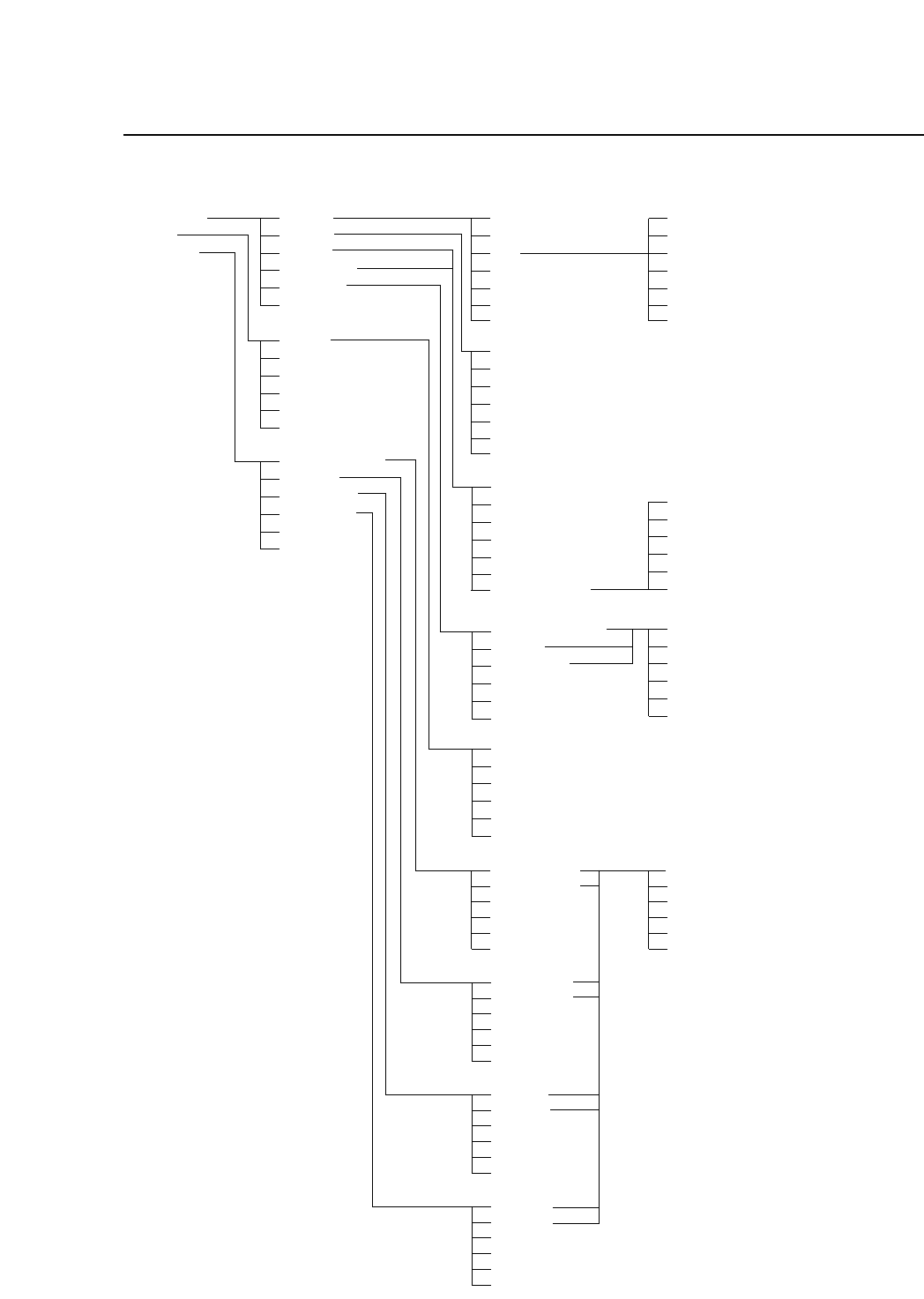
Chapter 1 Command Hierarchy
Part 3
3 – 4
Version 5.0
FCP IV-3 Operation
CAMERA
X/Y
D1/D2/Z
RETURN
530
XC/YC
MARK
WIDE
NARROW
BRIGHT
RETURN
531
X0/Y0
XL/YL
XPCB/YPCB
XMAX/YMAX
XMIN/YMIN
RETURN
532
PICKUP POS.
ORIGIN
MAX LIMIT
MIN LIMIT
RETURN
533
POSITION 1
POSITION 2
Z0
SPEED
RETURN
✩START SW
531/1
RETURN
✩START SW
531/2
POSITION 1
RETURN
✩START SW
531/3,4
RETURN
✩START SW
531/13
MARK CAMERA
WIDE
NARROW
RETURN
531/5
SET
RETURN
532/1
▲
■
▼
SELECT
RETURN
531/51
PICK UP T1
PICK UP T2
RETURN
533/1
D1 ORIGN
D2 ORIGN
Z0
RETURN
533/2
D1 MAX
D2 MAX
Z MAX
RETURN
533/3
D1 MIN
D2 MIN
Z MIN
RETURN
533/4
POSITION 2
CHECK
RETURN
SET
RETURN
533/11
531/37, 531/47
Part 3
3 – 5
Version 5.0
Chapter 1 Command Hierarchy
FCP IV-3 Operation
SPEED
CONV. WIDTH
TRACE LIST
MODE
RETURN
540
▲
▼
RETURN
541
COMMON AREA
AXIS AREA
TRACE DATA
PRINT ALL
RETURN
SRV
SRV-1
+PAGE
-PAGE
+LINE
-LINE
PRINT
RETURN
COUNTER
PROGRAM
RETURN
551
COUNTER
PROGRAM
RETURN
552
RETURN
553 (When table mode is joint mode)
TABLE 2
TABLE 1
RETURN
554
X AXIS
Y AXIS
D AXIS
D RESUPPLY
DUMP PARTS
RETURN
550
TABLE 2
TABLE 1
RETURN
(When table mode is not in joint mode)
(For HELPS)
SRV-15
PRINT READY
RETURN
PRINT READY
RETURN
RETURN
✩START SW
555

Part 3
Version 5.0
Chapter 2 Table of Command Pages
3 – 6
...........................................Ready.............................................................................000/000
AUTO...............................Automatic Operation...................................................100/000
MARK EDITOR..............Recover from Fiducial Mark Read Error..................130/000
SEQ. NO...........................Inputting the Start Sequence Number......................140/000
MODE ..............................Selecting the Operation Mode....................................150/000
...........................................During Automatic Operation.....................................170/000
STEP .................................Step Operation..............................................................200/000
LOADER..........................Operating the Loader..................................................300/000
UNLOAD PCB................Unloading Boards........................................................310/000
LOAD PCB ......................Loading New Boards...................................................320/000
LOAD PSTN....................Shifting Table to Load Position..................................330/000
LIFTER ▲▼.....................Moving the Lifter Up/Down .....................................300/000
PROGRAM......................Selecting the Production Program.............................400/000
CHANGE.........................Changing the Current Production Program............410/000
QTY. SET..........................Setting the Scheduled Production Quantity ............420/000
QTY. CLEAR....................Resetting the Number of Completed Boards...........430/000
SKIP..................................Skipping Portions of a Program.................................440/000
BLOCK.............................Skipping Blocks on a Board........................................441/000
DEVICE............................Working with Device Data .........................................450/000
CHECK ............................Device Check Mode Selection....................................451/000
MODE 1 ...........................Device Check Mode 1..................................................451/100
MODE 2 ...........................Device Check Mode 2..................................................451/200
MODE 3 ...........................Device Check Mode 3..................................................451/300
OFFSET............................Setting Device Offsets..................................................455/000
Command Name Description
Command
Page
2. Table of Command Pages
All commands in Chapter 3 can be conveniently referred to by using the
command page. The command page is shown on the color display with the
first three digits.
FCP IV-3 Operation