SIPLACE-SX4-DX4-用户手册.pdf - 第106页
Service Work Conveyor 3.6.6 Replacing the Cylinder Unit on the Adjustment U ni t (DC/QC only) 106 Service Manual SIPLACE SX4/DX4 3.6.6 3 . 6 . 6 R e p la c in g t h e C y lin d e r U n it o n t h e A d ju s t m e n t U n…

Service Work
3.6.5 Replacing the Lifting Table Motor [03064983-xx] (EC only) Conveyor
Service Manual SIPLACE SX4/DX4 105
Installation
► Follow the removal instructions in reverse order for installation. Also observe the following instruc-
tions:
CAUTION
Installation instructions
► Fit the shims onto the new motor.
► Make sure that the motor connection cables do not rub against any parts. In particular,
make sure that they do not point upwards or downwards.
► Perform a reference run for the lifting table motor. (See also "5.5.4 Calibrating the Motors
in the SX Conveyor" [ ➙ 260])
Service Work
Conveyor 3.6.6 Replacing the Cylinder Unit on the Adjustment Unit (DC/QC only)
106 Service Manual SIPLACE SX4/DX4
3.6.6
3.6.6 Replacing the Cylinder Unit on the Adjustment Unit (DC/QC only)
Replacing the Cylinder Unit on the Adjustment Unit (DC/QC only)
Parts, equipment and tools
There are two versions of the cylinder unit, one for the adjustment unit in the input area or center and
one for the adjustment unit in the output area.
▪ Adjustment unit 1 for width adjustment DC split (incl. trailing cable) – input area/center [03081359-xx]
▪ Adjustment unit 2 for width adjustment DC split (incl. trailing cable) – output area [03081361-xx]
Overview
Removal
► Use the software to move the conveyor sides into the position which allows you best access.
► If required, loosen the conveyor side clamps. (see "3.6.1 Loosening the Conveyor Side Clamps"
[➙95]).
► Switch off the machine, disconnect it from the power supply and secure it to prevent unauthorized
reactivation. Observe the instructions in section "1.2 Preparatory Work..." [ ➙ 12].
► Loosen the screws fastening the lifting table plate and remove the lifting table plate.
► Dismantle the cover plate on the lower end of the trailing cable, to gain access to the cable.
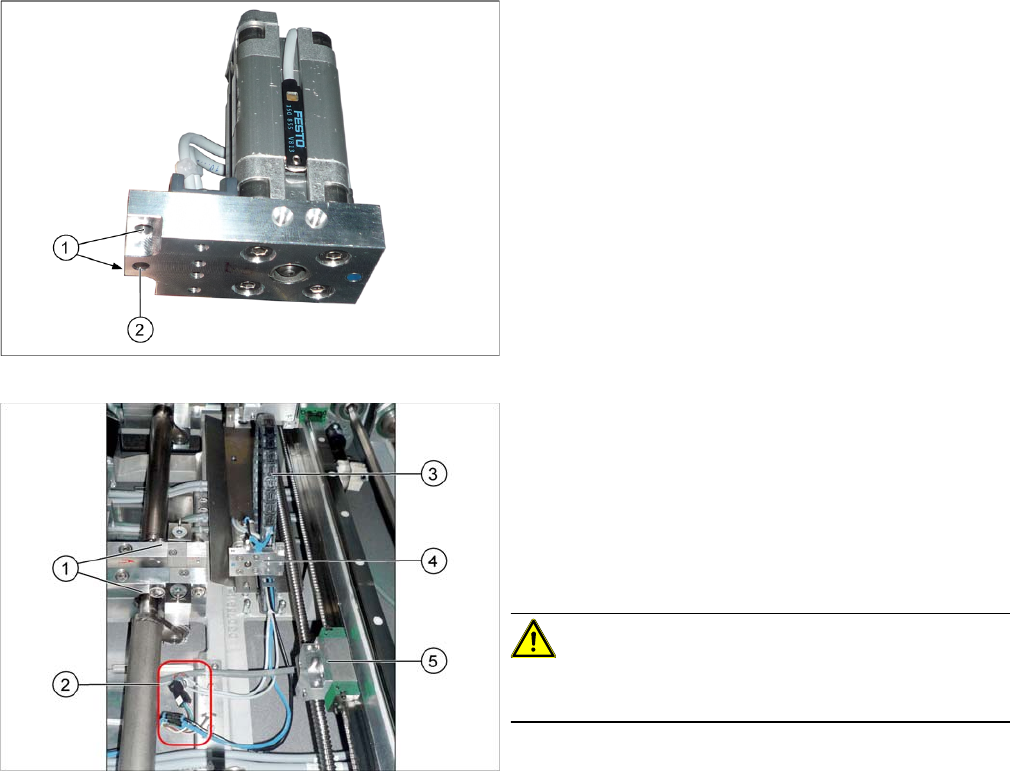
Cylinder unit
1. Holes for the carriage fastening screws
2. Centering hole
1. Lifting tables
2. Electrical and pneumatic connections for the cylinder
unit
3. Trailing cable for the cylinder unit
4. Cylinder unit
5. Guide carriage with receptacle for cylinder unit and
centering pin
CAUTION!
Never dismantle the carriage or the receptacle for the cyl-
inder unit!
Service Work
3.6.6 Replacing the Cylinder Unit on the Adjustment Unit (DC/QC only) Conveyor
Service Manual SIPLACE SX4/DX4 107
► Loosen the screws fastening the cylinder unit to the carriage and then remove the carriage. The cyl-
inder unit is pinned and can be stiff to move.
► Unplug the electrical and pneumatic connections. You may want to mark the positions, to make clear
assignment easier later on. Open the corresponding cable ties to help you, if needed.
► Remove the cylinder unit from the machine.
Installation
► Follow the removal instructions in reverse order for installation. Also observe the following instruc-
tions:
CAUTION
Installation instructions
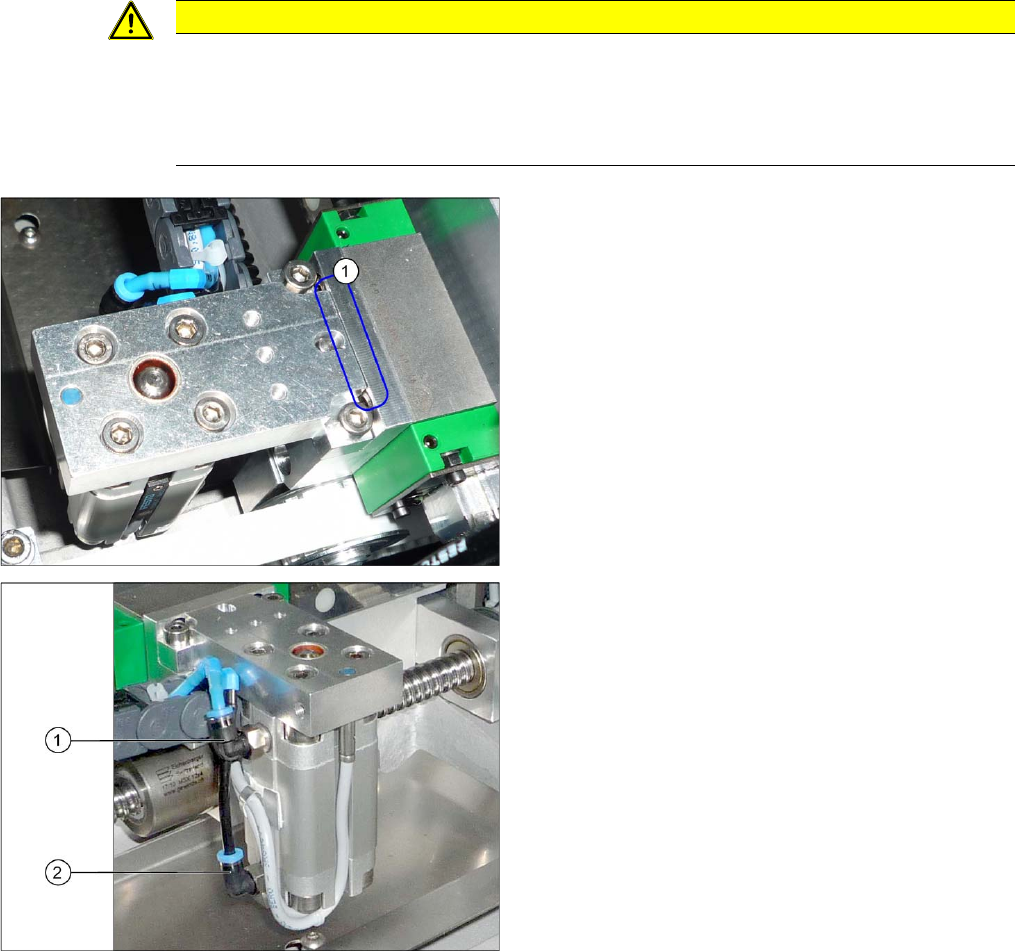
► Make sure that the cylinder unit is flush against the guide carriage (see below).
► Make sure that the cables and hoses do not rub against any parts.
► Make sure that you have correctly assigned the hoses to the connections (see below).
1. The cylinder unit must lie flush against the carriage.
1. Connection "Move cylinder in" – blue hose
2. Connection "Move cylinder out" – black hose