SIPLACE-SX4-DX4-用户手册.pdf - 第53页
Service Work 3.2.12 Replacing the Output Coupling Link (K7) [03065 954-xx] Ele ctrical System Service Manual SIPLACE SX4/DX4 53 3.2.12 3 . 2 . 1 2 R e p la c in g t h e O u t p u t C o u p lin g L in k ( K 7 ) [ 0 3 0 6 …
Service Work
Electrical System 3.2.11 Replacing the Protective Contactor Combination [00358268-xx]
52 Service Manual SIPLACE SX4/DX4
3.2.11
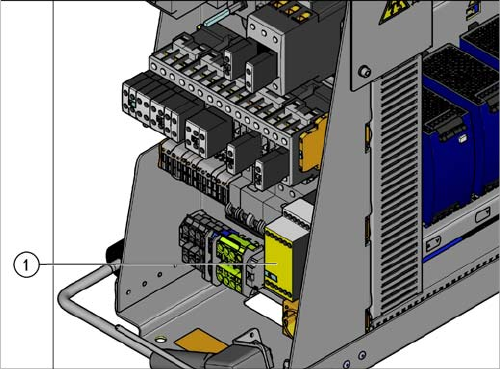
3.2.11 Replacing the Protective Contactor Combination [00358268-xx]
Replacing the Protective Contactor Combination [00358268-xx]
Parts, Equipment and Tools
▪ Protective contactor combination 3TK28 25 [00358268-xx]
Overview
Removal
► Switch off the machine, disconnect it from the power supply and secure it to prevent unauthorized
reactivation. Observe the instructions in section "1.2 Preparatory Work..." [ ➙ 12].
► Unplug all connections to the protective contactor combination. You may want to mark their posi-
tions, to make clear assignment easier later on.
► Take the protective contactor combination off the rail. To do this, press the protective contactor com-
bination upwards slightly and tilt it.
Installation
► Follow the removal instructions in reverse order for installation.
1. Protective contactor combination
Service Work
3.2.12 Replacing the Output Coupling Link (K7) [03065954-xx] Electrical System
Service Manual SIPLACE SX4/DX4 53
3.2.12
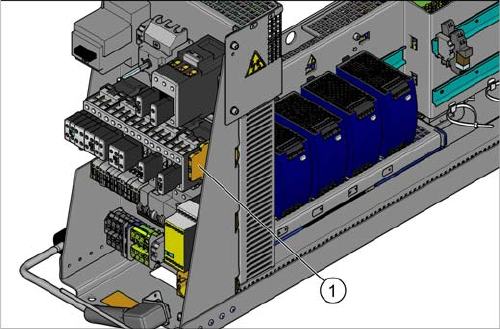
3.2.12 Replacing the Output Coupling Link (K7) [03065954-xx]
Replacing the Output Coupling Link (K7) [03065954-xx]
Parts, Equipment and Tools
▪ Output coupling link 24V AC/DC 1W [03065954-xx]
Overview
Removal
► Switch off the machine, disconnect it from the power supply and secure it to prevent unauthorized
reactivation. Observe the instructions in section "1.2 Preparatory Work..." [ ➙ 12].
► Unplug all connections to the output coupling link. You may want to mark their positions, to make
clear assignment easier later on.
► Take the output coupling link off the rail.
Installation
► Follow the removal instructions in reverse order for installation.
1. Output coupling link
Service Work
Electrical System 3.2.13 Replacing the Socket [00375320-xx]
54 Service Manual SIPLACE SX4/DX4
3.2.13
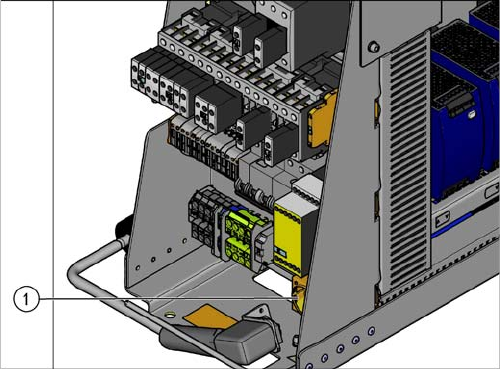
3.2.13 Replacing the Socket [00375320-xx]
Replacing the Socket [00375320-xx]
Parts, Equipment and Tools
▪ Socket, rail-mounted SD-D/SC/LA/GY [00375320-xx]
Overview
Removal
► Switch off the machine, disconnect it from the power supply and secure it to prevent unauthorized
reactivation. Observe the instructions in section "1.2 Preparatory Work..." [ ➙ 12].
► Unplug all connections to the socket. You may want to mark their positions, to make clear assign-
ment easier later on.
► Take the socket off the rail.
Installation
► Follow the removal instructions in reverse order for installation.
1. Socket