SIPLACE-SX4-DX4-用户手册.pdf - 第94页
Service Work Gantries 3.5.14 Installa tion Positions on the Head Plate 94 Service Manual SIPLACE SX4/DX4 3.5.14 3 . 5 . 1 4 I n s t a lla t io n P o s it io n s o n t h e H e a d P la t e Installation Position s on the H…
Service Work
3.5.13 Replacing the Head Adapter for the HCU and the HCU Gantries
Service Manual SIPLACE SX4/DX4 93
Converting the HCU
If you have ordered the base adapter without HCU(s) you will have to convert the HCU(s). Proceed as
follows:
► Repeat this procedure for the second HCU, if necessary (for TwinHead only).
Installation
► Follow the removal instructions in reverse order for installation. Also observe the following instruc-
tions:
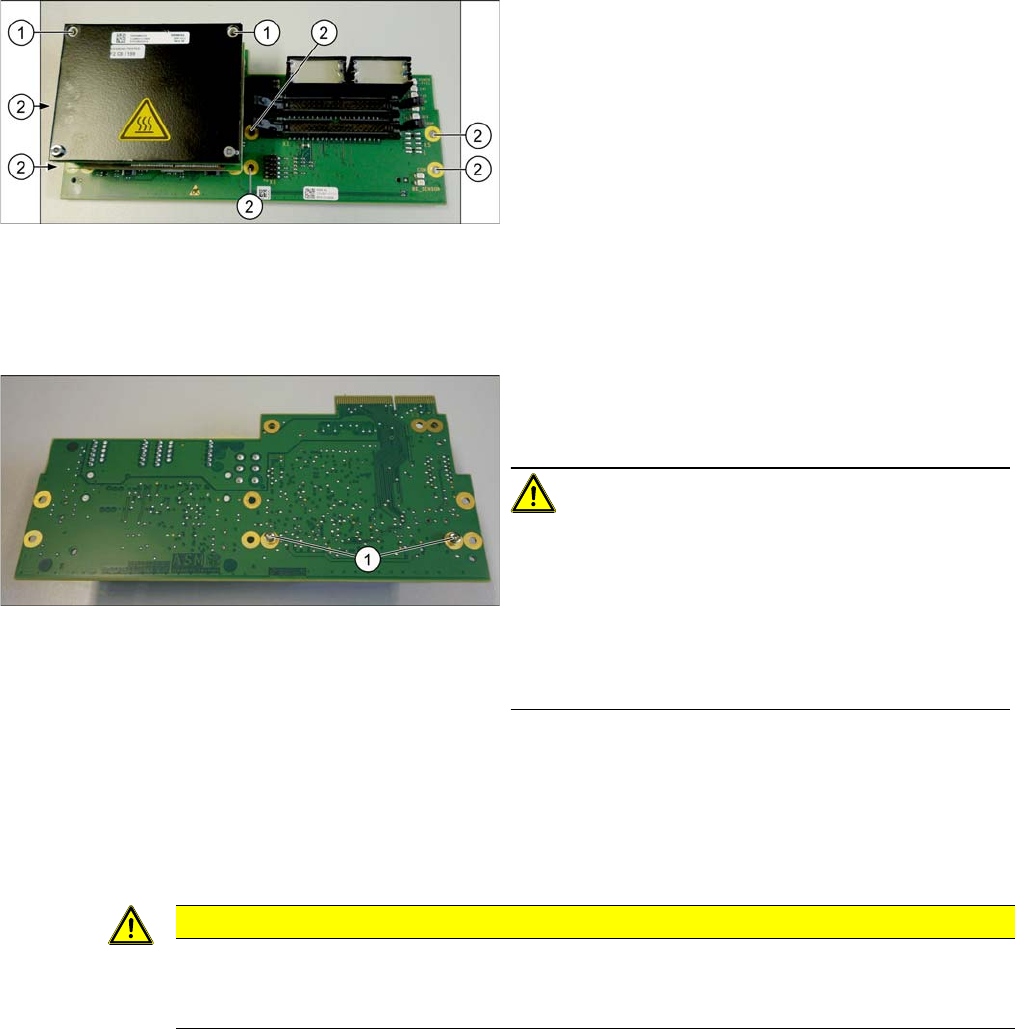
► Loosen the screws (2) fastening the board.
► In addition, the board is fastened with the topmost of
both HCU screws (1). You also need to loosen this.
► Carefully pull the board down and off.
Make sure that the head adapter board is connected
to the head interface via a press-fit connection from
below.
► Loosen the two screws fastening the HCU on the
back of the board and carefully pull the HCU off the
base adapter.
CAUTION!
Washers and pins
Make sure that you do not lose the washers. Make a note
of the number of washers used for each screw, as this
may well differ. These will need to be fitted back in again
as well.
Make sure that you do not damage the pins under the
HCU.
CAUTION
Installation instructions
► Check the firmware and perform a download, if needed. (See "5.8.1 Firmware Download
(SW 70x)" [ ➙ 266])
Service Work
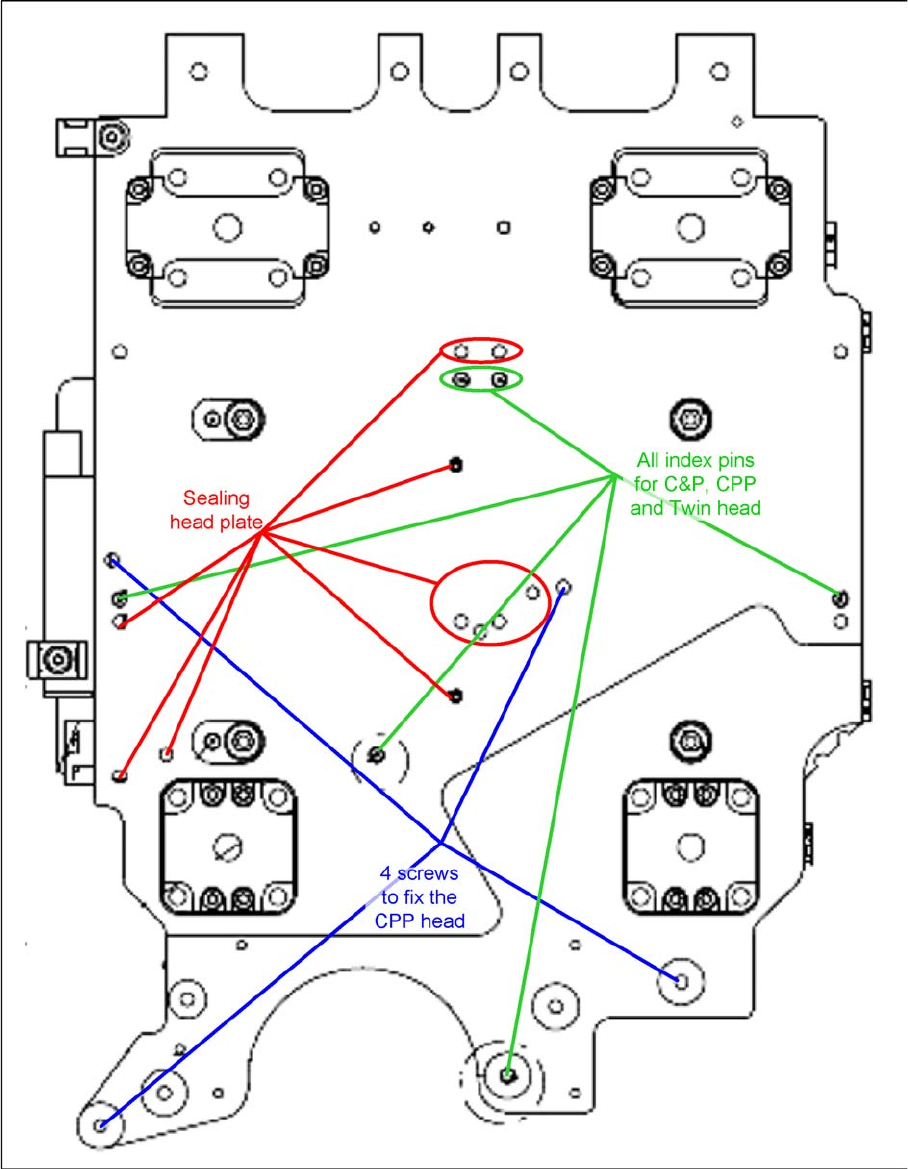
Gantries 3.5.14 Installation Positions on the Head Plate
94 Service Manual SIPLACE SX4/DX4
3.5.14
3.5.14 Installation Positions on the Head Plate
Installation Positions on the Head Plate
Service Work
3.6.1 Loosening the Conveyor Side Clamps Conveyor
Service Manual SIPLACE SX4/DX4 95
3.6
3.6 Conveyor
Conveyor
Conveyo r X-Series S, SX-Ser ies, DX-S eries – Ca ution: Moving the Conveyor Sides
3.6.1
3.6.1 Loosening the Conveyor Side Clamps
Loosening the Conveyor Side Clamps
Many tasks performed on the conveyor require that the conveyor sides are moved when the machine is
switched off. The clamps on the conveyor sides of dual conveyors can be released for this.
0100 - SXDX12V1V2 SXDX4 X34iS
Conveyo r X-Series S, SX-Ser ies, DX-S eries – Ca ution: Moving the Conveyor Sides
CAUTION
Moving the conveyor sides
The conveyor sides are highly sensitive and may not be moved unless you have released the
brakes. If you do move them without releasing the brakes, this could cause irreparable damage
to the conveyor sides.
► We recommend that you use the software to help you move the conveyor sides.
► If you are not able to do this, the conveyor sides of dual conveyors can also be moved by
manually docking in the adjustment units. Make sure that the cylinders in all clamping units
of a particular side engage. The conveyor sides can then be moved by carefully pulling on
the toothed belt of the width adjustment unit.
► If you are not able to do this, the brakes of dual conveyors can also be manually released
using a pin. Take special care not to distort the conveyor sides.
CAUTION
Lifting table
► The lifting table must always be lowered when the conveyor sides are moved.
NOTICE
Single conveyor
There are no clamps on a single conveyor.
► You can move the flexible side here by carefully pulling on the width adjustment toothed
belt.
CAUTION
Moving the conveyor sides
The conveyor sides are highly sensitive and may not be moved unless you have released the
brakes. If you do move them without releasing the brakes, this could cause irreparable damage
to the conveyor sides.
► We recommend that you use the software to help you move the conveyor sides.
► If you are not able to do this, the conveyor sides of dual conveyors can also be moved by
manually docking in the adjustment units. Make sure that the cylinders in all clamping units
of a particular side engage. The conveyor sides can then be moved by carefully pulling on
the toothed belt of the width adjustment unit.
► If you are not able to do this, the brakes of dual conveyors can also be manually released
using a pin. Take special care not to distort the conveyor sides.