SIPLACE-SX4-DX4-用户手册.pdf - 第156页
Service Work Cutter 3.9.1 Replacing the Cutter on the COT Insert [03066690-xx] 156 Service Manual SIPLACE SX4/DX4 Installation ► Move the cut ter into its installa tion p osition, us ing the sup po rt/chair for assistanc…
Service Work
3.9.1 Replacing the Cutter on the COT Insert [03066690-xx] Cutter
Service Manual SIPLACE SX4/DX4 155
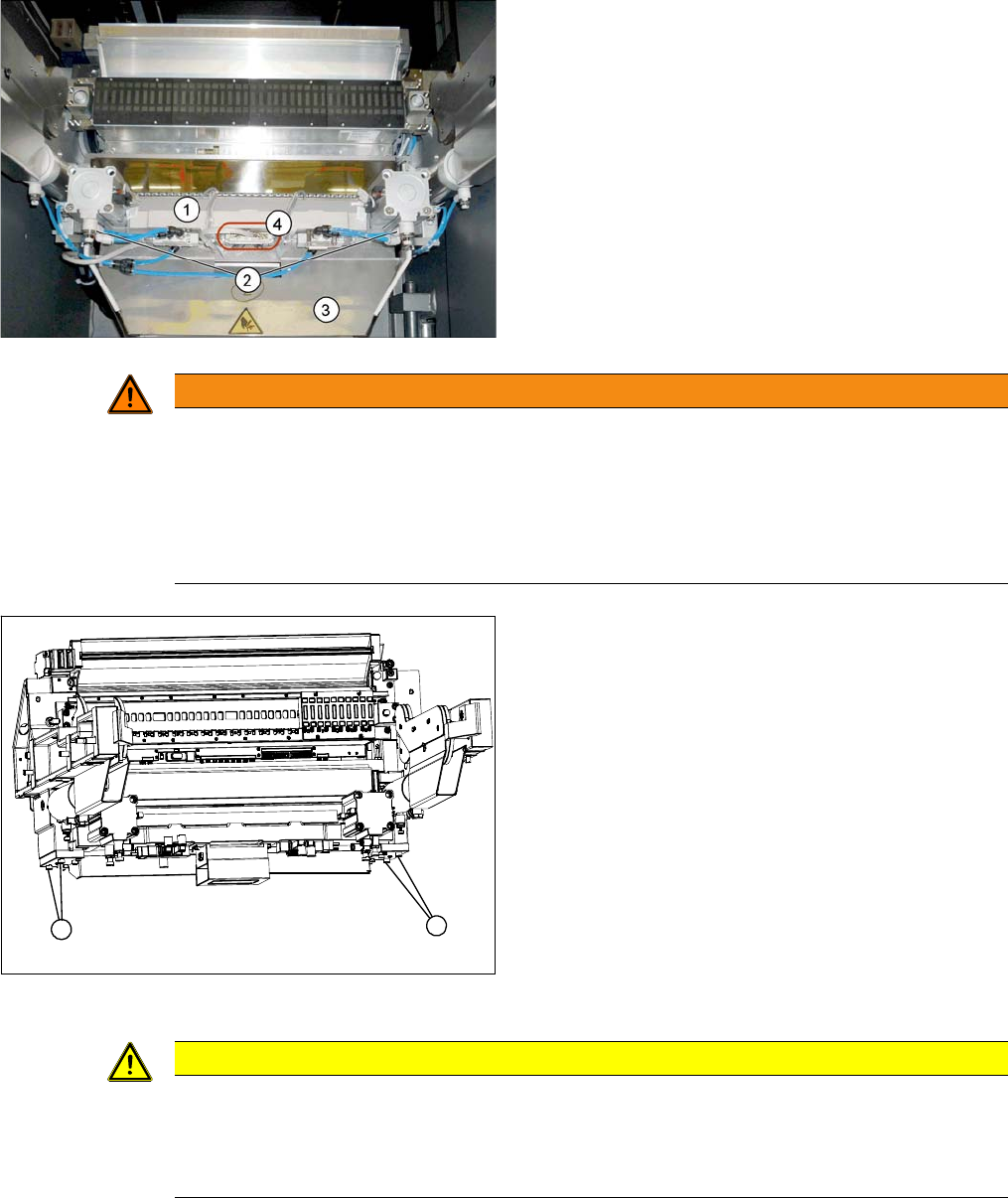
1. Cutter
2. Pneumatic cylinder
3. Waste tape container
► Loosen the four screws fastening the waste tape con-
tainer (3) and remove this container.
► Loosen the compressed air connections for the short-
stroke cylinder (2) at the coupling.
► Unplug the electrical connections (4) to the cutter by
pressing the connector at the side and pulling it off.
WARNING
Risk of injury when releasing the fixtures!
The cutter is only held by the fastening screws and is not supported by other parts. If the four
fastening screws are loosened, the cutter will fall down and out of the machine.
► Make sure that no one is under the cutter!
► Support the cutter by placing a suitable object (e.g. height-adjustable support or chair) un-
der it.
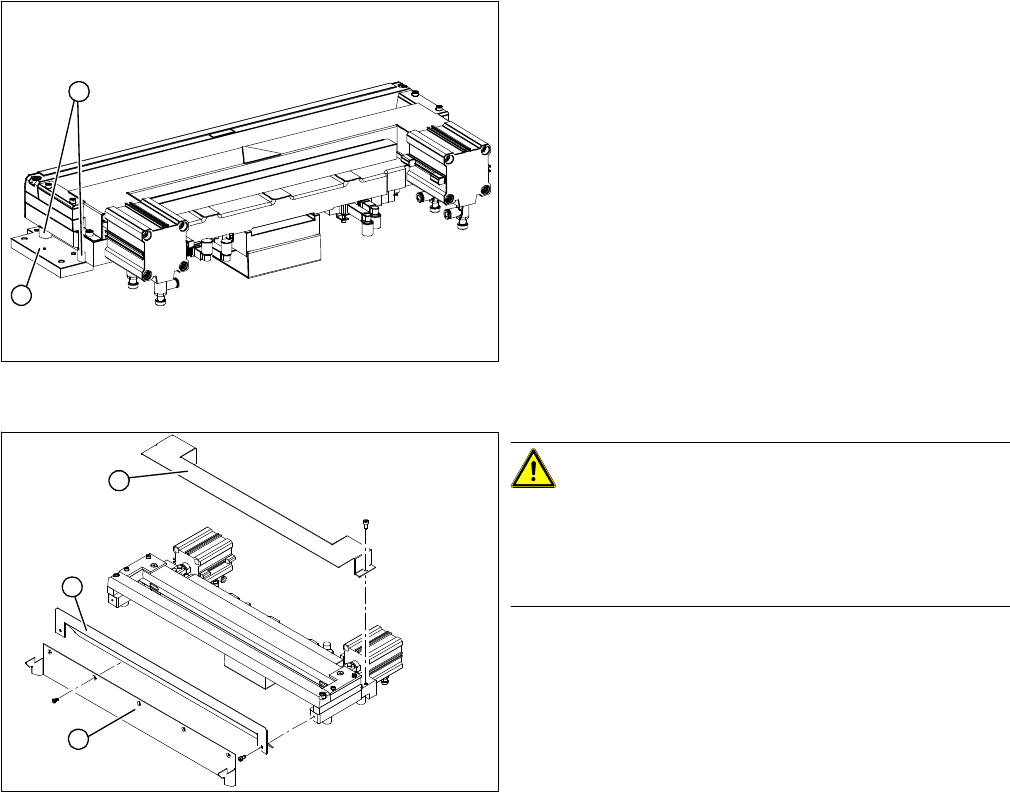
COT insert (using example of X series)
► Loosen the four fastening screws (1) on the cutter
mount.
► Carefully lower the cutter and lift it out of the machine.
1
1
CAUTION
Additional work
► For all further work, either fix the cutter to the mounting plate with four hexagon socket-head
screws (M6) or use screw clamps to fasten the cutter to a sturdy table.
► Do not place the cutter onto the pneumatic connections down on the lifting cylinders.
Service Work
Cutter 3.9.1 Replacing the Cutter on the COT Insert [03066690-xx]
156 Service Manual SIPLACE SX4/DX4
Installation
► Move the cutter into its installation position, using the support/chair for assistance.
► Carefully lift the cutter into the planned position.
► Tighten all four fastening screws.
► Reconnect to the electrical and compressed air systems.
► Fit the waste tape container.
Cutter (using example of X series)
► Remove the two fixtures (1) on the left and right and
attach these with the spacer sleeves (2) to the new
cutter.
⇨ There may also be other shims in-between, which
will then need to be fitted back in the correct posi-
tion after service work.
► Carefully lift the cutter onto the spacer sleeves. Use
the spacer disks if provided.
► Tighten all four fastening screws.
Cutter (using example of X series)
CAUTION!
There is a risk of injuring yourself on the cutting edge of
the blades.
For this reason, the deflector plate (2), cover (1) and pro-
tective sheet (3) must be left mounted in place.
2
1
1
3
2
Service Work
3.9.2 Replacing the Baffle Plate [03019896-xx] Cutter
Service Manual SIPLACE SX4/DX4 157
3.9.2
3.9.2 Replacing the Baffle Plate [03019896-xx]
Replacing the Baffle Plate [03019896-xx]
Parts, equipment and tools
▪ Baffle plate (SIPLACE HF) [03019896-xx]
Removal
Installation
► Follow the removal instructions in reverse order for installation.
See also
1.2 Preparatory Work... [ ➙ 12]
► Remove the cutter from the machine. (See "3.9.1 Re-
placing the Cutter on the COT Insert [03066690-xx]"
[ ➙ 154])
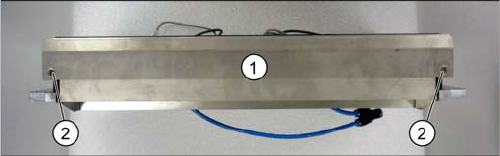
The baffle plate (1) is located on the back of the cutter.
► Loosen the two screws (2) fastening the baffle plate
and then remove the baffle plate.