SIPLACE-SX4-DX4-用户手册.pdf - 第138页
Service Work Placement heads 3.7.1 Fast Head Exch ange 138 Service Manual SIPLACE SX4/DX4 ► The presence of calibr ation nozzles is che cked here. Make sure that the h ead is e quipped with calib ration nozzles. ► If t h…
Service Work
3.7.1 Fast Head Exchange Placement heads
Service Manual SIPLACE SX4/DX4 137
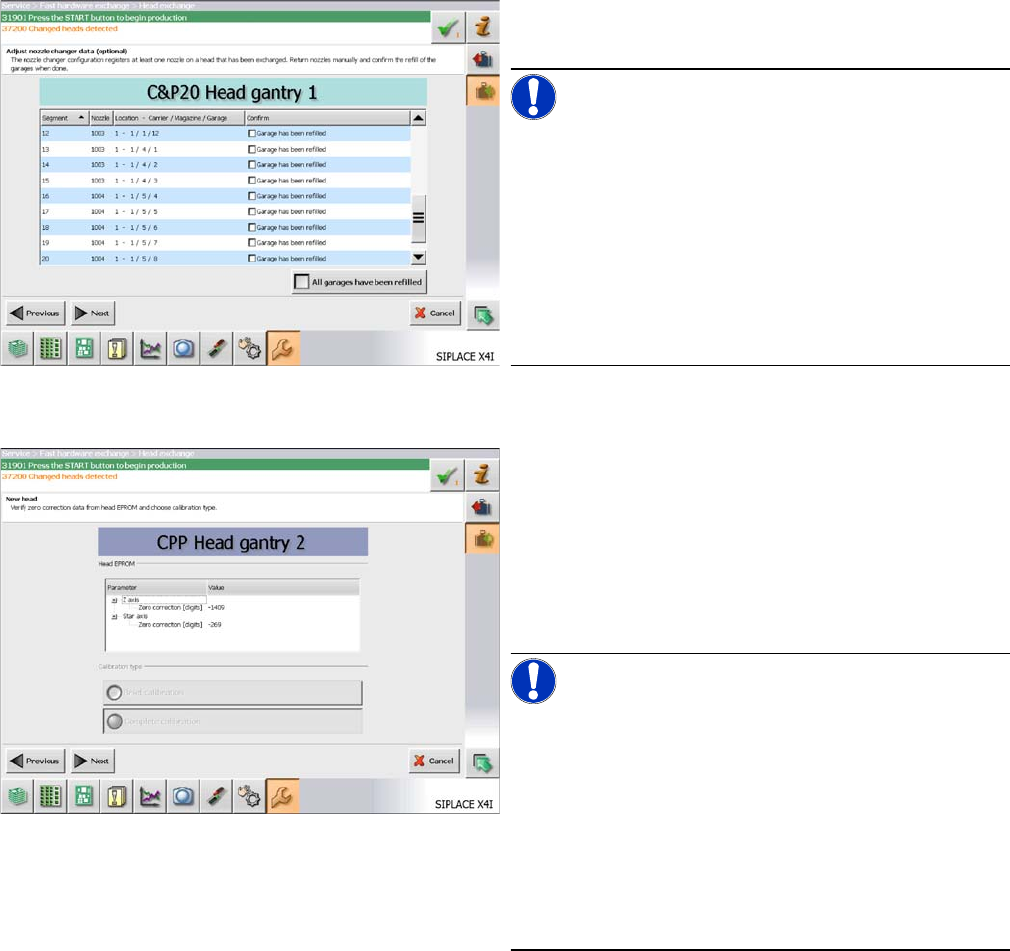
► Refill the nozzle changer garages of the nozzle
changer with the relevant nozzles.
NOTICE!
You can skip refilling the garages. In this case you have
to refill the nozzle changer before the start of the produc-
tion.
In the columns "Nozzle" and "Location - Magazine Carri-
er/Magazine/Garage" you see the nozzles that were pre-
sent on the removed head and that are now missing in
the nozzle changer.
If the garage has been refilled, confirm this in the "Con-
firm" column.
► Click on "Next".
The head specific data from the EEPROM are automati-
cally transferred to the machine data during the startup of
the machine.
► Check the values in the "Head EEPROM" section.
► In the "Calibration type" section select "Brief calibra-
tion" for precalibrated heads and "Complete calibra-
tion" for all other heads.
NOTICE!
This "Brief calibration" procedure covers the following
points:
The component camera at the head will be calibrated.
(Determination of the head rotation in relation to the com-
ponent camera)
The segment offset is detected using the reference seg-
ment. (Determination of the global segment offset (head
offset) in relation to the PCB camera and the positioning
of all stationary cameras)
► Click on "Next".
If several heads were exchanged, this dialog will be dis-
played for each head.
Service Work
Placement heads 3.7.1 Fast Head Exchange
138 Service Manual SIPLACE SX4/DX4
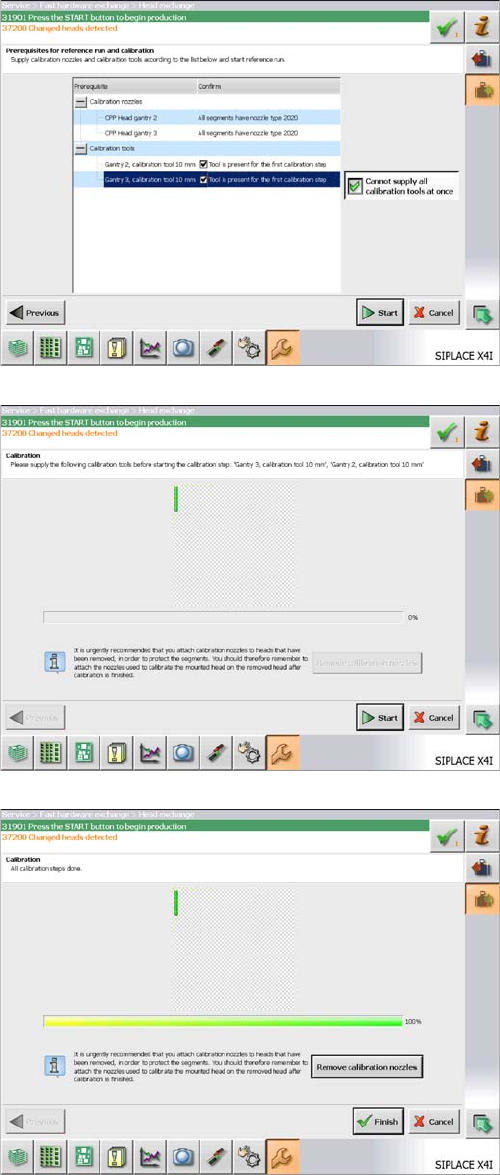
► The presence of calibration nozzles is checked here.
Make sure that the head is equipped with calibration
nozzles.
► If there is no calibration tool present for each head,
click on the "Cannot supply all calibration tools at
once button". You will be prompted to provide the cal-
ibration tool for each head individually.
► Click on "Start". A complete reference run will be car-
ried out.
► Provide the necessary calibration tools and click on
"Start". The calibration will be started.
► If there is an empty magazine in the machine after the
calibration has been completed, select the "Remove
calibration nozzles" button.
► Click on "Finish".
► If there are any problems during the reference run
(vacuum check), perform the "zero correction" for the
pressure control valve.
The Fast Head Exchange has now been completed and
production can be restarted.
Service Work
3.7.2 Replacing the C&P20/A/M Head Placement heads
Service Manual SIPLACE SX4/DX4 139
3.7.2
3.7.2 Replacing the C&P20/A/M Head
Replacing the C&P20/A/M Head
Parts, equipment and tools
▪ Select the placement head:
▪ Torque screwdriver 100-500 Ncm [03078400-xx]
▪ Extension/straight TX20 [03073256-xx]
▪ Bit holder for Torque Vario-S screwdriver [03078706-xx]
▪ Torx Allen screwdriver TX8 [03080081-xx]
▪ Calibration tool version SST23 [03034148-xx]
▪ Protective hose for component sensor [03078596-xx]
▪ For additional work to the placement head:
Service manual "C&P20 / C&P20 A / C&P20 M head" [DE: 00197464-xx] [EN: 00197465-xx]
▪ For vacuum pump mode, if required:
- assembly instructions "Vacuum pump X-Series S, SX4/DX4" [00196845-xx]
- assembly instructions "Vacuum pump SX1/2, DX1/2" [00196614-xx]
- assembly instructions "Vacuum pump X-Series (SC 70x)" [00196433-xx]
- assembly instructions "Vacuum pump X-Series" [00195089-xx]
NOTICE
Fast Head Exchange (FHE)
► Observe the instructions in section "3.7.1 Fast Head Exchange" [➙134] when exchanging
a head.
NOTICE
Example
Replacement of the placement head is shown using the example of a C&P20 A machine. The
replacement procedure for other C&P20 placement heads is the same. Any differences will be
explicitly indicated.
Head type Item no.
C&P20 A 03062095-xx – with camera
03058420-xx – without camera
C&P20 M 03103108-xx – without camera