SIPLACE-SX4-DX4-用户手册.pdf - 第254页
Settings Conveyor Settings 5.5.1 Belt Tension 254 Service Manual SIPLACE SX4/DX4 Setting See also 3.6.1 Lo osening the Conveyo r Side Clamps [ ➙ 95] 3.6.1 Lo osening the Conveyo r Side Clamps [ ➙ 95] 1.2 Prep…
Settings
5.5.1 Belt Tension Conveyor Settings
Service Manual SIPLACE SX4/DX4 253
5.5.1.3
5.5.1.3 Setting the Conveyor Drive Belt Tension
Setting the Conveyor Drive Belt Tension
Setting without Flat Spiral Spring [03075316-xx]
Setting
See also
3.6.1 Loosening the Conveyor Side Clamps [ ➙ 95]
1.2 Preparatory Work... [ ➙ 12]
Setting with Flat Spiral Spring [03075316-xx]
Parts, equipment and tools
Prerequisite
► Use the software to move the conveyor sides into the position which allows you best access. As an
alternative, you can loosen the clamps for the relevant sides in dual conveyors.
► Switch off the machine, disconnect it from the power supply and secure it to prevent unauthorized
reactivation. Observe the instructions in section "1.2 Preparatory Work..." [ ➙ 12].
► The motor needs to be loosely fastened with three screws. Do not tighten these screws fully yet.
► Check the tension of the toothed belt. The tension
must be 250+/-15 Hz.
► If the tension is not correct, loosen the conveyor drive
and adjust the tension.
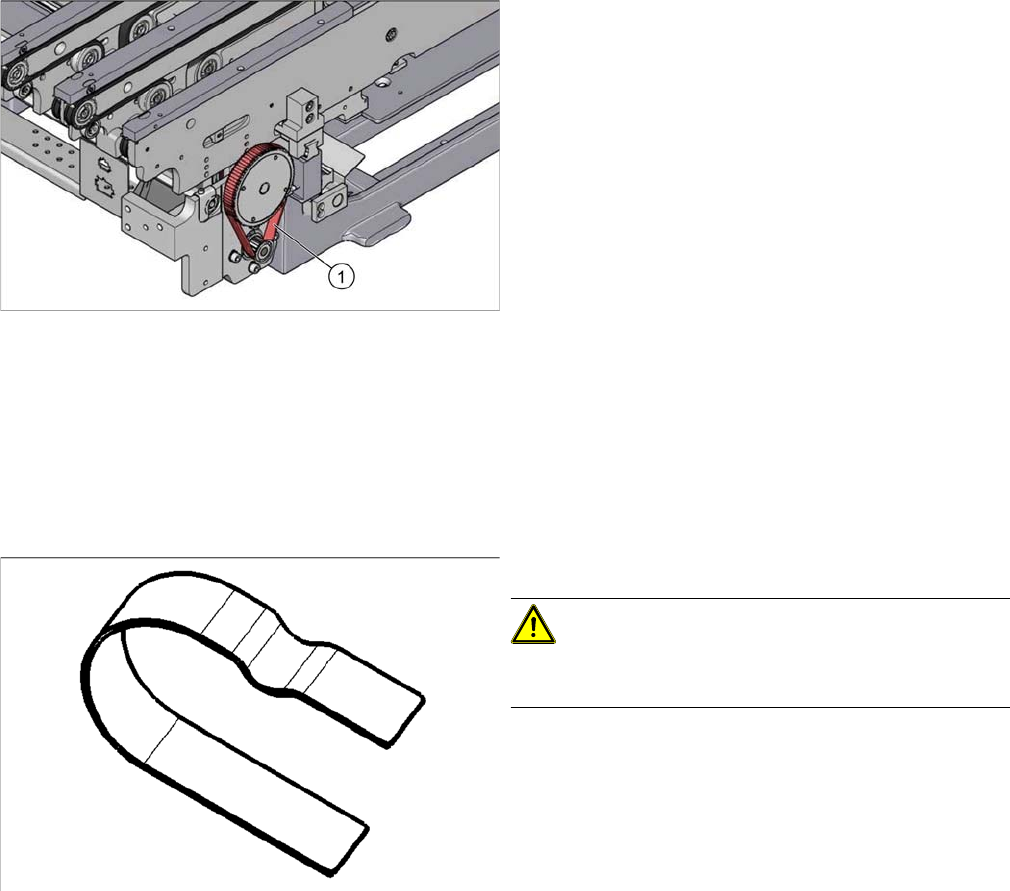
▪ Flat spiral spring [03075316-xx]
CAUTION!
If the flat spiral spring is used frequently or is bent, correct
setting can no longer be guaranteed.
Settings
Conveyor Settings 5.5.1 Belt Tension
254 Service Manual SIPLACE SX4/DX4
Setting
See also
3.6.1 Loosening the Conveyor Side Clamps [ ➙ 95]
3.6.1 Loosening the Conveyor Side Clamps [ ➙ 95]
1.2 Preparatory Work... [ ➙ 12]
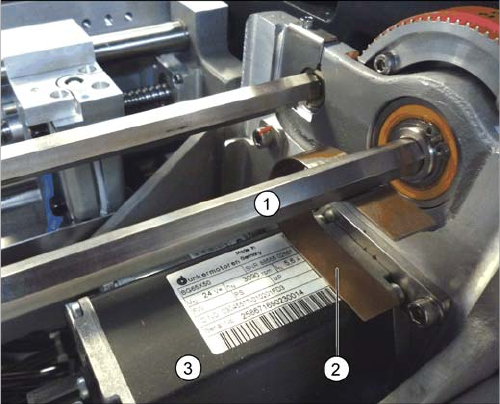
Conveyor drive (using example of SX1/SX2)
► Clamp the flat spiral spring (2) between the motor (3)
and the shaft above it (1). While doing so, push the
flat spiral spring as far as possible in the direction of
the conveyor side. The flat spiral spring must lie flush
on the motor, as shown in the diagram. The shaft
should be set so that its flat side is in the flat spiral
spring.
► Tighten the screws fastening the motor.
⇨ The tension of the flat spiral spring and the weight of
the motor should now have set the belt tension cor-
rectly to 250 +/-20 Hz.
Settings
5.5.1 Belt Tension Conveyor Settings
Service Manual SIPLACE SX4/DX4 255
5.5.1.4
5.5.1.4 Calculating the Belt Tension
Calculating the Belt Tension
Example
Distance between the rollers: 235 mm
Calculation:
20000/235 = 85 (exactly 85.106…)
10 % of 85.106… = 8.5106…
Result:
Belt tension: 85 +/-9 Hz
NOTICE
For conveyor belt only
This calculation only applies to the conveyor belt.
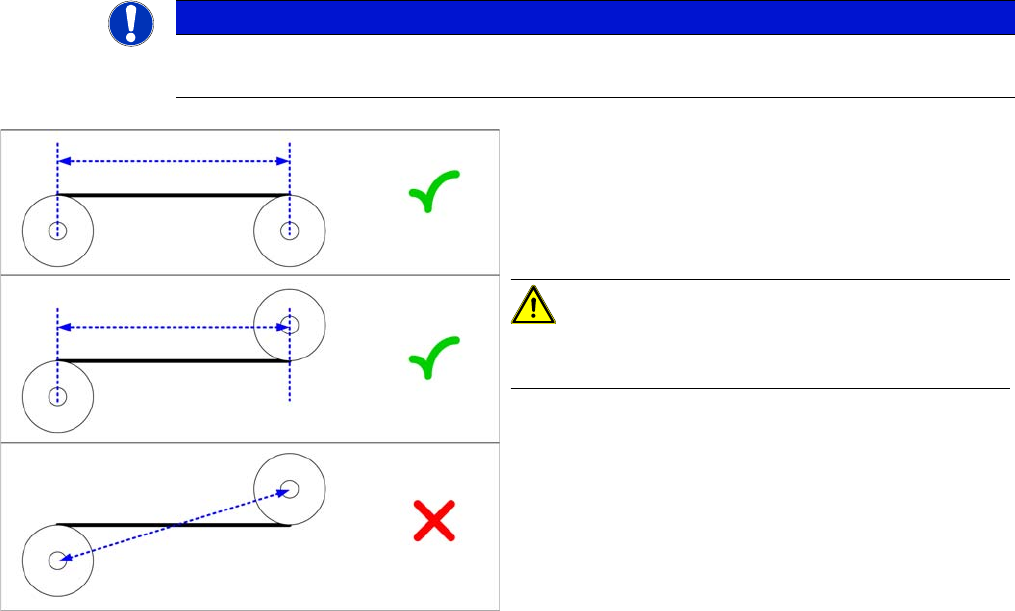
► Define the two deflection pulleys between which you
want to set the belt tension. If possible, avoid using
the idlers for this.
► Measure the distance between the two deflection pul-
leys parallel to the conveyor belt. (see diagram)
CAUTION!
Please note that it is not always possible to just measure
the deflection pulleys from center to center.
► Calculate the belt tension using the following formula:
(20000 / roller spacing [mm]) [Hz]
The permissible tolerance is always plus/minus 10 % of
the calculated value.