SIPLACE-SX4-DX4-用户手册.pdf - 第263页
Settings 5.6.1 Setting the Nozzle Changer Height Nozzle Changer Setting Service Manual SIPLACE SX4/DX4 263 5.6 5 . 6 N o z z le C h a n g e r S e t t in g Nozzle Changer Setting 5.6.1 5 . 6 . 1 S e t t in g t h e N o z z…
Settings
Conveyor Settings 5.5.6 Lifting Table
262 Service Manual SIPLACE SX4/DX4
5.5.6
5.5.6 Lifting Table
Lifting Table
5.5.6.1
5.5.6.1 Setting the Parallelism and Height of the Lifting Table Plate
Setting the Parallelism and Height of the Lifting Table Plate
Overview
Setting
► Use the software to move the conveyor sides to maximum width. (see also "3.6.1 Loosening the Con-
veyor Side Clamps" [ ➙ 95]).
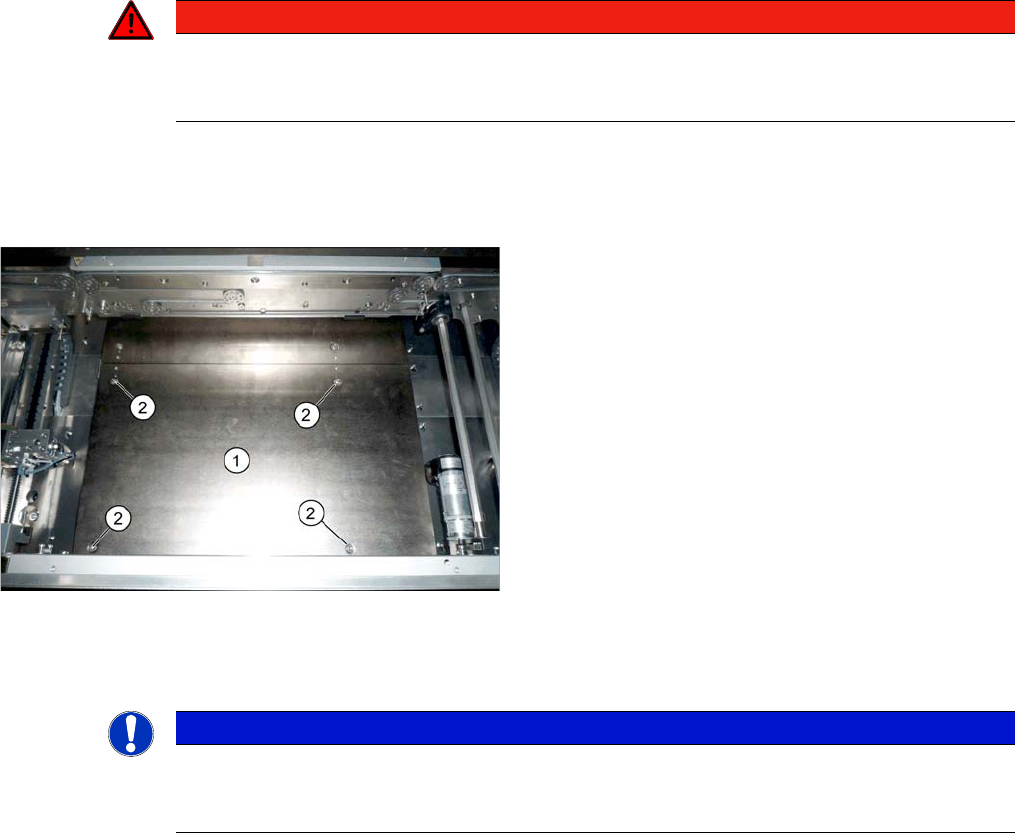
► Loosen the screws fastening the lifting table plate (countersunk screws) but do not remove the lifting
table plate.
► Use the software to clamp the lifting table (without board).
► Underneath the fastening screws, there are setting screws (socket-head 5).
Use these setting screws to set the lifting table plate so that it has no play between it and the clamp-
ing edge.
► Check all four corners of the lifting table for any play.
► Check the setting by clamping a board into place. Check all corners to see whether there is any play.
► Calibrate the zero position of the lifting table motor.
See also
1.2 Preparatory Work... [ ➙ 12]
DANGER
Press the EMERGENCY STOP!
Before performing adjustment work you must ensure that the lifting table has been secured
against movement!
Lifting table plate (example of X-Series S shown)
1. Lifting table plate
2. Fastening screws for lifting table plate
NOTICE
Single, dual conveyor
The setting is shown in the diagram using the example of a lifting table unit for the dual conveyor
(DC). Setting the single conveyor (SC) follows the same procedure.
Settings
5.6.1 Setting the Nozzle Changer Height Nozzle Changer Setting
Service Manual SIPLACE SX4/DX4 263
5.6
5.6 Nozzle Changer Setting
Nozzle Changer Setting
5.6.1
5.6.1 Setting the Nozzle Changer Height
Setting the Nozzle Changer Height
Parts, equipment and tools
▪ NC shim plate [03021079-xx]
▪ NC support plate [03021044-xx]
▪ Screws DIN 965-M4 x 10-4.8 [00095312-xx]
Settings
5.6.2
5.6.2 Setting the Height of the Nozzle Reject Station
Setting the Height of the Nozzle Reject Station
Parts, equipment and tools
▪ Shim plates for nozzle reject device [03039514-xx]
Settings
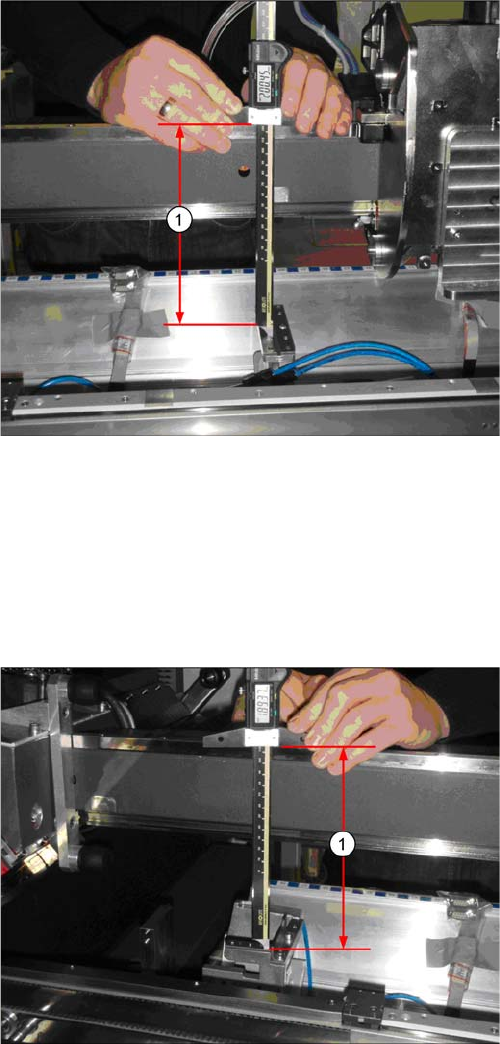
► The distance (1) between the contact surface of the
reject unit and the guidance rail of the gantry needs
to be 200 +/-0.2 mm.
You may need to use shim plates to adjust this.
► The distance (1) between the contact surface of the
nozzle reject station and the guidance rail of the gan-
try needs to be 189 +/-0.2 mm.
You may need to use shim plates to adjust this.
Settings
Nozzle Changer Setting 5.6.3 Jumpers on the Nozzle Changer
264 Service Manual SIPLACE SX4/DX4
5.6.3
5.6.3 Jumpers on the Nozzle Changer
Jumpers on the Nozzle Changer
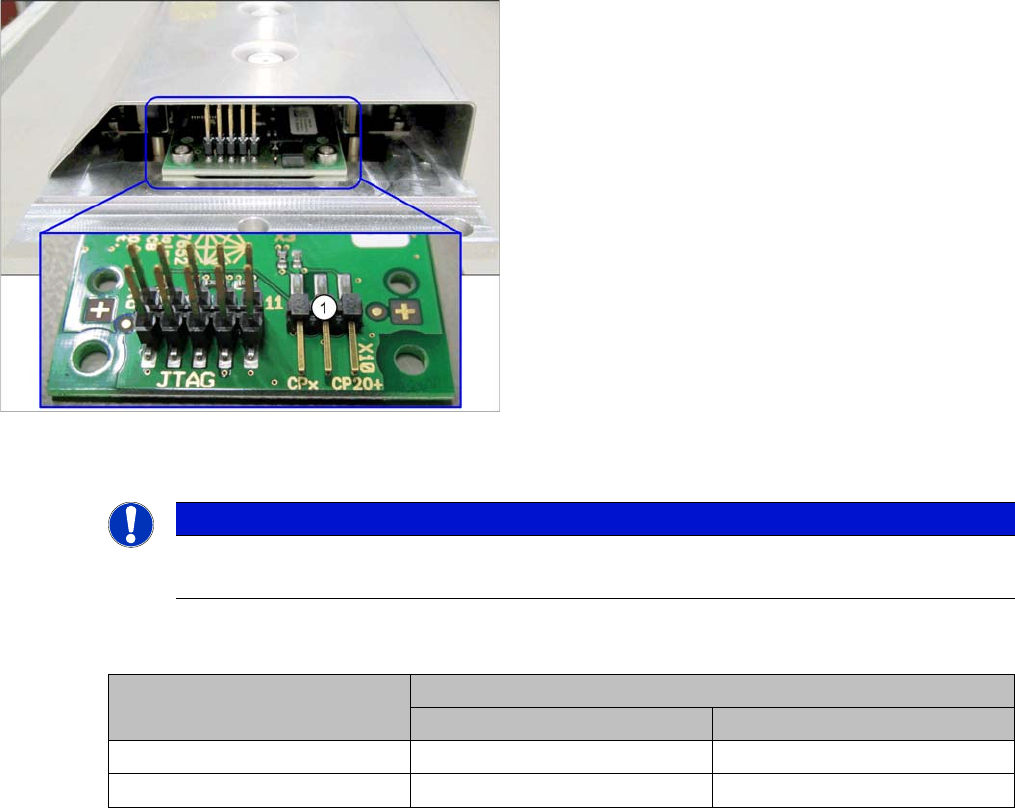
The jumper X10 needs to be set at the following nozzle changers:
▪ Nozzle changer basic structure CPx/all assembly - short [03103649-xx]
▪ Nozzle changer basic structure CPx/all assembly - long [03103514-xx]
Overview
Setting
► Set the correct value for your head type and software.
Nozzle Changer CP20P - Jumper X10
Jumper X10
See also
6.6.2 Nozzle Changer Main Board C&P20P [03107652-xx] [ ➙ 295]
1. Jumper X10
NOTICE
Before installation
Due to the design, this setting must be performed before installation in the machine.
Head Jumper position
SW <= 706.x SW >= 707.x
CPx, DLM 1-2 1-2 or 2-3
C&P20 P --- 2-3 (factory settings)