SIPLACE-SX4-DX4-用户手册.pdf - 第292页
Description of the circuit boards COT inse rt 6.4.1 Connecting assy FCU [03059783- xx] 292 Service Manual SIPLACE SX4/DX4 6.4 6 . 4 C O T in s e r t COT insert 6.4.1 6 . 4 . 1 C o n n e c t in g a s s y F C U [ 0 3 0 5 9…
Description of the circuit boards
6.3.3 Conveyor control TSP410 Conveyor
Service Manual SIPLACE SX4/DX4 291
6.3.3
6.3.3 Conveyor control TSP410
Conveyor control TSP410
Conveyor control [03077468-xx]/[03077469-xx]
Description of the circuit boards
COT insert 6.4.1 Connecting assy FCU [03059783-xx]
292 Service Manual SIPLACE SX4/DX4
6.4
6.4 COT insert
COT insert
6.4.1
6.4.1 Connecting assy FCU [03059783-xx]
Connecting assy FCU [03059783-xx]
03059783-04
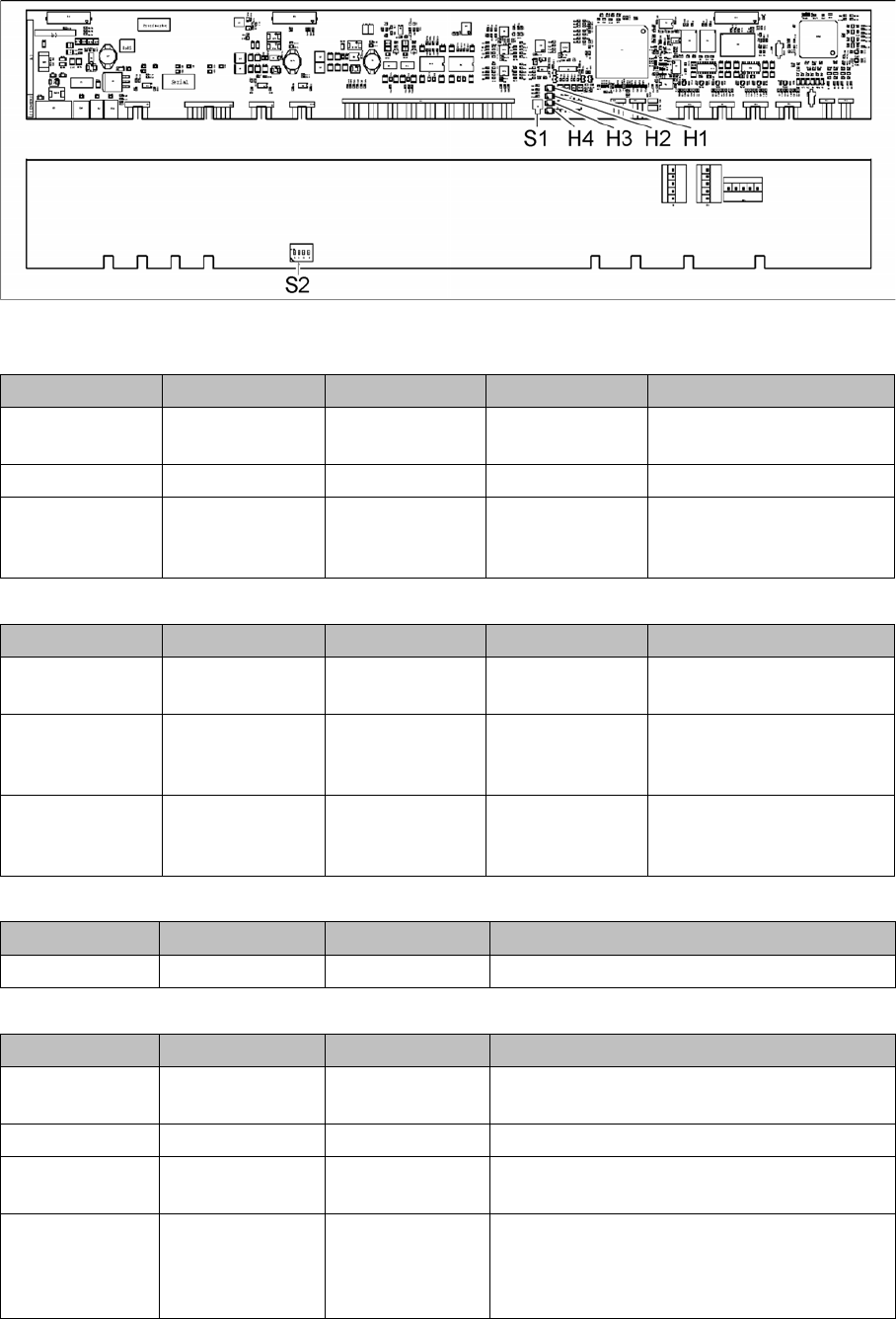
LED (test mode for reject box switched off – S2.1 ON) [03059783-04]
LED (test mode for reject box switched on – S2.1 OFF) [03059783-04]
Button S1 [03059783-04]
Dip switch S2 [03059783-04]
LED Color Status Signal name Description
H1, H2, H3, H4 GN Sequential shift
light
LED1, 2, 3, 4 FCU OK
H1, H2, H3, H4 GN ON LED1, 2, 3, 4 eSW application missing
H1, H2, H3, H4 GN Flashing LED1, 2, 3, 4 FCU error, reboot place-
ment machine or replace
FCU
LED Color Status Signal name Description
H1 or H2 or H3 or
H4
GN Flashes LED1 or 2 or 3 or
4
No sensor connected for
reject box 1 or 2 or 3 or 4
H1 or H2 or H3 or
H4
GN OFF LED1 or 2 or 3 or
4
Sensor for reject boxes 1 or
2 or 3 or 4 connected, but
no reject box inserted
H1 or H2 or H3 or
H4
GN ON LED1 or 2 or 3 or
4
Sensor for reject boxes 1 or
2 or 3 or 4 connected, but
no reject box inserted
Buttons Status Function Description
S1 OFF RESET When pressed
Switch Status Signal name Description
S2.1 ON/OFF FCU_ENV3 ON: test mode for reject box switched off
OFF: test mode for reject box switched on
S2.2 OFF FCU_ENV2 40-fold FCU
S2.3 ON/OFF FCU_ENV1 ON: without insert control, with virtual button
OFF: with insert control, without virtual button
S2.4 ON/OFF FCU_ENV0 ON: with tape cutter and with nozzle changer
functionality
OFF: without tape cutter and without nozzle
changer functionality
Description of the circuit boards
6.5.1 Vision LED driver VLT 33 [03039244-xx] Stationary cameras
Service Manual SIPLACE SX4/DX4 293
6.5
6.5 Stationary cameras
Stationary cameras
6.5.1
6.5.1 Vision LED driver VLT 33 [03039244-xx]
Vision LED driver VLT 33 [03039244-xx]
This board is part of the stationary camera SST25, SST33 and SST36. The stationary cameras which
can be fitted vary according to the machine type used.
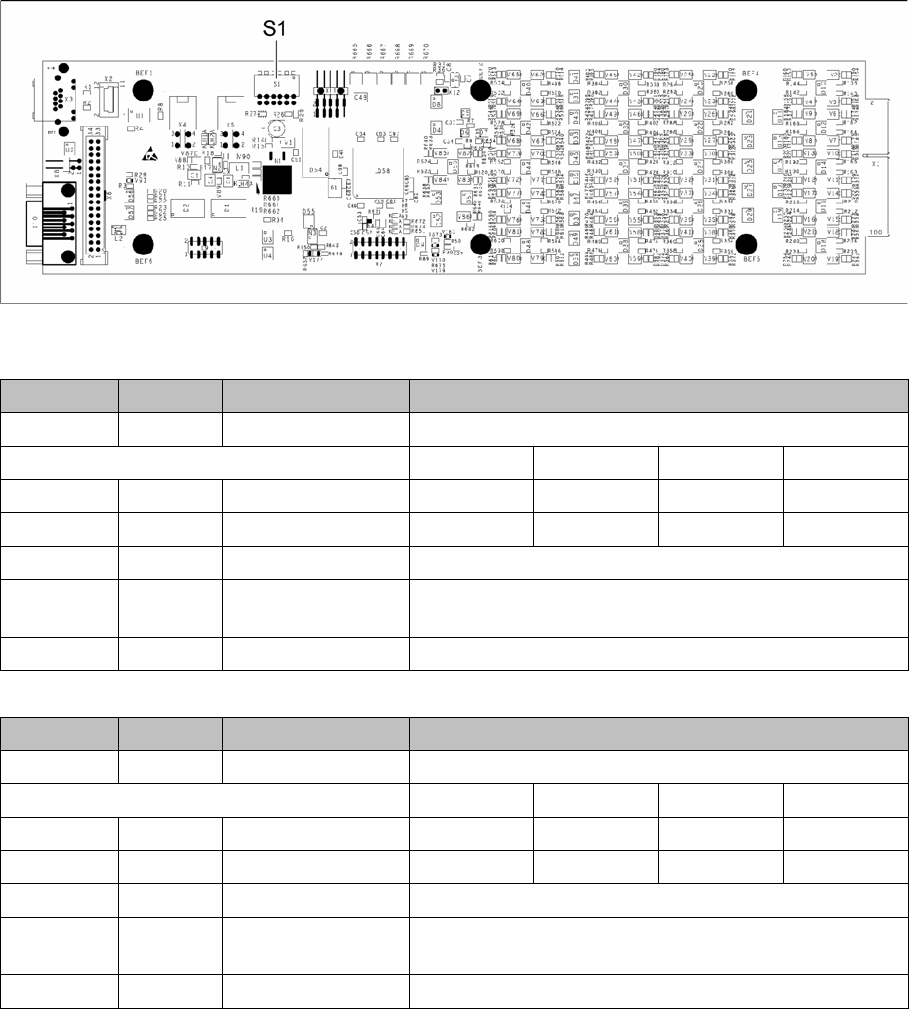
03039244-03
DIP switch S1 for SST25 [03039244-03]
DIP switch S1 for SST33, 36 [03039244-03]
Switch Status Signal name Description
S1.1 OFF VCU_CODE OFF: normal operation, ON: Reset
Gantry 1 Gantry 2 Gantry 3 Gantry 4
S1.2 ON/OFF GANTRY_ID_0 OFF ON OFF ON
S1.3 ON/OFF GANTRY_ID_1 OFF OFF ON ON
S1.4 OFF SMD_LED OFF: standard LED, ON: SMD LED
S1.5 OFF CAN_H OFF: with CAN terminator
ON: without CAN terminator
S1.6 OFF CAN_GROUP OFF: FC camera, ON: IC camera
Switch Status Signal name Description
S1.1 OFF VCU_CODE OFF: normal operation, ON: Reset
Gantry 1 Gantry 2 Gantry 3 Gantry 4
S1.2 ON/OFF GANTRY_ID_0 OFF ON OFF ON
S1.3 ON/OFF GANTRY_ID_1 OFF OFF ON ON
S1.4 OFF SMD_LED OFF: standard LED, ON: SMD LED
S1.5 OFF CAN_H OFF: with CAN terminator
ON: without CAN terminator
S1.6 ON CAN_GROUP ON: IC camera , OFF: FC camera