00198227-03_UM_MaterialSetupAssistant_2.3-R17-1_DE_EN.pdf - 第132页
Introduction Functional Limits 132 ASM Material Setup Assistant 2.3 (R17-1) ASM Material Setup Ass i st a n t 2 . 3 Automatic synchronization of the production schedule and monito ring of production progress by the Order…
Introduction
Scope of Functions With ASM Material Manager
ASM Material Setup Assistant 2.3 (R17-1) ASM Material Setup Assistant 2.3 (R17-1) 131
1.3
1.3 Scope of Functions With ASM Material Manager
Scope of Functions With ASM Material Manager
ASM Material Manager is available in two versions.
ASM Material Manager - Full Version
With the full version, you perform the storage management with the ASM Material Manager. The material
flow in the factory is controlled totally and completely automatic.
▪ Material order via material demand lists.
▪ Automatic pick-up from the relevant storage equipment (e. g. SIPLACE Material Tower).
▪ Controlled transport of the material (via PDAs) into the pre-setup area and back.
ASM Material Manager for MSA
With the ASM Material Manager for MSA, you control the material flow in the factory yourself. Based on
the setup lists from ASM Setup Center, you trigger the order, the transport, and the handover of the ma
-
terial into the setup area. You can use the scan procedures Sort material and Record material to enter
the material in ASM Setup Center.
See also "5.8.3 Sorting and Recording Supplied Material" [ ➙ 213].
1.4
1.4 SIPLACE Material Setup Assistant Benefits
SIPLACE Material Setup Assistant Benefits
Reduction of material movement between warehouse and presetup area
Material demand lists are created in the Order Manager. These are automatically sent to the ASM Ma
-
terial Manager, in accordance with the production order. Warehouse picking is performed with the ASM
Material Manager.
▪ Only the material which is not already in the presetup area or at the relevant line will be picked from
the warehouse.
▪ Only the material which is not required anymore in the production schedule will be placed back in
the warehouse.
Reduction of presetup work due to reuse of materials
Material reuse in the presetup area reduces the setup work considerably. The setup work in the pre-set
-
up area and in the warehouse is reduced by each individual reuse of a material.
Efficient user guidance with status LED display on the feeders
The status LEDs of the SIPLACE Material Setup Assistant indicate the most important information for
the operator.
Fewer materials opened or sent back to warehouse
The reuse of materials means that material often remain in the presetup areas of the lines. This reduces
the number of opened materials in the warehouse.
Introduction
Functional Limits
132 ASM Material Setup Assistant 2.3 (R17-1) ASM Material Setup Assistant 2.3
Automatic synchronization of the production schedule and monitoring of production progress
by the Order Manager
SIPLACE Material Setup Assistant automatically distributes information about the production schedule
to the following areas of your production environment:
▪ Production/line
– Update of production schedules in the SIPLACE Line Control GUI on the lines.
▪ Presetup area
– Order of setups to be prepared in ASM Setup Center GUI plus determination and display of ma
-
terial reuse status in the Active Feeder Pool.
▪ Warehouse
– Generation of material demand lists for the warehouse in the ASM Material Manager.
This means that the production scheduler no longer needs to manually communicate the production
schedule to the various process stages. The production scheduler can monitor the progress of the pro
-
duction schedule with the help of Gantt diagrams in the Order Manager.
1.5
1.5 Functional Limits
Functional Limits
General Information
The following functions are only supported to a limited degree or not all in SIPLACE Material Setup As
-
sistant 2.3:
▪ With S-type feeders, material reuse is only possible to a limited degree. (See "8 Mixed Operation of
S Feeders and X Feeders in a Line" [ ➙ 239])
▪ Conversion with uninterrupted feeder changeover at the line (floating setup)
With ASM Material Manager for MSA
The following workflow steps are NOT supported in SIPLACE Material Setup Assistant 2.3 in combina
-
tion with ASM Material Manager for MSA.
▪ ASM Material Manager for MSA does not create material demand lists.
▪ With the ASM Material Manager for MSA, material CANNOT be picked from the warehouse.
▪ Reordering refill material is not possible via the ASM Material Manager for MSA.
▪ Material CANNOT be put into the warehouse with the ASM Material Manager for MSA.
NOTICE
ASM Material Manager - Full Version Only
Material requirement lists can only be created with the ASM Material Manager - Full Version.
NOTICE
Use of multiple-track feeders
Feeders with more than one track (e.g. the SIPLACE SmartFeeder 2x8 mm X) are not recom
-
mended for use in flexible family setups. However, in fixed setups and on constant tables, these
feeders are recommended.
Preconditions and Configurations
ASM Material Setup Assistant 2.3 (R17-1) ASM Material Setup Assistant 2.3 (R17-1) 133
2
2 Preconditions and Configurations
Preconditions and Configurations
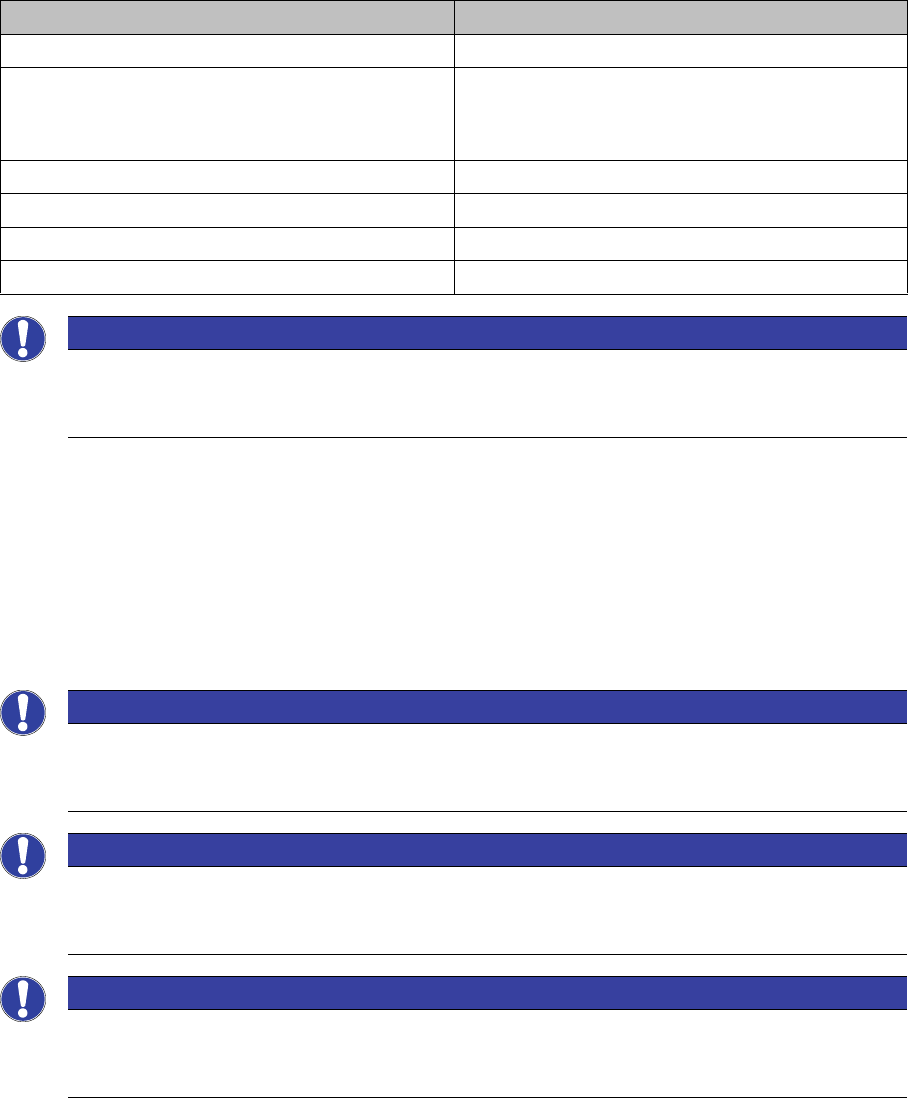
The following systems are a prerequisite for the SIPLACE Material Setup Assistant 2.3. These must be
already installed correctly and functional. For more details about the installation procedure, refer to the
relevant installation guide.
To enable SIPLACE Material Setup Assistant to function and communicate with the applications in
-
volved, you need to modify the configuration settings for the following applications.
▪ ASM Setup Center
▪ ASM OIB
▪ ASM Material Manager - full version (not with ASM Material Manager for MSA)
▪ ASM Engineering Data Manager (EDM) – optional
These configurations were performed during the installation of the Order Manager. See also the Instal
-
lation Guide for Material Setup Assistant 2.x [item no. 00198228-02].
Application From software version
ASM Setup Center 9.1
ASM Material Manager - Full Version
Or
ASM Material Manager for MSA
2.6
SIPLACE Pro with LCGUI 14.1 or higher
ASM OIB 5.1
Order Manager 2.3
ASM Engineering Data Manager (EDM) – optional 3.4
NOTICE
Tearing down all lines and changeover tables before the first commissioning
When introducing SIPLACE Material Setup Assistant, all lines and changeover tables must be
torn down before the first commissioning.
NOTICE
Configuration Settings in ASM OIB
You can adjust the configuration settings in ASM OIB later on, to suit your requirements. See
also "2.1 Configuration Settings in ASM OIB" [ ➙ 134].
NOTICE
Checking the configuration settings in ASM Setup Center
Check the configuration settings in ASM Setup Center. See also "2.2 Configuration Settings in
ASM Setup Center" [ ➙ 154].
NOTICE
Checking the configuration settings in ASM Material Manager
Check the configuration settings in ASM Material Manager. See also "2.3 Configuration Set
-
tings in the ASM Material Manager" [ ➙ 161].