00198227-03_UM_MaterialSetupAssistant_2.3-R17-1_DE_EN.pdf - 第216页
Workflow with Flexible Family Setup Executing and Monitoring Setup Preparation 216 ASM Material Setup Assistant 2.3 (R17-1) ASM Material Setup Ass i st a n t 2 . 3 5.8.4.1 5 . 8 . 4 . 1 S c a n W o r k f lo w " C h …
Workflow with Flexible Family Setup
Executing and Monitoring Setup Preparation
ASM Material Setup Assistant 2.3 (R17-1) ASM Material Setup Assistant 2.3 (R17-1) 215
5.8.4
5.8.4 Checking the Material Reuse Status
Checking the Material Reuse Status
Purpose
In order to identify and assign an individual packaging unit, the scan workflow Check reuse status is
available in ASM Setup Center.
This is helpful if you find material without an assignment to a location.
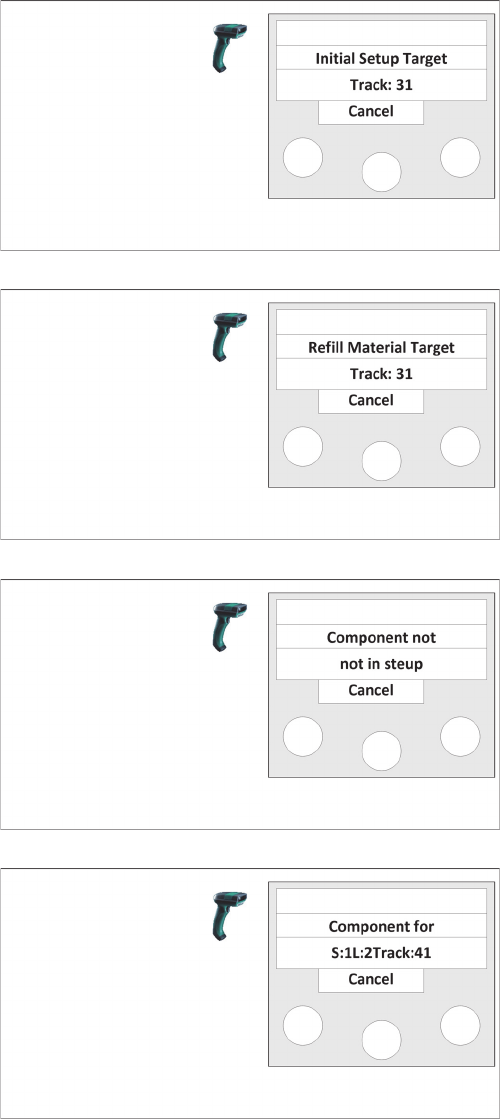
Step 5
If this packaging unit is required for the location, the tar
-
get track of the location is displayed.
The packaging unit is registered.
If another packaging unit has been scanned with this ma
-
terial, the Refill Material Target menu is displayed.
Step 5a
If this packaging unit is required as refill material for the
location, the target track of the location is displayed.
The packaging unit is registered.
If the component of this packaging unit is not part of the
setup, the Component not in setup menu is displayed.
Step 5b
It is indicated that this component is not required in this
setup.
If, however, the component of this packaging unit must be
set up at another location, the Component for menu is
displayed.
Step 5c
It is indicated that this component is required on station
(S:xx), at location (L:xx) on track (T:xx).
The packaging unit is registered if the following option is
enabled in ASM Setup Center: main menu => Extras =>
Settings => General => Settings for offline setup verifica
-
tion and, in Material Setup Assistant, the option Register
material for other location.
Workflow with Flexible Family Setup
Executing and Monitoring Setup Preparation
216 ASM Material Setup Assistant 2.3 (R17-1) ASM Material Setup Assistant 2.3
5.8.4.1
5.8.4.1 Scan Workflow "Check Reuse Status"
Scan Workflow "Check Reuse Status"
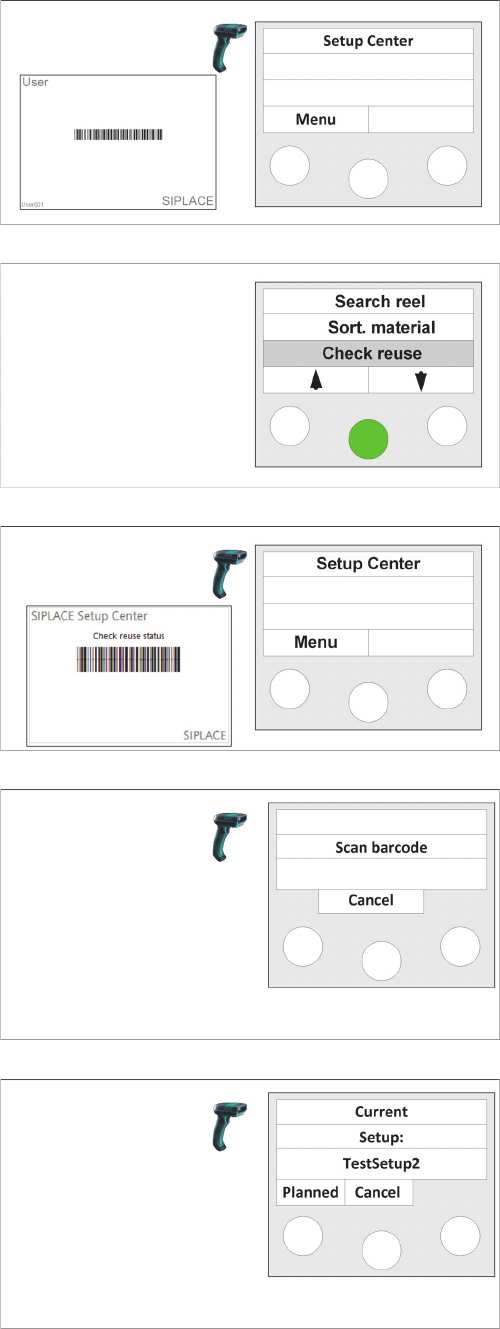
Step 1 (optional)
Scan in the the User if the "User registration at the reader
required“ option has been activated via
Extras Settings
Reader
.
Step 2
► Select the Check reuse function and confirm with En
-
ter.
Step 2a (alternatively)
► Scan the Check reuse status control barcode.
Step 3
► Scan the barcode of the packaging unit.
⇨ Depending on the status of the packaging unit, differ
-
ent messages can be displayed at the scanner.
⇨ After the message has been displayed, you can scan
another packaging unit to have its status displayed.
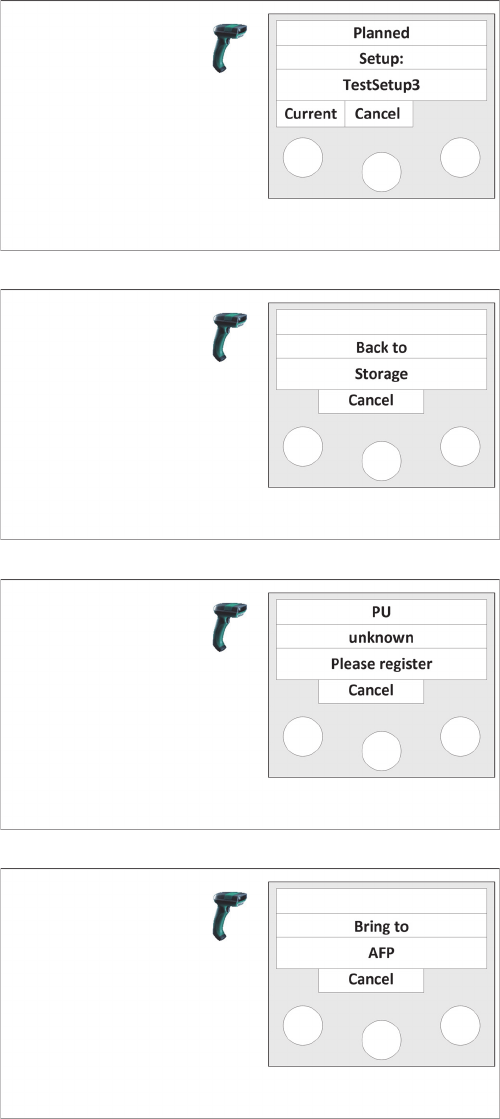
Message A
If this packaging unit is currently required for a setup, the
setup is displayed.
If this packaging unit is also planned for a later setup,
Planned is displayed.
► If you select Planned, message B Planned Setup is
displayed.
Workflow with Flexible Family Setup
Executing and Monitoring Setup Preparation
ASM Material Setup Assistant 2.3 (R17-1) ASM Material Setup Assistant 2.3 (R17-1) 217
Message B
The current setup is displayed.
Use Current to switch back to the previous menu.
Message C
It is indicated that this packaging unit must be returned to
the warehouse and put into storage.
Message D
It is indicated that this packaging unit is unknown and
must be registered.
Message E
It is indicated that this packaging unit must be put into the
AFP.