00198227-03_UM_MaterialSetupAssistant_2.3-R17-1_DE_EN.pdf - 第170页
Overview of Setup Preparation in ASM Setup Center Setup Preparation with Material Setup Wizard 170 ASM Material Setup Assistant 2.3 (R17-1) ASM Material Setup Ass i st a n t 2 . 3 Toolbar Table Icon/meaning Mean ing Sets…
Overview of Setup Preparation in ASM Setup Center
Setup Preparation with Material Setup Wizard
ASM Material Setup Assistant 2.3 (R17-1) ASM Material Setup Assistant 2.3 (R17-1) 169
3
3 Overview of Setup Preparation in ASM Setup Center
Overview of Setup Preparation in ASM Setup
Center
3.1
3.1 Setup Preparation with Material Setup Wizard
Setup Preparation with Material Setup Wizard
The Setup Preparation tab is only shown if these functions have been enabled in the settings. This option
requires a license.
► Go to the Setup Center main menu and enable the function Extras => Settings => General => Set
-
tings for offline setup verification => Material Setup Wizard and then select the option Use Material
Setup Wizard.
See "3.1.1 View - Setup Preparation" [ ➙ 169]
3.1.1
3.1.1 View - Setup Preparation
View - Setup Preparation
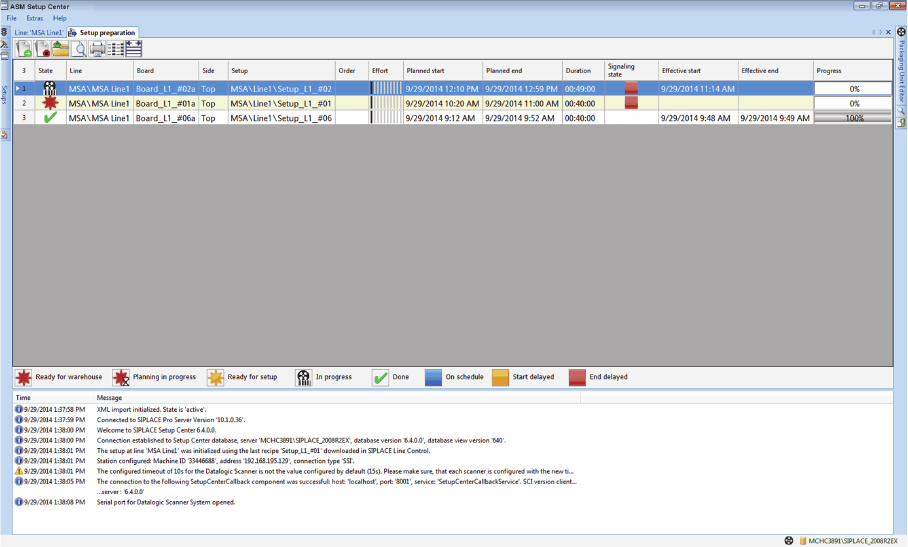
The Setup preparation view shows the planned SIPLACE Material Setup Assistant tasks for setup
preparation with the Setup Center.
Overview
Overview of Setup Preparation in ASM Setup Center
Setup Preparation with Material Setup Wizard
170 ASM Material Setup Assistant 2.3 (R17-1) ASM Material Setup Assistant 2.3
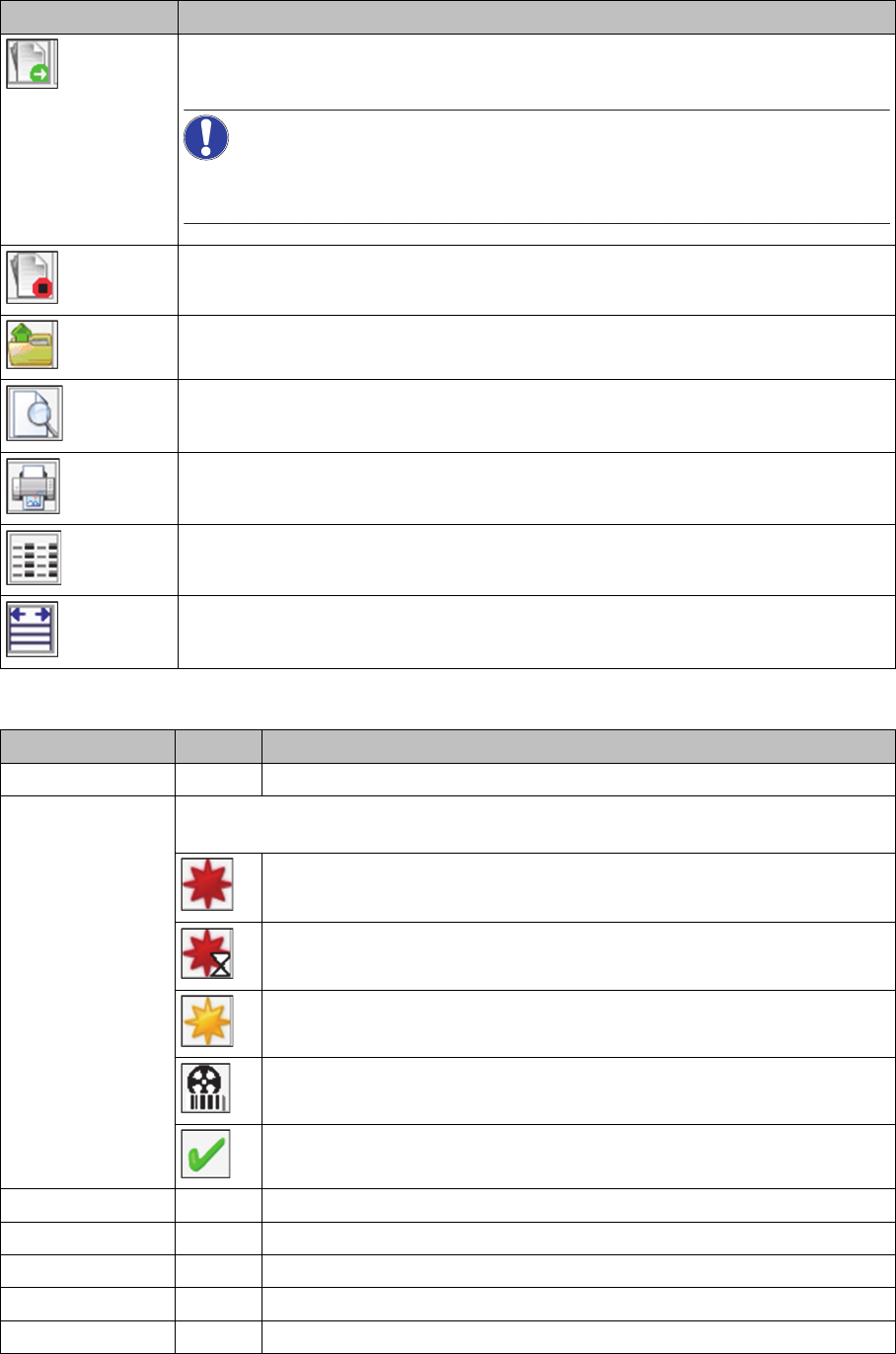
Toolbar
Table
Icon/meaning Meaning
Sets the starting point and begins setup preparation for the selected task.
NOTICE! This action is also performed when the setup list is scanned for
the first time (scanning the quickstart barcode).
Sets the end point and ends the setup preparation for the selected task.
Opens the view with the setup preparation for this setup.
Opens the print preview of the setup for the setup preparation.
Prints the setup report for the setup preparation.
Specify the parameters that will be shown in the table. A dialog box is opened in
which you can enable/disable the columns.
The width of the individual columns within the table is aligned to their contents.
Designation Icon Meaning
Task No. Order of tasks from the SIPLACE Material Setup Assistant workflow.
Status Shows the current status of this task. There can be 5 statuses waiting in the form
of icons for each task.
The outsourcing of material for this setup has not yet started.
A scheduling run is currently being performed in the SIPLACE Order
Manager.
Outsourcing has begun and has been completed for at least one loca
-
tion.
The offline setup verification is being performed in the presetup area with
ASM Setup Center.
The offline setup verification has been performed with ASM Setup
Center. The tasks performed will be removed from the list after 28 days.
Line Shows the path and the name of the line.
Board Shows the path and the name of the board.
Page Shows the board side (top/bottom).
Setup Shows the path and the name of the setup.
Job Shows the path and the name of the job.
Overview of Setup Preparation in ASM Setup Center
Setup Preparation with Material Setup Wizard
ASM Material Setup Assistant 2.3 (R17-1) ASM Material Setup Assistant 2.3 (R17-1) 171
Outlay Shows how many tracks of the maximum possible quantity are to be set
up (percentage utilization of line with components by setup).
The more lines which are black, the more setup work is needed. A line
for which all tracks are occupied will display all ten lines in black. If the
line has a lower utilization, fewer lines will be black.
Planned start Shows the scheduled time and date for starting this task.
Planned end Shows the scheduled time and date for finishing this task.
Duration Shows how much time is planned for this task.
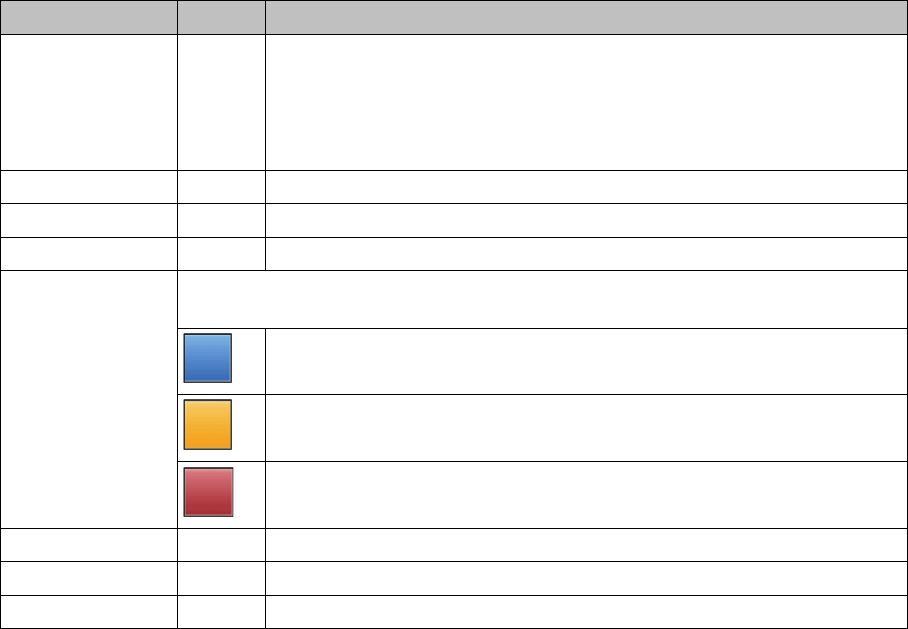
Signal status Shows whether the planned and upcoming tasks are within the scheduled time
-
frame.
Blue:
The task can be processed as planned.
Orange:
The planned starting time has been delayed.
Red:
The planned end time has been delayed.
Effective start Shows the time and date for when setup actually began.
Effective end Shows the time and date for when setup actually ended.
Progress Shows the setup progress (0% to 100%).
Designation Icon Meaning