00198227-03_UM_MaterialSetupAssistant_2.3-R17-1_DE_EN.pdf - 第168页
Preconditions and Configuratio ns Configuration Settings in EDM 168 ASM Material Setup Assistant 2.3 (R17-1) ASM Material Setup Ass i st a n t 2 . 3
Preconditions and Configurations
Configuration Settings in EDM
ASM Material Setup Assistant 2.3 (R17-1) ASM Material Setup Assistant 2.3 (R17-1) 167
► Confirm with OK and save the ED configuration with Save.
Additional Filter Options
In the Name Pattern tab, you can set further filter restrictions. As the rule is normally to be applied to all
production schedules, this is, however, an exception.
► Enter a regular expression to which the name of the production schedule is linked. If no entry is
made, the filter is set to the notifications of changes to ALL production schedules of the lines.
► Confirm with OK and save the ED configuration with Save.
Preconditions and Configurations
Configuration Settings in EDM
168 ASM Material Setup Assistant 2.3 (R17-1) ASM Material Setup Assistant 2.3
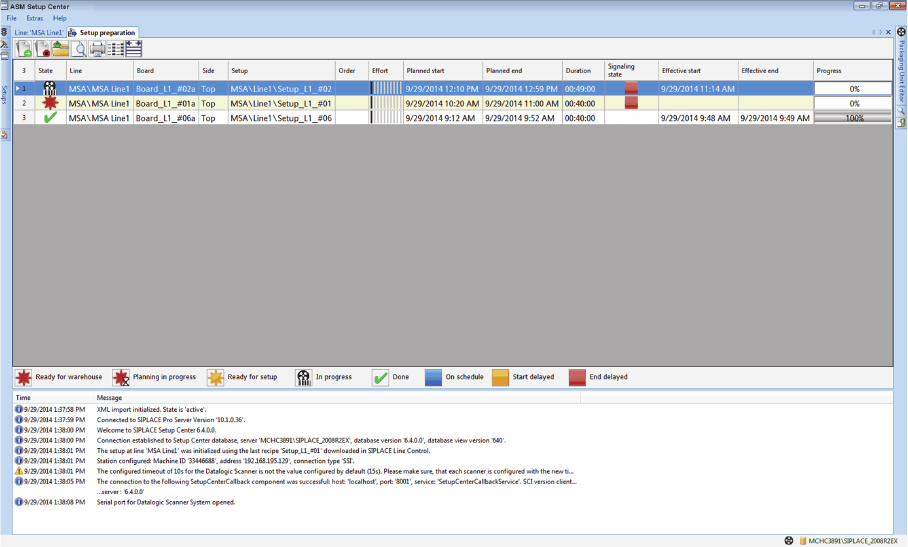
Overview of Setup Preparation in ASM Setup Center
Setup Preparation with Material Setup Wizard
ASM Material Setup Assistant 2.3 (R17-1) ASM Material Setup Assistant 2.3 (R17-1) 169
3
3 Overview of Setup Preparation in ASM Setup Center
Overview of Setup Preparation in ASM Setup
Center
3.1
3.1 Setup Preparation with Material Setup Wizard
Setup Preparation with Material Setup Wizard
The Setup Preparation tab is only shown if these functions have been enabled in the settings. This option
requires a license.
► Go to the Setup Center main menu and enable the function Extras => Settings => General => Set
-
tings for offline setup verification => Material Setup Wizard and then select the option Use Material
Setup Wizard.
See "3.1.1 View - Setup Preparation" [ ➙ 169]
3.1.1
3.1.1 View - Setup Preparation
View - Setup Preparation
The Setup preparation view shows the planned SIPLACE Material Setup Assistant tasks for setup
preparation with the Setup Center.
Overview