00198227-03_UM_MaterialSetupAssistant_2.3-R17-1_DE_EN.pdf - 第226页
Workflow with Fixed Setup and Constant Tables Creating Fixed Setups and Constant Tables in SIPLACE Pro 226 ASM Material Setup Assistant 2.3 (R17-1) ASM Material Setup Ass i st a n t 2 . 3 6.2 6 . 2 C r e a t in g F ix e …
Workflow with Fixed Setup and Constant Tables
Preconditions and Configurations
ASM Material Setup Assistant 2.3 (R17-1) ASM Material Setup Assistant 2.3 (R17-1) 225
6
6 Workflow with Fixed Setup and Constant Tables
Workflow with Fixed Setup and Constant Tables
In SIPLACE Material Setup Assistant, the functions for import, approval, download etc. are basically the
same as in the workflow for flexible family setups. The familiar functions are available in both cases. This
chapter describes the deviations and particularities when working with fixed setups and constant tables.
For common tasks and identical procedures, please refer to the standard workflow with flexible family
setups. Knowledge and content of chapter "5 Workflow with Flexible Family Setup" [ ➙ 189] are a pre
-
requisite.
6.1
6.1 Preconditions and Configurations
Preconditions and Configurations
6.1.1
6.1.1 Refill Material for Fixed Setups and Constant Tables
Refill Material for Fixed Setups and Constant Tables
Specify if refill material is to be requested for fixed setups and constant tables.
► Go to the ASM Studio and start the Factory Explorer module.
► Select Central Settings.
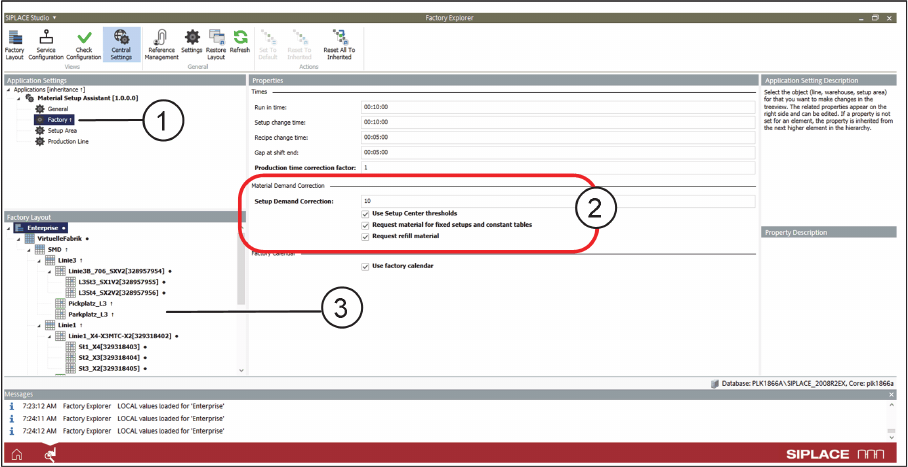
Factory Explorer – Central Settings: Factory
► Go to Application Settings => Material Setup Assistant and select Factory (1) from the tree structure.
SIPLACE MSA supports fixed setups and constant tables with or without request for refill material. The
settings can be made per line or globally.
► Go to the Factory Layout (3) of the line (e.g. Line 1) for the individual setting or go to Enterprise for
the global setting.
► If the material for constant tables and fixed setups is to be requested for this production line, go to
Setup Demand Correction (2) and activate the Material for fixed setups and constant tables option.
► Activate the Request refill material option if the refill material is to be requested for this production
line.
See also Constant Tables and Refill Material.
Workflow with Fixed Setup and Constant Tables
Creating Fixed Setups and Constant Tables in SIPLACE Pro
226 ASM Material Setup Assistant 2.3 (R17-1) ASM Material Setup Assistant 2.3
6.2
6.2 Creating Fixed Setups and Constant Tables in SIPLACE Pro
Creating Fixed Setups and Constant Tables in SIPLACE Pro
In order to define a setup as a fixed setup in SIPLACE Pro, you need to make the following settings in
the SIPLACE Pro Setup Editor.
Fixed Setup in the Setup Editor
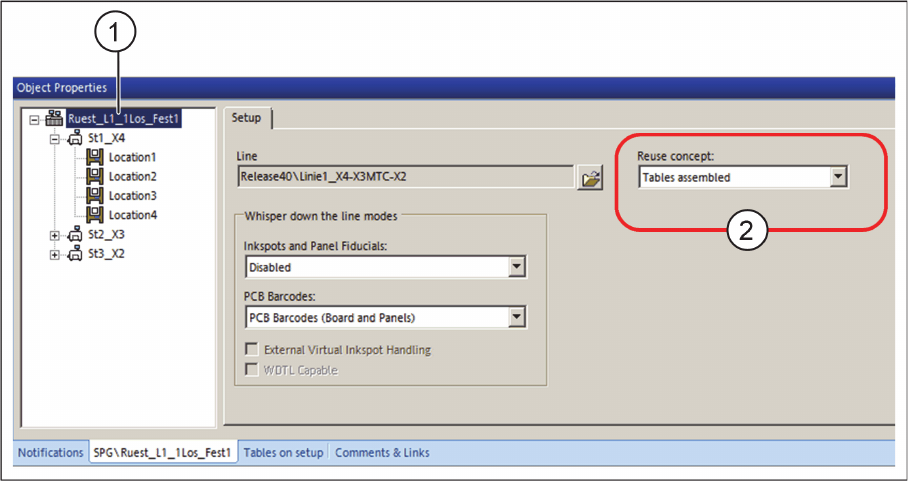
Setup Editor - Tab: Setup
► Open the Setup Editor and mark the setup (1).
► In the Setup tab => Reuse concept (2), select the Tables assembled option.
Workflow with Fixed Setup and Constant Tables
Creating Fixed Setups and Constant Tables in SIPLACE Pro
ASM Material Setup Assistant 2.3 (R17-1) ASM Material Setup Assistant 2.3 (R17-1) 227
Constant Tables
You can create constant tables either manually in SIPLACE Pro or using an optimization tool like SiClus
-
ter Professional.
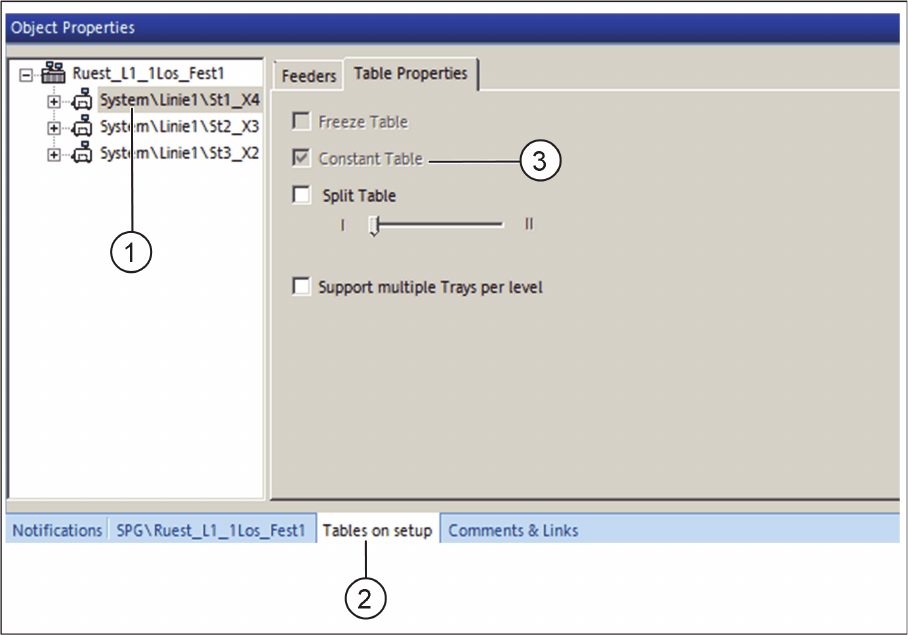
Setup Editor - Tables on setup - Constant Table already activated
► Open the Setup Editor and select the table (1) from the tree structure.
► In the Tables on setup tab (2), select the Table Properties tab.
⇨ If the constant table was already created using the optimizing tool SiCluster Professional, the Con
-
stant table check box (3) is automatically activated.
► If the constant table is to be created manually, activate the Freeze Table check box. The Constant
Table check box is deactivated.