00198227-03_UM_MaterialSetupAssistant_2.3-R17-1_DE_EN.pdf - 第228页
Workflow with Fixed Setup and Constant Tables Creating a Material Requirement List in ASM Material Manager 228 ASM Material Setup Assistant 2.3 (R17-1) ASM Material Setup Ass i st a n t 2 . 3 6.3 6 . 3 C r e a t in g a M…
Workflow with Fixed Setup and Constant Tables
Creating Fixed Setups and Constant Tables in SIPLACE Pro
ASM Material Setup Assistant 2.3 (R17-1) ASM Material Setup Assistant 2.3 (R17-1) 227
Constant Tables
You can create constant tables either manually in SIPLACE Pro or using an optimization tool like SiClus
-
ter Professional.
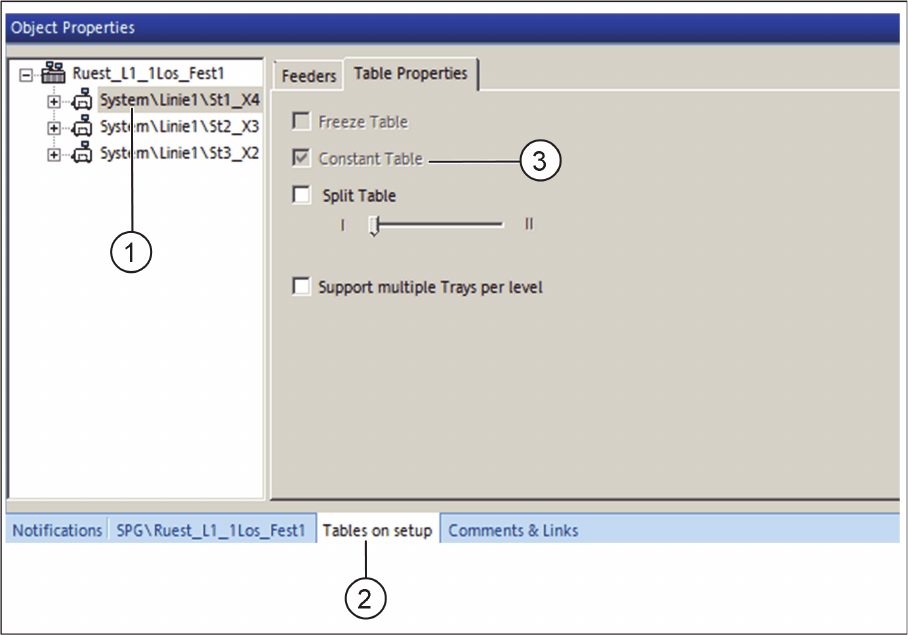
Setup Editor - Tables on setup - Constant Table already activated
► Open the Setup Editor and select the table (1) from the tree structure.
► In the Tables on setup tab (2), select the Table Properties tab.
⇨ If the constant table was already created using the optimizing tool SiCluster Professional, the Con
-
stant table check box (3) is automatically activated.
► If the constant table is to be created manually, activate the Freeze Table check box. The Constant
Table check box is deactivated.
Workflow with Fixed Setup and Constant Tables
Creating a Material Requirement List in ASM Material Manager
228 ASM Material Setup Assistant 2.3 (R17-1) ASM Material Setup Assistant 2.3
6.3
6.3 Creating a Material Requirement List in ASM Material Manager
Creating a Material Requirement List in ASM Material Manager
For a fixed setup, a material requirement list needs to be created for each location in the ASM Material
Manager. For a setup with one or more constant tables, a material requirement list is generated for each
constant table. The flexible tables are not taken into account. Only the material for the basic setup (= one
reel per position) is requested and picked from the warehouse.
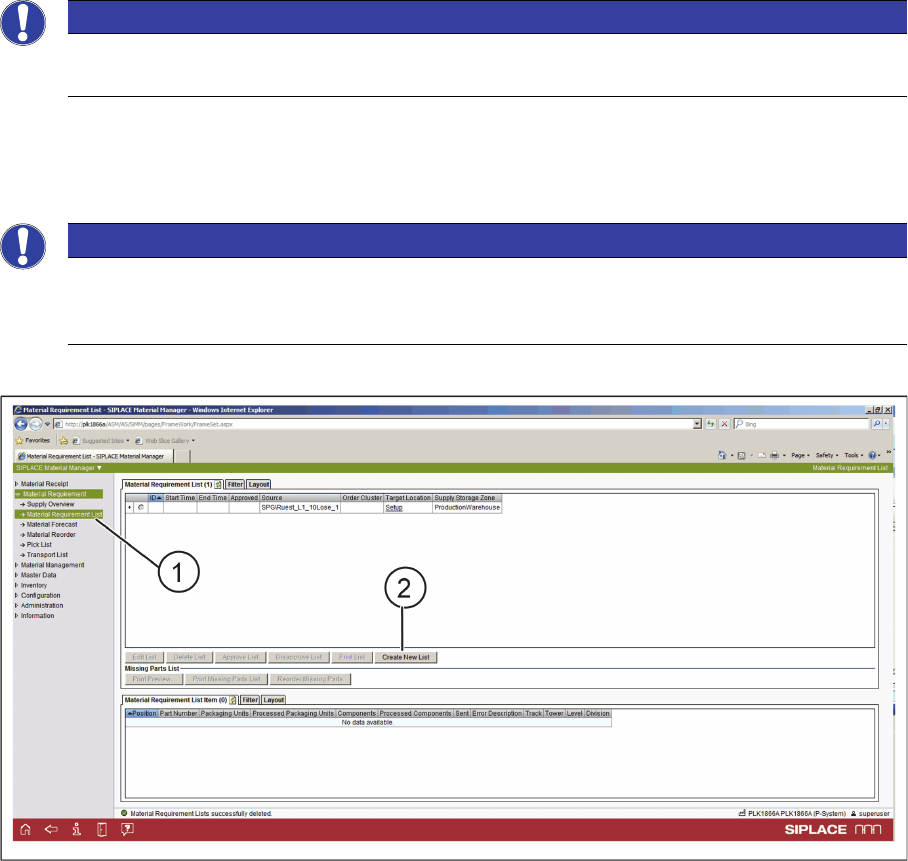
► Start the ASM Material Manager.
ASM Material Manager - Creating a Material Requirement List - Step 1
► Select Material Requirement => Material Requirement List (1) from the tree view.
► Select Create new list (2).
⇨ The selection of the line is displayed.
NOTICE
Only with ASM Material Manager - full version
Material demand lists can only be created with the ASM Material Manager - full version.
NOTICE
The fixed setup needs to be optimized
The fixed setup needs to be optimized or the constant table(s) need to be part of an optimized
setup.
Workflow with Fixed Setup and Constant Tables
Creating a Material Requirement List in ASM Material Manager
ASM Material Setup Assistant 2.3 (R17-1) ASM Material Setup Assistant 2.3 (R17-1) 229
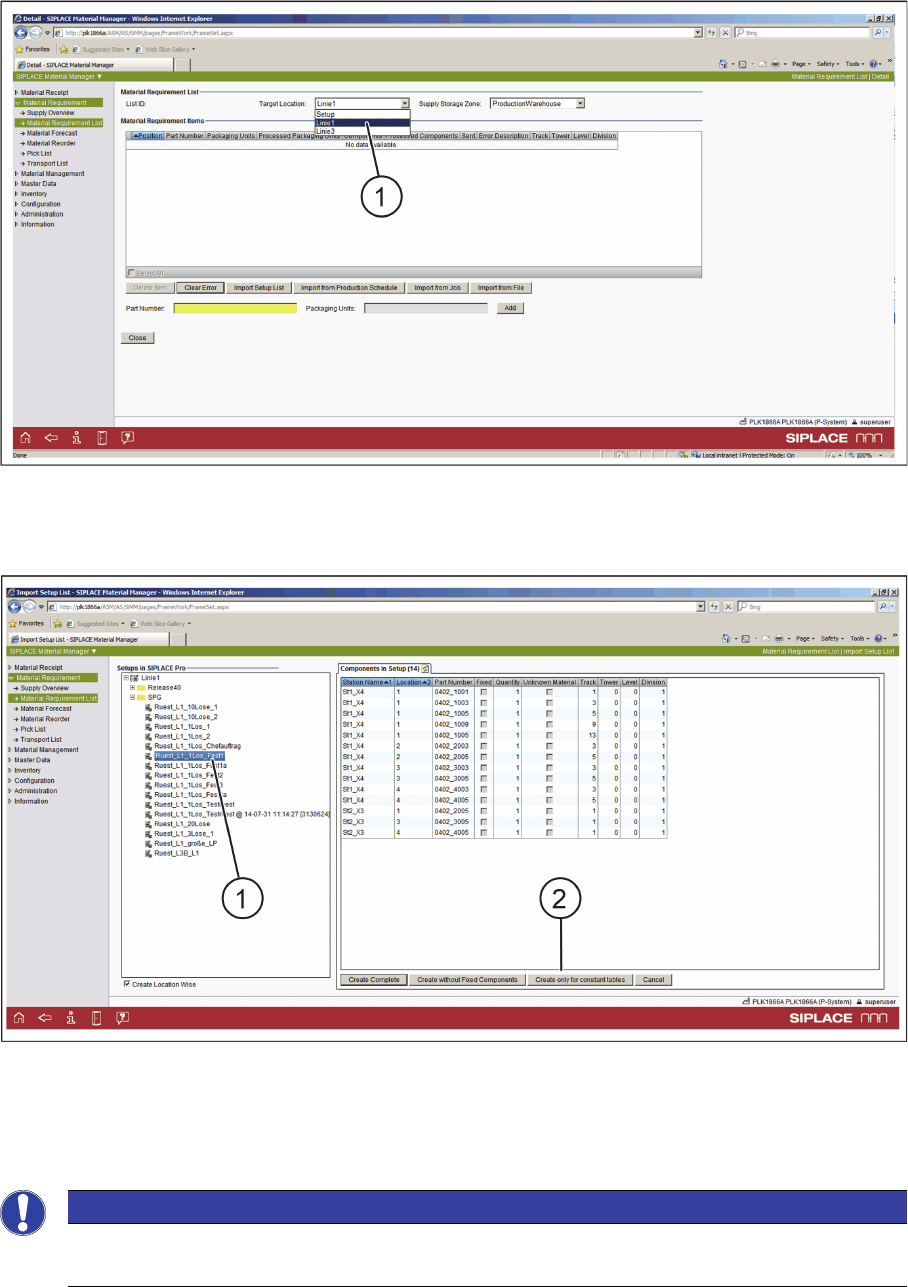
ASM Material Manager - Creating a Material Requirement List - Step 2
► Select the line from the Target Location list (1).
⇨ The SIPLACE Pro setups are shown in the tree view.
ASM Material Manager - Creating a Material Requirement List - Step 3
► In the tree view (1), select the SIPLACE Pro setup that contains the constant tables.
► Select the Create only for constant tables (2) button.
⇨ The material requirement list is being created.
NOTICE
Applicable for fixed setups
This function is also used for fixed setups.