00198227-03_UM_MaterialSetupAssistant_2.3-R17-1_DE_EN.pdf - 第141页
Preconditions and Configurations Configuration Settings in ASM OIB ASM Material Setup Assistant 2.3 (R17-1) ASM Material Setup Ass istant 2.3 (R17-1) 141 2.1.3 2 . 1 . 3 D e f in in g t h e F lo w o f M a t e r ia ls Def…
Preconditions and Configurations
Configuration Settings in ASM OIB
140 ASM Material Setup Assistant 2.3 (R17-1) ASM Material Setup Assistant 2.3
2.1.2.3
2.1.2.3 Connecting the SIPLACE Pro Line Control Adapter to MSA
Connecting the SIPLACE Pro Line Control Adapter to MSA
This setting establishes the connection between SIPLACE Material Setup Assistant and SIPLACE Pro.
Thus, the recipes will be entered in the Line Control GUI.
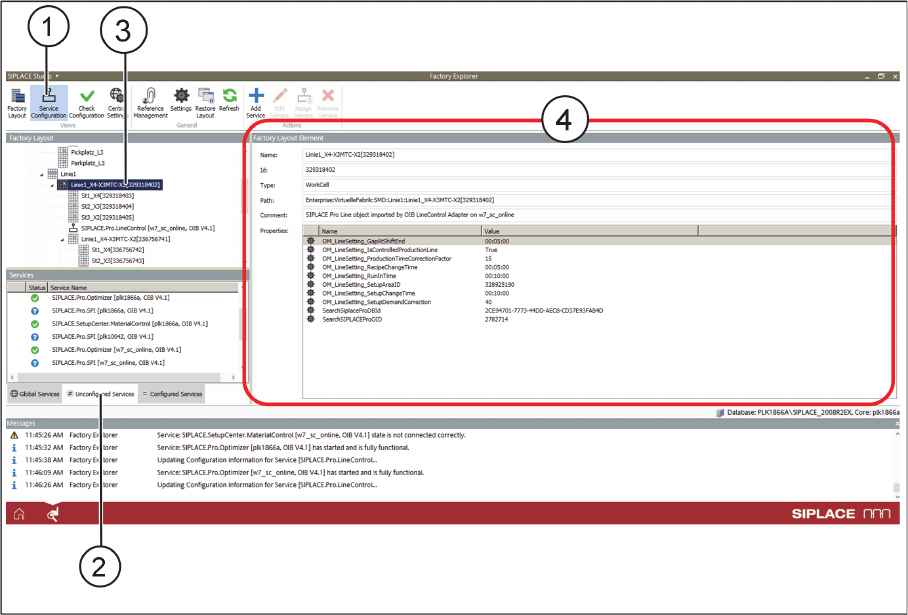
► Select Service Configuration (1).
Service Configuration - Factory Layout Element - Tab
► In the Unconfigured Services tab (2), find the service Siplace.Pro.LineControl.
► Using the mouse, drag this service on the entry (3) for the line in the factory layout.
⇨ The properties will be shown (4).
Preconditions and Configurations
Configuration Settings in ASM OIB
ASM Material Setup Assistant 2.3 (R17-1) ASM Material Setup Assistant 2.3 (R17-1) 141
2.1.3
2.1.3 Defining the Flow of Materials
Defining the Flow of Materials
After successfully defining the factory layout, you need to define the flow of materials for your factory.
This means that you need to define the material warehouses which supply the presetup areas and the
presetup areas which are assigned to the production lines.
Assigning material warehouses to the presetup area
Define the material warehouse which is to be assigned to the presetup area. The flow of material and
the reuse of materials takes place between the selected presetup area and the assigned warehouse.
Multiple presetup areas can be assigned to one warehouse, in accordance with your factory layout.
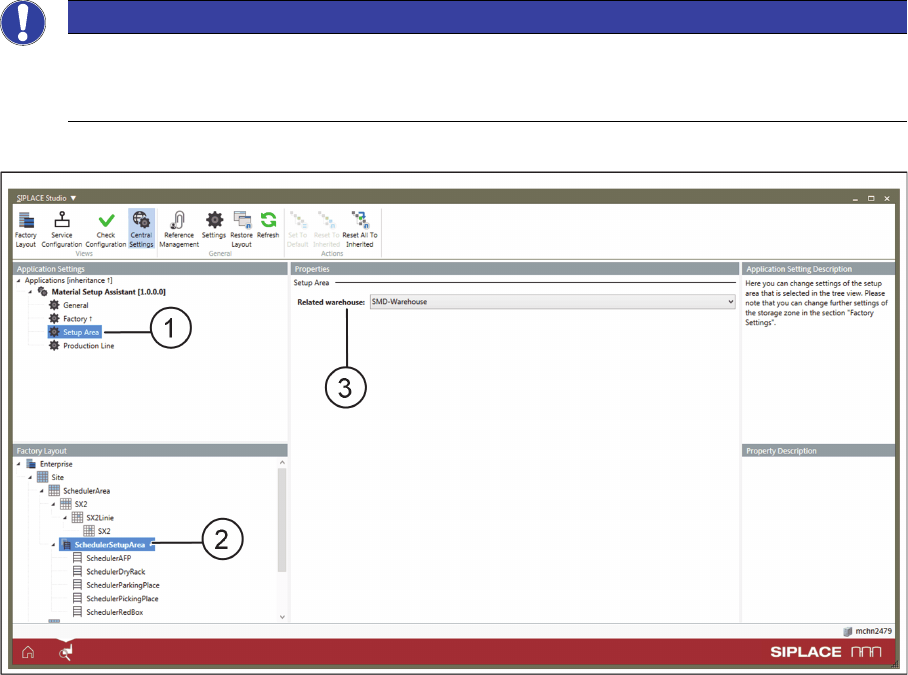
► Select Central Settings.
Application Settings: Setup Area
► Go to Application Settings => Material Setup Assistant and select Setup Area (1) from the tree struc
-
ture.
► Go to Factory Layout (2) and select the pre-setup area.
► Go to Properties => Related warehouse (3) and assign the required warehouse to the selected pre-
setup area.
NOTICE
Workflow with ASM Material Manager for MSA
During the installation of ASM Material Manager for MSA, a warehouse is automatically creat
-
ed. This warehouse must be assigned here.
Preconditions and Configurations
Configuration Settings in ASM OIB
142 ASM Material Setup Assistant 2.3 (R17-1) ASM Material Setup Assistant 2.3
Assigning the presetup area to the production line
Define which presetup area is to be assigned to the respective production line. The flow of materials and
the reuse of materials takes place between the selected production line and the warehouse.
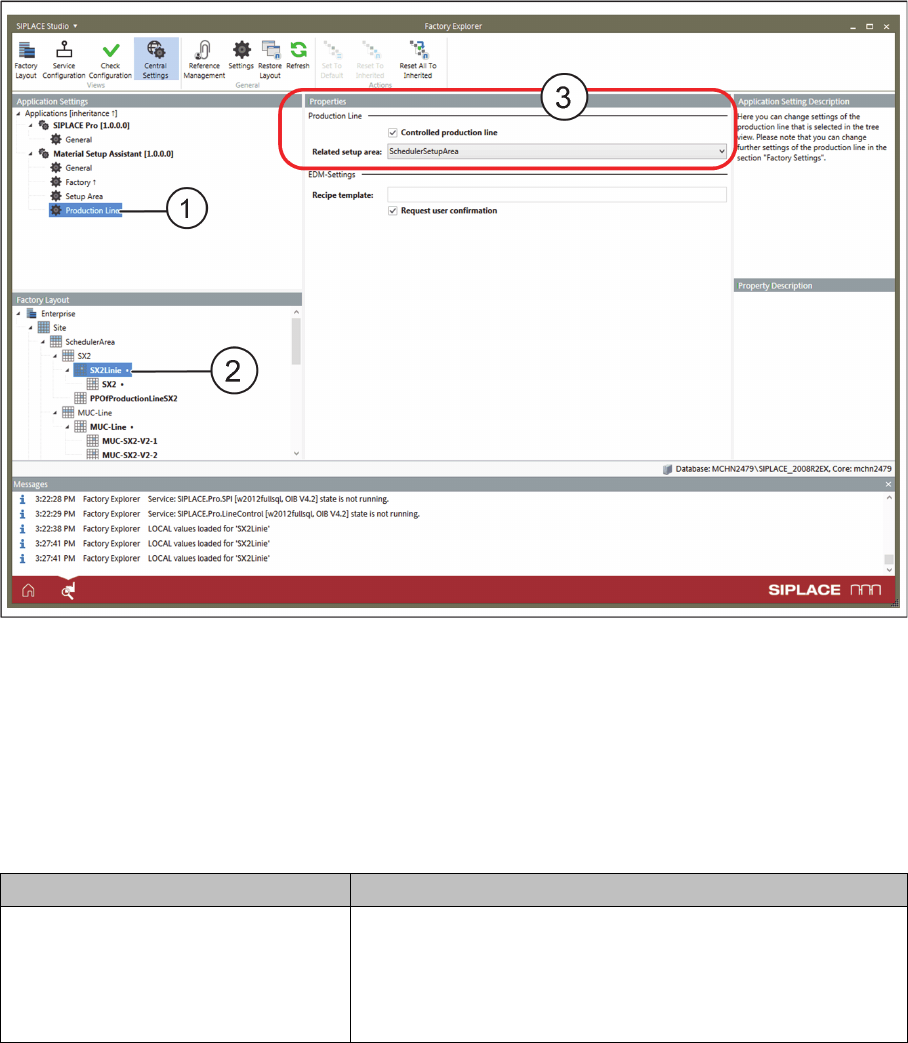
Application Settings: Production Line - Properties
► Go to Application Settings => Material Setup Assistant and select Production Line (1) from the tree
structure.
► Go to Factory Layout (2) and select the production line.
► Go to Properties => Related setup area (3) and assign the required pre-setup area to the selected
production line.
Optional settings
Parameters Function
Is controlled production line Enabled: This line is controlled via the Material Setup Assistant
workflow.
If the factory has lines which you do not want to control via the
Material Setup Assistant, this option can be disabled for the re
-
spective lines.