00198227-03_UM_MaterialSetupAssistant_2.3-R17-1_DE_EN.pdf - 第232页
Workflow with Fixed Setup and Constant Tables Setting up in ASM Setup Center 232 ASM Material Setup Assistant 2.3 (R17-1) ASM Material Setup Ass i st a n t 2 . 3 6.5 6 . 5 S e t t in g u p in A S M S e t u p C e n t e r …
Workflow with Fixed Setup and Constant Tables
Picking Material in ASM Material Manager
ASM Material Setup Assistant 2.3 (R17-1) ASM Material Setup Assistant 2.3 (R17-1) 231
6.4
6.4 Picking Material in ASM Material Manager
Picking Material in ASM Material Manager
► Use the PDA to pick the material for the fixed setup or the constant table.
Material Management
ASM Material Manager - Material Management
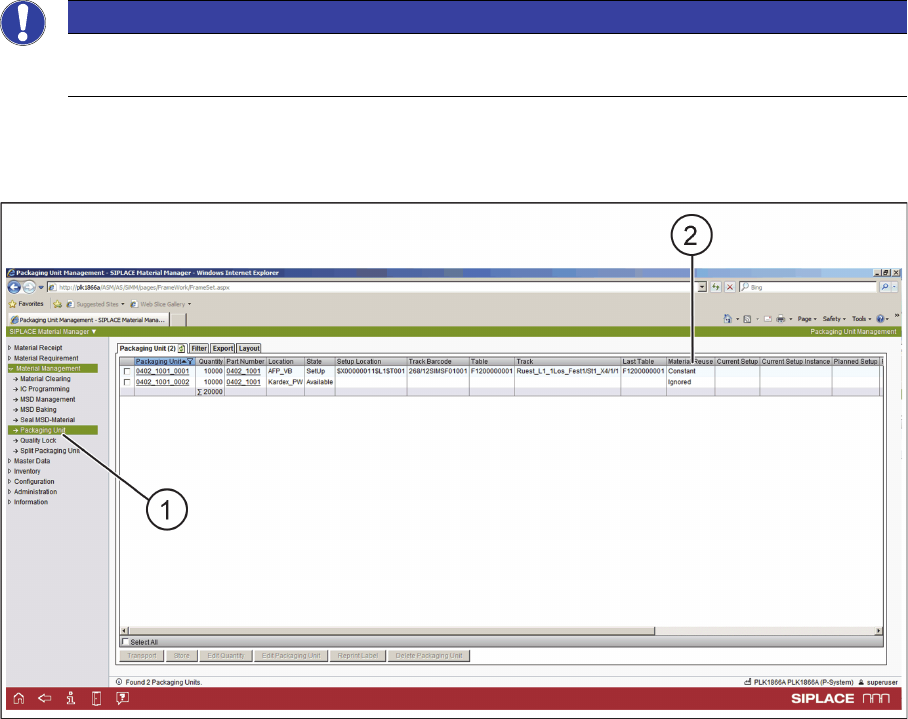
► In the tree view, select Material Management => Packaging Unit (1).
► In Material Management => Packaging Unit, the usage of the relevant packaging units is displayed.
► The picked material is set to Constant in Material Reuse (2).
NOTICE
Only with ASM Material Manager - full version
Putting material into storage is only possible with the ASM Material Manager - full version.
Workflow with Fixed Setup and Constant Tables
Setting up in ASM Setup Center
232 ASM Material Setup Assistant 2.3 (R17-1) ASM Material Setup Assistant 2.3
6.5
6.5 Setting up in ASM Setup Center
Setting up in ASM Setup Center
If the material for a fixed setup or a constant table in a location is picked, the changeover table can be
set up with SIPLACE Setup Center. Use the ASM Setup Center standard function for "Offline Setup".
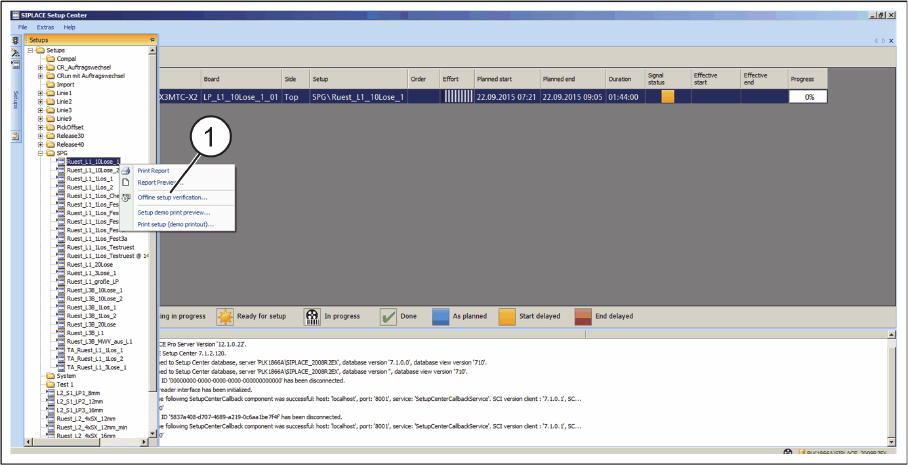
► In the tree view, select the setup.
ASM Setup Center - Print Report
► Print the setup list for the optimized fixed setup or the optimized setup containing one or more con
-
stant tables. Create this setup list using the Print Report function (1) from the context menu.
► Set up the locations using the Setup Center scanner or the PDA.
▪ For fixed setups, set up all locations in succession. For constant tables, set up only the constant lo
-
cations.
6.6
6.6 Importing, Planning, and Approving
Importing, Planning, and Approving
► Import the fixed setup or a setup containing one or more constant tables into the Order Manager.
► Sort the recipes and specify the times.
► Make the approval.
These procedures are identical when working with flexible family setups.
For an example, refer to the sections on working with the flexible family setup:
"5.1 Importing SIPLACE Pro Jobs" [ ➙ 189]
"5.2 Scheduling Starting Times and Production Order" [ ➙ 192]
"5.3 Editing Production Schedules" [ ➙ 193]
"5.4 Approving Production Schedules" [ ➙ 195]
Workflow with Fixed Setup and Constant Tables
Reordering Refill Material
ASM Material Setup Assistant 2.3 (R17-1) ASM Material Setup Assistant 2.3 (R17-1) 233
6.7
6.7 Reordering Refill Material
Reordering Refill Material
Depending on the configuration for reordering the refill material, SIPLACE Material Setup Assistant will
request the required refill material for the fixed setup or the constant table.
Viewing setup and material demand
A setup job in Setup Center or Order Manager - Monitoring is only created if material is to be set up in
the setup area. If, for example, material is missing on one or more tables in a combination of flexible and
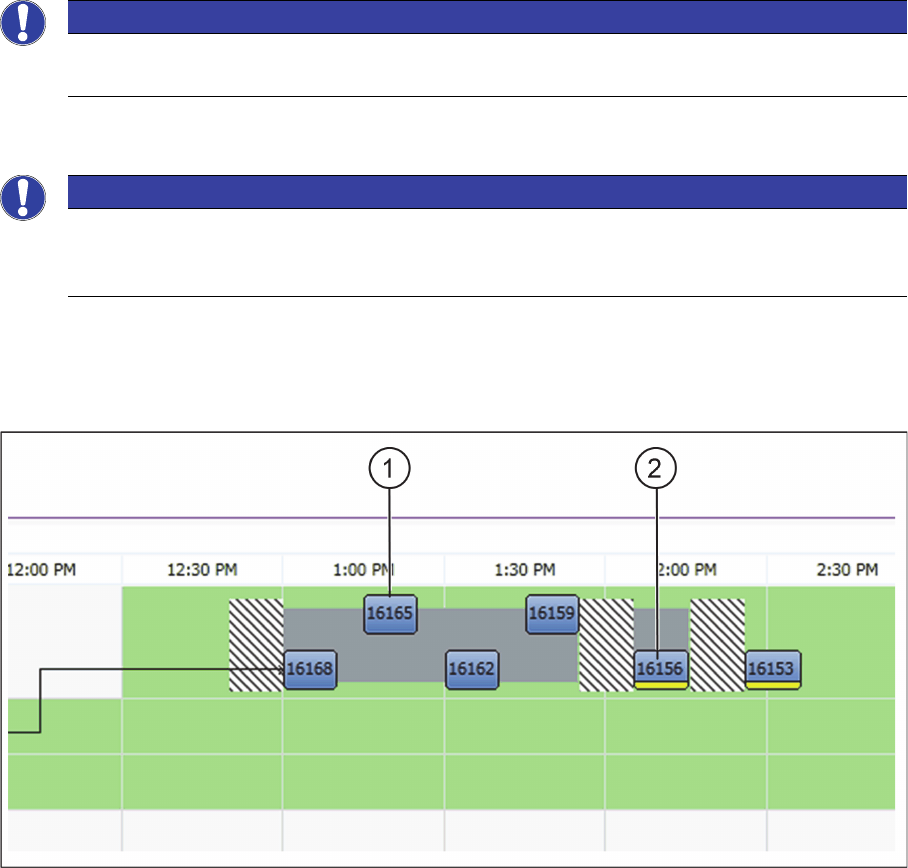
constant tables in a setup. Fixed setups or setups with at least one constant table are highlighted.
Order Manager - Monitoring - Production or Placement
1. Production or placement with flexible table
2. Production or placement with constant table
► Right-click with the mouse on the production or placement of the constant tables.
► In the context menu, select the function Show Material Demand.
⇨ The Show Material Demand dialog box will be shown.
NOTICE
Only with ASM Material Manager - full version
Reordering material is only possible with the ASM Material Manager - full version.
NOTICE
No job for the setup preparation
If only refill material is needed, no new job for the setup preparation is created. It is assumed
that the refill material is brought directly to the line and spliced there later on.