00198227-03_UM_MaterialSetupAssistant_2.3-R17-1_DE_EN.pdf - 第193页
Workflow with Flexible Family Setup Editing Production Schedules ASM Material Setup Assistant 2.3 (R17-1) ASM Material Setup Ass istant 2.3 (R17-1) 193 Compressing The action Compress e liminates time gaps between jobs. …
Workflow with Flexible Family Setup
Scheduling Starting Times and Production Order
192 ASM Material Setup Assistant 2.3 (R17-1) ASM Material Setup Assistant 2.3
5.2
5.2 Scheduling Starting Times and Production Order
Scheduling Starting Times and Production Order
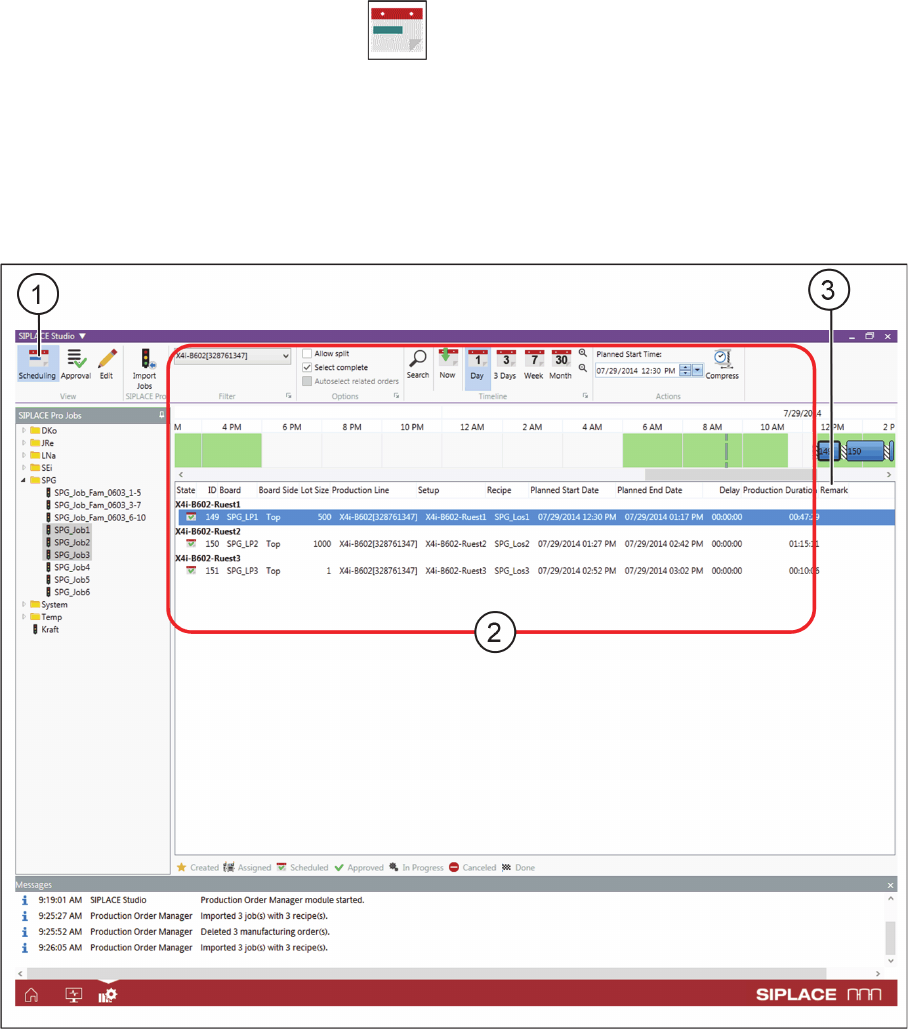
► Go to the View toolbar and select the Scheduling icon (1).
⇨ The view switches over to Scheduling.
You can define the starting times and the order of production for the individual jobs in the Scheduling (2)
view.
The Remark (3) column shows customized comments fields (such as furnace profile, soldering or print
-
ing details etc.), which can be defined in the SIPLACE Pro settings. These additional comments are
shown in extra columns. They need to be enabled in the configuration settings at Additional comment
columns. See also Production Order Manager Configurations.
Production Order Manager – start scheduling
► Drag & drop the production jobs with the mouse into the timeline, until you have reached the required
order, starting and end times.
⇨ The selected jobs will be inserted at their new position and will be assigned the modified start and
end times. The times of the following jobs will also be adjusted.
⇨ The production order is worked through from top to bottom.
⇨ The work-free times from the factory calendar will be taken into account and shown as gaps between
the production jobs.
⇨ The factory settings from the configuration, such as the Setup change time, Recipe change time or
Gaps at shift end will be taken into account. See also Defining Factory Configurations.
Workflow with Flexible Family Setup
Editing Production Schedules
ASM Material Setup Assistant 2.3 (R17-1) ASM Material Setup Assistant 2.3 (R17-1) 193
Compressing
The action Compress eliminates time gaps between jobs. The approved jobs in the timeline are
collected together so that no additional pauses exist. The Dialog - Compress dialog box will open.
► Select the setting in this dialog box which is to be used for compressing.
5.3
5.3 Editing Production Schedules
Editing Production Schedules
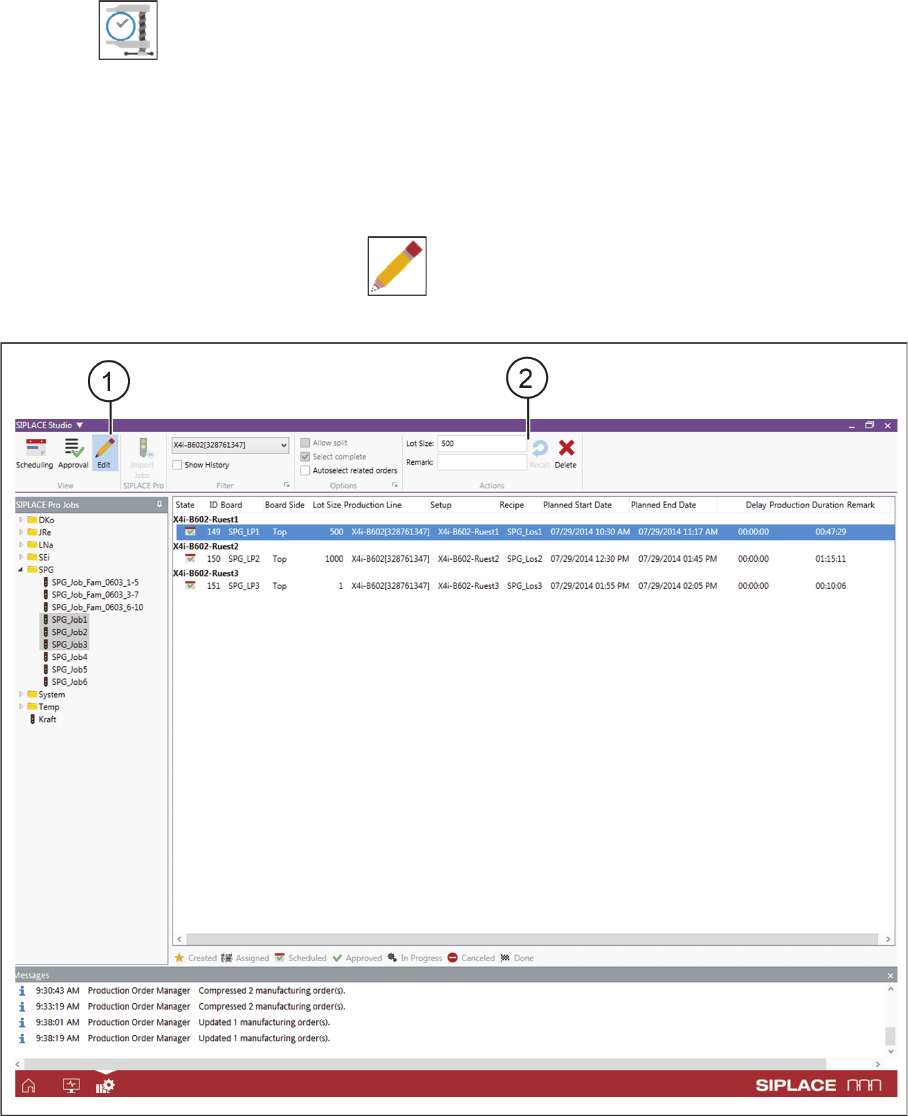
Scheduled and non-approved production schedules can be edited.
► Go to the View toolbar and select the Editing icon.
⇨ Switches over to the Edit view.
Production Order Manager – editing production schedules
Refer to View - Edit to see the available Filters and Actions for editing production schedules.
Workflow with Flexible Family Setup
Editing Production Schedules
194 ASM Material Setup Assistant 2.3 (R17-1) ASM Material Setup Assistant 2.3
How to edit productions schedules
▪ Deleting production jobs
– You can only delete production jobs which have not yet been started or which have already been
completed.
– The production jobs are deleted completely from the system. This may be necessary if you im
-
ported the wrong jobs from SIPLACE Pro.
▪ Recalling production jobs
– The recalling of production jobs may be necessary if you want to change the order or the start/
end times later on.
– Recalled production jobs remain in the system and are marked with the status Planned.
– You can only recall approved production jobs if the production has not yet started on the line.
NOTICE
Observing notifications
If subsequent production jobs are affected by these changes, a notification will be issued ac
-
cordingly.
WARNING
Deleting and recalling production jobs
When deleting and recalling production jobs, there may be problems if the picking or presetup
tasks have already been started. You may need to manually identify, tear down and put back
into the warehouse the materials concerned. If the picking and/or the presetup for the affected
production jobs has already been started, a warning will be issued accordingly.
NOTICE
Reapproving production schedules
After processing the production schedules, these need to be approved again. The production
schedule will be updated with the changes made.