00198227-03_UM_MaterialSetupAssistant_2.3-R17-1_DE_EN.pdf - 第235页
Workflow with Fixed Setup and Constant Tables Final Work and Hints ASM Material Setup Assistant 2.3 (R17-1) ASM Material Setup Ass istant 2.3 (R17-1) 235 6.9 6 . 9 F in a l W o r k a n d H in t s Final Work and Hints Par…
Workflow with Fixed Setup and Constant Tables
Material Picking and Producing
234 ASM Material Setup Assistant 2.3 (R17-1) ASM Material Setup Assistant 2.3
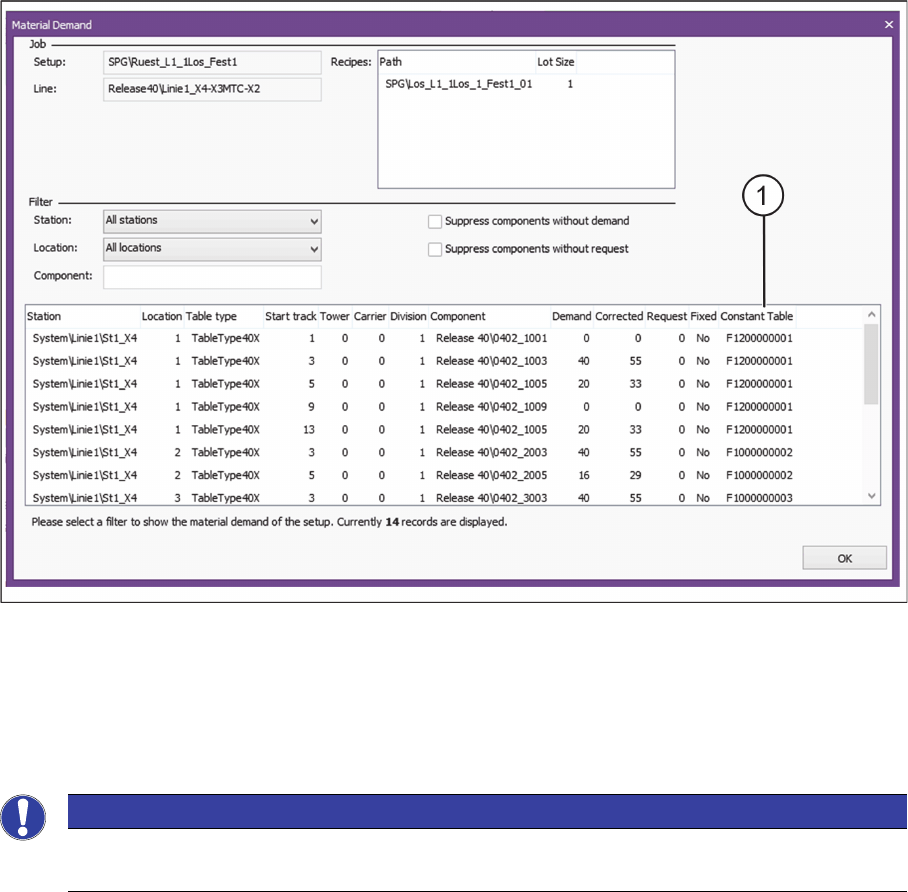
Dialog - Material Demand with constant tables
1. Table ID of the constant table
► For a description of the individual parameters, refer to Dialog - Material Demand.
6.8
6.8 Material Picking and Producing
Material Picking and Producing
► Pick the material and bring the refill material to the line.
► If single material is missing, set it up on the constant table.
► Produce the job.
These procedures are identical when working with flexible family setups.
For an example, refer to the sections on working with the flexible family setup:
"5.7 Executing and Monitoring Material Picking" [ ➙ 205]
"5.8 Executing and Monitoring Setup Preparation" [ ➙ 210]
"5.9 Producing Recipes on the Line" [ ➙ 218]
NOTICE
Only with ASM Material Manager - full version
Putting material into storage is only possible with the ASM Material Manager - full version.

Workflow with Fixed Setup and Constant Tables
Final Work and Hints
ASM Material Setup Assistant 2.3 (R17-1) ASM Material Setup Assistant 2.3 (R17-1) 235
6.9
6.9 Final Work and Hints
Final Work and Hints
Parking constant tables
After the production, the changeover tables for fixed setups or the constant tables are not returned to the
feeder rack or the docking station. The constant tables are "parked" at an appropriate place near the line.
If a constant table is required at the same position in the next setup, it can stay in the station.
The tables are parked until they are needed again.
Constant tables that are no longer used
If a constant table or a fixed setup is no longer used, perform the following tasks:
1. Tear down table(s) with Setup Center.
2. Tear down table(s) physically.
3. Store material with ASM Material Manager. The status of the material reuse is reset. (Only possible
with ASM Material Manager - full version.)
4. After step 4, do no longer use the fixed setup or the constant tables with the SIPLACE Material Setup
Assistant (planning, producing, etc.).
If you need the fixed setup or the constant tables later on, you must start from the beginning (Creating
Fixed Setups and Constant Tables in SIPLACE Pro etc.)
NOTICE
Material placed on a feeder rack
If material of or for a constant table or a fixed setup is to be placed on a feeder rack, the feeders
are shown "green" (LED). In this case, "green" means: Do not tear down.
Workflow with Fixed Setup and Constant Tables
Final Work and Hints
236 ASM Material Setup Assistant 2.3 (R17-1) ASM Material Setup Assistant 2.3