00198227-03_UM_MaterialSetupAssistant_2.3-R17-1_DE_EN.pdf - 第173页
Getting Started and Overview of the Order Manager Introduction ASM Material Setup Assistant 2.3 (R17-1) ASM Material Setup Ass istant 2.3 (R17-1) 173 4 4 G e t t in g S t a r t e d a n d O v e r v ie w o f t h e O r d e …
Overview of Setup Preparation in ASM Setup Center
Setup Preparation with Material Setup Wizard
172 ASM Material Setup Assistant 2.3 (R17-1) ASM Material Setup Assistant 2.3

Getting Started and Overview of the Order Manager
Introduction
ASM Material Setup Assistant 2.3 (R17-1) ASM Material Setup Assistant 2.3 (R17-1) 173
4
4 Getting Started and Overview of the Order Manager
Getting Started and Overview of the Order Manager
4.1
4.1 Introduction
Introduction
The Order Manager enables you to plan and monitor the SIPLACE Material Setup Assistant workflow.
Two tools are available for this:
Production Order Manager
The Production Order Manager is used to import SIPLACE Pro jobs or individual recipes of a SIPLACE
Pro job.
When importing SIPLACE Pro jobs, the optimized jobs are imported with the recipes and setups from
SIPLACE Pro and the production order of setups and recipes is scheduled for the lines. When importing
recipes, individual recipes of the optimized job can be imported.
After successful scheduling, you can approve the production order for the lines. The connected lines and
their presetup areas, plus the items in stock, will be updated and the required information is automatically
made available at the workplaces.
Monitoring
When production jobs are approved, an internal planning run is started in the background. After the pro
-
duction run is finished, the following information is shown as tasks/time bars in a Gantt diagram in the
Monitoring view:
▪ Line: production status of the recipe on the line
▪ Presetup area: presetup tasks for preparing setups in the presetup area
▪ Warehouse: material picking for scheduled setups
Workflow
The integrated SIPLACE Material Setup Assistant workflow facilitates communication with the connect
-
ed systems at the respective workplaces:
▪ SIPLACE Line Control GUI
– Updates the production schedule and enables you to perform downloads to the lines.
▪ SIPLACE Setup Center GUI
– Makes the data for setup preparation available so that offline setup tasks can be performed.
▪ ASM Material Manager - Full Version
– Creates the material requirement lists so that material can be taken out of the warehouse.
For a detailed description of the SIPLACE Material Setup Assistant workflow, refer to:
▪ "5 Workflow with Flexible Family Setup" [ ➙ 189]
▪ "6 Workflow with Fixed Setup and Constant Tables" [ ➙ 225]
Production Order Manager
Monitoring
Getting Started and Overview of the Order Manager
Production Order Manager
174 ASM Material Setup Assistant 2.3 (R17-1) ASM Material Setup Assistant 2.3
4.2
4.2 Production Order Manager
Production Order Manager
4.2.1
4.2.1 Starting the Production Order Manager
Starting the Production Order Manager
► Start ASM Studio.
⇨ ASM Studio will open with the modules installed.
► Start the module Production Order Manager.
⇨ The Production Order Manager module will open.
See also "4.2.2 Overview - Production Order Manager" [ ➙ 174].
4.2.2
4.2.2 Overview - Production Order Manager
Overview - Production Order Manager
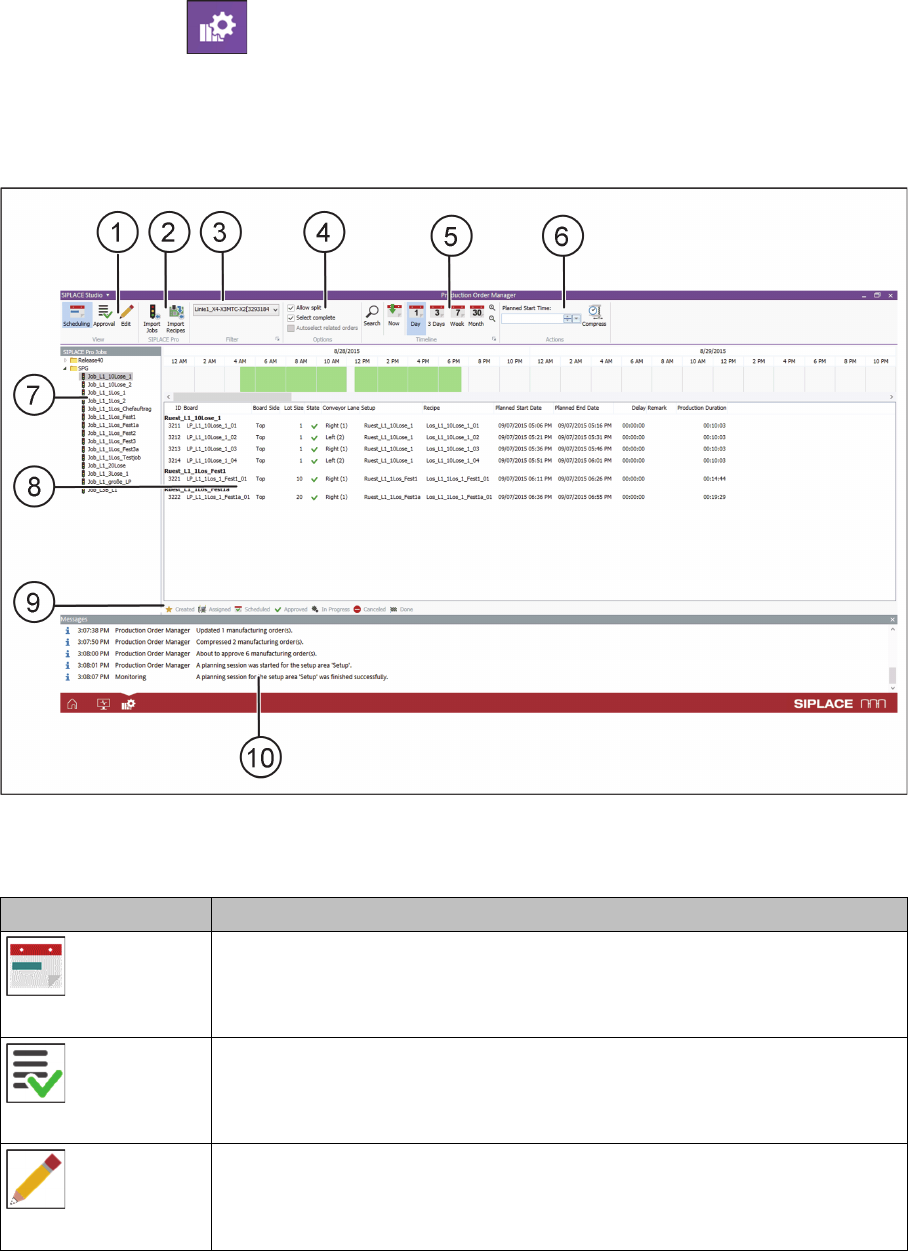
Overview of the user interface – Production Order Manager
View (1)
Icon Description
Scheduling
Switches over to the Scheduling view. See also "4.2.3 View - Scheduling"
[ ➙ 177].
Approval
Switches over to the Approval view. See also "4.2.4 View - Approval" [ ➙ 178].
Edit
Switches over to the Edit view. See also "4.2.5 View - Edit" [ ➙ 179].