00198227-03_UM_MaterialSetupAssistant_2.3-R17-1_DE_EN.pdf - 第156页
Preconditions and Configuratio ns Configuration Settings in ASM Setup Center 156 ASM Material Setup Assistant 2.3 (R17-1) ASM Material Setup Ass i st a n t 2 . 3 2.2.2 2 . 2 . 2 C o n f ig u r in g t h e A S M S e t u p …
Preconditions and Configurations
Configuration Settings in ASM Setup Center
ASM Material Setup Assistant 2.3 (R17-1) ASM Material Setup Assistant 2.3 (R17-1) 155
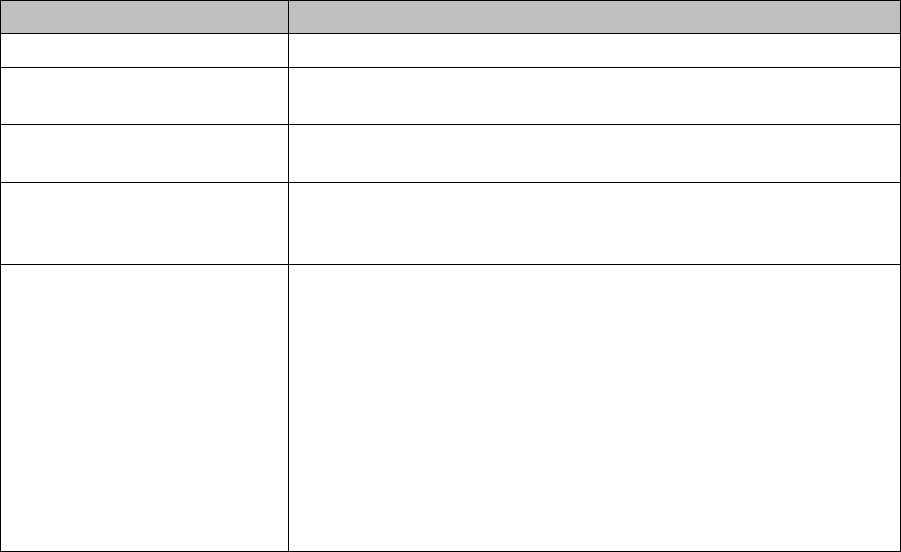
ASM OIB Core connection
Parameters Description
Computer name Name of the computer on which the ASM OIB core is installed.
HTTP Port: The HTTP port through which the ASM OIB core can be reached.
The HTTP port was configured during ASM OIB installation.
TCP Port: The TCP port through which the ASM OIB core can be reached. The
TCP port was configured during ASM OIB installation.
Employed protocol: Select the communication protocol HTTP or TCP) to be used for
communicating with the ASM OIB Core. The TCP protocol is select
-
ed. You can use HTTP as an alternative.
Callback interface: Callback TCP Port:
The TCP port through which Setup Center is supposed to receive
data and notifications from the ASM OIB Core services.
Callback TCP Port band width:
Alternative ports that can be used if the previously configured Call
-
back TCP Port is busy.
Example: Configured Callback TCP Port = 2000
Band width = 10
If 2000 is already occupied by another program, the first port availa
-
ble between 2001 and 2010 will be used.
Preconditions and Configurations
Configuration Settings in ASM Setup Center
156 ASM Material Setup Assistant 2.3 (R17-1) ASM Material Setup Assistant 2.3
2.2.2
2.2.2 Configuring the ASM Setup Center Application
Configuring the ASM Setup Center Application
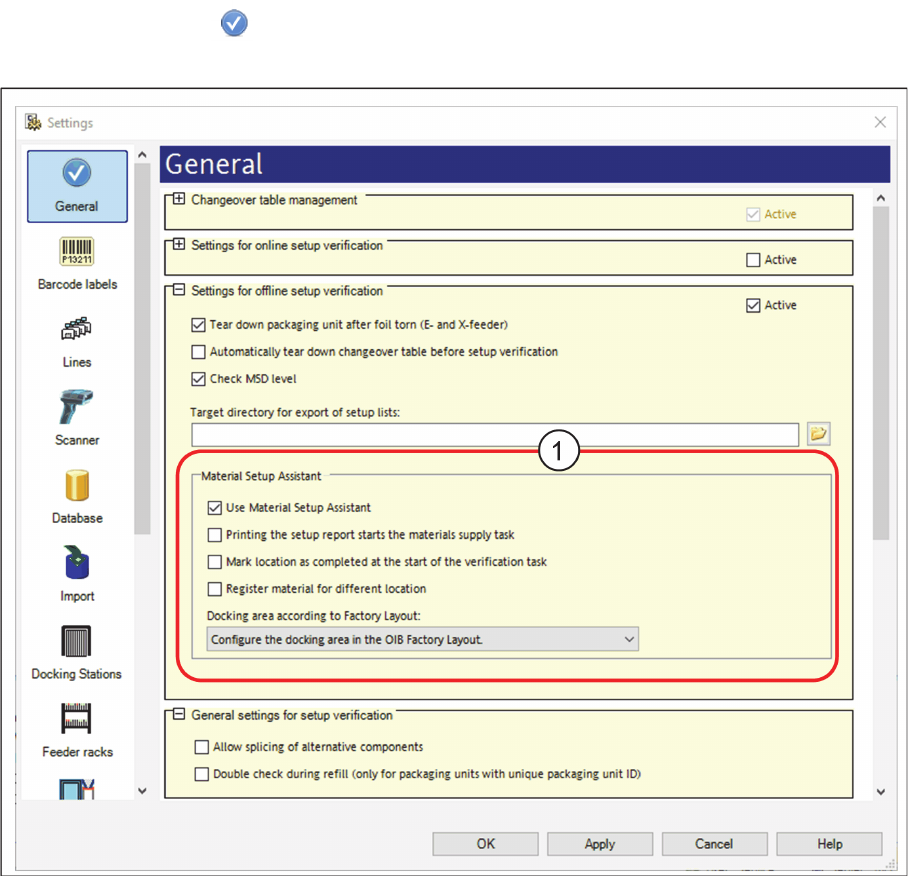
► In the main menu open Extras > Settings and the Settings window will open.
► Select the category General.
⇨ The dialog box General will be shown.
Settings – General
Activating the "setup preparation" view.
► Navigate to Settings for online setup verification.
► Go to Material Setup Assistant (1) and enable the option Use Material Setup Assistant.
⇨ The Setup verification view is now active in ASM Setup Center. This view is used for the Material
Setup Assistant workflow. The tasks waiting and their status are shown. Setup lists can also be print
-
ed.
Preconditions and Configurations
Configuration Settings in ASM Setup Center
ASM Material Setup Assistant 2.3 (R17-1) ASM Material Setup Assistant 2.3 (R17-1) 157
Printing the setup report starts material supply task
Disabled: Default setting
Enabled: The material supply task is automatically set to the status "started" once the setup report is
printed. Thus, SIPLACE Material Setup Assistant is notified that the material supply task has been start
-
ed.
Workflow with ASM Material Manager for MSA
► For the workflow with ASM Material Manager for MSA, enable the Printing the setup report starts
materials supply task option.
The printout of the setup report is used as the order form for the other material management system
und the customer uses it to start the material procurement. Thus, it is ensured that the material which
is ordered via the setup report is used.
Mark location as completed at the start of the verification task
Once a location is fully verified, this is registered in the setup job in Material Setup Assistant, increasing
the progress of this setup job. Once all locations have been verified, the setup job progress will be shown
as 100%. This means that the setup job has been completed. The time taken to complete the presetup
process can be seen in Monitoring.
If a location is not fully verified, for example when certain MSD materials are scheduled for subsequent
configuration at the line, this location can not be marked as completed in the Material Setup Assistant.
The operator then needs to scan in the "end barcode".
To avoid this, enable this option.
The location will be marked as completed, as soon as you start the presetup process. You do not need
to scan in the "end barcode".
However, this means that the presetup job appears in Monitoring as if it were completed, while the last
location is still being configured.
Register material for other location
Option for the workflow with ASM Material Manager for MSA with the scan workflow Sort material.
Disabled: The scan workflow Sort material only records reels for the current location. For packaging units
that are used on other locations, the user receives a hint as to where the packaging unit is used. The
user can freely decide where the packaging unit is to be used.
Enabled: During the scan workflow Sort material, the packaging unit for the other recognized location is
registered and will be taken into account during a recalculation of the material demand.
Assigning the pre-setup area for this Setup Center application
The storage zone for the presetup area must have been created in the factory layout of the Factory Ex
-
plorer. Multiple presetup areas can be present as storage zone within the same production environment.
See also "2.1.2 Defining the Factory Layout" [ ➙ 137]
Docking area according to factory layout shows all the Storage zones for the factory layout.
► Go to Docking area according to factory layout and select the presetup area which is assigned to
this Setup Center application.