00198227-03_UM_MaterialSetupAssistant_2.3-R17-1_DE_EN.pdf - 第214页
Workflow with Flexible Family Setup Executing and Monitoring Setup Preparation 214 ASM Material Setup Assistant 2.3 (R17-1) ASM Material Setup Ass i st a n t 2 . 3 5.8.3.1 5 . 8 . 3 . 1 S c a n W o r k f lo w " S o …
Workflow with Flexible Family Setup
Executing and Monitoring Setup Preparation
ASM Material Setup Assistant 2.3 (R17-1) ASM Material Setup Assistant 2.3 (R17-1) 213
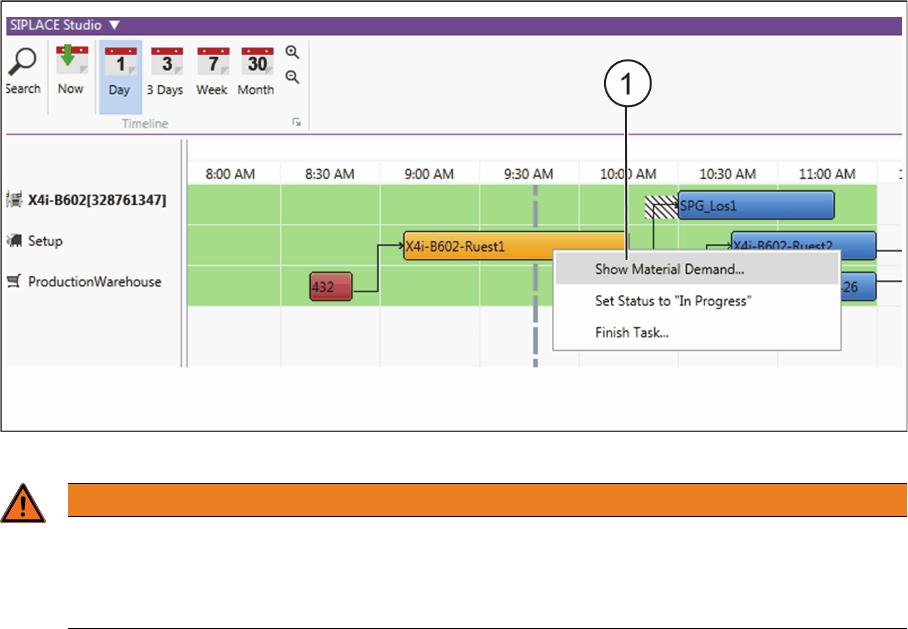
Context menu for setup preparation
► Right-click with the mouse on the setup preparation.
⇨ The context menu (2) will open.
Context menu for setup preparation
5.8.3
5.8.3 Sorting and Recording Supplied Material
Sorting and Recording Supplied Material
Purpose
If you use the ASM Material Manager for MSA no material demand lists are created. To support the op
-
erator during setup at the line, the scan workflow Sort material is available in ASM Setup Center.
The storage management of the customer system supplies the material in the pre-setup area that is re
-
quired and to be set up at the relevant location. Perform the Sort Material scan workflow to have the
available material identified and recorded.
The scan workflow Sort material only records reels for the current location. For packaging units that are
used on other locations, the user receives a hint as to where this packaging unit is used. The user can
freely decide where this packaging unit is to be used.
Option
In ASM Setup Center, you can enable the Register material for other location function. During the scan
workflow Sort material, the packaging unit for the other recognized location is registered and will be tak
-
en into account during a recalculation of the material demand.
► Go to the ASM Setup Center main menu and enable the function Extras => Settings => General =>
Settings for offline setup verification and, in Material Setup Assistant, select the option Register ma
-
terial for other location. See also "2.2.2 Configuring the ASM Setup Center Application" [ ➙ 156].
WARNING
Manual "Set Status to In Progress" and "Finish Task"
In the normal process, the functions Set Status in Progress and Finish Task are automatically
performed by the system. Manual Set Status to In Progress and Finish Task should only be
used in exceptions and may only be used by trained specialist personnel.
Workflow with Flexible Family Setup
Executing and Monitoring Setup Preparation
214 ASM Material Setup Assistant 2.3 (R17-1) ASM Material Setup Assistant 2.3
5.8.3.1
5.8.3.1 Scan Workflow "Sort Material"
Scan Workflow "Sort Material"
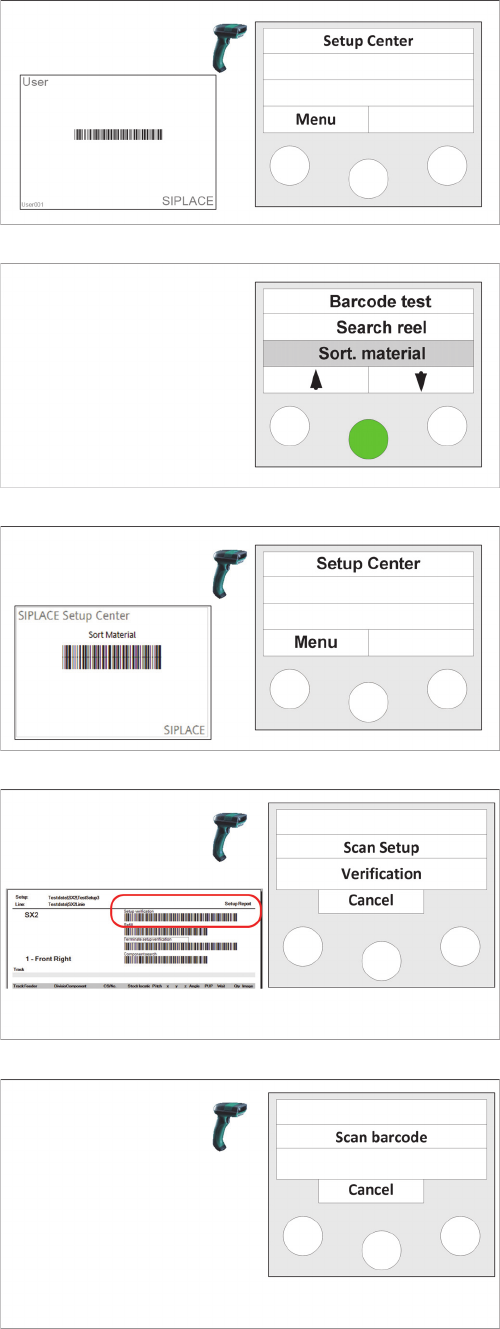
Step 1 (optional)
Scan in the the User if the "User registration at the reader
required“ option has been activated via
Extras Settings
Reader
.
Step 2
► Print the report for the required setup.
► Select the Sort. material function and confirm with
Enter.
Step 2a (alternatively)
► Print the report for the required setup.
► Scan the Sort. material control barcode.
Step 3
► Scan the setup verification barcode of the previously
printed setup report.
Step 4
► Scan the barcode of the packaging unit.
⇨ Depending on the usage of the packaging unit, differ
-
ent messages can be displayed at the scanner.
⇨ After the message has been displayed, you can scan
another packaging unit to have its usage displayed.
Workflow with Flexible Family Setup
Executing and Monitoring Setup Preparation
ASM Material Setup Assistant 2.3 (R17-1) ASM Material Setup Assistant 2.3 (R17-1) 215
5.8.4
5.8.4 Checking the Material Reuse Status
Checking the Material Reuse Status
Purpose
In order to identify and assign an individual packaging unit, the scan workflow Check reuse status is
available in ASM Setup Center.
This is helpful if you find material without an assignment to a location.
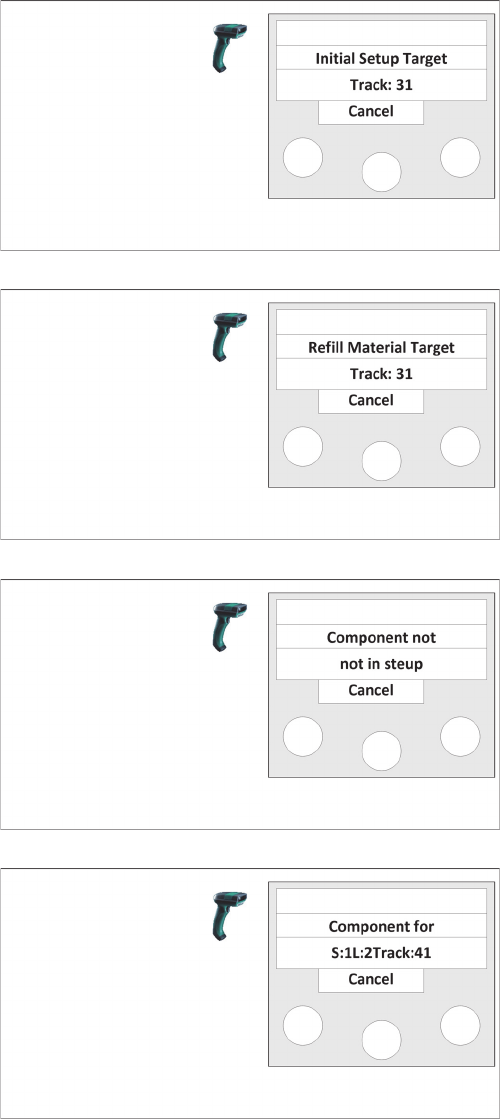
Step 5
If this packaging unit is required for the location, the tar
-
get track of the location is displayed.
The packaging unit is registered.
If another packaging unit has been scanned with this ma
-
terial, the Refill Material Target menu is displayed.
Step 5a
If this packaging unit is required as refill material for the
location, the target track of the location is displayed.
The packaging unit is registered.
If the component of this packaging unit is not part of the
setup, the Component not in setup menu is displayed.
Step 5b
It is indicated that this component is not required in this
setup.
If, however, the component of this packaging unit must be
set up at another location, the Component for menu is
displayed.
Step 5c
It is indicated that this component is required on station
(S:xx), at location (L:xx) on track (T:xx).
The packaging unit is registered if the following option is
enabled in ASM Setup Center: main menu => Extras =>
Settings => General => Settings for offline setup verifica
-
tion and, in Material Setup Assistant, the option Register
material for other location.